One enrollment funnel

One enrollment funnel, one record, every family accounted for

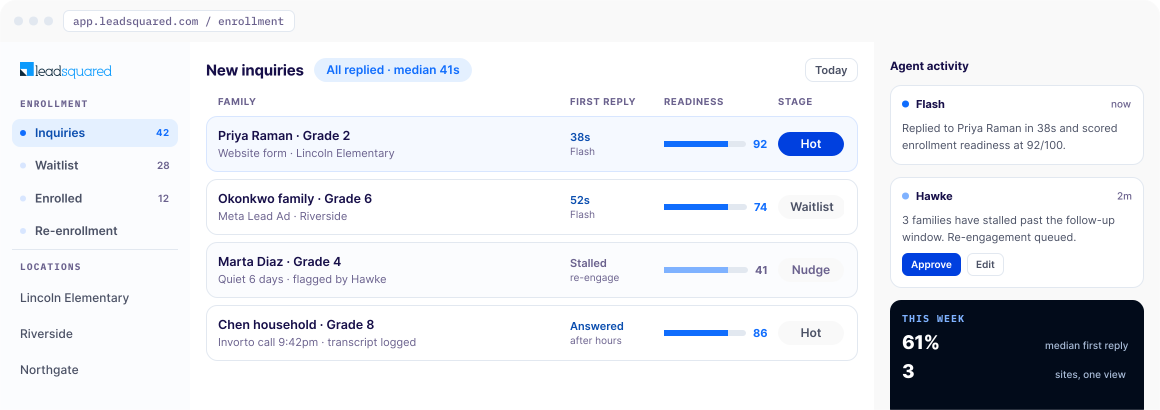
Most programs lose families in the wait between an inquiry and a reply. That wait is longest when demand is highest. As an after-school program CRM, LeadSquared puts every inquiry into one enrollment funnel with an owner, a response, and a next step already attached, whether it arrives at 9am on a Tuesday or 9pm on a Saturday. One record per family, and one view across every location you run.

WHERE ENROLLMENT LEAKS

Challenges after-school programs face without the right software

Demand for after-school programs is far larger than the supply. The Afterschool Alliance’s fifth edition of America After 3PM, published in October 2025 based on a survey of 30,515 parents and guardians, found that parents of nearly 30 million children want an after-school program, while 22.6 million of those children are not enrolled in one. That means more than three in four children whose parents want a place do not have one.

Cost is the barrier parents name most often, ahead of program availability and safe transportation. Software doesn’t impact any of the three. It does determine what happens once a parent makes an inquiry. A parent comparing different programs on price and pickup time is usually talking to more than one, and the program that responds is the one still in the conversation when it’s time to make the final decision. Between running sessions and covering the front desk, most programs don’t have anyone free to respond exactly the moment an inquiry arrives. In the first weeks of an enrollment period, that gap is where enrollment quietly leaks.

Without an after school program CRM built for enrollment, the same problems keep repeating:

  • Enrollment inquiries go unanswered after hours and over the weekends, exactly when working parents are searching and comparing programs.
  • The September surge overwhelms staff tracking enrollment in spreadsheets and shared inboxes.
  • Waitlisted families receive inconsistent updates, or none at all, and end up enrolling elsewhere before anyone calls back.
  • Email, SMS, and phone calls happen across three different places, so no one knows what a family has already been told.
  • Enrollment and waitlist status live separately at each location, so nobody can see how enrollment is tracking across locations until someone compiles it by hand.
  • Re-enrollment and follow-up are handled manually, if at all, so families who never enrolled may not hear from you even when a spot opens up.
Your tech stack

Where LeadSquared sits in your program’s tech stack

Check-in, attendance, and billing platforms are built around the enrolled roster. What happens before a family is enrolled varies from product to product, and much of it is left to whoever is at the front desk: the first inquiry, the tour, the waitlist, the enrollment forms, the follow-up call that never happened. That stretch is where LeadSquared operates as after-school program management software.Check-in, attendance, and billing platforms are built around the enrolled roster. What happens before a family is enrolled varies from product to product, and much of it is left to whoever is at the front desk: the first inquiry, the tour, the waitlist, the enrollment forms, the follow-up call that never happened. That stretch is where LeadSquared operates as after-school program management software.

Inquiries arrive from wherever families happen to find you: the program page on your site, a link in the school newsletter, a paper form the school office passed on two days later, a Meta (Facebook or Instagram) ad, a parent phoning the front desk during your pickup window. Each one lands in a single enrollment funnel with the child’s grade, site, and session preference attached to it. From there, the platform answers, prioritizes, schedules, and follows up on its own until there is a reason for a coordinator to step in.

01 · CAPTURE
Every inquiry, one funnel
Program pageFront-desk callSchool newsletterPaper formMeta / Instagram ad
02 · ANSWERS
Answered in seconds
<1m first reply
Every inquiry answered automatically, from any channel, at any hour.
03 · PRIORITIZES
Sorted before you open it
Gradeattached
Siteattached
Session preferenceattached
04 · SCHEDULES
Books the next step
The tour and follow-ups, scheduled without phone tag.
05 · FOLLOWS UP
Until a coordinator steps in
RemindersRe-engagementOn its own
Follows up on its own until there's a reason to step in.
Invorto Voice AI Co-Pilot

Answers phone calls instantly when site coordinators are busy supervising drop-offs, pickups, or activities. (Available as a licensed add-on.)

FloStack instant booking

Turns an inquiry into a booked tour without the four-message exchange it normally takes. Separately licensed add-on.

This is the same education CRM platform LeadSquared builds for colleges and career schools, configured for organizations that enroll by session rather than by semester.

Disclosure: This page is published by an enrollment technology provider. The capabilities outlined here reflect how the product is set up for after-school enrollment, and none of it is an independent evaluation of the options available in this category.

What changes

What changes once LeadSquared is running

Flash, Hawke, Quill, and RevGuard were built in LeadEdge, LeadSquared’s AI research lab, and are available now.

They write back to the same family record, so a readiness score, a stalled-inquiry flag, and a site report are all drawn from one source rather than three.

In practice, here’s what day-to-day enrollment management looks like with LeadSquared:

Answer in 1 min
Waitlist follow-up
Stale records
Ask Quill
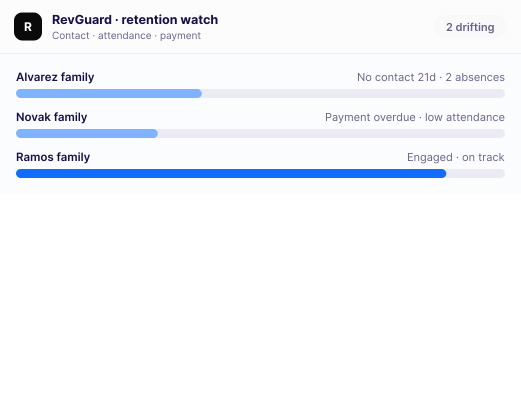
Drifting families
Re-enrollment
Parent concerns
FloStack · add-on
Invorto · add-on
FLASH

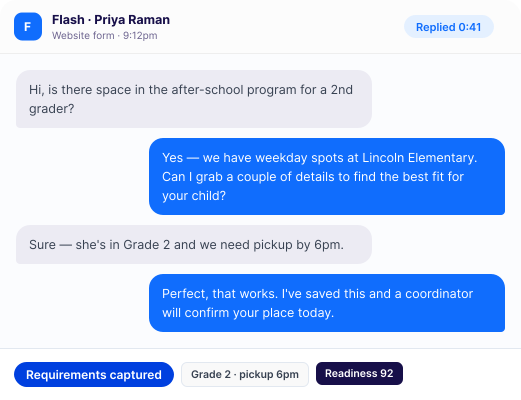
Answer every family in under a minute

Flash replies to each new inquiry within 60 seconds, at any hour, from any channel, works out the family’s actual requirements, and scores how ready they are to enroll from 0 to 100. Coordinators work on an already sorted queue of inquiries.

card · flash chat
WORKFLOWS

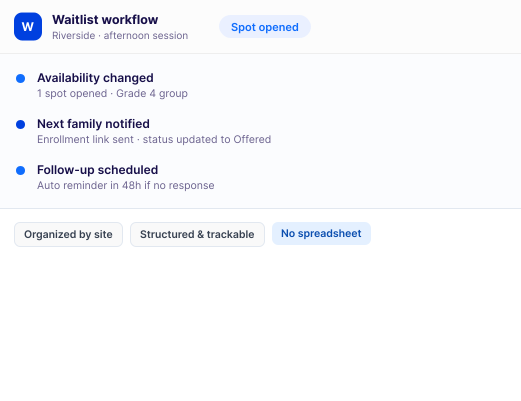
Move waitlist follow-up out of spreadsheets

Keep waitlisted families organized by site and the criteria that matter to your enrollment team. When the availability status changes, configurable workflows can trigger the next steps, send enrollment communications, update the family’s status, and follow up within defined timelines. Your team gets a structured, trackable process instead of relying on spreadsheets and manual reminders.

card · waitlist workflow
HAWKE

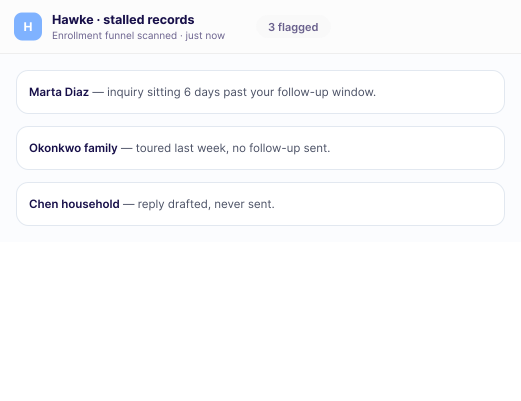
Notice the records going stale

Hawke scans the enrollment funnel for records that have stalled — an inquiry sitting past your follow-up window, a family who toured and got no follow-up — and surfaces each one with the reason attached.

card · hawke stalled records after-school program management software | leadsquared
QUILL

Ask instead of building a report

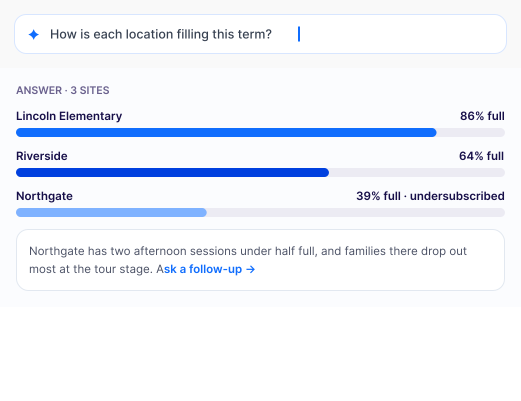
Ask Quill a question in plain English and the answer comes back immediately. How each location is filling, which sessions are undersubscribed, where families drop out, whose inquiries are going cold.

card · quill report
REVGUARD

See which enrolled families are drifting

RevGuard watches contact history, plus attendance and payment data where those systems are connected.

card · revguard after-school program management software | leadsquared
RE-ENROLLMENT

Run next term’s re-enrollment before the window opens

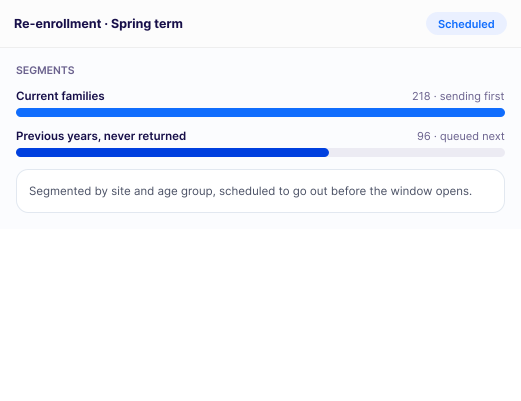
Campaigns go out to current families first, then to families from previous years who never came back, segmented by site and age group.

card · re-enrollment
CASES

Keep every parent concern on the record

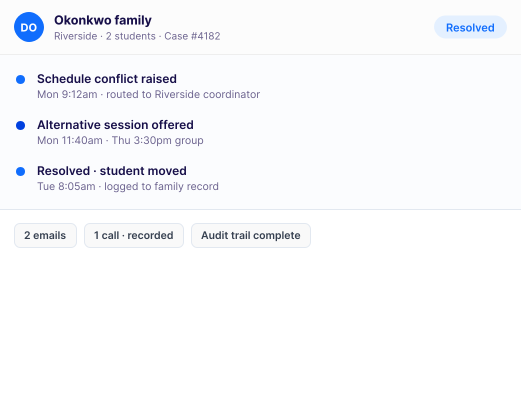
Questions and complaints reach the coordinator who already knows the family, and stay attached to their history. When an annual board review comes round, or a licensing inspector arrives unannounced, the trail is already there.

card · cases after-school program management software | leadsquared
FLOSTACK · ADD-ON

No wait between the form and a real conversation with FloStack

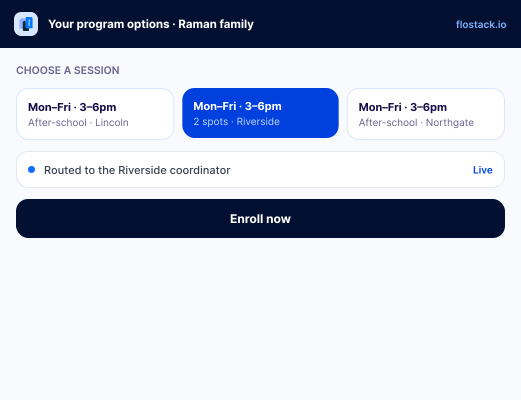
The moment a form is submitted, FloStack hands the inquiry to the coordinator who covers that location and gives the family a personalized page with their program options, session times, and a direct enrollment link.

card · flostack after-school program management software | leadsquared
INVORTO · ADD-ON

Handle enrollment calls around the clock

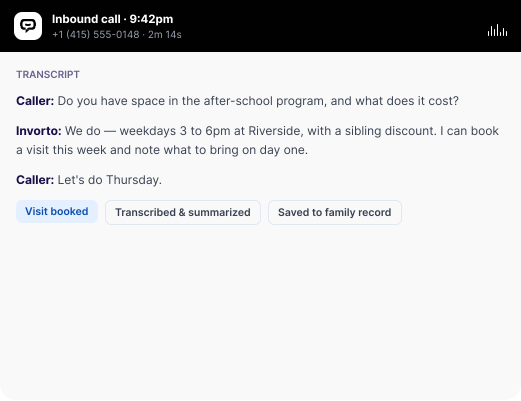
Answers inbound and outbound enrollment calls around the clock — availability, session times, cost, what to bring on day one — qualifies the family, and books the visit. It handles multiple languages and regional accents. Every call is transcribed and summarized straight onto the family’s record, so nobody has to take notes.

card · invorto call after-school program management software | leadsquared
FIT & GOVERNANCE

Fitting the way after-school programs actually operate

A program running inside a school building, on a district calendar, with a mix of subsidized and private-pay families, has requirements a general-purpose CRM was never designed around. Three of them decide whether the software survives its first term.

data_privacy
card
DATA PRIVACY & GOVERNANCE

Protecting student and family records

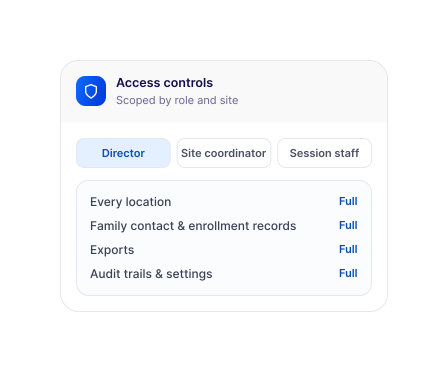
Records for minors, scoped by role and site: Family contact details, enrollment history, and communication logs sit behind role-based and granular permissions that control what each user can see and do, from viewing a record to exporting a list. The configuration follows the access policy your organization sets, not a default.

Access that follows the location: A director sees every location, A site coordinator sees only the families at their own location, and session staff see only their group. It’s configured to your structure during implementation.

A record you can hand to a board or a licensor: Audit trails show what changed on a record and in your account settings. So, an annual review starts from a trail, not from someone’s memory. Field-level change history is a paid feature, switched on during implementation. Some audit data is only kept for a set period, so check the retention window against your own review cycle.

Supporting your FERPA and licensing obligations: FERPA obligations sit with the institution, not the software. LeadSquared supports them with role-based and granular permissions, plus audit trails over record and configuration changes. Both are configured to your access policy during implementation. The underlying security controls are audited under SOC 2 Type II.

BUILT TO SCALE

From one site to a district-wide network

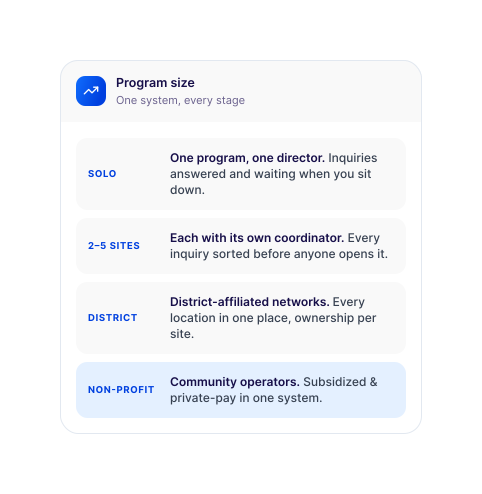
One program, one director wearing every hat: Most of your day is spent with children, not at a computer. Inquiries arriving in those hours are answered, scored, and waiting for you when you sit down.

Two to five locations, each with its own coordinator: Every inquiry lands with the right coordinator, sorted by location, grade band, or session before anyone opens it.

District-affiliated networks: Enrollment and waitlist status for every location in one place, with ownership assigned per site.

Non-profit and community operators: Subsidized and private-pay families follow separate intake paths inside one system. A subsidy applicant goes to the coordinator who handles eligibility. Their record waits at the documentation stage until it clears, then moves onto the waitlist. Private-pay inquiries take the standard path. A director sees both streams filling in the same view.

built to scale-full
built-to-scale
INTEGRATIONS

Connecting to what you already run

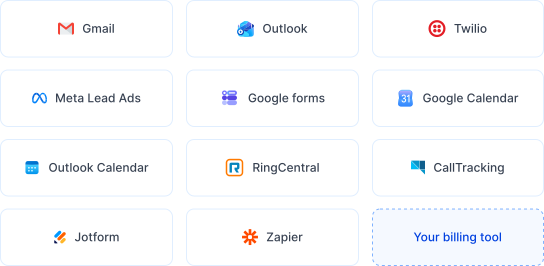
Family communication: Gmail, Outlook, and Twilio, so email and SMS send from the record rather than someone’s personal thread.

Where inquiries come from: Meta Lead Ads, Instagram Ads, Google lead forms, and embed forms on your program or school website.

Scheduling: Google Calendar and Outlook Calendar for tours, coordinator availability, and program events.

Phone: RingCentral and CallTrackingMetrics, with recordings tied back to the family record.
Forms and workflow: Jotform, Zapier, and Universal Data Sync (UDS).

Attendance and billing: Your existing systems, connected by native integration, API, or Universal Data Sync, so enrollment data reaches your system of record without re-keying.

ENROLLMENT ON AUTO-PILOT

Why programs pick LeadSquared over an attendance or registration app

Registration and attendance products are built primarily around rosters, check-in, and payment. Moving a family from interested to enrolled is a different job, and it needs education lead management software designed for it.

LIVE · 3 SITESLast 24 hours
142 inquiries36 waitlistedone view · 3 sites
Automated sequences keep every family warm
First reply · under a minuteWaitlist updatesStale-record recovery · HawkeSeasonal re-enrollment
enrollment-first design

Built around enrollment rather than the roster

It covers the inquiry, the waitlist, and the term-over-term return, sitting alongside the roster and billing tools you already pay for.

ai across the enrollment journey

Agents that share one record

Flash, Hawke, Quill, and RevGuard are native to the platform and run from a single login. Invorto and FloStack extend it with voice AI and instant booking as separately licensed add-ons.

bolt after-school program management software | leadsquared

Peak week handling without peak-week hiring

Automation absorbs the inquiry volume that would otherwise need temporary front-desk cover.

re enrollment after-school program management software | leadsquared

Every site in one place

No compiling location reports by hand before a board meeting.

purpose-built, not repurposed

Records protected by design

Role-based and granular permissions scoped to role and site, with audit trails over record and configuration changes.

direct implementation

Configured by the people who build it

LeadSquared’s own team maps the platform to your enrollment process.

After-school budgets usually come from a grant, a district line item, parent fees, or some combination, so the honest test is whether the platform fills more seats than it costs to run. Ask for a cost-per-enrollment estimate against your own inquiry volume during the demo.

Getting started

What getting started looks like

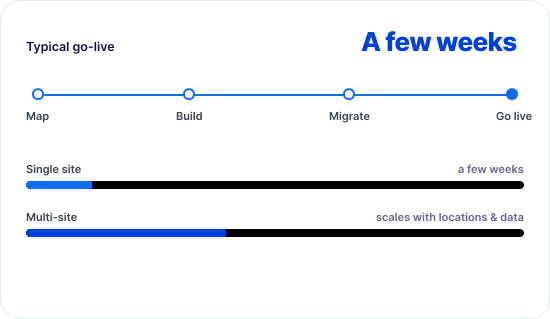
LeadSquared’s team maps your current process from first inquiry to first day, then builds it into the platform: enrollment stages, waitlist rules, routing, lead sources, calendars, and front-desk training. From your end, it needs an export of existing inquiries and families, your session and term calendar, and a list of who should see what at each location. Single-site programs are typically live in a few weeks; a multi-site network takes longer depending on the number of locations and how much historical data needs to be migrated.

a-few-week

Frequently asked questions

What happens to a family’s record if they withdraw, or never enroll at all?

If a family withdraws or doesn’t enroll, their prospect record and engagement history can remain available in LeadSquared. This allows the school to re-engage them in a future admissions cycle instead of treating them as a brand-new inquiry. How long records are retained, archived, or deleted will follow the institution’s data-governance requirements and configured processes.

How do waitlists work when we run several sites?

Each building keeps its own list. When a place frees up there, the next family on that site’s list is contacted automatically with an enrollment link and their record moves forward. Directors can compare how each site is filling by asking Quill for a report in plain language.

Can we communicate with families who don’t speak English at home?

Yes. Automated sequences can run in more than one language and trigger on a family’s stated preference; Invorto handles multiple languages and regional accents on inbound calls.

We’re a non-profit with a tight budget. Is this realistic?

Most small programs start with three things: answering inquiries automatically, notifying the waitlist, and running re-enrollment. That covers where the majority of families are lost. Cost depends on seats, sites, and which add-ons you opt for. See our education CRM pricing or ask for a quote at the demo.

Can LeadSquared connect to district platforms or student information systems?

Yes! Through native integrations, APIs, or Universal Data Sync. Where a district runs its own SIS or enrollment portal, that connection is scoped during implementation, since district systems vary widely.

Do we have to sign a long-term contract?

Contract terms vary by plan and the add-ons you choose — some programs prefer month-to-month during a first season, others lock in annual pricing for a lower rate. Your rep can walk through the options that fit your enrollment cycle during the demo.

This page is published by an enrollment technology provider. The capabilities outlined here reflect how the product is set up for after-school enrollment, and none of it is an independent evaluation of the options available in this category.

Last reviewed: September 2026

GET STARTED

Get started with LeadSquared’s after-school program software

A term in, the difference shows up in three places: inquiries answered while parents are still deciding, a waitlist that advances itself, and a re-enrollment list that goes out on time. LeadSquared also builds dance studio management software for organizations offering enrichment classes alongside their program.

See how LeadSquared handles enrollment for programs like yours.

prod.bread.humanisys.ai