One enrollment funnel

One platform to manage the full swim school enrollment journey

Pool scheduling software is designed around the students already on your roster, covering attendance, lane assignments, and makeup credits.

LeadSquared starts earlier, at the first inquiry, and works alongside your scheduling software rather than replacing it. As swim lesson management software, it is built around the enrollment decision itself.

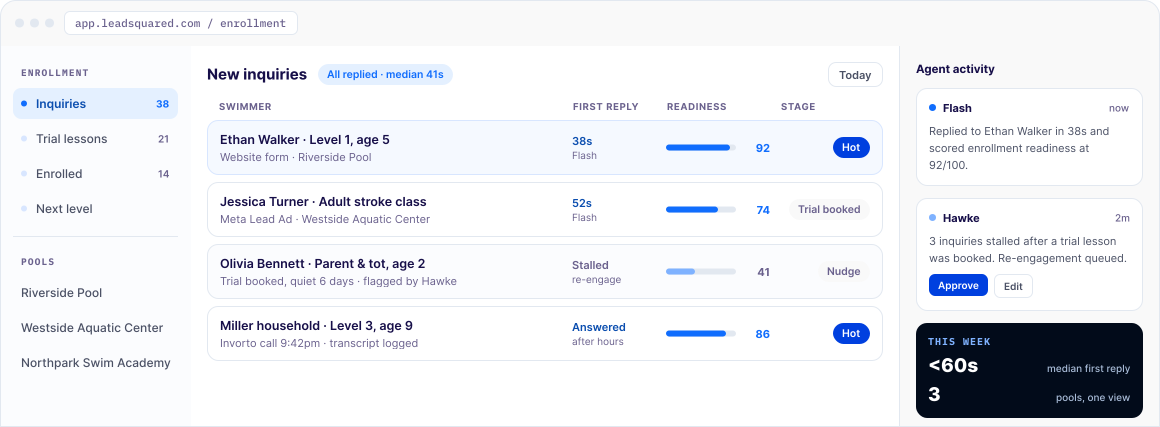
Every inquiry enters the same enrollment funnel. A reply goes out within seconds. When a spot opens, the next family on the waitlist is notified automatically. When a student is close to finishing a level, an outreach sequence goes out before they have a reason to drift. Owners and operations directors see enrollment and waitlist activity across every pool from one place.

WHERE ENROLLMENT LEAKS

Challenges swim schools face without the right software

The enrollment is usually decided in the hour after the inquiry comes in. For most schools, that hour is unmanaged.

  • Enrollment inquiries pile up at the start of each season, and staff try to track them in spreadsheets
  • Waitlisted families get inconsistent updates
  • Students who finish a level often don’t come back for the next one, because no one reaches out
  • Trial lessons get booked and then missed, with no system to follow up
  • Directors running more than one pool have no single view of enrollment or waitlist length across locations
  • The first school to reply usually wins the enrollment, and a same-day callback often isn’t fast enough
ENROLLMENT ON AUTO-PILOT

What swim schools achieve with LeadSquared

Instant first reply
Waitlist & spots
Stalled records
Level progression
Trial no-shows
Ask Quill
Family questions
FLASH

Answer every inquiry before the family moves on

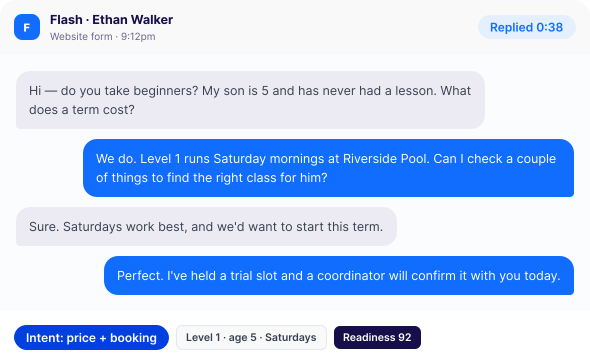
Flash, the platform’s AI response agent, sends a personalized first reply within seconds and scores how ready each family is to enroll, so staff know who to call first.

swim-flash · chat
WAITLIST

Fill every open spot without touching a spreadsheet

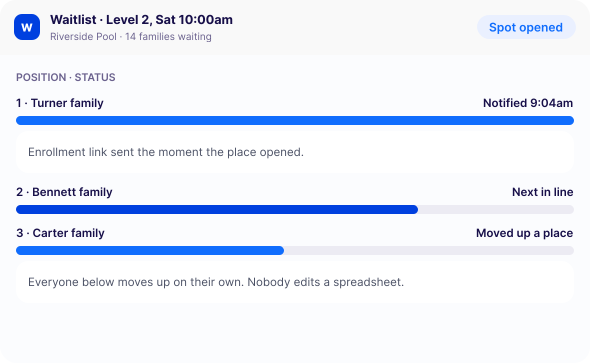
Waitlist positions update automatically, and the moment a place opens, the next family gets a notification with a direct enrollment link.

swim waitlist · spot opened swim school management software | leadsquared
HAWKE

Catch the families who are about to fall through the cracks

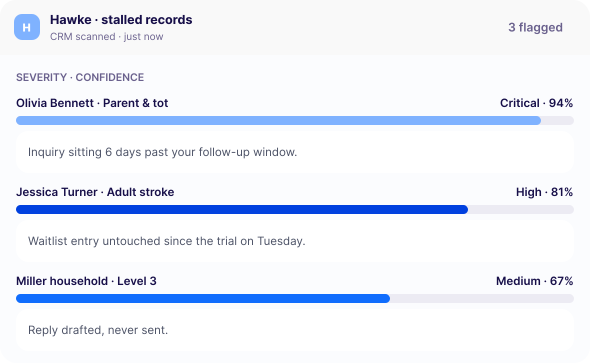
Hawke, the platform’s record-monitoring agent, scans the CRM for waitlist entries and inquiries that have stalled, and flags each one with the reason attached.

swim hawke · stalled records swim school management software | leadsquared
LEVEL PROGRESSION

Keep students moving from one level to the next

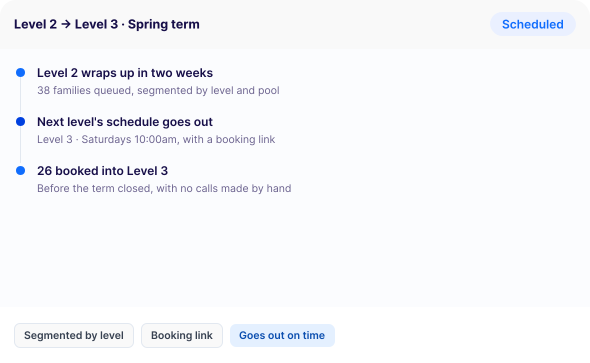
Automated campaigns reach families as a level wraps up, with the next level’s schedule and a booking link.

swim - level progression · campaign
TRIAL REMINDERS

Stop losing instructor time to no-shows

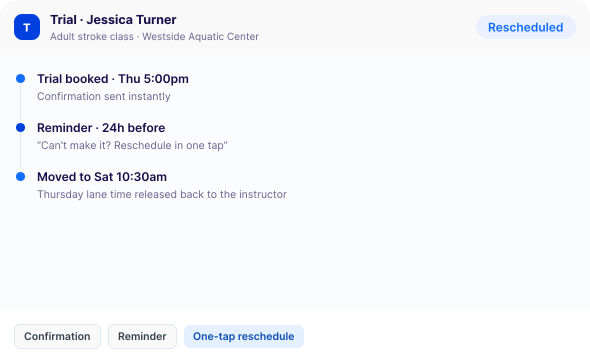
Automated reminders and confirmations go ahead of every booked trial, and a family that can’t make it gets a one-tap way to reschedule.

swim - trial reminders · rescheduled
QUILL

See every pool from one screen

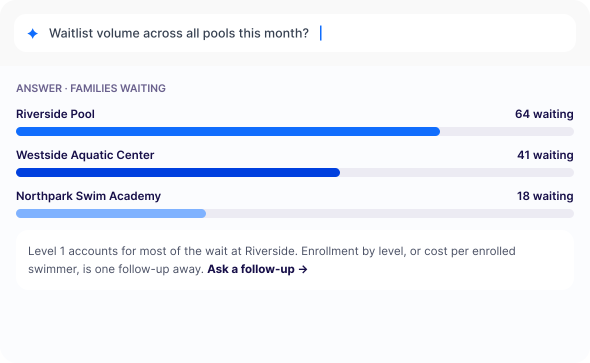
Ask Quill, the platform’s reporting agent, for a reports in plain language (waitlist volume by site, enrollment by level, whatever a director needs) instead of compiling them by hand.

swim quill · cross pool report swim school management software | leadsquared
CASES

Resolve family questions without delay

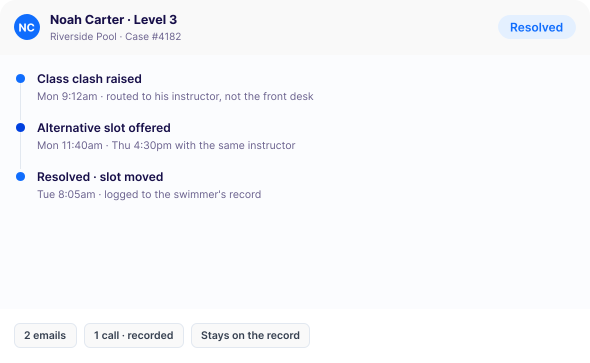
Inquiries and concerns are tracked and routed automatically, with a full history attached to the record.

swim case · resolved swim school management software | leadsquared
Capabilities

Key capabilities of LeadSquared’s swim school platform

AI-powered enrollment for swim schools

01 · CAPTURE
Every inquiry, one funnel
Lessons pageMeta ad · summer swim campOpen day formVoicemail
02 · ANSWERS
Answered on its own
<1mfirst reply
Every inquiry answered automatically, from any channel, at any hour.
03 · SCORES
Sorted before you open it
Levelattached
Swimmer ageattached
Preferred day & timeattached
04 · ROUTES
Matched to an instructor
Sent to an instructor with a matching opening.
05 · FOLLOWS UP
Until a person steps in
RemindersRe-engagementOn its own
Follows up on its own until there's a reason to step in.

Instant inquiry response and readiness scoring with Flash. Every inquiry gets a personalized reply within seconds, mentioning the level, age group, and session requested. Flash also scores how ready each family is to enroll, so coordinators know who to call first during a surge.

Automated waitlist management and spot notification. When a spot opens, the platform identifies the next family in line, sends a notification with a direct enrollment link, and moves them through the pipeline. No one updates a spreadsheet by hand.

Stalled-record detection with Hawke. Hawke continuously checks the CRM for waitlist entries and inquiries that have gone quiet or stopped moving and surfaces each one with the reason attached. So, nothing sits unnoticed during a busy season.

Automated trial reminders. Families with a booked trial lesson get reminders and confirmation prompts ahead of time, plus a simple way to reschedule if they can't make it, so instructor time stays booked.

Level-progression outreach. As a student nears the end of a level, an automated sequence goes out with next-level scheduling and a booking link, so re-enrollment doesn't depend on someone remembering to make the call.

Cross-pool reporting with Quill. Quill turns a plain-language question — “show me waitlist volume across all pools this month” — into an instant report, giving directors visibility without asking a coordinator to pull one together.

Separately licensed add-ons

Instant scheduling with FloStack (add-on). The moment a family submits an inquiry, FloStack routes it to the right coordinator and delivers the family a personalized page showing open levels and time slots, with a direct booking link. It manages scheduling across multiple coordinator calendars and locations.

Invorto Voice AI Co-Pilot (add-on). Invorto handles inbound and outbound enrollment calls around the clock, answering questions about levels, availability, pricing, and session timing when staff can't get to the phone. It works in multiple languages, logs every call transcript to the CRM, and hands the call off to a person the moment a family is ready to book.

data_privacy
data-privacy-card
Fit & governance

Data privacy for swim schools

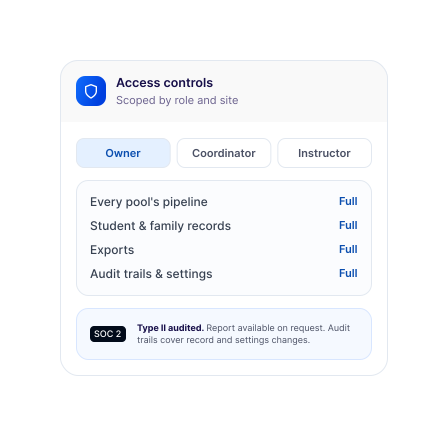
Student and family data protection: Records sit behind role-based access controls, with a complete audit trail of every enrollment action. Access is scoped by role, so a coordinator sees only their assigned locations and an instructor sees only their own roster.

Granular access controls: Owners and directors see every pool’s pipeline. Coordinators see their assigned locations. Instructors see only their own class rosters.

Audit trails: Every inquiry, message, and enrollment action is logged automatically, and the platform’s security controls are audited under SOC 2 Type II.

Your school owns the records it collects, and you set who can access them and how long they are kept. LeadSquared holds that data on your behalf.

BUILT TO SCALE

Built for swim schools at every stage of growth

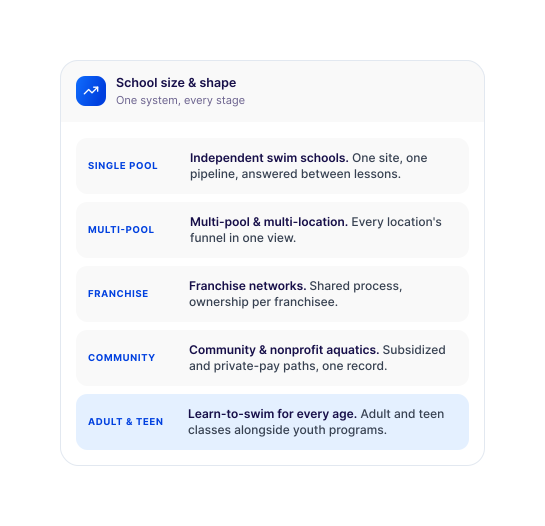
  • Independent, single-pool swim schools
  • Multi-pool and multi-location operators
  • Franchise swim school networks
  • Community and nonprofit aquatics programs
  • Schools running adult and teen learn-to-swim alongside youth programs

If your organization runs a swim club rather than a lesson-based school, the same platform works as swim club management software. The enrollment and waitlist workflows are the same ones behind LeadSquared’s dance studio management software and martial arts school software. Operators running more than one kind of program can see how the platform is used across LeadSquared’s education CRM and enrollment solutions.

built to scale swim school management software | leadsquared
data-privacy-card-2
INTEGRATIONS

Integrates with your existing swim school tech stack

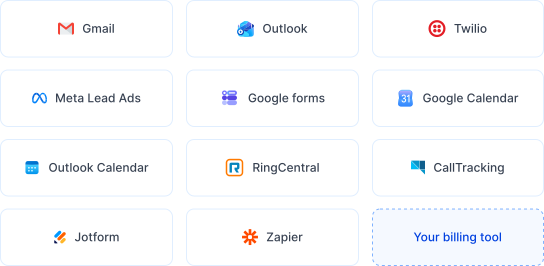
Email and SMS: Gmail, Outlook, and Twilio, so all family communication runs from one platform

Lead sources: Meta (Facebook) Lead Ads, Instagram Ads, Google lead forms, and embedded forms on your website

Calendar and scheduling: Google Calendar and Outlook Calendar for coordinator and instructor scheduling

Telephony: RingCentral and CallTrackingMetrics

Productivity: Jotform, Zapier, and Universal Data Sync (UDS)

Disclaimer: This page is published by the company behind the platform it describes.

Why LeadSquared

Why swim schools choose LeadSquared

Swim schools typically choose between pool scheduling software, designed around the students already on the roster, and general-purpose CRMs, designed for longer sales cycles and higher-value deals. A swim school sits between the two. It runs on fast decisions and recurring enrollment, and the software behind it should be built the same way.

LIVE · 3 POOLSLast 24 hours
142 inquiries36 trials bookedone view · 3 pools
Enrolled — and back for the next level
<1mfirst reply
1 viewevery location
Autolevel progression
Enrollment-first design

Built to convert waitlist families and trial bookings into enrolled students.

AI included from day one

Flash, Hawke, and Quill are included in the platform. Invorto and FloStack are available as add-ons when you need them.

Built for enrollment surges

Automated intake, waitlist management, and follow-up absorb peak-season volume without extra admin staff.

Retention built in

Automated level-progression outreach keeps students enrolled without relying on someone remembering to call.

Multi-pool visibility

Every location's enrollment funnel and waitlist in one place, reportable in plain language.

Guided implementation

An in-house LeadSquared team configures the platform to your workflow.

As a swim school CRM, LeadSquared is built around the enrollment decision itself: the search, the inquiry, the trial, and the years of re-enrollment that follow it.

Frequently asked questions

Does LeadSquared work alongside my existing pool scheduling software?

Yes. LeadSquared handles enrollment, waitlists, and family communication. It is not a replacement for the software that manages lane bookings and attendance. It also connects to your calendar tools so scheduling stays in sync.

Can it manage waitlists for multiple skill levels and time slots at once?

Yes. Each level and session keeps its own waitlist. When a spot opens for a specific level or timeslot, the next matching family is notified automatically.

How does LeadSquared handle enrollment across multiple pool locations?

Each pool runs its own pipeline and waitlist. Directors see all of them rolled into one view and can ask Quill for a plain-language report (by site, by level, or by whatever comparison they need) instead of compiling one manually.

How does the platform protect student and family data?

Records sit behind role-based access controls, with encryption in transit and at rest and a full audit trail of every interaction. Access is scoped so instructors see only their own students, and security controls are audited under SOC 2 Type II.

What does the Voice AI Co-Pilot handle when staff can’t get to the phone?

Invorto is an add-on that answers inbound calls around the clock, covering availability and pricing questions when nobody is free to pick up. Calls that need a person are handed off with the full conversation logged, so nothing gets lost in a busy week.

How is LeadSquared priced for swim schools?

Pricing is quoted per school rather than published as a fixed plan, so it reflects your number of locations and users. FloStack and Invorto are add-ons, priced separately from the core platform. You can review plan options on the education CRM pricing page or ask for a quote during a demo.

GET STARTED

Get started with LeadSquared’s swim school management software

After go-live, the next enrollment surge looks different. Inquiries get a reply in seconds, the waitlist moves on its own, and students hear from you before the next level starts.

prod.bread.humanisys.ai