





- Home

- Learn
- Healthcare
- 5 best healthcare CRM to integrate with NextGen to optimize appointment scheduling
HEALTHCARE
5 best healthcare CRM to integrate with NextGen to optimize appointment scheduling
Contents

 17 min read


Today, healthcare practices depend heavily on digital systems to manage patient records and handle other operations. These systems, known as electronic health records (EHRs), help providers store clinical data, manage billing, and coordinate care.
One widely used platform in this space is NextGen Healthcare, which combines EHR capabilities with practice management tools for healthcare organizations.
Among its many functions, NextGen includes built-in appointment scheduling features.
With it, clinics can manage provider calendars, book patient visits, send automated reminders, and allow patients to schedule appointments online through the software’s built-in patient portal. In other words, the platform already provides the tools needed to organize and manage the appointment calendar.
However, running an efficient schedule involves more than simply booking visits. Healthcare teams also need to communicate with patients before appointments, handle cancellations, and follow up after visits. These activities often require consistent outreach and workflow automation.
This is where healthcare customer relationship management (CRM) systems come in. When integrated with NextGen, a healthcare CRM can use scheduling data to automate communication and engagement around appointments.
In this guide, we’ll explore why some practices integrate healthcare CRM tools with NextGen, what features to look for, and the 5 best healthcare CRM platforms that support these workflows.
As we touched on, most practices using NextGen Healthcare EHR already have a built-in scheduling system.
NextGen’s practice management system allows clinics to create appointments, manage provider schedules, send reminders, and let patients request visits through the patient portal.
However, the operational work surrounding those appointments often involves additional processes that can become difficult to manage as patient volume grows.
For example, missed appointments and late cancellations can disrupt clinic schedules. When this happens, front-desk teams often need to quickly contact other patients to fill in the newly opened time slot. In many practices, this outreach still happens manually through phone calls or individual messages.
Patient communication before and after visits can also require significant effort. Staff may need to confirm appointments, follow up with patients who did not respond to reminders, help patients reschedule, or encourage them to book recommended follow-up visits.
NextGen does offer patient engagement and access tools that help automate some of these workflows. However, these capabilities are sometimes implemented through additional modules, and many clinics still rely heavily on manual coordination.
This is where healthcare CRM platforms can complement the scheduling system by automating communication and engagement around appointments.
At this point, it helps to clarify what a healthcare CRM does, especially since it is often confused with an EHR.
A healthcare CRM is a system designed to manage patient communication and relationships, rather than clinical records. Its main purpose is to organize and automate how healthcare organizations interact with patients across different touchpoints.
An EHR platform such as NextGen EHR focuses primarily on clinical and operational workflows, including maintaining patient charts, documenting care, managing billing, and maintaining appointment calendars.
A healthcare CRM focuses on a different layer of operations. It helps practices manage:
This becomes especially useful when connected to appointment data.
When a CRM integrates with a scheduling system like NextGen, it can automatically trigger communication workflows based on scheduling events. For example, when an appointment is created in the EHR, the CRM can send confirmation messages, pre-visit instructions, reminders, and post-visit follow-ups.
In this setup, the appointment calendar still lives inside NextGen. The CRM simply uses that information to automate communication and engagement around the visit. This allows clinics to manage the full patient interaction cycle without changing how appointments are scheduled.
Once a healthcare CRM is connected to NextGen’s scheduling system, the goal is not to replace the appointment calendar. Instead, the CRM helps manage everything that happens around the appointment, such as reminders, patient communication, and follow-ups.
Here are some practical ways this integration can improve scheduling workflows.
Most practices already send reminders through NextGen. A CRM integration can expand this by sending reminders across multiple channels such as SMS, email, or voice calls. Patients can often confirm or cancel directly from the message, which helps reduce missed visits.
When a patient cancels or misses an appointment, a CRM can automatically trigger rescheduling messages. For example, patients may receive a link to book a new slot, or the system may notify other patients waiting for earlier availability.
Many EHR systems rely heavily on portal notifications or basic messaging tools. Healthcare CRMs typically support broader outreach channels such as text messaging, email campaigns, and automated call reminders, making it easier to reach patients through their preferred method.
CRMs allow practices to communicate with patients before and after visits. This may include sending preparation instructions, intake forms, or follow-up care reminders.
CRM platforms also provide reporting tools that help clinics understand patient behavior, such as reminder response rates, no-show patterns, and scheduling trends. This insight helps practices refine their communication strategies and keep appointment schedules running smoothly.
First, the CRM should integrate reliably with NextGen. Most healthcare integrations rely on technologies such as APIs, HL7 interfaces, or FHIR-based interoperability standards to exchange data securely. This allows appointment information, patient details, and scheduling updates created in NextGen to trigger actions inside the CRM. Without a stable integration, automation will not work properly.
A strong CRM should allow communication to be triggered automatically by scheduling events. For example, when an appointment is booked in NextGen, the CRM can send a confirmation message, followed by reminder notifications closer to the visit date and follow-up communication afterward.
Modern patients expect convenient ways to manage appointments. Some CRM platforms provide links in reminder messages that allow patients to confirm, cancel, or request a new time. These responses can then update the practice’s scheduling workflow.
Different patients prefer different communication methods. Effective systems support several channels, such as SMS, email, phone reminders, and secure messaging, so practices can reach patients in the way they are most likely to respond.
If a patient cancels an appointment, some CRM tools can automatically notify other patients waiting for earlier openings. This helps clinics fill empty slots more quickly and reduce lost revenue.
Finally, look for platforms that provide operational insights. Metrics such as confirmation rates, no-show patterns, and appointment utilization help practices identify scheduling gaps and improve efficiency over time.
| CRM / Platform | Primary Focus | Best For | Integration Approach |
|---|---|---|---|
| LeadSquared | Comprehensive patient journey and engagement automation | Practices that want to orchestrate journeys from first contact through appointments and long‑term engagement | Connector Integration (configured via LeadSquared connectors and APIs) |
| Luma Health | Patient access and engagement with scheduling automation | Clinics focused on patient self‑scheduling, confirmations, and waitlist/cancellation management | Marketplace Integration (official partner with NextGen) |
| NexHealth | Front‑office automation with real‑time scheduling and messaging | Practices wanting seamless online booking, patient intake, and two‑way messaging | API integration |
| Salesforce Health Cloud | Enterprise CRM for unified patient data and care coordination | Large or multi‑site organizations needing advanced analytics and customizable workflows | API integration |
| Dash by Relatient | Patient access and automated scheduling outreach | Practices prioritizing self‑service scheduling and automated patient communication | Marketplace Integration (official partner with NextGen) |
LeadSquared offers a fully HIPAA-compliant, purpose-built healthcare CRM designed to help hospitals, clinics, and specialty practices manage patient acquisition, intake, communication, and engagement on one platform.
The system focuses on automating patient journeys—from the first inquiry to appointments, follow-ups, and long-term engagement. It can integrate with NextGen EHR or hospital information systems to automate patient communication, reduce no-shows, and improve patient intake efficiency.
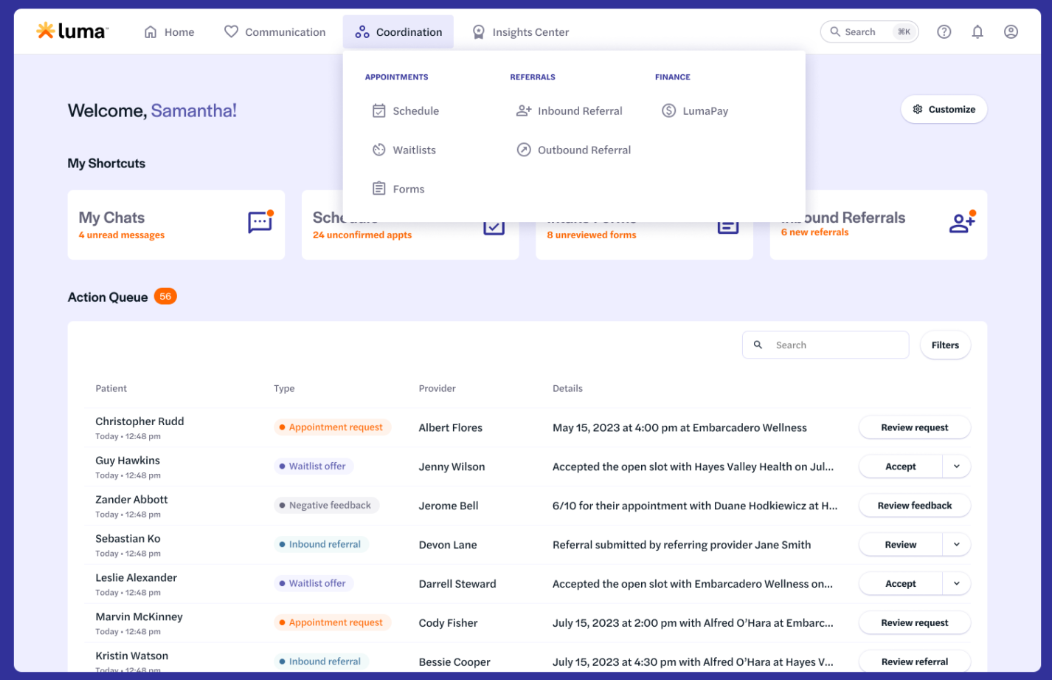
Luma Health is a patient engagement and communication platform that handles appointment scheduling and communication across the patient journey. Rather than replacing an EHR’s scheduling system, it works alongside systems like NextGen to automate the communication and operational workflows that happen around appointments.
• Supports patient self-scheduling through web, SMS, chatbot, or other digital channels.
• Sends automated reminders that allow patients to confirm, cancel, or reschedule appointments.
• Smart waitlist automatically offers newly opened slots to other patients waiting for earlier appointments.
• Provides multi-channel communication including text, email, voice, and secure messaging.
• Supports mobile patient intake with digital forms, insurance uploads, and pre-visit preparation.
• Includes analytics and engagement insights to track patient communication performance and satisfaction.
• Primarily focused on patient engagement and access workflows rather than full CRM lifecycle management.
• Implementation may require configuration to align with existing EHR scheduling workflows.
• Pricing details are typically not publicly listed and require consultation.
• Custom pricing based on organization size, features, and deployment scale.
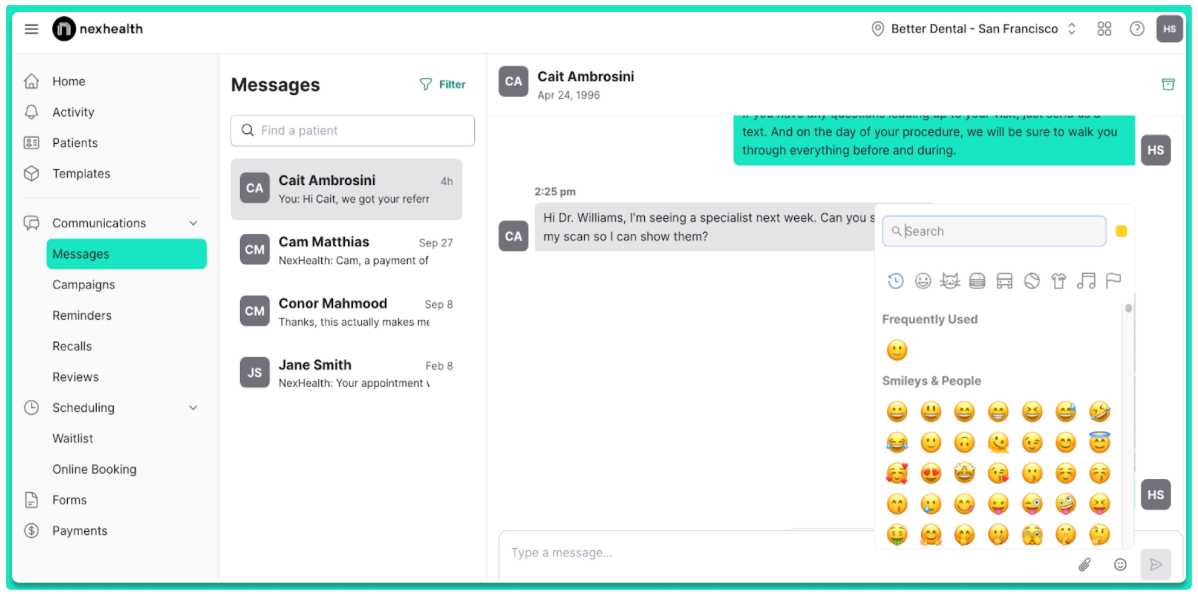
NexHealth is a patient engagement platform designed to automate many of the front-office tasks that happen around appointments. It connects with EHR systems like NextGen and uses that data to power online scheduling, patient communication, digital forms, and payments. Instead of replacing the EHR calendar, NexHealth sits on top of it and syncs patient and appointment data in real time, so clinics can automate reminders, intake, and follow-ups.
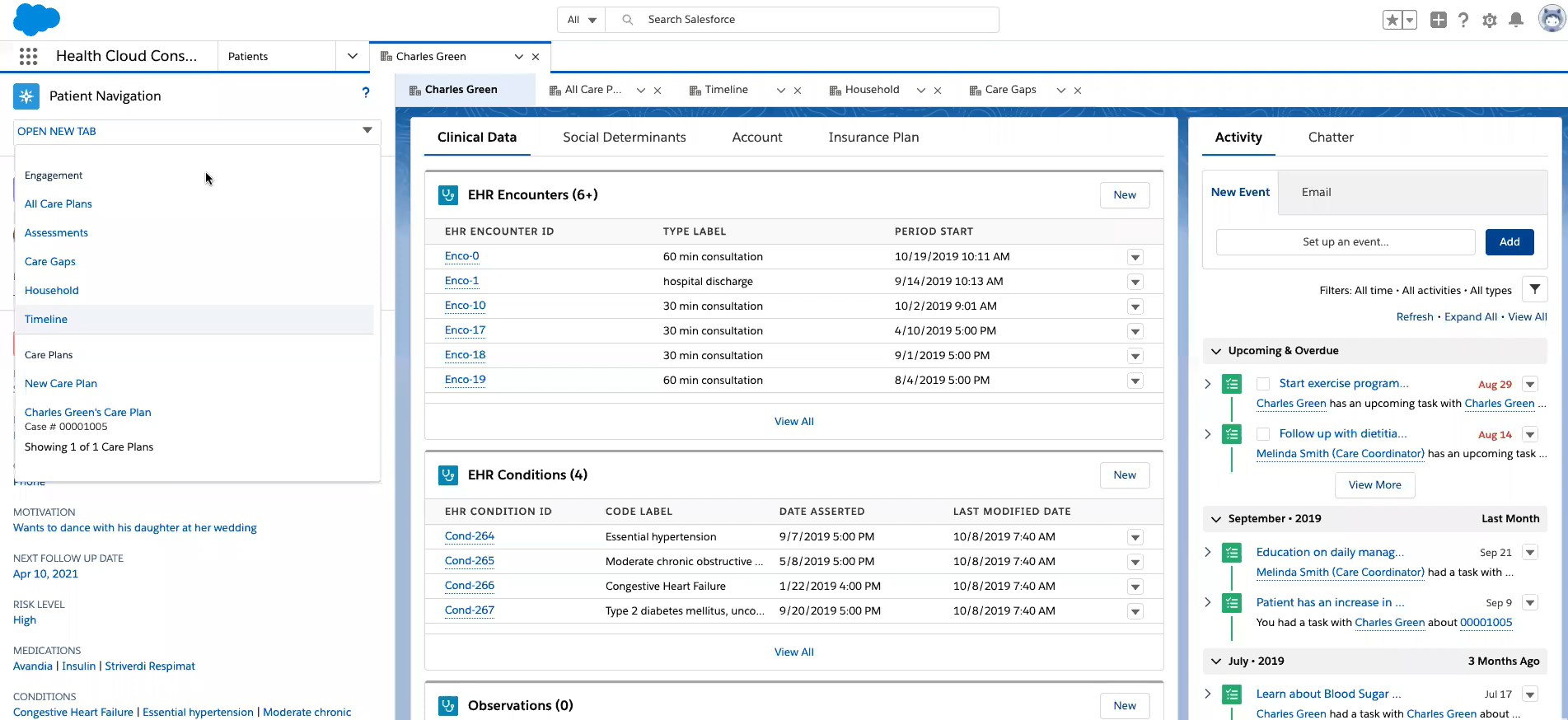
Salesforce Health Cloud is a healthcare-specific version of Salesforce’s CRM platform designed to help mid to large-sized healthcare providers manage patient relationships, care coordination, and engagement workflows. Instead of replacing an EHR such as NextGen, it typically sits alongside it and connects through healthcare interoperability standards like HL7 and FHIR. This allows organizations to combine clinical data from EHR systems with communication and engagement workflows inside the CRM.
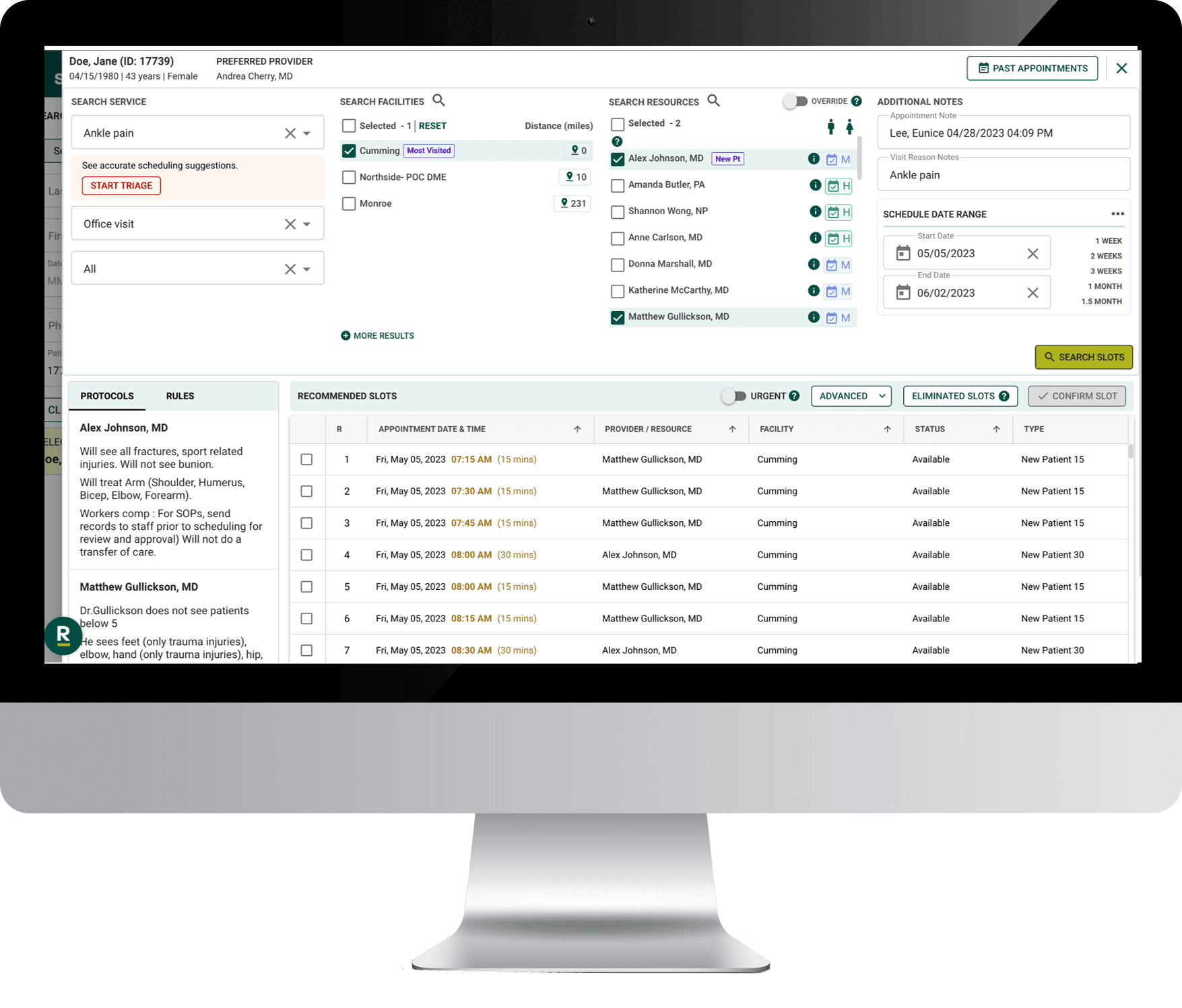
Dash is a patient access and engagement platform developed by Relatient, a healthcare technology company focused on improving how patients schedule and access care. The platform can work alongside EHR and practice management systems like NextGen to simplify appointment scheduling, communication, and patient intake.
In many practices, Dash is used to automate scheduling workflows, reduce call center workload, and give patients more self-service options to book or manage appointments.
NextGen already offers strong appointment scheduling capabilities through its practice management system. Most clinics using the platform rely on it to manage provider calendars, patient bookings, and day-to-day scheduling operations.
Where many practices need additional support is communication and coordination that happens around those appointments. Tasks such as confirming visits, sending reminders, handling cancellations, filling open slots, and following up with patients often involve multiple steps and significant staff time.
This is where healthcare CRM platforms can add value. When integrated with NextGen, they can use scheduling data to automate patient communication, streamline front-desk workflows, and help practices stay connected with patients before and after visits.
The right solution will depend on how your organization manages scheduling today and what operational challenges you want to solve. Some practices prioritize self-scheduling tools, while others focus on outreach automation or patient engagement analytics.
If you’re exploring CRM options, LeadSquared Healthcare CRM is designed to support these workflows alongside EHR systems like NextGen.
You can book a free demo to see how LeadSquared works in practice and how it can help streamline appointment-related workflows.
Healthcare CRM platforms typically connect with NextGen using integration technologies such as APIs, HL7 interfaces, or middleware connectors. These technologies allow the two systems to exchange data securely.
For example, when a patient books an appointment in NextGen, the appointment information can be shared with the CRM. The CRM can then automatically send confirmation messages, reminders, or follow-up communications based on that scheduling event.
This approach allows NextGen to continue managing clinical records and scheduling, while the CRM handles communication and workflow automation.
In most cases, appointment scheduling still happens inside NextGen because it manages provider calendars, visit types, and scheduling rules.
However, some healthcare CRM platforms provide self-scheduling interfaces that connect to the NextGen calendar. When patients book through these interfaces, the appointment is created directly in the NextGen scheduling system.
This gives patients more convenient ways to schedule visits while keeping the official schedule managed by NextGen.
Healthcare CRM integrations are commonly used by:
Multi-location medical practices
Specialty clinics with high patient volumes
Hospitals and health systems
Practices that rely heavily on appointment scheduling and patient outreach
These organizations often manage large numbers of patient interactions and benefit from automating communication around appointments.
The level of technical work required depends on the CRM platform and integration method.
Some vendors offer prebuilt integrations that can be configured relatively quickly with support from the vendor.
Other integrations may require API configuration or middleware setup handled by IT teams or implementation partners.
Most healthcare CRM providers guide clinics through the integration process to ensure patient data flows securely between systems.
Implementation timelines can vary depending on the size of the organization and the complexity of workflows being configured.
For smaller practices using standard integrations, setup may take a few weeks. Larger healthcare organizations with multiple locations and customized workflows may take several months to fully deploy the system.
The implementation usually includes system integration, workflow configuration, staff training, and testing.
Before integrating a CRM, healthcare organizations should evaluate:
their current scheduling and communication workflows
the number of appointments they manage each day
how patients currently receive reminders or follow-ups
whether staff spend significant time on manual outreach
Understanding these operational needs helps practices choose a CRM platform that fits their workflow rather than adding unnecessary complexity.
 15 min read 18 min read 15 min read


 AdvancedMD integration: 5 best healthcare CRMs for no-show reduction