





- Home

- Learn
- Healthcare
- 5 best Patient Management Software for doctors
HEALTHCARE
5 best Patient Management Software for doctors
Contents

 16 min read


Doctors in the U.S. work between 52.3 and 62.8 hours per week depending on specialty, according to a 2024 AMA survey.
However, a significant portion of that time is not spent directly with patients. The same survey shows physicians spend only about 27.2 hours per week on direct patient care, with the rest going toward indirect care and administrative work such as documentation, order entry, and insurance-related tasks.
So where does the rest of their time go?
Mostly, on paperwork and administrative tasks that add friction to already demanding healthcare workflows.
To tackle these challenges, practices increasingly rely on Patient Management Software (PMS) – a tool designed to simplify administrative responsibilities and keep clinics running efficiently.
In this article, we’ll explore 5 of the best patient management software options available for doctors in the U.S. We’ll highlight the features and value of each tool to help you find the right fit for your practice.
As we touched on, Patient Management Software (PMS) is a platform that automates routine administrative tasks for healthcare practices. Unlike Electronic Health Records (EHR) that focus on handling clinical data, PMS typically deals with scheduling, billing, patient communication and so on.
EHRs store medical records and track clinical information, while PMS focuses on the business side of healthcare. EHRs manage diagnoses, treatment plans, and patient history, whereas PMS ensures appointments, billing, and office operations run smoothly. Together, they create a complete solution for both patient care and practice management.
Missed patient appointments and inefficient scheduling disrupt workflows and cost practices huge sums each year.
Paper charts or uncoordinated systems increase errors and slow down care.
Manual verification and claims handling can cause payment delays and extra administrative work.
Without a unified system, managing telehealth visits and remote monitoring is cumbersome.
Delayed results, limited portals, and inconsistent follow-ups make patients feel disconnected.
Manual processes make HIPAA and data security harder to maintain, raising legal and financial risks.
Here are the key features and capabilities you should look for in a modern PMS:
Your patient management system should simplify appointment management with features that reduce no-shows and optimize provider calendars. Look for automated reminders (SMS, email, or app-based), real-time availability, waitlist management, and easy rescheduling options.
A patient management system should streamline billing and claims management, either natively or through integrations with revenue cycle management (RCM) systems. Look for capabilities like insurance eligibility verification, electronic claims submission, denial management, and payment tracking to improve cash flow and reduce administrative burden.
Patients expect convenient, digital-first experiences. A strong PMS should include a secure patient portal where they can schedule appointments, access records, view test results, make payments, and communicate with providers. Support for mobile apps and omnichannel communication (SMS, email, and more) is increasingly important.
A PMS should integrate seamlessly with Electronic Health Records (EHR/EMR) systems to ensure smooth data exchange across clinical and administrative workflows.
Look for systems that support modern interoperability standards like HL7 FHIR (Fast Healthcare Interoperability Resources), which enable secure, real-time data sharing across platforms.
Additionally, consider whether the system meets ONC Health IT certification standards, which indicate compliance with U.S. interoperability and data-sharing requirements.
Choose a PMS that offers customizable dashboards and reports to monitor operational and financial performance. Advanced systems also provide insights into patient engagement, appointment trends, and revenue metrics, helping practices make data-driven decisions.
Patient data is highly sensitive and regulated under laws like HIPAA. Your patient management system should offer strong security measures such as encryption, role-based access controls, audit logs, and regular updates.
Additionally, for U.S. practices, it’s important to consider alignment with programs like the MIPS (Merit-based Incentive Payment System) which requires accurate reporting and can impact Medicare reimbursements.
| Tool Name | Best Features | Pricing |
| LeadSquared | Patient data consolidation, multichannel communication, AI-powered healthcare call center assistance | Pro: $60/user/month Super: $100/user/month |
| athenaOne | AI-powered documentation, automated coding & billing, patient portal | Custom pricing |
| NextGen Healthcare | Unified scheduling & billing, specialty-specific messaging templates, mobile access | Custom pricing |
| Salesforce Health Cloud | Unified patient profiles, AI-powered analytics, real-time collaboration | Enterprise: $350/user/month Unlimited: $525/user/month |
| eClinicalWorks | Integrated scheduling & billing, AI-enhanced charting, telehealth support | $10,000 one-time or $599/month per provider; AI tools ~$100/month |
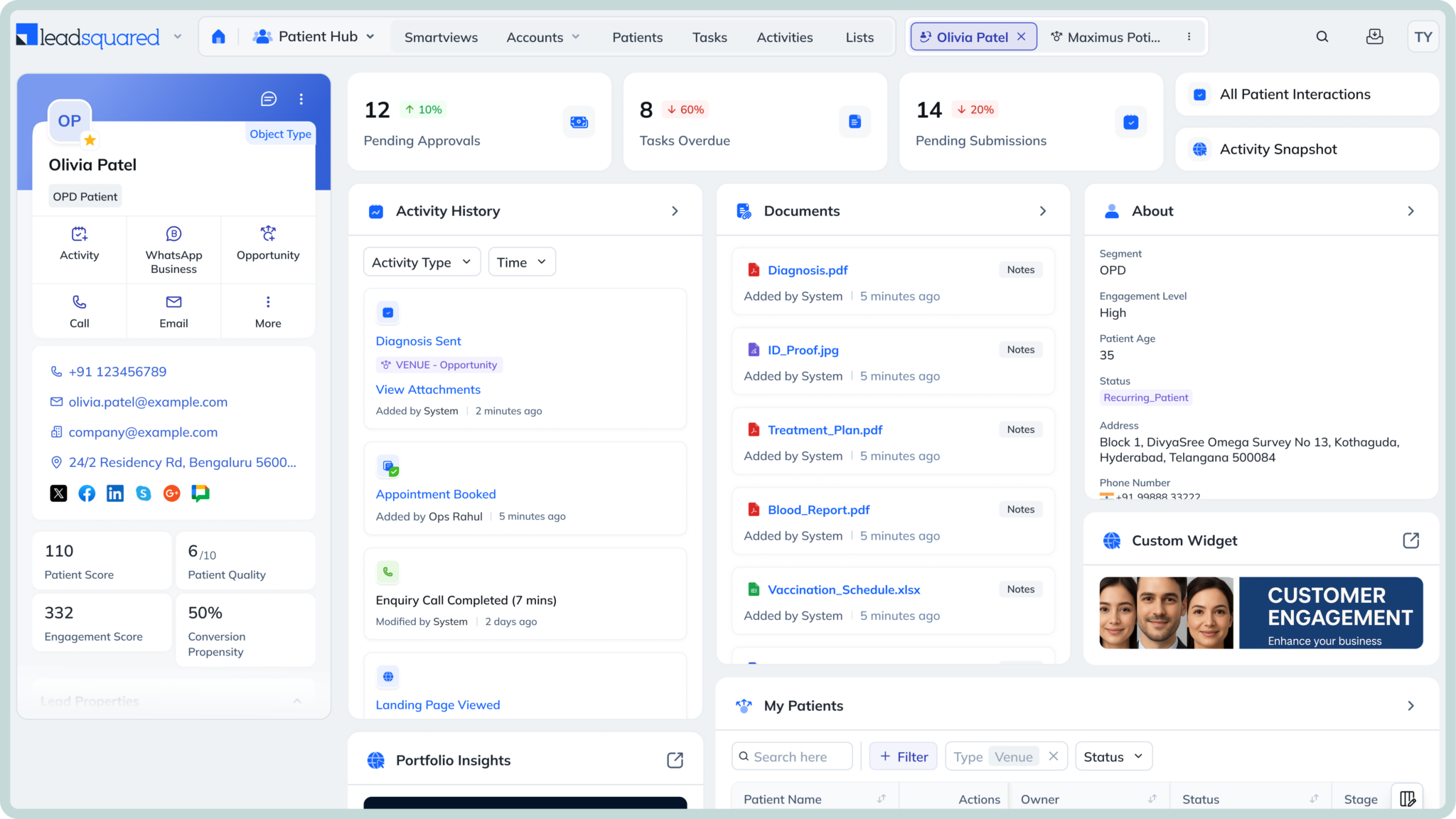
LeadSquared is a fully HIPAA-compliant healthcare CRM that helps practices keep track of patient inquiries, appointments, and follow-ups without things slipping through the cracks. It’s built more for the operational side of care—especially for teams that deal with a steady flow of new patients.
Instead of switching between different tools, you can manage patient communication, scheduling, and interactions in one place. It also helps teams respond faster and stay organized as patients move from their first inquiry to booking and beyond.
For practices that get a lot of calls or online inquiries, it’s particularly useful for making sure those leads are followed up on and converted into actual visits. And if needed, it can connect with EHR systems to handle clinical data alongside it.
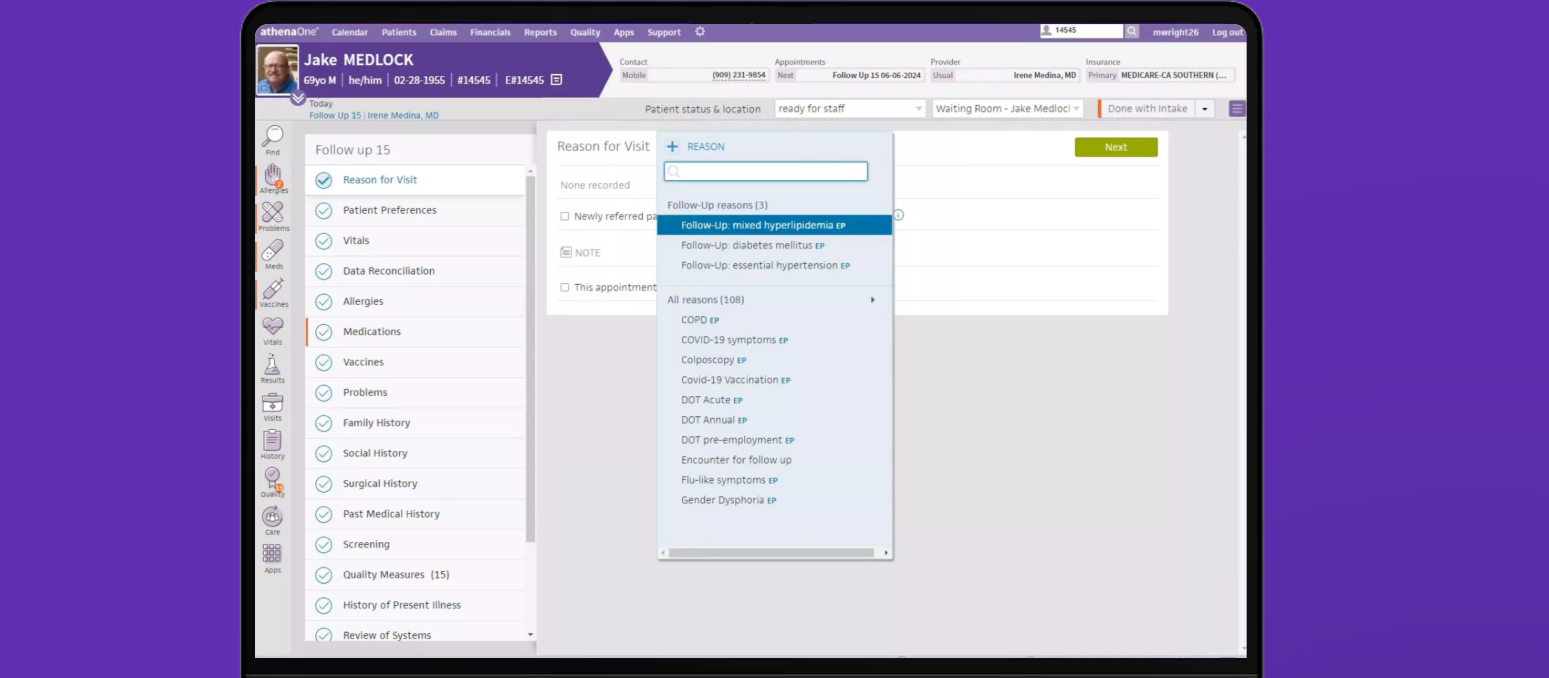
athenaOne is a cloud-based system that combines EHR, billing, and practice management into a single platform. It’s built for practices that want both clinical and operational workflows handled in one place, instead of managing separate tools.
A big part of its value comes from how tightly billing, documentation, and patient workflows are connected. As visits are documented, the system helps carry that information through coding, claims, and payments, reducing the amount of manual follow-up teams usually deal with.
athenaOne does not publish fixed pricing and typically offers custom quotes based on practice size, specialty, and services used.
Most practices are priced using a percentage-of-collections model, where the cost is tied to the revenue the practice generates. This typically ranges from around 4% to just over 10% of monthly collections, depending on factors like specialty, claim volume, and billing complexity.
 Image credit: TempDev
NextGen Healthcare offers a combined practice management and EHR system designed mainly for small to mid-sized practices. It brings scheduling, billing, and clinical workflows into one platform, so teams don’t have to switch between multiple systems during a patient visit.
It’s often used by practices that need more flexibility, especially those with specialty-specific workflows, since the platform allows for deeper customization than many out-of-the-box systems.
NextGen Healthcare does not publish fixed pricing and provides custom quotes based on practice size, specialty, and modules selected.
However, based on available industry data and estimates, most practices can expect:
In general, costs increase when additional modules—such as advanced analytics, integrations, or revenue cycle management services—are included.
Implementation and onboarding are usually priced separately and can vary significantly depending on the size and complexity of the practice.
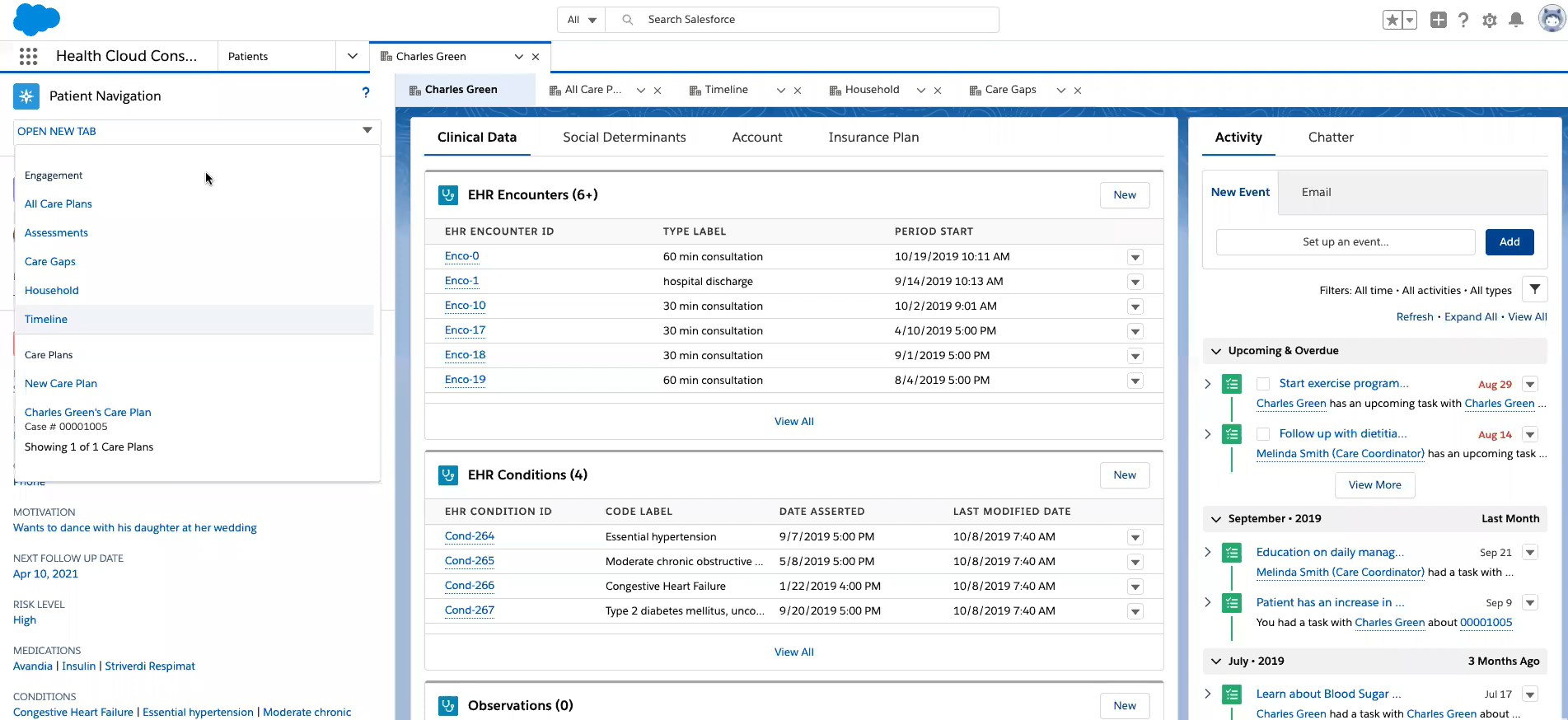
Salesforce Health Cloud is a healthcare-focused CRM built on Salesforce, designed to help organizations manage patient relationships, communication, and care coordination at scale.
Instead of handling clinical workflows directly, it focuses on bringing together patient data from different systems and making it easier for care teams, support staff, and administrators to stay aligned.
It’s typically used by larger practices, hospitals, and healthcare organizations that need a flexible system to manage complex workflows, patient outreach, and coordination across multiple teams.
Salesforce Health Cloud offers tiered pricing, but final costs depend on customization and additional products.
Salesforce also offers more advanced bundles (like Data Cloud or industry-specific packages), which can significantly increase total cost depending on the setup.
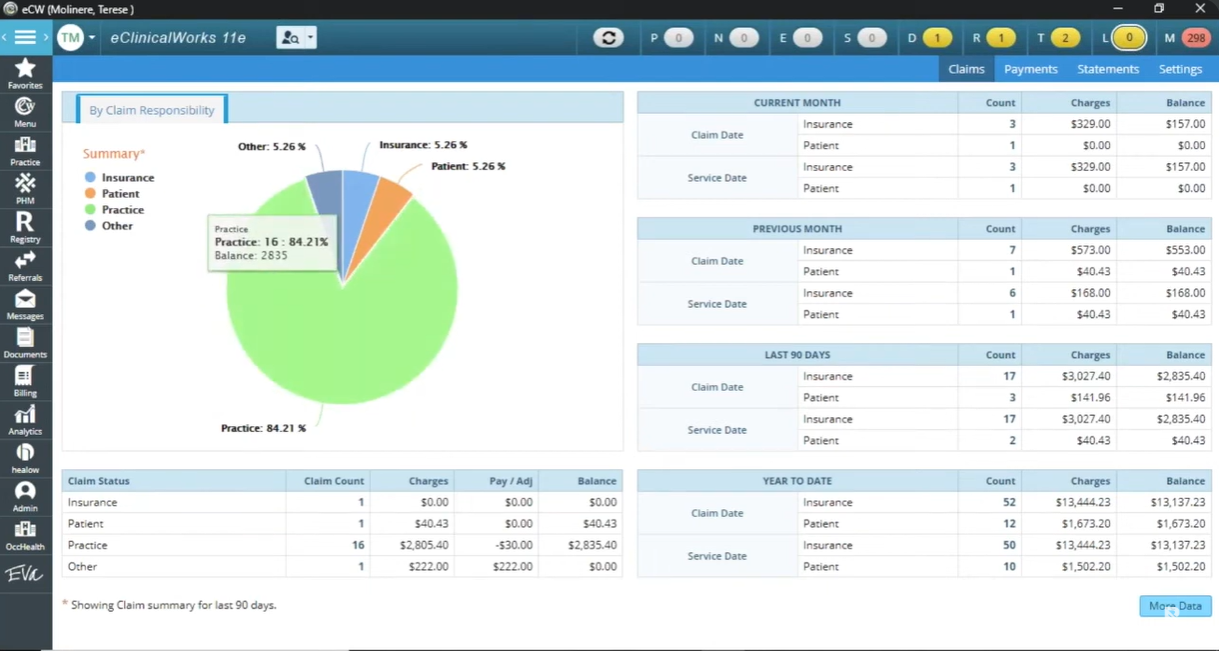
eClinicalWorks is a cloud-based EHR platform with built-in practice management tools, designed to handle both clinical and administrative workflows in one system. It combines charting, scheduling, billing, telehealth, and patient engagement features, making it a common choice for practices that want an all-in-one setup.
It’s used across practices of all sizes, but has particularly strong adoption among independent and ambulatory practices that want a single system for both clinical and administrative work.
eClinicalWorks previously offered perpetual licensing models, but pricing varied widely based on contracts and setup. Most modern implementations use a subscription-based pricing starting at around $449–$599 per provider per month, with additional costs for implementation, training, and add-on features.
These plans typically include hosting, maintenance, support, and core features like patient portals and messaging.
A good Patient Management Software is an investment in efficient operations, happier patients, and stronger revenue. The best system is the one that aligns with your practice’s priorities, whether that’s scheduling, billing, or patient communication.
If you want all of this on one platform, with automation and AI built in, LeadSquared is a great choice.
Book a quick demo with LeadSquared to see how it can work for your practice.
When choosing a patient management system, “HIPAA-compliant” is just the starting point. To truly evaluate a platform’s security and reliability, you should look at a few key factors:
Business Associate Agreement (BAA):
This is essential. Any vendor handling patient data must provide a BAA that outlines their responsibility for protecting PHI under HIPAA.
Encryption standards:
Look for strong encryption methods like AES-256 (for data at rest) and TLS or FIPS-compliant protocols (for data in transit) to ensure patient data is protected at all times.
SOC 2 certification:
This indicates that the vendor has undergone independent audits to verify their security, availability, and data protection practices.
HITRUST certification:
This is a more rigorous, healthcare-specific security framework. While not all vendors have it, it’s a strong signal of advanced compliance.
It’s also important to note that not all vendors publicly disclose every certification. In many cases, detailed compliance documentation (such as SOC reports) is shared during the evaluation or procurement process.
The time it takes to implement a patient management system depends on how complex your setup is. For a small clinic, it can be up and running in just a few weeks. Mid-sized practices usually take one to three months, while larger organizations may need several months to fully roll it out.
A big part of the timeline goes into data migration, staff training, and configuring the system to match your workflows. Integrations with existing tools can also add time, especially if customization is involved.
Most modern patient management systems are built to work alongside other healthcare tools rather than replace everything. They can typically integrate with EHR systems, lab software, billing platforms, and even communication tools.
That said, the level of integration can vary. Some systems offer seamless, built-in integrations, while others may require APIs or third-party connectors. It’s worth checking how easily the system fits into your current setup before committing.
The monthly subscription is only one part of the total cost. Many practices overlook expenses like onboarding, data migration, staff training, and integrations with other systems.
Some vendors also charge extra for advanced features like analytics, automation, or patient engagement tools. That’s why it’s important to look at the total cost of ownership, not just the base price, before making a decision.
 19 min read 17 min read 15 min read



 HIPAA Compliant Email Marketing: Everything You Need to Know
