





- Home

- Learn
- Healthcare
- Best CRM to use alongside WebPT for physical therapy practice growth
HEALTHCARE
Best CRM to use alongside WebPT for physical therapy practice growth
Contents

 15 min read


WebPT gives physical therapy practices many of the tools they need to attract and retain patients.
Depending on the plan they are on, practices get to use tools to manage leads, marketing campaigns, landing pages, online scheduling, patient engagement, and analytics within the WebPT platform. WebPT Reach also supports automated email, text, and in-app campaigns, including reactivation campaigns for past patients.
That raises a reasonable question: if WebPT already does all this, why add a CRM?
For some practices, there might be no reason to. But as a practice grows, its needs can extend beyond the workflows already available in WebPT. You may want to manage prospects across more channels, build more customized follow-up processes, or connect patient acquisition activity with other systems your organization uses.
An additional CRM can be another layer for managing the relationships and growth workflows that matter to your practice.
This guide explores when that extra layer is useful and which CRM options are worth considering alongside WebPT.

Adding a CRM makes the most sense when the practice has a workflow problem that WebPT alone doesn’t fully address. That could be a growing number of inquiries, several people responsible for follow-ups, multiple locations, or relationships with referral sources that need ongoing attention.
Rather than replacing WebPT, the CRM can provide another layer for organizing those activities.
| Growth challenge | What WebPT already provides | How a CRM can add value |
| You need to manage prospective patients across a more customized process | WebPT Reach provides lead management, tracks and follows up with prospective patients, and can move their information into the EMR when they are ready to schedule. | A CRM may provide additional flexibility for designing prospect workflows around custom stages, rules, ownership, and actions, depending on the CRM. |
| Follow-up involves complex, multi-step workflows | WebPT Reach already supports automated marketing campaigns and intelligent workflows, including targeted email, text, and in-app messaging. | An additional CRM may be useful when the practice wants workflows that extend across other teams, systems, contact types, or business processes. |
| The practice uses several software systems | WebPT already integrates with 60+ vendors and supports different integration types and ongoing integration monitoring. | A CRM can serve as a separate relationship-management layer across connected systems, where the specific CRM integrations support the required data flows. |
| Leaders want a different view of acquisition activity | WebPT provides marketing analytics, lead tracking, and 50+ reports covering practice performance. | A CRM may provide an additional view centered on contacts, acquisition stages, interactions, and workflow activity, depending on what data it receives. |
| Referral relationships are important | WebPT already supports referral communication, referral traceability, and tools designed to help practices strengthen relationships with referring providers. | A CRM may add broader relationship-management workflows for referral contacts, such as ongoing non-clinical outreach, ownership, and relationship activity, depending on its capabilities. |
| The practice operates across multiple locations | WebPT supports multi-location practices with standardized workflows, centralized user management, centralized reporting, and organization-wide insights. | A CRM may add a separate centralized layer for managing prospects, contacts, referral relationships, and acquisition workflows across locations, if those capabilities are supported. |
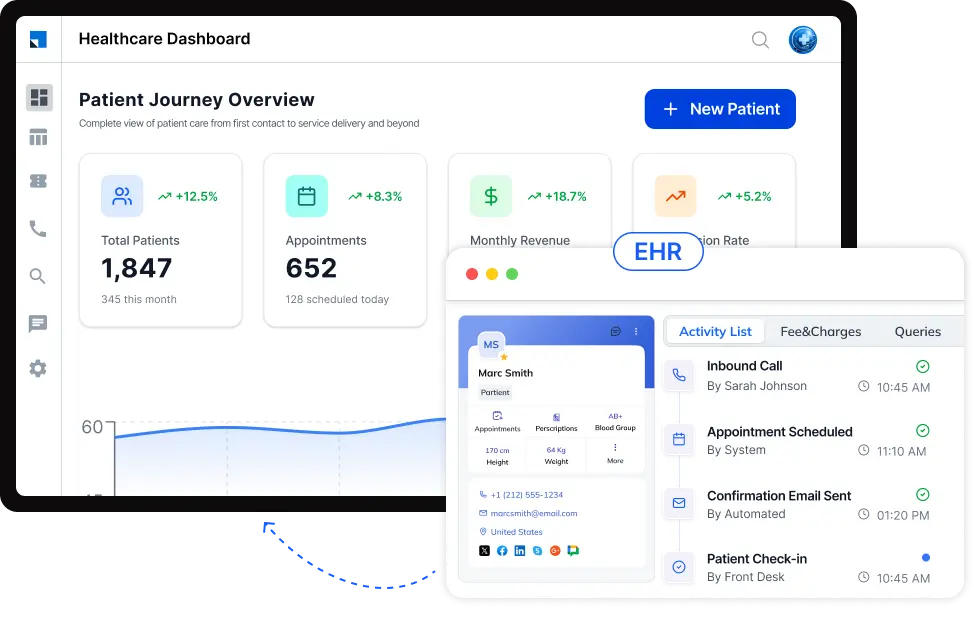
“Works with WebPT” can mean very different things depending on the integration. Before choosing a CRM, a physical therapy practice should understand exactly how the two systems will communicate and what staff will still have to manage manually.
WebPT currently says its platform integrates with more than 60 vendors. Its documented integration services include inbound patient registration, outbound billing, inbound and outbound documentation, and custom integrations. WebPT also describes ongoing monitoring and support for its integration channels.
That makes these questions important:
| Question to ask | Why it matters |
| Does this CRM have a specific WebPT connection? | A CRM’s general ability to integrate with healthcare systems does not establish that it can connect to WebPT. |
| What information will be shared? | Confirm whether the integration covers the information your workflow actually needs rather than assuming everything will synchronize. |
| Is the connection one-way or two-way? | Data may flow into the CRM without being sent back to WebPT, or vice versa. |
| Is it a standard, third-party, or custom connection? | The implementation method can affect setup, support, and what the integration can accomplish. WebPT separately documents custom integrations. |
| How quickly is information transferred? | The timing of data exchange can matter when staff need current information to act on an inquiry or patient record. |
| What happens when data doesn’t transfer? | Find out how failures are detected and resolved. WebPT says its integration channels are monitored and failed data exchange can be automatically resubmitted. |
| Does it actually reduce administrative work? | A useful integration should reduce unnecessary copying, exporting, or re-entering of information across the systems you use. |
| How is patient information protected? | Confirm the CRM’s HIPAA and security arrangements before connecting systems that may contain protected health information. |
| CRM | Best fit for a WebPT practice | How it works with WebPT | Where it can help | Healthcare & privacy | Key consideration |
| LeadSquared | PT practices looking for a healthcare-focused CRM for patient acquisition, intake, engagement, referrals, and automation | Third-party integration through Keragon. Keragon lists LeadSquared among the tools that can be connected with WebPT. The exact data fields, triggers, and actions available for the WebPT–LeadSquared workflow should be confirmed based on the practice’s requirements. | Patient acquisition and intake, workflow automation, communication and engagement, referral workflows, reporting, and patient-journey management. | LeadSquared offers HIPAA-compliant healthcare CRM and BAA, along with access controls, audit trails, and encryption. | A strong healthcare fit. Practices should discuss the available WebPT integration method and data flow before choosing it. |
| Salesforce Health Cloud | Larger or growing practices and organizations that need highly configurable healthcare CRM capabilities | Third-party connection through Keragon. Keragon currently documents WebPT–Salesforce connectivity and automation. | Healthcare-specific patient/provider views, referral management, appointment workflows, care coordination, and extensive customization. | Salesforce provides HIPAA-related services and a BAA/Business Associate Agreement for applicable services and configurations. | Powerful and highly configurable, but its breadth may be more than a smaller PT practice needs. |
| HubSpot | PT practices with a strong focus on marketing, acquisition, and CRM-driven engagement | Third-party connection through Keragon. | Marketing, contact management, campaigns, automation, and acquisition workflows. | HubSpot supports storing HIPAA-covered health/medical data on eligible Enterprise subscriptions when the required Sensitive Data settings and BAA terms are configured. Some HubSpot tools have restrictions around sensitive data. | Healthcare practices need to carefully configure the account and verify that the specific HubSpot tools they plan to use support their data requirements. |
| HighLevel | Practices prioritizing marketing automation, lead nurturing, messaging, and conversion workflows | Third-party connection through Keragon. | Lead nurturing, marketing automation, pipelines, messaging, forms, and appointment-related workflows. | HighLevel offers an optional account-wide HIPAA add-on with encryption of ePHI, BAA support, audit logging, and MFA enforcement. HIPAA functionality is not enabled by default. | A marketing-oriented option, but practices handling PHI need the HIPAA package and appropriate configuration. |
| Keap | Smaller practices looking for CRM and marketing automation | Third-party connection through Keragon. | Contact management, CRM, marketing automation, and follow-up workflows. | Keap allows customers to configure its CRM for HIPAA use and execute a BAA. However, Keap’s email, SMS, and VoIP functionality is excluded from its HIPAA-compatible offering and BAA. | The exclusion of Keap’s email, SMS, and VoIP services from its HIPAA offering is particularly important for a PT practice considering patient communications. |
WebPT Reach already automates many of the marketing activities a physical therapy practice needs. But here’s where the workflows can differ:
| Practice need | WebPT Reach already provides | What an additional CRM can potentially add |
| Capture and nurture prospective patients | Landing pages, lead capture, lead management, and automated follow-up for prospects. | A separate CRM can provide additional contact stages, ownership rules, tasks, and workflows if the practice needs a different or more customized prospect-management process. |
| Run patient marketing campaigns | Segmented automated email, text, and in-app campaigns, including reactivation campaigns. | A CRM may extend automation to other contact types and business workflows, such as prospects, referral contacts, or other non-clinical relationships, depending on its capabilities. |
| Respond to prospect activity | WebPT Reach tracks and manages prospective patients through its lead-management workflow. | A CRM can potentially trigger different assignments, tasks, notifications, or follow-up sequences based on contact properties and activities. This would depend on the CRM. |
| Coordinate acquisition across systems | WebPT Reach is designed to move patient and lead information into and out of its EMR environment. | A CRM can provide another layer for coordinating acquisition activity across connected systems, if the specific integrations support the required data exchange. |
| Track marketing performance | WebPT provides marketing and engagement reporting, including lead and campaign-related metrics. | A CRM may provide an additional acquisition-focused view of contacts, stages, activities, and workflow outcomes, depending on the CRM and the data available to it. |
A practice may consider an additional CRM when its requirements extend beyond WebPT’s rehab-specific marketing and patient-engagement workflows. For example, the practice may want one configurable system to manage prospective patients alongside referral partners, assign ownership across an acquisition team, trigger internal tasks based on prospect activity, or coordinate workflows across other connected business systems.
The nuance is: WebPT can automate marketing within its own patient and lead-management ecosystem; an additional CRM may be useful when the practice wants to extend relationship and acquisition workflows across a broader set of contacts, teams, processes, or connected systems.
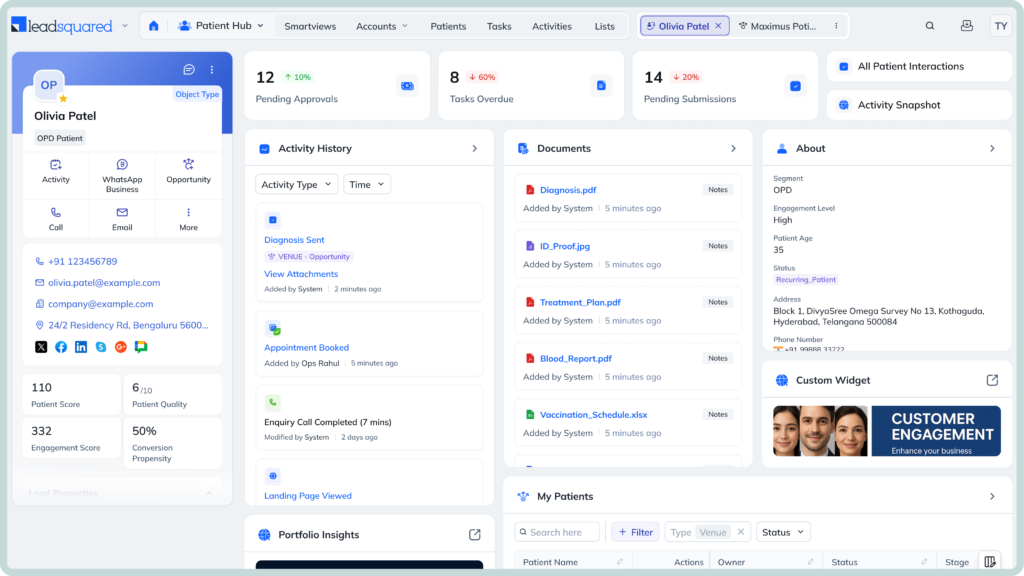
LeadSquared can capture inquiries, route them to the appropriate team, automate follow-ups, and track prospects through the patient acquisition process. Its healthcare platform also supports referral tracking and visibility into referral status and referring partners.
For a physical therapy practice, this can create a dedicated workflow around the journey from inquiry or referral to scheduled appointments and continued engagement.
LeadSquared’s Invorto Voice AI can handle inbound and outbound patient calls. It can answer common questions, qualify inquiries, and conduct follow-up outreach. Invorto captures conversation information in the CRM and routes callers to the appropriate team when human intervention is needed.
That gives a PT practice another option for handling repetitive call-based interactions alongside its existing communication workflows.
FloStack is LeadSquared’s lead-qualification and routing layer. It can use lead information and predefined rules to prioritize and route inquiries, then direct prospects toward relevant microsites, representatives, or booking options.
For a practice receiving inquiries for different services, providers, or locations, this can help automate what happens immediately after a prospect expresses interest, rather than leaving staff to manually determine who should handle each inquiry.
LeadSquared’s healthcare CRM supports referral and partner management. This helps practices manage relationships with referring partners, track incoming opportunities through the pipeline, monitor activity, and identify cases that need attention.
The CRM can provide a relationship-management layer around the referral process for physical therapy practices.
LeadSquared’s healthcare platform supports multi-location operations, including location-based workflows, routing, dashboards, and centralized visibility.
For a growing physical therapy organization, this can help standardize acquisition and follow-up processes across branches while still giving teams visibility into activity at individual locations.
LeadSquared offers a HIPAA-compliant healthcare CRM with a BAA, with built-in security controls for access management, audit trails, data encryption, and protection of sensitive healthcare information.
That matters when a practice is considering where patient-related acquisition and engagement information should live.
Keragon lists LeadSquared among the tools that can be connected with WebPT, providing a third-party integration route. The specific data exchanged and workflows available through that connection should be verified for the practice’s requirements.
See how LeadSquared can help your team manage growth beyond your core WebPT workflows. Book a free demo to explore the platform and find the right approach for your practice.
Yes. A CRM can help a multi-location physical therapy practice route inquiries to the appropriate clinic or team, assign ownership, and give staff visibility into the status of each inquiry. This can make it easier to maintain consistent follow-up processes across locations. The exact routing and location-management capabilities depend on the CRM.
Yes. Some CRMs can prioritize leads using information such as inquiry sources, patient characteristics, engagement activity, or other criteria defined by the practice. This can help staff focus first on inquiries that meet specific business rules rather than treating every lead identically. The criteria and automation available depend on the CRM.
Yes. A CRM can give each inquiry an assigned owner and maintain a record of follow-up activity, helping teams identify inquiries that have not been contacted or require another follow-up. Automated tasks, reminders, and notifications can also support accountability. These capabilities vary by CRM and configuration.
A CRM can help standardize how teams handle inquiries by defining consistent stages, ownership rules, follow-up workflows, and communication processes. For example, a practice can establish a common process for handling a new inquiry regardless of which staff member or location receives it. The extent of this customization depends on the CRM.
Yes. A CRM can manage different types of contacts, not just patients or prospective patients. Depending on the platform, a practice may use it to organize referring providers, business partners, community contacts, or other professional relationships separately from its patient records. This can be useful when the practice wants to manage relationship-building activities that are not part of the patient’s clinical record.
It depends on how the systems are connected. A CRM integration can move specific information between systems, but an integration does not necessarily mean that every field or record is synchronized in both directions. Practices should determine which system is the source of truth for each type of information, what data is exchanged, whether updates flow one way or both ways, and how duplicate records are handled.
Not necessarily. If a practice already has an effective process for tracking referring providers, following up with them, and measuring the resulting patient volume, an additional CRM may provide limited value. A CRM becomes more relevant when the practice wants a structured way to manage provider relationships, record interactions, assign follow-up activities, or coordinate outreach as its referral network grows.
A CRM may be unnecessary when the practice’s existing WebPT setup and other tools already handle its lead management, marketing, patient engagement, reporting, and follow-up requirements effectively. Adding another system can introduce additional costs, configuration, training, and data-management responsibilities. The decision should therefore be based on a specific workflow or visibility gap rather than simply adding a CRM because the practice is growing.
Enter your details and we'll send you a quick confirmation email to verify your address.
 15 min read 15 min read 13 min read



 CRM for Kipu Health users: Managing the admissions pipeline for addiction treatment...
