


- Home

- Learn
- Healthcare
- HubSpot for healthcare: HIPAA compliance, limitations, and best alternatives
HEALTHCARE
HubSpot for healthcare: HIPAA compliance, limitations, and best alternatives
Contents

 16 min read


HubSpot offers healthcare practices a strong set of marketing and CRM tools for attracting and engaging prospective patients.
However, using HubSpot in a healthcare setting raises specific questions about HIPAA compliance, the cost of accessing its features that handle sensitive-data, and its ability to support patient intake workflows.
HubSpot’s HIPAA-supporting Sensitive Data features and applicable Business Associate Agreement (BAA) require an eligible Enterprise subscription. Practices must also work out how to bring faxed referrals into their intake process and connect HubSpot with their electronic health record (EHR). These requirements can change the cost and complexity of using the platform.
This guide examines HubSpot’s HIPAA requirements, its limitations for healthcare workflows and the alternatives worth considering.
Yes, HubSpot can support HIPAA-compliant data handling, but only under specific conditions. Healthcare organizations must subscribe to its Enterprise plan, enable its Sensitive Data features and enter into an applicable Business Associate Agreement (BAA). Even then, not every HubSpot feature supports protected health information (PHI), and using the platform does not automatically make a practice HIPAA compliant. The practice must configure HubSpot appropriately and ensure its own processes meet HIPAA requirements.
HubSpot’s Sensitive Data functionality requires an eligible Enterprise subscription. This includes Enterprise editions of Marketing Hub, Sales Hub, Service Hub, Data Hub, Content Hub, Smart CRM and Revenue Hub. Free, Starter and Professional subscriptions do not provide this functionality.
The cost depends on the products your practice needs. For example, Sales Hub Enterprise starts at $150 per seat per month, with a mandatory one-time onboarding fee of $3,500. Marketing Hub Enterprise starts at $3,600 per month for five Core Seats and has a $7,000 onboarding fee. These prices are in USD and exclude applicable taxes.
If your team needs multiple Hubs or additional seats, the subscription cost can increase further.
Enabling Sensitive Data does not make every HubSpot tool suitable for handling PHI. HubSpot does not support Sensitive Data properties in chatbots, personalization tokens, playbooks or sandboxes. Highly Sensitive Data has additional restrictions on where it can be used.
For example, a practice cannot assume it can use PHI stored in a CRM property to personalize chatbot conversations. It must check whether each feature supports the type of information involved before including it in a patient-facing workflow. This makes it important to evaluate the specific HubSpot tools your team intends to use, not just the availability of a BAA.
Managing marketing leads is different from managing healthcare inquiries through intake. A marketing team might capture a contact, send an email campaign and track conversions. A healthcare practice must also process referrals, collect supporting documents, coordinate follow-ups and ensure relevant information reaches the right team. HubSpot can support parts of this process, but practices with more specialized requirements may need additional tools or integration work.
A practice evaluating HubSpot’s free or lower-tier plans may find that the setup it initially considered does not meet its requirements for handling protected health information (PHI). Moving to an eligible Enterprise subscription changes the investment involved, particularly when multiple teams need access to patient acquisition, marketing and service tools.
This concern has come up in LeadSquared’s conversations with healthcare buyers. A physical therapy group, for example, raised concerns about the cost of HubSpot’s HIPAA-supporting tier. The issue goes beyond the subscription price itself. Practices must consider how many employees need access, which Hubs they need and whether the required onboarding and configuration fit their budgets.
For smaller practices, this can make HubSpot harder to justify if they only need a focused set of patient acquisition and intake workflows.
Fax remains relevant to healthcare referrals. But HubSpot does not include its own built-in fax service. Practices that need to send and receive faxes through the CRM must connect an external provider. For example, the Fax.Plus integration lets users send and receive faxes from HubSpot contact, company, deal and ticket records. It can also automate outbound faxes through HubSpot workflows and log fax activity against records.
However, this requires a separate Fax.Plus account and an Enterprise subscription with that provider to send faxes. Practices handling protected health information (PHI) must also have a signed Business Associate Agreement (BAA) with Alohi, the company behind Fax.Plus.
In LeadSquared’s conversations with healthcare buyers, an ABA provider raised concerns about HubSpot’s ability to support inbound fax as part of its intake workflow.
Practices should therefore evaluate whether the fax provider and its integration support their complete intake process, rather than assume HubSpot can handle it.
HubSpot’s mobile app lets field executives view CRM records, create tasks and log meetings. However, its standard mobile tools do not provide the dedicated route planning and territory management that practices with active referral networks may need.
For example, teams visiting physician offices may need to:
Practices can add these capabilities through third-party apps such as Mapsly, which offers route optimization, territory assignment, location tracking and field visit check-ins that sync with HubSpot. However, Mapsly requires a separate subscription.
There is also an offline limitation: HubSpot’s mobile app provides read-only access to cached records when there is no internet connection. Users cannot log visits or update records until they reconnect. Accounts storing Sensitive Data are excluded from offline access altogether. These limitations can make field operations harder to manage.
| Tool | Best for | Main features | Integration | HIPAA | Limitations to weigh | Pricing |
| LeadSquared | Multi-location practices focused on patient acquisition and intake. | – Patient inquiry capture and referral tracking. – Automated intake follow-ups and lead distribution. – Patient acquisition and conversion reporting. | – Prebuilt integrations with supported EHR/EMR platforms, including Athena, AdvancedMD and ModMed, and more. – UDS supports custom data flows and API connections with external applications. | HIPAA-compliant healthcare offering with a BAA. | – LeadSquared manages patient acquisition, engagement and intake, but does not replace the EHR for clinical documentation or medical records. – UDS is not a ready-made connector for every application. Custom data flows require compatible APIs, field mapping and configuration. UDS is also a paid feature | Quote-based. Pricing depends on practice requirements and configuration. |
| Tebra | Independent practices looking for an all-in-one EHR and practice management platform. | – Integrated EHR and practice management. – Online scheduling and digital patient intake. – Billing and patient engagement tools. | – EHR, practice management, billing, and patient engagement are connected within its platform. – Supports integrations with external healthcare applications, including labs, and imaging services. | HIPAA-compliant. Tebra states that a BAA is included in its customer agreement. | Its marketing tools focus on websites, SEO, paid search and reputation management rather than detailed lead distribution or referral partner analytics. | Published pricing ranges from $49 to $799 per provider/month, depending on the solution and practice type. |
| Luma Health | Specialty practices and health systems managing complex referrals and patient access workflows. | – Automated referral intake, including fax processing. – Patient outreach and appointment scheduling. – Waitlist management and automated follow-ups. | – EHR integrations support referral and appointment data exchange. – Connects with communication platforms to coordinate patient access workflows. | States that it is HIPAA-compliant and provides a BAA. Published security credentials include SOC 2 Type II, HITRUST and ISO 27001. | – Focuses on patient access and engagement rather than full prospect and relationship management. Practices needing broader CRM capabilities may need to connect it with a platform such as Salesforce. | Custom pricing. No standard public subscription rate is listed. |
| Solutionreach | Medical and dental practices focused on patient engagement and retention. | – Automated appointment reminders and two-way texting. – Patient recall and reactivation campaigns. – Online scheduling and patient surveys. | – Connects with more than 400 EHR and practice management systems. – Syncs patient communication and engagement activities with practice records, including appointment reminders and intake. | Identifies itself as a HIPAA business associate and states that it uses administrative, physical and technical safeguards to protect PHI. Confirm BAA availability and terms with the vendor. | – Focuses on existing-patient engagement rather than the full journey from inquiry to patient conversion. – Its scheduling templates may not distinguish appointment types adequately, with some practices reporting that patients book unsuitable slots and staff must correct them afterward. | – Custom quotes for Patient Connect, Practice Efficiency, Practice Growth, and Enterprise. |
| Evaluation area | HubSpot | LeadSquared |
| Primary positioning | General-purpose CRM with marketing, sales and service tools | Healthcare CRM for patient acquisition, engagement, referral management, and intake |
| HIPAA support | Sensitive Data features and an applicable BAA require an eligible Enterprise subscription and appropriate configuration | HIPAA-compliant offering with a BAA, encryption, role-based access controls, and audit trails |
| Integrations | Native integrations, third-party apps through its Marketplace, APIs, and custom connections | Prebuilt integrations with supported EHR/EMR, scheduling, telephony, insurance verification, and marketing platforms. Also supports third-party apps and custom connections through APIs and UDS |
| EHR data synchronization | Available through supported Marketplace integrations, APIs, and custom development. Capabilities depend on the EHR and connector | Supports EHR integrations and UDS (Universal Data Sync), a no-code platform for configuring data flows, mapping fields and connecting external APIs |
| Patient intake and referrals | Forms, landing pages, chatbots, and workflows to capture and manage contacts | Digital intake forms, inquiry capture, referral tracking, automated follow-ups, and visibility into intake progress |
| Lead distribution | Workflow-based owner assignment and rotation, including load-balanced options for eligible records | Distribution Engine assigns inquiries based on staff availability, workload and routing rules, with automatic reassignment when response deadlines are missed |
| Inquiry conversion | Marketing automation, forms, chatbots, and meeting links | FloStack directs prospects to relevant next steps, such as service information, callbacks, chat or appointment booking, based on their inquiry details |
| Voice engagement | Calling tools, call logging and conversational tools, with additional capabilities through integrations | Invorto uses AI voice agents to handle calls, answer configured questions, and capture inquiry details. Configured API connections can also support appointment availability checks and booking actions |
| Field operations | Mobile CRM for accessing records, tasks, and activities. Offline access is read-only and unavailable for accounts storing Sensitive Data | Healthcare mobile CRM with day planning, route guidance, territory management, geofencing, check-ins, and field activity tracking |
| Patient acquisition reporting | Contact, deal and revenue attribution reports, with deal and revenue attribution requiring Marketing Hub Enterprise | Reporting across patient sources, campaigns, referrals, intake stages, appointments, conversions, and appointment-to-visit performance |
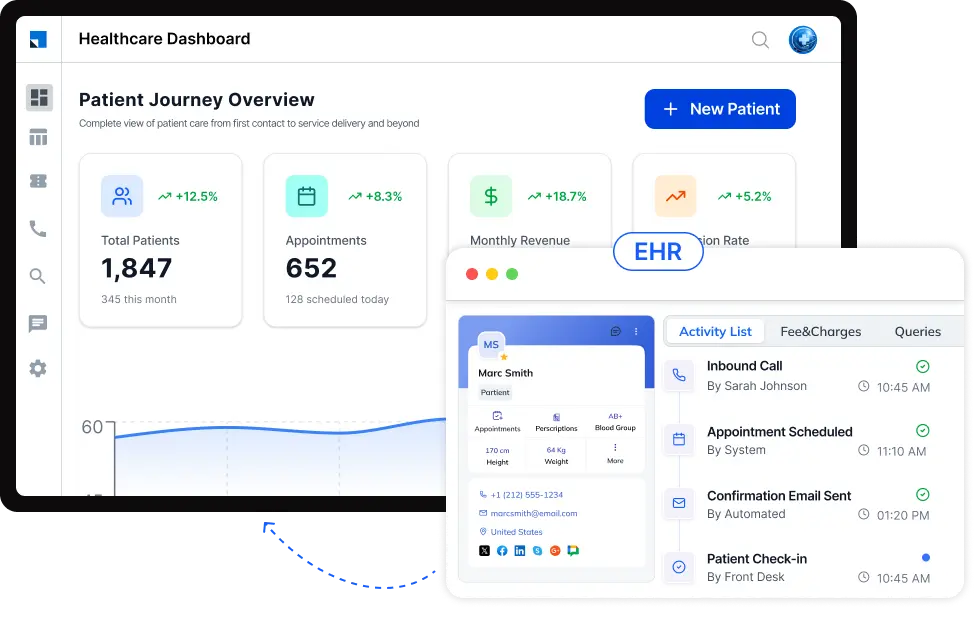
A healthcare CRM needs to do more than capture patient inquiries. Your team must respond promptly, assign each inquiry to the right coordinator, follow up consistently, and help prospective patients move towards an appointment. LeadSquared supports these activities through its healthcare CRM and connected products.
Consider a patient who visits your website to enquire about a dermatology treatment. Here’s how your team can manage that inquiry using LeadSquared.
Patients may contact your practice through website forms, referral channels or phone calls. LeadSquared captures inquiries from supported channels, while its connected AI voice platform, Invorto, can handle configured inbound or outbound calls.
For example, if a prospective patient calls after hours to ask about a treatment, Invorto can answer questions using your practice’s configured knowledge base and collect details such as the caller’s contact information and treatment interest. It also generates a transcript and call summary, giving your team the information needed to follow up. If you want the voice agent to check appointment availability or book a slot during the call, the relevant API tools must first be configured.
Once an inquiry enters LeadSquared, its Distribution Engine can assign the lead according to rules set by your practice. You can account for factors such as location, service interest, staff availability and current workload. If the assigned coordinator misses the first-response deadline, the engine can automatically reassign the inquiry to another eligible team member.
This helps intake managers distribute incoming inquiries without manually checking who is available to handle each one.
Your team can create automated follow-up sequences for prospective patients who need more information before booking. For the next step in the conversion journey, LeadSquared’s FloStack can use inquiry details and configured rules to direct prospects to relevant service information, a callback, chat or an appointment booking link.
For instance, someone enquiring about a dermatology procedure could be directed to a microsite explaining the treatment and offering a booking option. FloStack can also display configured calendar availability so the prospect can select a suitable time to book an appointment.
LeadSquared can connect with supported EHR and practice management platforms through prebuilt integrations. It also supports third-party integrations and custom API connections. For additional integrations, Universal Data Sync (UDS) provides a no-code way to connect applications and decide what information should be shared between them.
For example, when a prospective patient schedules an appointment and the appointment details are recorded in your EHR, a configured integration can send those details to the patient’s record in LeadSquared
Your team can then track where the inquiry came from and whether the booked appointment turned into a visit. Reports also help monitor referral conversions, intake progress and staff response times.
Looking for a CRM that better supports your practice’s patient acquisition and intake needs? Give LeadSquared a closer look.
Book a demo to explore the CRM and see how it fits your practice’s needs.
Switching from HubSpot to another CRM is usually a moderately complex project. Basic contact and company records are relatively straightforward to transfer. The work becomes more involved when your practice needs to preserve activity history, custom properties, associations between records, workflows and reports. These often require additional mapping, rebuilding and testing in the new CRM.
The effort depends on how extensively your team uses HubSpot and how much historical data you need to retain. Before choosing a HubSpot replacement, ask the vendor for a migration plan that covers data transfer, workflow setup, integration testing, and user onboarding.
Yes. A phased transition can help your practice avoid interruptions. Start by migrating a sample of records and testing essential workflows. You can then introduce the new CRM to a smaller team before moving everyone across. Keeping HubSpot available during this period also gives your team a fallback while you validate the new setup.
Not necessarily. Your new CRM can often be configured to support familiar workflows, so your team doesn’t have to start from scratch. However, employees will still need time to learn the new platform and understand how everyday tasks are handled in it.
Before choosing a HubSpot alternative, ask for a demo using scenarios your team deals with regularly. Check how easily employees can complete routine tasks and whether your team will need ongoing technical support to manage changes.
Look for a healthcare CRM that can accommodate additional locations, users, and service lines without making everyday operations harder to manage. Check whether you can define location-specific workflows and access permissions while maintaining visibility across the organization. Your CRM should also make it possible to compare performance across locations as your practice grows.
That depends on how much of HubSpot your practice relies on. If you primarily use it for contact management and marketing, a focused CRM may cover your requirements without recreating the entire HubSpot platform. If multiple teams depend on its marketing, sales, and service tools, assess which functions must be retained and whether the replacement can support them or connect with specialist applications.
If you’re considering moving away from HubSpot, compare alternatives against these requirements:
Check whether the vendor offers a Business Associate Agreement (BAA) and which services it covers. Also verify that third-party providers handling PHI on the vendor’s or practice’s behalf have appropriate agreements.
Look beyond the subscription price. Factor in the required plan and user licenses, implementation, data migration, integrations, training, and ongoing support.
Confirm that the CRM connects with your specific EHR and can exchange the information your team needs, such as patient contact details, appointment updates, and referral status. Check which data can be synced and in which direction.
Check how the CRM handles fax referrals, referral tracking, inquiry assignment, and patient follow-ups. Find out which capabilities are built in and which require third-party tools or custom configuration.
Look for reporting that connects marketing spend and inquiry sources to new-patient conversions, so your practice can assess acquisition costs. If your team visits referral partners, check for mobile access, route planning, and visit tracking.
Enter your details and we'll send you a quick confirmation email to verify your address.
 17 min read 19 min read 14 min read


