





- Home

- Learn
- Healthcare
- The Jane app-CRM integration: How therapy and wellness practices automate patient outreach
HEALTHCARE
The Jane app-CRM integration: How therapy and wellness practices automate patient outreach
Contents

 15 min read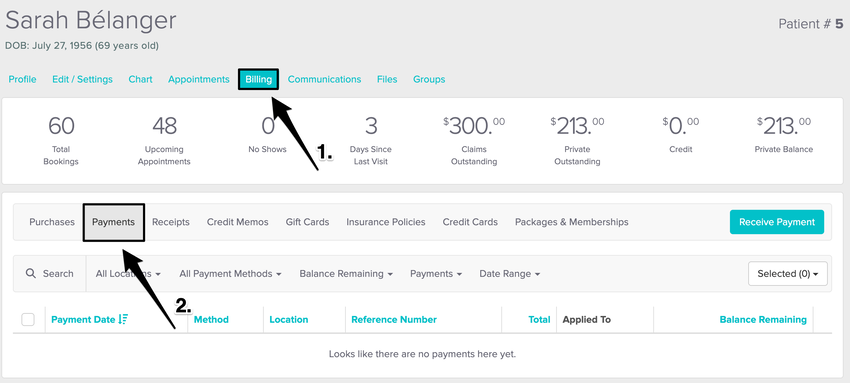


If Jane is already helping you run your practice, why would you need a CRM?
It’s a fair question. The Jane app can handle much of what happens once a patient enters your practice. People can book appointments online, your team can manage schedules and intake, and practitioners can document care. Jane also supports billing and patient communication.
But the gap of not having a CRM often makes itself known before an appointment is booked or after a patient stops coming.
Someone might inquire about your services but not schedule. Your team may need to follow up on the inquiry, but that person’s info can easily get lost among emails and phone calls. You may also have patients who haven’t returned to your practice in months, or you may want to know which marketing campaigns are bringing people through your doors.
A CRM can help organize this part of the patient journey.
It can give your team a place to track inquiries, schedule follow-ups, manage outreach, and see where prospective patients came from.
This article will guide you through what a CRM can add to a Jane-based practice, what to consider when choosing one, how the Jane app CRM integrations work, and 5 CRMs worth considering for your practice.

A CRM may be worth considering if:
If none of these apply, adding a CRM may simply give your team another system to maintain. But if your current setup is becoming difficult to manage, a CRM can fill that gap without replacing Jane.
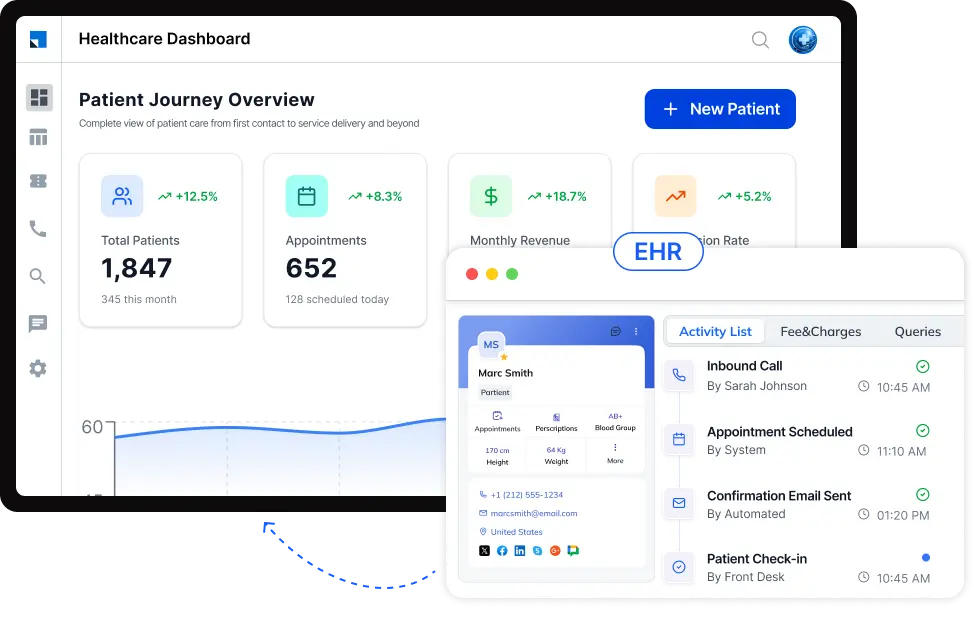
A CRM may be useful when you also want a dedicated way to manage people who have contacted your practice but have not booked yet.
For example, your team could keep track of where an inquiry came from, who is responsible for following up the inquiry, previous conversations, and more. This gives everyone a shared view instead of relying on spreadsheets or memory.
Jane already handles standard follow-ups with features such as Return Visit Reminders. A CRM can complement this by letting your team set up different follow-up paths based on the type of inquiry you receive. For example, someone who asked about physiotherapy but never booked could receive a different sequence from a patient who cancelled and didn’t reschedule. Depending on the CRM, these paths can trigger emails, SMS messages, staff tasks, or reminders automatically. This helps your team manage each type of follow-up consistently instead of creating and tracking every outreach process manually. The exact options depend on the CRM and its Jane integration.
Jane already provides marketing measurement through Google Analytics and Google Tag Manager. Its current integration can send booking conversion data to Google, allowing practices to see which campaigns, channels, and ad clicks are driving new patient bookings.
A CRM can potentially add another layer by helping your team manage what happens between an initial response and a booking. For example, if someone responds to a campaign but doesn’t schedule, the CRM could help track the inquiry, assign follow-up, and record the eventual outcome.
Jane’s Referral Report already shows where patients were referred from and the number of patients and revenue associated with each referral source.
A CRM can potentially take this further by helping your team manage the relationship behind the referral. You could keep contact information for referral partners, record interactions with them, assign follow-ups, and give team members visibility into entire the referral pipeline (depending on their roles and permissions, of course).
This distinction is particularly useful for practices that depend on ongoing referral relationships.
An integration should let information move between systems without your staff having to repeatedly copy it from one place to another. But the details can vary significantly from one integration to another.
Before choosing a CRM, ask:
Find out exactly what moves between the systems. It could include patient details, appointments, or other information, but don’t assume that every integration shares the same data.
Some integrations are one-way. For example, Jane’s TrustDrivenCare integration sends patient and appointment data from Jane to TrustDrivenCare, but nothing is written back to Jane.
Jane says its integrations page is the source of truth for its product integrations. If a CRM claims to work with Jane but isn’t listed there, ask the CRM provider exactly how the connection works.
A useful integration should eliminate repetitive tasks, such as entering the same contact information into Jane and the CRM, exporting data between systems, or manually updating both systems when something changes.
There’s also an important development to be aware of. Jane’s integration landscape is changing. In April 2026, Jane announced an approval-based API partner program designed to let technology partners build secure integrations with Jane. Jane’s current developer documentation also describes its Developer Platform APIs for approved technology partners and practitioner-authorized integrations.
| CRM | How it works with Jane | Where it can help your practice | What makes it worth considering | Healthcare & privacy | Key consideration |
| LeadSquared | Custom integration | Capture and follow up with prospective patients, automate outreach, manage referrals, and track acquisition activity | Built specifically for healthcare, with patient acquisition, intake, engagement, workflow automation, reporting, and HIPAA-compliant capabilities | Healthcare-focused CRM with HIPAA-compliant capabilities and BAA | Best suited for practices that want acquisition, intake, engagement, and referral workflows in one CRM |
| TrustDrivenCare | Official Jane integration | Use Jane patient and appointment data for automated outreach and communication | Directly connects to Jane and focuses on patient communication and retention | Patient communication/CRM platform; Jane documents its compliance review | The Jane connection is one-way: Jane sends data to TDC, but TDC does not write data back to Jane |
| GoHighLevel | Third-party connection | Capture leads, run campaigns, automate follow-ups, and manage marketing workflows | Strong emphasis on marketing automation | General-purpose platform; verify healthcare/privacy requirements for the specific deployment | Strong marketing automation, but Jane connectivity depends on the third-party setup |
| HubSpot | Third party connection | Manage contacts, inquiries, campaigns, and follow-up workflows | Broad CRM and marketing ecosystem | General-purpose CRM; healthcare/privacy features depend on the services and configuration used | Broad ecosystem, but not a Jane-native CRM |
| Zoho CRM | Third-party connection | Manage leads, contacts, workflows, communication, and reporting | Highly configurable CRM with healthcare-related capabilities | HIPAA-capable, but requires configuration; BAA available on request | Flexible platform, but Jane compatibility needs to be established separately |
Jane already automates many communications tied to appointments and other practice events.
But a CRM can add a different type of automation: communication based on where a person is in the practice’s broader relationship with them. Instead of asking only, “Is there an appointment that needs a reminder?”, the workflow can ask, “What happened to this person, and what should happen next?”
Note: The CRM examples below describe workflows a CRM can support. Whether a particular workflow can use the Jane app data as its trigger depends on the CRM’s specific integration with Jane and the information that integration makes available.
| Practice situation | What the Jane app does | What a CRM can add |
| Upcoming appointment | Sends automated email and SMS appointment reminders, subject to the applicable settings and patient consent. | Build additional pre- or post-appointment workflows, such as sending information, creating staff tasks, or triggering follow-ups based on the contact’s CRM status. |
| Cancelled, missed, or follow-up appointment | Return Visit Reminders can prompt patients to book another appointment. | Create a separate follow-up workflow around the contact, such as assigning a task to staff or sending additional outreach when the contact meets defined conditions. |
| Waitlist opening | Can automatically notify eligible patients when a suitable appointment becomes available. | Coordinate additional actions outside the waitlist notification, such as routing the contact to a team member or continuing an engagement workflow after the notification. |
| New inquiry that has not resulted in a booking | Provides online booking and patient-management workflows. | Keep the person in a prospect workflow, assign ownership, schedule follow-ups, and automatically continue or stop outreach based on actions such as booking or responding. |
| Patient or contact engages with an outreach campaign | Supports patient email communication and integrations with external marketing tools. | Use engagement as a workflow signal to change the contact’s next step, send another communication, or create a task for staff. |
| Patient becomes inactive | Provides reports that can help practices identify patients without upcoming appointments. | Build defined inactive-patient segments and place them into automated re-engagement workflows, where supported by the CRM. |
| Staff needs to follow up | Provides staff-facing reminders and task functionality. | Automatically assign follow-up tasks based on defined conditions, helping teams see who needs attention and why. |
The distinction is: Jane’s automation is closely tied to the practice-management events it records, while a CRM can orchestrate a broader sequence of actions around a contact’s status, activity, and engagement.
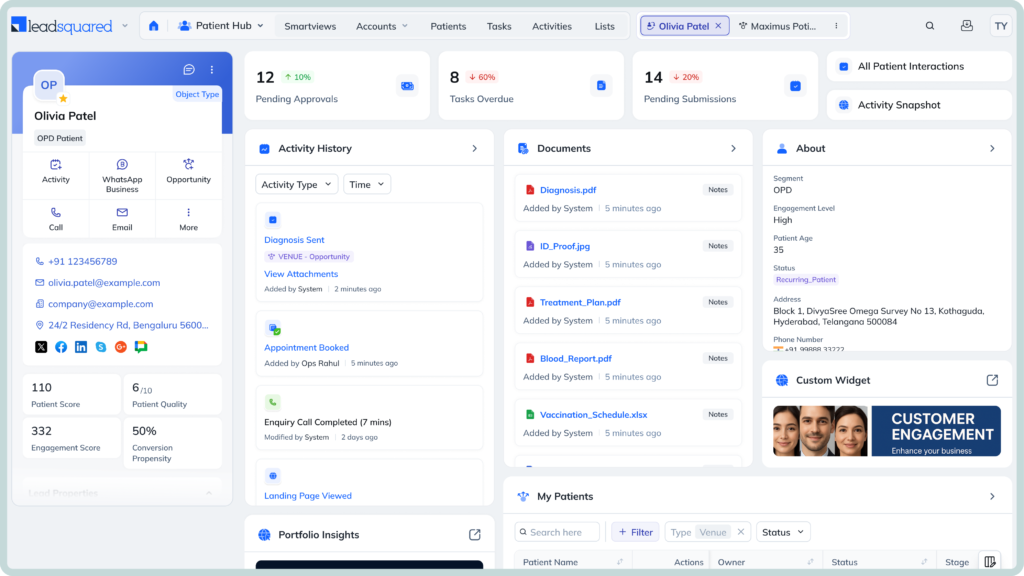
Jane can handle the day-to-day running of a practice. LeadSquared can add capabilities that help teams manage more complex patient journeys and outreach. Here are a few areas where the two can complement each other:
LeadSquared’s Invorto Voice AI can handle routine patient calls, answer common questions, follow up with patients, and support tasks such as appointment confirmations and intake reminders. This can help practices manage more conversations without requiring staff to handle every call manually.
FloStack is LeadSquared’s lead-qualification and routing layer. When someone submits an inquiry, it can use predefined rules to determine the appropriate next step, route the inquiry to the right team member, and direct the prospective patient to a personalized microsite or booking experience. For a healthcare practice, the experience can be tailored around factors such as the service they’re interested in, insurance, or location. This can help reduce the back-and-forth between an initial inquiry and an appointment.
LeadSquared’s healthcare intake capabilities can collect patient information, support digital forms, automate routing, and use AI-assisted interactions for routine intake tasks. This can be particularly useful for practices handling a high volume of new-patient inquiries.
LeadSquared can give practices a broader view of referring providers, including referral activity, follow-up, and relationship history. For referral-driven practices such as physiotherapy clinics, this can turn referral data into an ongoing relationship-management process.
Healthcare-specific reporting can help teams examine what happens between acquisition and conversion. Instead of looking only at how many inquiries or appointments they received, practices can investigate where prospective patients stop progressing and which sources produce better outcomes.
For expanding practices, LeadSquared can provide centralized workflows and visibility across teams and locations. This can make it easier to manage patient acquisition and engagement consistently without requiring every location to develop its own process.
Note: The exact information exchanged between Jane and LeadSquared will depend on the integration method and configuration available. These capabilities describe what LeadSquared can add around a Jane-based practice workflow, rather than implying that every LeadSquared feature is natively connected to Jane.
If the capabilities discussed above match the challenges your practice is trying to solve, a demo can help you move from possibilities to a clearer picture of how LeadSquared could fit your workflow.
Book a demo today to explore our platform and discuss the options that’ll work for your practice.
Yes. A CRM can be used alongside the Jane app rather than replacing it. Jane can continue handling core practice-management tasks such as appointments, patient records, scheduling, reminders, and reporting. A CRM can sit alongside Jane to manage activities such as prospective-patient engagement, marketing workflows, referral relationships, and other processes that happen around the appointment journey. The exact division of responsibilities depends on the CRM and the available integration.
Yes. A CRM can manage prospective patients before they become patients in Jane. For example, someone who submits a website inquiry, calls about a service, or responds to an advertisement may need a follow-up before they ever schedule an appointment. A CRM can keep these prospects in a separate workflow, record their interactions, and help staff move them toward booking. This can complement Jane’s patient and appointment workflows rather than replacing them.
Yes, depending on the CRM and the communication channels it supports. A healthcare CRM can bring inquiries from sources such as website forms, phone calls, email, and other channels into a shared contact record. This gives staff one place to see who contacted the practice, what happened next, and whether someone still needs a response. Some healthcare CRMs also offer voice capabilities that can connect phone interactions with the CRM record.
It could. A CRM can segment contacts into different groups and use those groups to deliver more relevant campaigns. For example, a practice could create different outreach for prospective patients who never booked, existing patients who have not returned, or people interested in a particular service. Jane also supports marketing-related workflows and integrations, so a CRM is most useful when a practice needs more advanced segmentation or automated journeys rather than simply basic patient communication.
You can, but the practice should decide which system is responsible for each type of communication. Jane already supports appointment reminders and return-visit reminders, including automated email reminders for eligible workflows. If a CRM also sends reminders, both systems could potentially send overlapping messages unless their workflows are configured carefully. Jane’s documentation similarly highlights the importance of coordinating third-party messaging services with Jane’s own communications.
Yes. A CRM can be particularly useful when a practice operates across multiple locations or has several teams handling patient acquisition and engagement. It can provide a shared view of inquiries, assign people to the appropriate location or team, and help management compare activity across locations. The value becomes greater as the practice grows and managing these processes separately at each location becomes harder.
Yes, some CRMs can connect phone interactions with contact records and keep a history of calls and follow-up activities. This can help staff understand whether a prospective patient has already been contacted, who spoke with them, and what needs to happen next. Healthcare CRMs with AI voice capabilities can go further by handling certain routine conversations or follow-ups automatically. The specific calling and AI capabilities depend on the CRM and its configuration.
First, check exactly what data the CRM will receive, how that data will be transferred, who can access it, and what privacy and security protections the CRM provides. You should also determine whether the connection is one-way or two-way and whether the CRM needs access to patient information at all.
Jane says its integrations are designed with privacy and security in mind and recommends limiting access according to each user’s role. Jane also states that, for its third-party messaging services, it does not send medical or health-record data from patient charts and limits shared information to what is necessary for the service.
Enter your details and we'll send you a quick confirmation email to verify your address.
 15 min read 15 min read 13 min read



 GEGI SIS CRM integration: Bringing admissions automation to small private ...
