





- Home

- Learn
- Healthcare
- CRM for Kipu Health users: Managing the admissions pipeline for addiction treatment centers
HEALTHCARE
CRM for Kipu Health users: Managing the admissions pipeline for addiction treatment centers
Contents

 15 min read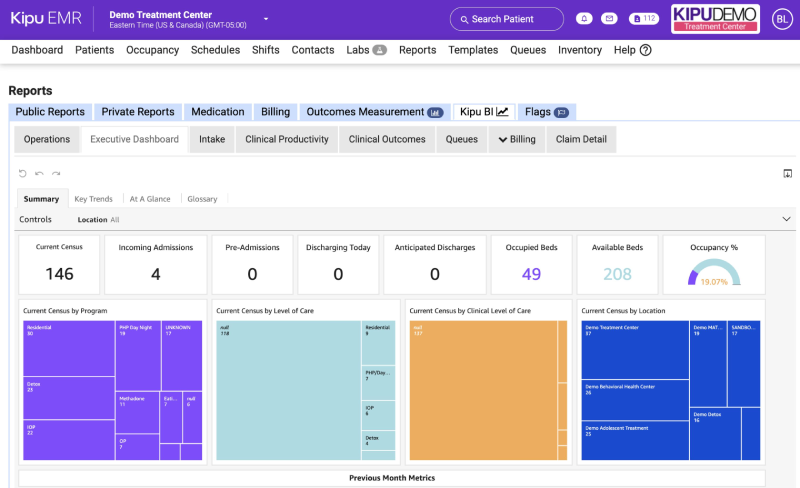


For an addiction treatment center, managing patient care and managing the path to treatment are two different jobs.
Kipu EMR is built around the first. Its behavioral-health-focused system gives treatment centers a central place for managing clinical information and supports workflows throughout the patient journey.
The path to treatment starts earlier. This is where admissions teams respond to inquiries, follow up with prospective clients, coordinate with referral sources, and figure out who is ready to move forward.
As inquiry volume grows, keeping track of these conversations and the tasks involved in managing them becomes a workflow of its own.
That’s where a CRM comes in. It gives admissions and marketing teams a structured way to manage prospective patients, referral relationships, follow-ups and outreach, while the EMR remains focused on the clinical record.
So, what does the Kipu-CRM landscape look like?
We’ll look at where a CRM fits alongside Kipu EMR, the work it can help your team manage, the factors that matter when choosing one, and compare 5 best CRM you can integrate with Kipu.
Kipu EMR can remain the foundation of your clinical workflow. The question is whether your admissions and growth teams have enough relationship-management work to justify a dedicated CRM. A few signs can help you decide.
If prospective patients come through your website, phone, paid campaigns and referral partners, a CRM can give your team a consistent way to manage those opportunities before they enter the EMR.
An inquiry may pass between admissions representatives, verification staff, and other members of the team before a decision is made. A CRM can provide shared visibility so everyone can see the status of the inquiry and next action.
Not every inquiry becomes an admission immediately. Prospects often need additional conversations before deciding; a CRM can support longer-term engagement instead of treating every inquiry as a one-time interaction.
Your EMR is primarily concerned with patient care. A CRM can give leadership tools to measure metrics that matter to the acquisition process, by helping connect marketing and referral activity with your client pipeline and activities.
A CRM may also make sense when your organization wants its admissions and growth workflows to work across multiple business systems rather than relying on a single software ecosystem.
A CRM can give every new inquiry a clear place in the admissions process. Staff can record the details they need, assign the opportunity to the right person, and track its status live. Instead of treating each inquiry as a one-off interaction, the team has a record they can return to as the conversation develops.
Once an inquiry is in the system, a CRM can help the admissions team track and manage what needs to happen next. Some prospects may be ready for an assessment while others need more information or several follow-ups. A shared pipeline makes it easier to see which opportunities are progressing and which ones may need attention.
The same approach can be applied to referral partners. A CRM can keep information about those relationships in one place and connect referrals to the opportunities they generate. Over time, this can help business development teams understand which relationships are producing opportunities and where further outreach may be worthwhile.
Not every prospective patient is ready to move forward after the first conversation. A CRM can help teams stay connected without relying entirely on manual reminders. Automated follow-ups through multiple communication channels can keep conversations moving, while nurture and re-engagement workflows can bring prospects back into focus when the timing is right.
The real value comes from connecting these activities to what happens next. A CRM can help teams trace an opportunity from its original source through follow-up and eventually admission. That gives treatment centers a better way to understand which inquiries, referral relationships, and marketing efforts are contributing to admissions.
For a Kipu EMR user, the roles are complementary. The EMR remains focused on patient care, while the CRM helps manage the relationships and opportunities that bring patients into that care.
| CRM | Best for | What you can use it for | HIPAA / compliance | Kipu EMR integration | What to consider |
| LeadSquared | If you want a behavioral-health CRM with configurable intake, admissions, referral and engagement workflows | Manage inquiries and admissions, automate follow-ups, manage referrals, engage patients across channels, and track marketing and admissions performance | HIPAA-compliant healthcare CRM with a BAA | Custom integration with Kipu | LeadSquared provides APIs, webhooks and developer tools for custom integration. If you want to connect it with Kipu, confirm the required architecture, data mapping, and implementation scope. |
| Kipu CRM | If you want your CRM and EMR to work within the Kipu ecosystem | Manage Treatment Opportunities, admissions, referral sources, communication, assessments, insurance/VOB information and marketing attribution | Kipu provides a BAA; Kipu EMR is also HITRUST certified | Native Kipu CRM–EMR connection | A natural choice if keeping your CRM and EMR closely connected within Kipu is a priority. |
| Dazos | If you want a behavioral-health CRM with documented Kipu connectivity | Manage admissions, referrals, bed availability, automation, attribution and other behavioral-health workflows | Dazos describes its CRM as HIPAA compliant | Documented bi-directional Kipu API integration | Check which Kipu data fields and synchronization events are supported for your specific workflow. |
| New Resilience | If you want a behavioral-health CRM to work alongside Kipu EMR | Manage outreach, admissions, referrals, VOB, engagement and attribution before and around admission | HIPAA compliant with a BAA, according to New Resilience | Documented native Kipu integration | Confirm that the data you need transferred to Kipu, such as demographics, insurance, VOB, referral source and level of care, matches your workflow. |
| Salesforce | If you need extensive customization and have the technical resources to support it | Build customized admissions, automation, reporting and integration workflows | HIPAA support depends on eligible Salesforce services, BAA and proper configuration | Custom Kipu implementation | A Kipu-Salesforce connection can be built, but the documented example is a custom implementation rather than a native connector. |
Look beyond basic contact management. Your CRM should help teams manage the progression from inquiry to qualification, follow-up, assessment, and admission. Kipu’s CRM can organize pre-admission activity around Treatment Opportunities and an Admissions Pipeline, so these are useful benchmarks when evaluating another CRM.
Referral sources are an important part of behavioral-health practice growth. Look for tools to record referral organizations and contacts, track interactions, attribute inquiries to their sources, and measure the admissions generated from those relationships.
Consider how much of the follow-up process you want to automate. Useful capabilities can include segmentation, lead nurturing, automated follow-ups, campaigns, re-engagement, and multi-channel communication. The right level of automation will depend on your team’s workflow and communication needs.
“Integrates with Kipu” can mean very different things. Ask whether the connection is native, API-based or custom, whether data moves one way or both ways, and what workflows it supports. Depending on the integration, you may need to understand whether it can exchange information such as prospect or patient details, referral information, insurance data, admission information, and so on. Kipu currently provides APIs that allow third-party developers to access and manipulate Kipu data, with 41 APIs currently listed and more being added.
Find out who is responsible for the integration. It may involve the CRM vendor, an integration partner, your own developers, or a combination of them. Kipu’s API terms also note that custom programming may involve fees, making implementation responsibilities and costs worth confirming upfront.
| Consider Kipu CRM if… | Consider a third-party CRM if… |
| You want a CRM built into the Kipu ecosystem. Kipu CRM and Kipu EMR are designed to work together, including workflows that transfer accepted treatment opportunities into the EMR. | You have specific CRM requirements that another platform addresses better. For example, you may prefer another CRM’s approach to automation, communication, reporting or customization. |
| Keeping admissions and clinical workflows closely connected is important. Kipu’s documentation describes a workflow in which an accepted treatment opportunity is sent to the EMR and its status can update after admission. | You want your CRM to connect with multiple systems. A third-party platform may be worth evaluating if your technology environment extends beyond Kipu and you want the CRM to serve as a broader engagement or acquisition layer. |
| Your admissions team wants a treatment-opportunity-based workflow. Kipu’s Treatment Opportunity Pipeline is designed as a centralized workspace for potential admissions, with information such as opportunity status, insurance, referral source, communication history and care-coordinator details. | You want to compare different approaches to managing admissions and growth workflows. Another CRM may organize these processes differently, so evaluate whether its workflow matches the way your team operates. |
| You want to minimize the number of systems your team has to manage. Keeping your CRM and EMR within the Kipu ecosystem can simplify the overall technology environment. | You’re comfortable adding another system and managing its integration with Kipu EMR. Confirm how the third-party CRM connects to Kipu, what data is exchanged and who is responsible for implementation and maintenance. |
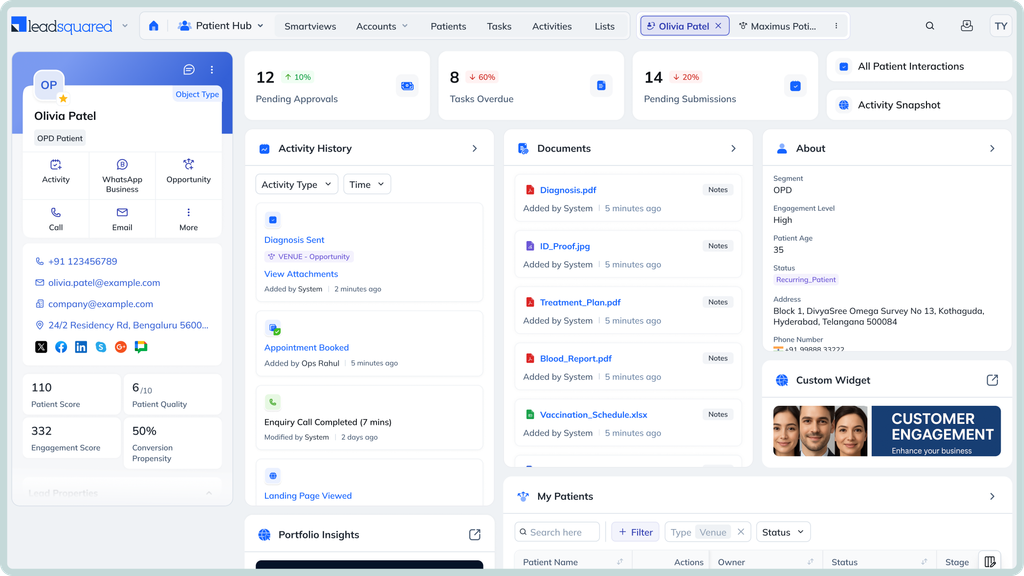
LeadSquared’s healthcare CRM can be configured for behavioral-health workflows, with capabilities for inquiry management, intake, referral management, engagement, automation and reporting. For an addiction treatment center, these capabilities can be applied across the admissions and patient-acquisition process.
LeadSquared lets teams capture inquiries, assign them to users, and track their progress through customizable pipelines. Teams can also create tasks and automate workflow steps based on lead activity.
For admissions teams, this provides a way to define the stages and actions that make up their own intake process rather than relying on a fixed pipeline.
LeadSquared includes referral management capabilities for healthcare organizations. Teams can organize referral information and track referral activity through the CRM.
This can be useful when admissions depend on a mix of referral partners, marketing channels, and direct inquiries. Referral activity can be tracked alongside the broader opportunity journey.
LeadSquared’s Invorto Voice AI can handle inbound and outbound calls for routine interactions. It can answer common questions, qualify inquiries, and follow up with prospects. Conversation details can be captured in the CRM, while calls that need human attention can be routed to the appropriate team member.
For an addiction treatment center, this can help your team handle routine call activity without requiring staff to manually manage every interaction.
FloStack is LeadSquared’s lead-qualification and routing solution. It can use information about an inquiry and predefined rules to determine where that inquiry should go next.
For treatment centers with multiple programs, locations or teams, FloStack can help route inquiries to the appropriate destination based on the criteria your team defines. That can make the handoff from initial inquiry to the right admissions resource more consistent.
LeadSquared supports automated communication through channels including email, SMS, WhatsApp, and voice. Its behavioral-health CRM also supports personalized campaigns and automated follow-ups.
Teams can use these capabilities to build follow-up journeys around different types of prospects. For example, workflows can be configured for continued outreach when someone does not respond or needs additional time before moving forward.
LeadSquared provides APIs and webhooks for connecting the platform with external applications. Its webhooks can send lead and opportunity information to external URLs when defined events occur.
One important qualification: If you’re considering the two platforms together, the integration would need to be scoped around the required data and workflows. That means confirming what information should move between systems, how frequently it should synchronize, and who will implement and maintain the connection.
LeadSquared offers a healthcare CRM that is HIPAA compliant and provides a Business Associate Agreement. Our healthcare offering also includes controls for permissions, access management, and audit trails.
These capabilities help healthcare organizations safely manage access to sensitive information within the CRM. Your organization is still responsible for configuring and using the platform in a way that meets its HIPAA obligations.
LeadSquared provides reporting and analytics for pipeline activity and conversions. Its behavioral-health CRM also includes dashboards and custom reporting for areas such as intake, referrals, and other operational metrics.
Depending on how the CRM is configured, teams can track metrics such as inquiry-to-admission conversion, response times, referral-source performance, lead-source performance, reasons opportunities are lost and more.
Your admissions workflow is unique to your treatment center. Book a LeadSquared demo to explore the CRM, see the workflows in action, and discuss how it can be configured around your team’s requirements.
Have Kipu EMR in your tech stack? Our team can also walk you through the integration requirements and help you understand what an implementation could look like.
Yes. A CRM does not have to replace the Kipu EMR. You can continue using Kipu for your clinical records while evaluating another CRM for admissions, marketing, or business-development workflows. The key is to define how the two systems will exchange information and which system will manage each type of data.
Yes, if the CRM is configured to capture those outcomes. You can create opportunity stages or lost-reason fields to record why an inquiry did not become an admission. This can help admissions and marketing teams identify patterns in lost opportunities and find areas where follow-up or qualification could improve.
It depends on the type of information. Kipu EMR serves as the clinical system, while a CRM can manage prospect and acquisition information. Before connecting the systems, define which platform owns each data field and when information should move between them. This can help prevent conflicting records and unnecessary reconciliation.
A multi-location treatment organization should check how the CRM handles facilities, programs, and user access before choosing a platform. You should also confirm whether opportunities can be assigned to the appropriate location and whether reports can be segmented. The right setup will depend on how your organization structures its programs and admissions teams.
Yes. A CRM can be configured to capture the source associated with an inquiry and retain that information as the opportunity progresses. This can help teams compare channels based on inquiries, qualified opportunities, and admissions. The exact attribution model depends on how the CRM and marketing channels are configured.
You don’t necessarily need to migrate everything. Start by identifying the information the CRM needs for admissions, referral management, and marketing. This may include prospect records, referral information, opportunity history, communication data, and attribution fields. The final migration scope should be based on the CRM’s data model, Kipu’s available data access and your organization’s data-retention requirements.
Enter your details and we'll send you a quick confirmation email to verify your address.
 15 min read 15 min read 13 min read


 CRM for Jenzabar SONIS institutions: Add enrollment automation without replacing...
