





CRM for Home Care Agencies
A CRM for home care agencies built around referrals, intake, and outreach
Respond faster to referrals, simplify intake, and organize client communication with a Home Care CRM built for everyday agency workflows.
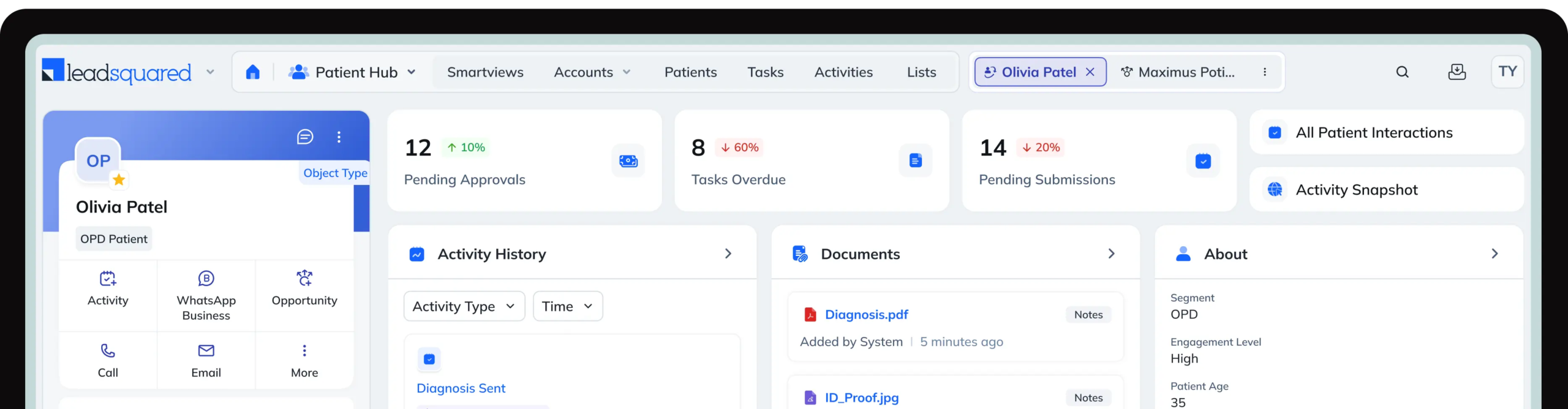
Running a home health or home care agency comes with its own set of hurdles. Across agencies, certain challenges
consistently slow growth and impact client experience.

Important referrals from hospitals, physicians, or families can get lost when tracking relies on spreadsheets or disconnected systems.

Delays in following up with inquiries/referrals reduce conversions and leave families or partners frustrated.

Without centralized tracking, teams struggle to know which inquiries are active, pending, or stalled.

Families, caregivers, clinicians, and referral partners often operate across disconnected channels.

Paper forms, scattered notes, and repetitive tasks make client intake slow and error-prone.

Limited dashboards and metrics make it hard to spot bottlenecks and plan effectively.
While many operational hurdles affect all agencies, home care and home health providers face distinct challenges
unique to their services and workflows.
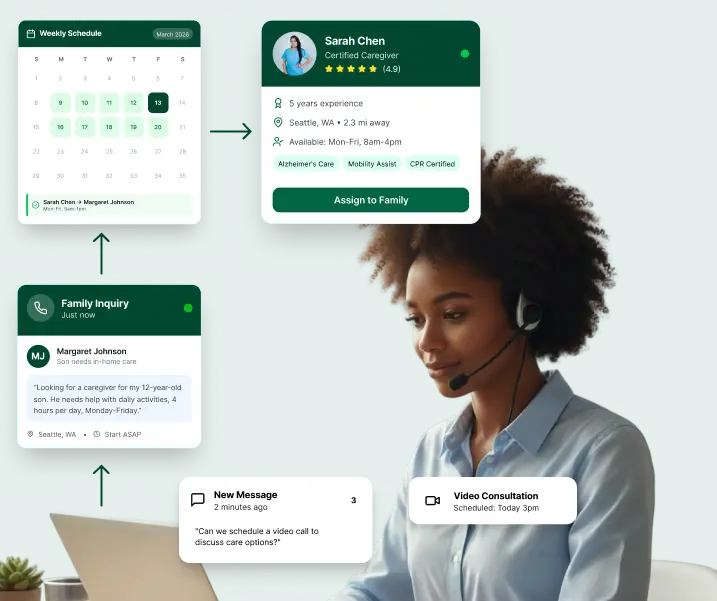
Managing constant inquiries from families can overwhelm intake teams without a centralized system.
Ensuring the right caregiver is assigned to each client at the right time is complex and time-sensitive.
Finding qualified caregivers and keeping them engaged is a constant challenge, especially for non-clinical roles.
Coordinating schedules and sharing updates across caregivers and staff is critical to consistent care delivery.
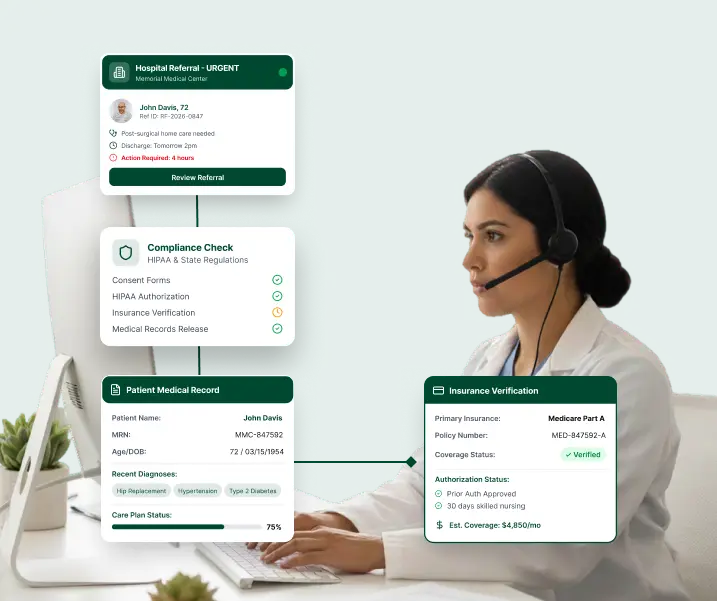
Sustained growth depends on tracking and nurturing referrals from hospitals, physicians, and rehab centers.
Accurate, timely documentation is mandatory for regulatory and audit purposes
Aligning nurses, therapists, and clinicians around care plans demands seamless collaboration.
Managing claims, authorizations, and reimbursements adds significant operational overhead.
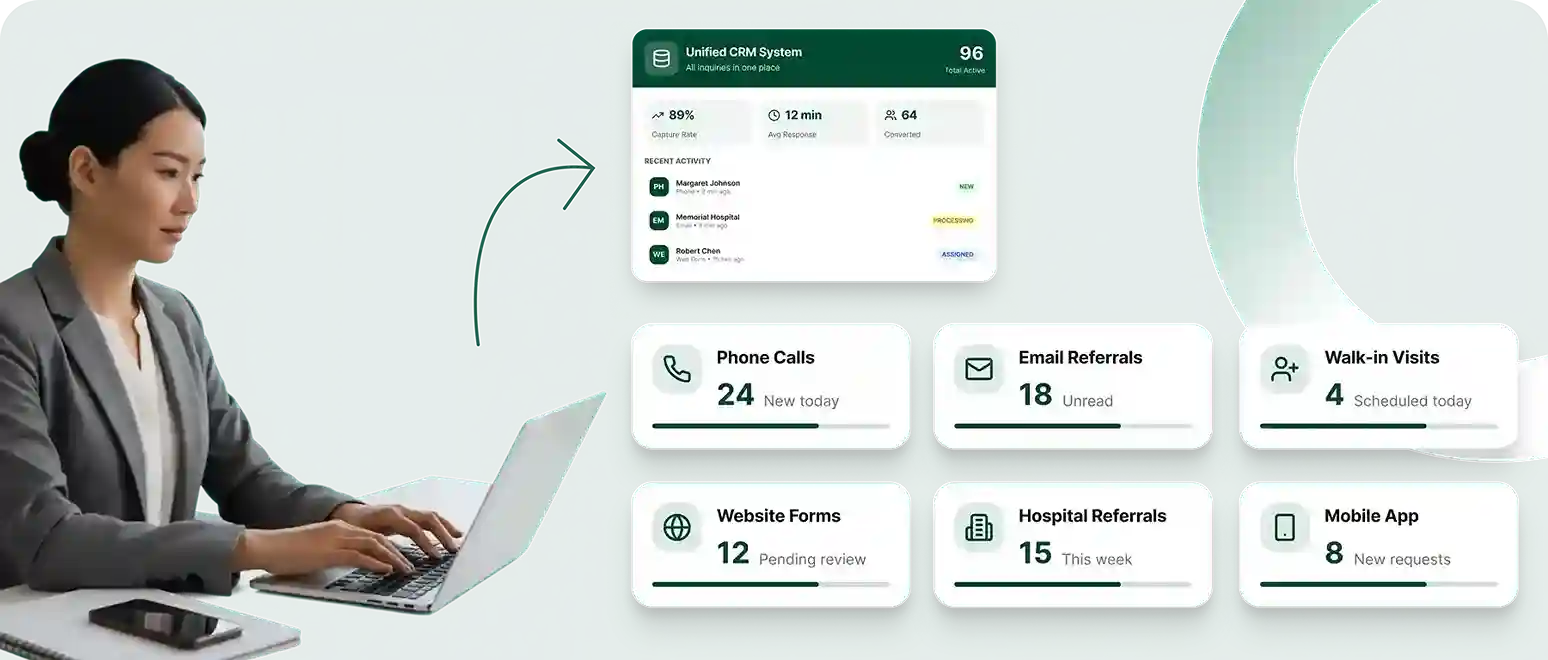
Every inquiry or referral — from hospitals, families, ads, or call centers — is an opportunity for your agency. Without the right tools to capture and route them, they bounce off.
LeadSquared’s home care CRM makes your inquiry/referral capture actionable:
Inquiries from calls, emails, forms, and partners automatically enter the system, so you can see every lead in one place, assign it instantly, and respond without delays.
With LeadSquared, you can route each referral to the right coordinator or office based on location or service type, ensuring faster follow-ups.
Every referral is tagged with its origin. This allows you to analyze which sources generate the most clients and focus your outreach efforts where they truly pay off.
Track every interaction with referral partners. Strengthen relationships with high-value partners and prioritize follow-ups with them to grow your referral network.
Managing clients from first inquiry to onboarding can be messy without a clear process. Our home care CRM’s intake pipeline tools turn manual workflows predictable and smooth.
Tracking status in spreadsheets or sticky notes makes it easy to lose sight of progress. See every lead and referral mapped across defined stages from new inquiry to assessment to enrollment for a clear view of what is in progress and what needs attention.
As leads move through the pipeline, keeping everyone aligned is difficult without visibility. Monitor where every referral currently stands,whether it needs a callback, assessment, contract, or scheduling without digging through emails.
Manual follow-ups and task assignments can slow intake and create bottlenecks. Trigger automatic actions such as assigning tasks, sending follow-up emails or texts, and prompting documentation requests to keep workflows moving smoothly.
Meeting response time goals is critical. Track service level agreements at each stage with alerts for approaching or missed deadlines to ensure timely follow-ups and accountability.
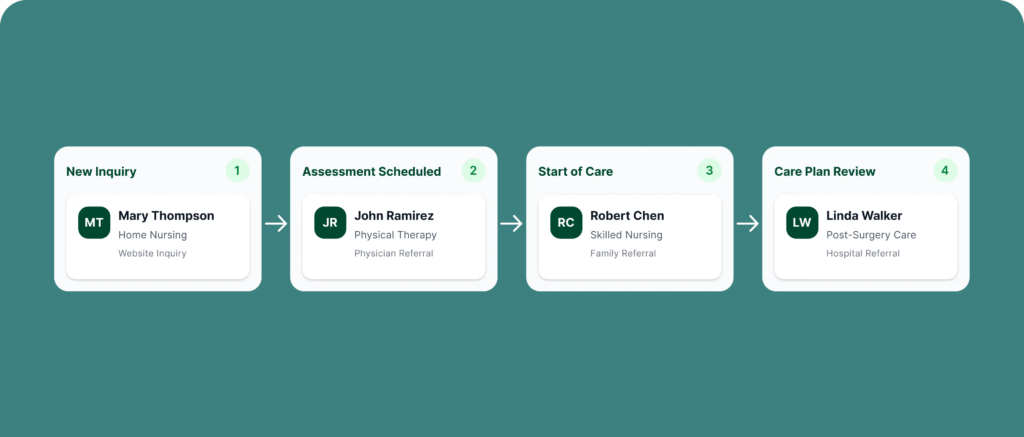
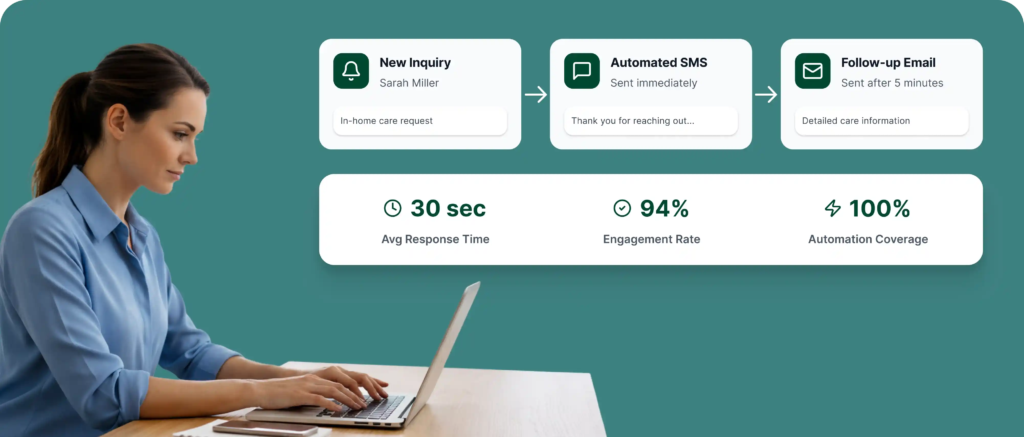
In home care and home health, families and referral partners often take time to make care decisions, and leads can easily go cold without consistent follow‑up. LeadSquared’s marketing automation helps teams stay engaged and responsive effortlessly.
When an inquiry comes in, send immediate acknowledgement messages or reminders so response times stay fast and professional, helping your agency stay top of mind with families and referral partners.
Guide prospects through their decision journey with a sequence of personalized messages that provide helpful information, answer questions, and build trust over time, increasing the likelihood of families choosing your agency.
Reach out to older or inactive leads with tailored messages so opportunities that might otherwise be forgotten are brought back into active consideration.
Many families research care options for weeks or months before deciding. Automatically send targeted content and updates across SMS and email to keep prospects engaged until they’re ready to commit.
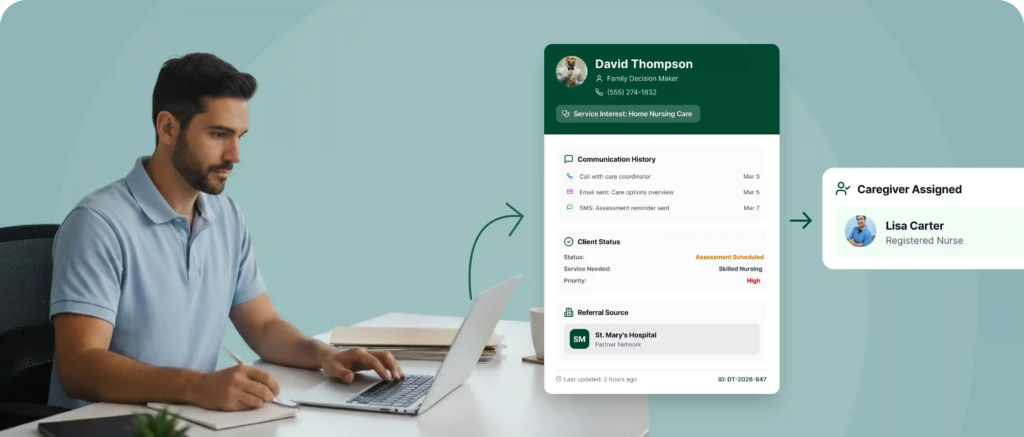
Managing families, clients, referral partners, and caregivers across different systems or spreadsheets can create information silos, leading to fragmented communication and missed context. A CRM for home care that centralizes all contacts into unified profiles ensures everyone on your team always works from the same comprehensive view.
Track each family’s communication, preferences, care history, and touchpoints in one profile for personalized, consistent service across interactions.
Consolidate all notes, interactions, and status updates for each client so teams can quickly understand needs and history without searching multiple systems.
Store and view every interaction with hospitals, physicians, case managers, or community partners for clear visibility into referral history and stronger partner engagement.
Keep caregiver information such as contact details, qualifications, certifications, and availability in one place to support better scheduling and team coordination.
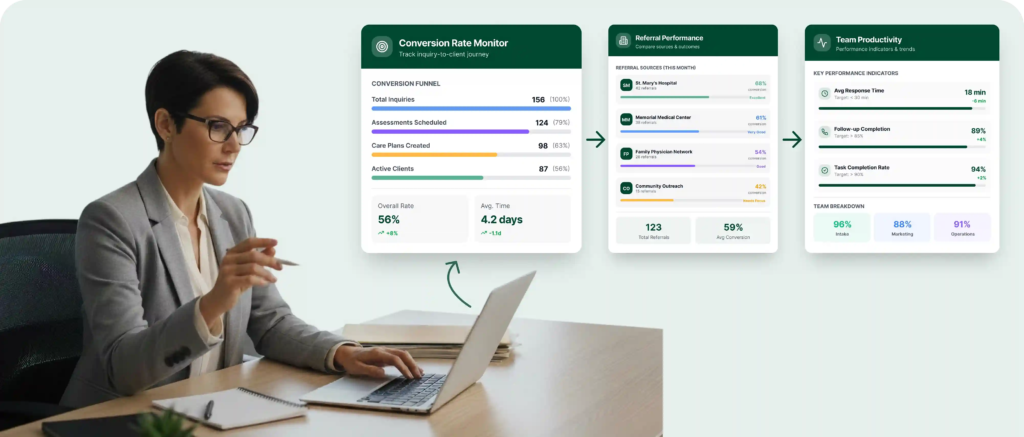
LeadSquared’s reporting and analytics tools help agencies understand what’s working, where improvements are needed, and how to plan for the future.
Track how many inquiries or referrals become active clients, so teams can identify bottlenecks, optimize intake processes, and focus on the most effective conversion paths.
Compare referral volumes and outcomes by source to understand which partners deliver the best results and prioritize relationship building and outreach accordingly.
Track key activity and performance indicators across intake, marketing, and operations teams to spot trends in responsiveness, follow‑ups, and task completion, enabling better coaching and resource allocation.
In home health and home care, your team spends hours every week reading emails, replying to referral partners, and tracking follow-ups.
Tracking status in spreadsheets or sticky notes makes it easy to lose sight of progress. See every lead and referral mapped across defined stages from new inquiry to assessment to enrollment for a clear view of what is in progress and what needs attention.
As leads move through the pipeline, keeping everyone aligned is difficult without visibility. Monitor where every referral currently stands,whether it needs a callback, assessment, contract, or scheduling without digging through emails.
Manual follow-ups and task assignments can slow intake and create bottlenecks. Trigger automatic actions such as assigning tasks, sending follow-up emails or texts, and prompting documentation requests to keep workflows moving smoothly.
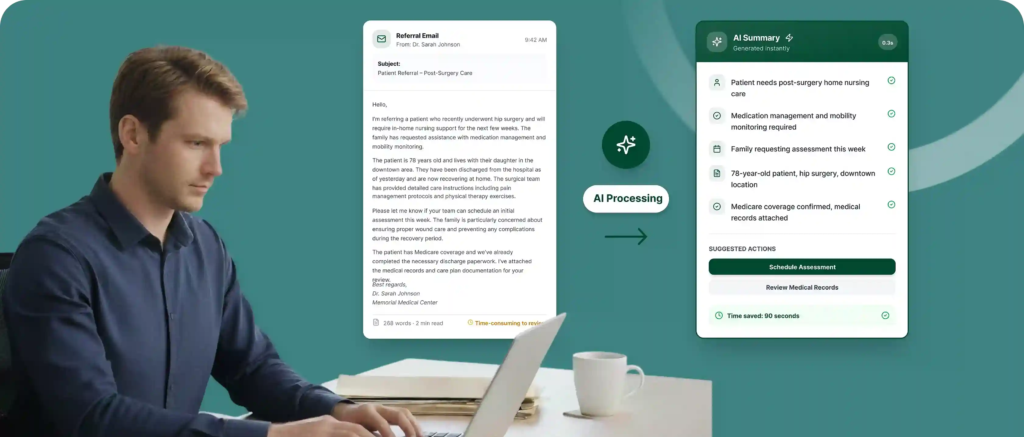
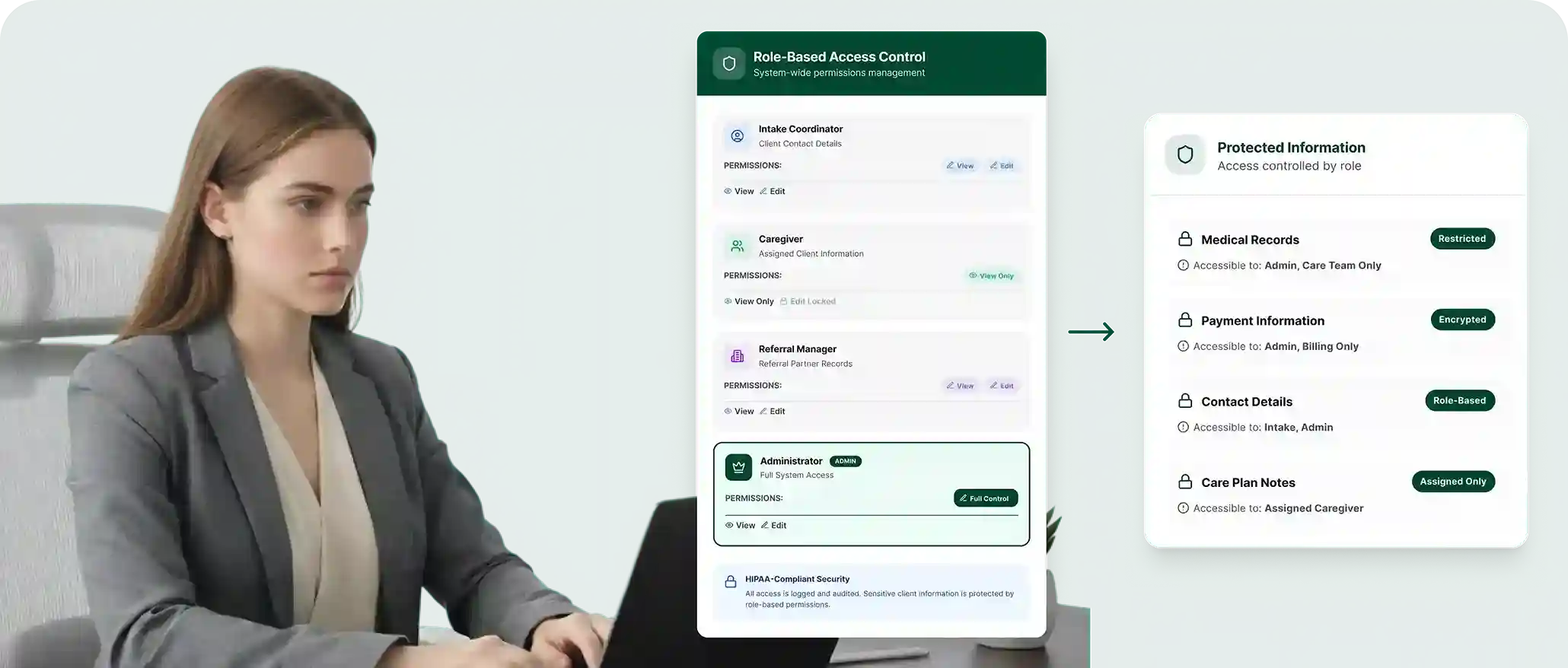
Protecting sensitive client and patient data isn’t optional in healthcare — it’s a foundational requirement. Home care agencies handle personal information daily, making robust compliance and security essential for legal, ethical, and operational confidence.
Not everyone on your team needs access to all information. Limit viewing and editing rights based on staff role to reduce internal exposure to sensitive data and align with privacy standards.
Track every interaction with protected health information by recording who accessed or changed records and when. Detailed logs support compliance audits and help detect unusual activity early.
Protect sensitive information by encrypting data both at rest and in transit, making it unreadable to unauthorized parties even if it is intercepted.
A home care CRM built with healthcare data protection in mind supports compliance with regulations such as HIPAA. This includes secure authentication, encrypted storage, structured access controls, and ongoing compliance monitoring to meet legal expectations.
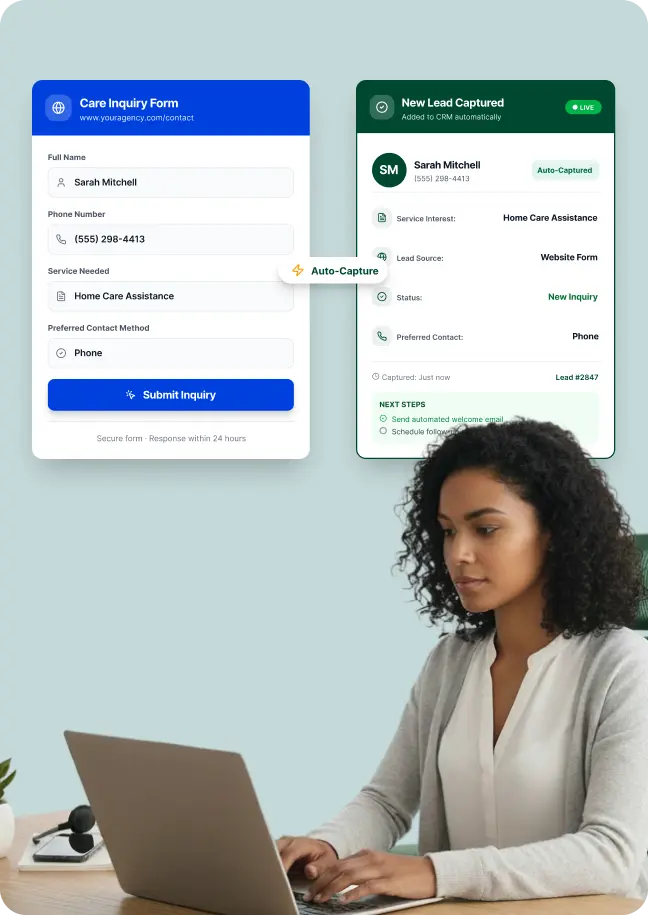
Getting inquiries is only half the battle — turning them into consultations requires speed and follow‑up discipline. LeadSquared’s CRM for home care helps teams manage this flow end‑to‑end, so every opportunity gets the attention it deserves.
Centralize all inquiries from contact forms, web chat, and landing pages into one system, so leads are logged instantly and ready for follow‑up without manual entry.
Record inbound calls and link them to our home care CRM profiles so your team can monitor caller history, follow‑up actions, and response timelines instead of losing context in phone logs or inboxes.
Trigger timely SMS or email messages after an inquiry to confirm receipt, share next steps, or provide helpful resources, keeping inquiries engaged even before a human call is made.
Assign new leads to the right team member automatically based on criteria like geography or service type, so responses happen quickly and no lead waits in a general inbox.
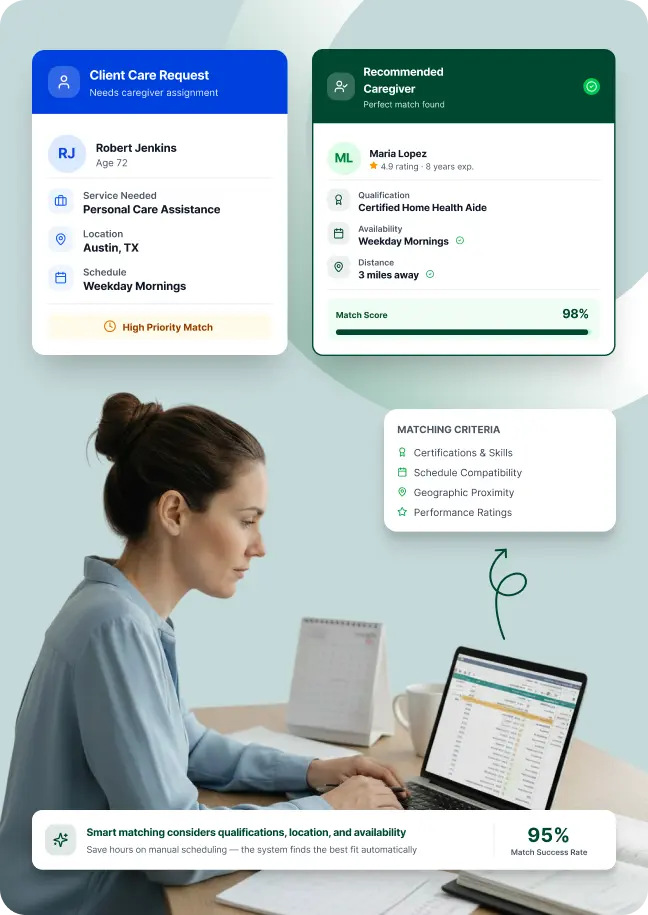
Coordinating caregivers across clients, schedules, tasks, and compliance requirements is one of the most time‑consuming operational demands for home care agencies. With LeadSquared’s home care CRM, you can:
Office staff typically review multiple caregiver profiles to find the right fit for each client. Instead of doing this manually, set clear rules for qualifications, availability, and location. The CRM applies these rules to recommend or auto-assign the best match, saving time and reducing errors.
Missing reminders for visits, documentation, or follow‑ups contributes to service gaps. Automated reminders keep caregivers informed of upcoming assignments and necessary tasks, so visits happen on time and paperwork stays current.
Caregivers must maintain certifications, background checks, and training. Centralized credential tracking flags upcoming expirations or missing documentation, so compliance doesn’t become a last‑minute scramble.
Changes in schedules, cancellations, or client updates are common. With workflow automation or integrations, send real‑time shift updates, route changes, and status alerts to caregivers and coordinators, reducing confusion and missed visits.
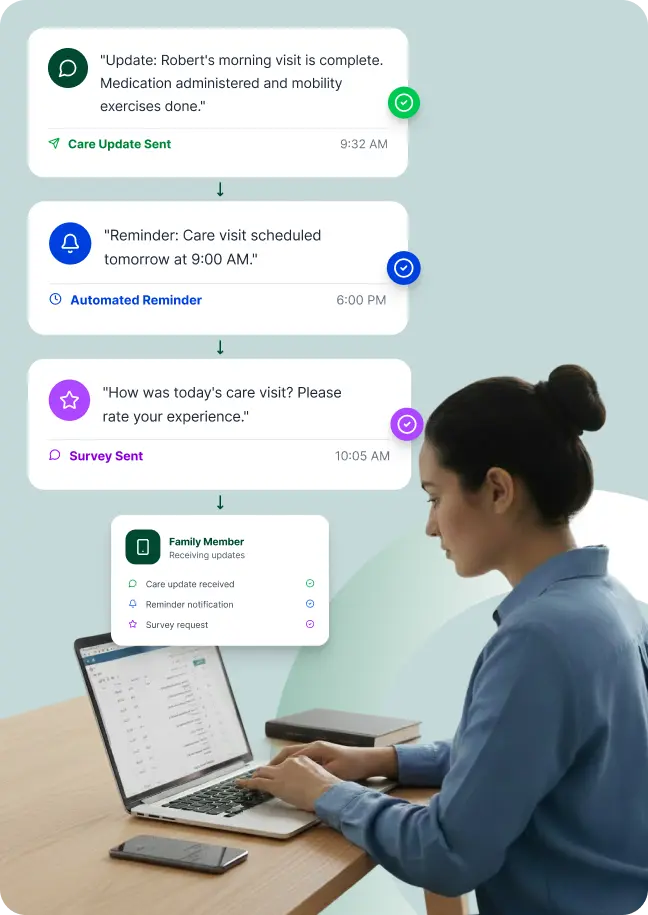
In home care, relationships with families are central to satisfaction and long‑term loyalty. Automating communication helps agencies keep families informed and engaged while reducing manual tasks for staff.
Families want timely updates about their loved one’s care and any changes to routines or needs. Send automated messages summarizing visit notes, care activities, or important status changes, so everyone stays informed without manual outreach.
Missed visits create frustration and erode trust. Automate reminders via SMS or email before scheduled visits to ensure families and caregivers are aligned and appointments happen smoothly, reducing confusion and no‑shows.
Regularly collecting feedback helps home care agencies understand family concerns and satisfaction levels in real time. Automate survey delivery after key interactions or milestones to gather insights that guide improvement and deepen trust.
Staying connected after service starts helps families feel valued. Use automated check‑ins, milestone messages, and retention campaigns to nurture relationships over time rather than waiting for issues to arise.
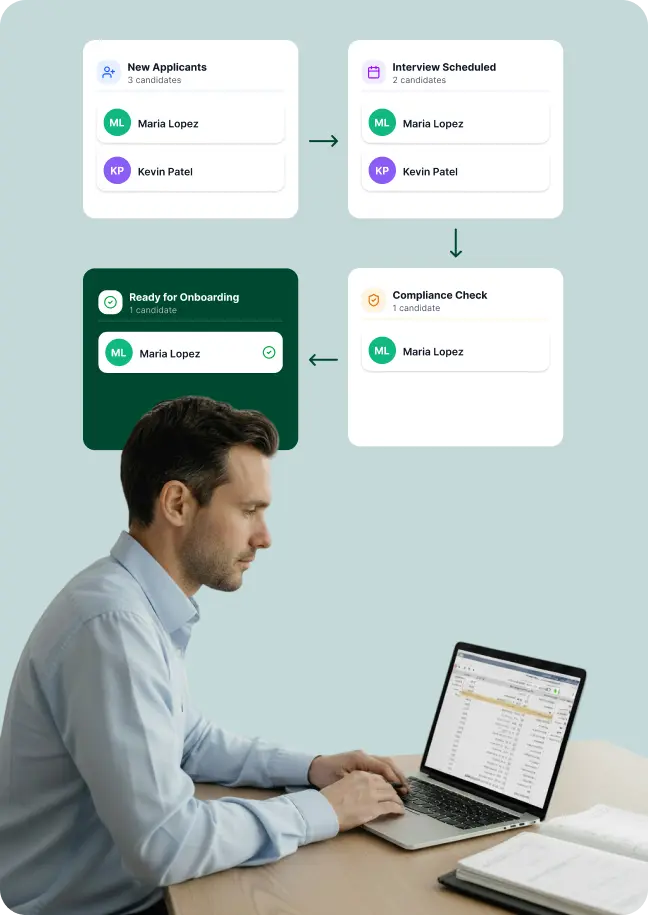
For home care agencies, hiring is never a one‑time task. With ongoing demand for quality caregivers and high turnover rates, keeping a steady pipeline of applicants and guiding them efficiently from application through onboarding is essential for sustainable growth. With LeadSquared, you can:
Monitor each candidate from application through final selection to ensure no talent slips through the cracks.
Post jobs, send outreach messages, and engage applicants automatically to maintain a steady, qualified talent pool.
Send invitations, reminders, and collect feedback automatically, so candidates move swiftly through screening.
Collect documentation, verify credentials, and complete compliance checks automatically, so new hires are ready faster and with fewer handoffs.
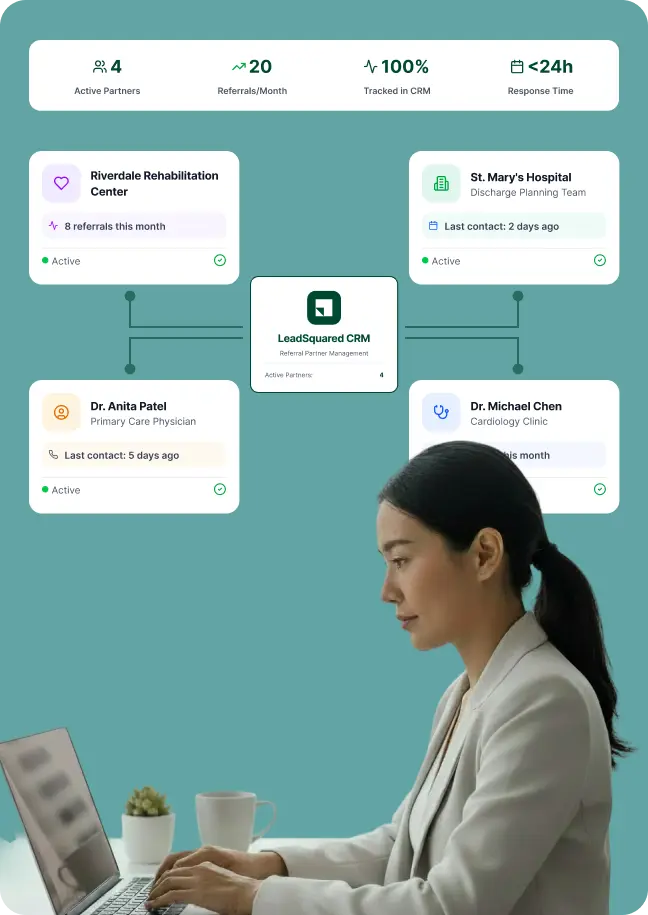
In home health care, sustained growth depends on strong referral relationships with physicians, hospital discharge teams, case managers, and rehabilitation centers. A CRM tailored to referral networks helps agencies manage these connections systematically instead of relying on fragmented notes, inboxes, or memory.
Maintain comprehensive records of every referral source within your CRM so your team can see which physicians, specialists, or clinics are sending referrals and how frequently.
Discharge planners and care coordinators are essential referral sources. Track your interactions, follow-ups, and engagement history with them, so your team knows exactly when and how each hospital contact was last engaged.
Compare referral volumes over time, by source or by specialty, so your agency can identify high-value partners and focus outreach where it drives growth.
With outreach sequences tied to referral partners, your team can send timely check-ins, referral updates, or thank-you notes automatically, helping nurture relationships without much effort.
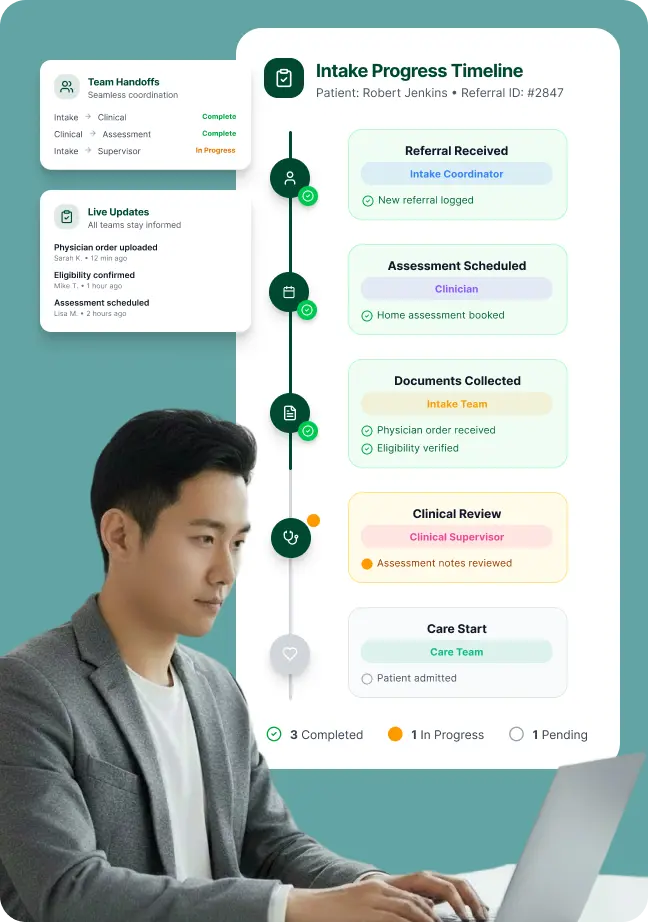
In home health, intake is not handled by one person alone. It involves intake staff, clinicians, therapists, and care coordinators. When information is passed through emails or separate systems, important details can be missed. This can slow down care and create compliance risks. LeadSquared brings the entire intake process into one shared system, so teams can move from referral to active care in a more organized way.
After receiving a referral, the next step is often a clinical assessment. Use LeadSquared to assign the right clinician based on availability and service area. Automatically notify the assigned staff member and record the appointment inside the system. Everyone can see when the assessment is scheduled and completed.
Home health intake includes multiple documents such as physician orders, eligibility verification, authorizations, and assessment notes. Instead of relying on memory or separate checklists, create automated task lists tied to each referral stage. This helps staff complete documentation in the correct order and within required timelines.
As the case moves from intake to clinical teams, responsibilities shift. Log notes, upload documents, and update status changes directly in the CRM. The next team member can review the full history in one place and continue the process without repeating work or asking for missing information.
Home health and home care agencies depend on multiple systems to run daily operations. Platforms such as AxisCare, WellSky Personal Care, MatrixCare, AlayaCare, and CareSmartz360 are commonly used for scheduling, EVV, caregiver management, and clinical workflows.
LeadSquared works alongside these systems to manage your referrals, intake, follow-ups, and more.
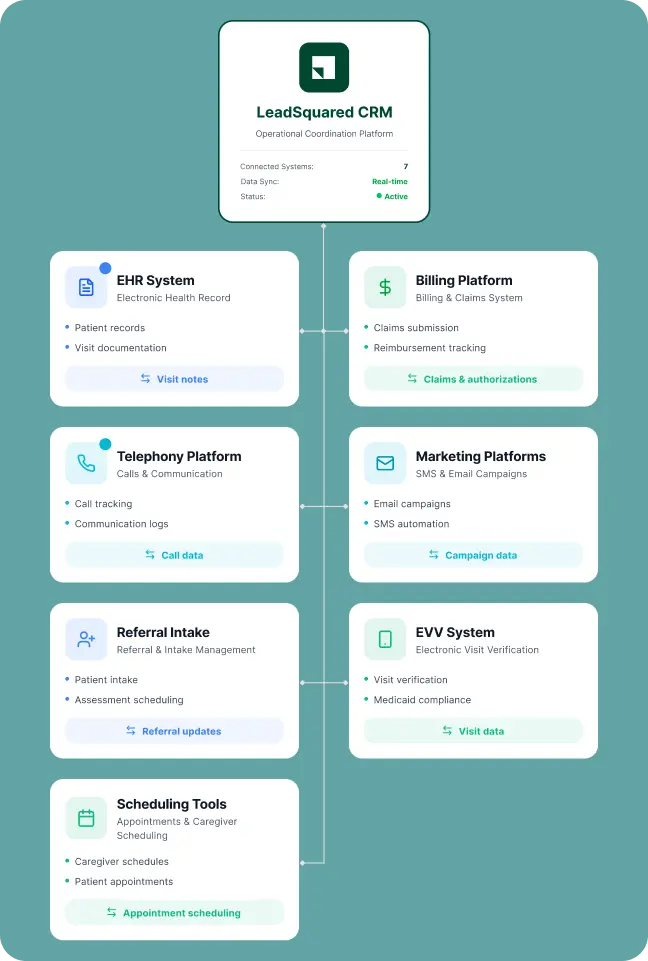
By automating patient engagement and connecting critical healthcare systems, Posterity Health achieved 7× revenue growth with the same team size.


Bring your patients, staff, and schedules into one system.
See how LeadSquared’s CRM for home care makes that possible.
A CRM for home care agencies is software that helps agencies manage the entire intake and communication process before care begins. It helps teams organize referrals, respond to family inquiries, track follow-ups, and move potential clients through intake in a structured way.
For example, when a family calls asking about care services, the CRM records the inquiry, stores conversation history, assigns follow-up tasks, and tracks whether the client has scheduled an assessment or started care.
Instead of relying on spreadsheets, emails, or handwritten notes, staff can see every inquiry and intake step inside one system.
Many agencies try to use general-purpose CRMs — tools built for broad sales teams — only to find they lack the workflow depth needed for home health and home care operations. LeadSquared is designed for high-velocity, referral-driven environments and addresses common gaps in generic systems.
Handle fast-moving referrals
Unlike basic CRMs that require lots of manual updates, LeadSquared captures inquiries from multiple sources in real time and routes them instantly. This is critical when referrals come from hospitals, physicians, call centers, and family inquiries, simultaneously.
Automate routine tasks
LeadSquared’s automation engine lets you define triggers and actions that reflect real workflows — not generic sales stages. You can automatically assign tasks, send follow-up messages, update statuses, and remind teams of deadlines without manual effort.
Route based on territory, service type, or team
LeadSquared lets you build logical routing based on geography, service type, caregiver availability, or other business rules your agency uses. This ensures the right coordinator sees the right referral quickly.
Blend sales and service workflows
Home health and home care require both conversion activities (lead follow-up, family outreach) and service coordination (care planning, visit tracking). LeadSquared supports both sides — intake and ongoing service delivery — in one unified flow instead of splitting them across separate tools.
Customize for healthcare needs
Generic CRMs often require heavy customization to map to healthcare processes. LeadSquared offers templates and features that already reflect common industry needs like referral tracking, family communication sequences, SLA monitoring, and coordinated task flows — reducing setup time and ongoing maintenance.
In short, generic CRMs are built for general sales pipelines. LeadSquared is built for the complexity of home health and home care workflows, helping teams stay coordinated and responsive from first inquiry through ongoing care.
A CRM (Customer Relationship Management system) for home health CRM organizes and tracks referrals, family/caregiver communication, leads, and operational workflows. An EHR (Electronic Health Record) stores clinical information such as medical records, visit documentation, care plans, and assessments. A CRM enhances intake, referrals, and engagement workflows, while an EHR focuses on clinical documentation. Together, they cover both operational and clinical needs without duplicating work.
Agencies should look for industry-specific features such as referral tracking, automation of follow-ups, scheduling and integration capabilities, strong compliance controls (e.g., HIPAA support), and reporting suited to home health and home care metrics rather than generic sales pipelines.
Home health CRMs with audit logs, role-based access, and secure documentation tracking make it easier to produce evidence during audits. Automated task trails and centralized records reduce the risk of missing documentation or regulatory issues.
Yes. Small home care agencies can benefit from a CRM because even a small team may handle many inquiries, callbacks, and referral conversations each week.
Without a structured system, it becomes easy to miss follow-ups or lose track of where a potential client stands in the intake process. A CRM helps staff stay organized by tracking every inquiry, assigning reminders, and keeping communication history in one place.
As the agency grows, the same CRM can continue supporting larger referral volumes and more advanced workflows without forcing the team to change systems later.
Home health agencies often receive Medicare referrals that involve strict timelines and detailed documentation. Intake teams may need to coordinate physician orders, insurance verification, eligibility checks, and communication between clinicians and referral sources.
A CRM helps organize these steps in one workflow. Staff can track referral status, assign intake tasks, upload required documents, and monitor what still needs to be completed before care begins.
This improves visibility across teams and helps agencies respond to referrals more quickly while reducing delays caused by missed paperwork or manual coordination.
CRMs centralize referral data, automate task assignments, send follow-up reminders, and provide pipeline visibility. This reduces manual work and delays, helping intake teams respond faster and move clients through stages smoothly and consistently.
Yes. A healthcare CRM integrates referral tracking with compliance, authorizations, EVV systems (important for Medicaid), and billing data. This reduces errors and supports smoother insurance processing, helping prevent claim rejections and delays.
No. Agencies of all sizes benefit from a CRM because it replaces spreadsheets and manual tracking with unified workflows. Even smaller teams gain visibility, automated follow-ups, and improved communication without needing large IT resources.
Implementation time varies by agency size and existing systems, but modern, purpose-built CRMs are designed for faster adoption without heavy customization. Many agencies begin basic workflows within weeks, with full integration improving over the first few months.
Yes. A specialized CRM can track caregiver applicants, automate interview follow-ups, manage credential data, and keep recruitment workflows streamlined, reducing time and manual effort.
Some can. For instance, LeadSquared’s home health and home care CRM includes built-in scheduling support through tasks and appointments, letting you log meetings, calls, and care coordination directly inside the CRM. You can create and schedule tasks with reminders without switching tools.
A home care CRM and scheduling software support different stages of the client journey.
A CRM is mainly used before care starts. It helps agencies manage referrals, family communication, intake coordination, and follow-ups. Teams use it to make sure inquiries are answered quickly and potential clients do not get lost during intake.
Scheduling software is mainly used after a client begins service. Agencies use it to schedule caregivers, manage shifts, track visits, handle EVV requirements, and support daily care operations.
Many agencies use both together. The CRM helps grow and manage intake, while scheduling software helps manage ongoing care delivery.


 Patient Engagement Software for Urgent Care Centers Scroll to top
