





- Home

- Learn
- Healthcare
- 5 best healthcare CRM platforms to integrate with eClinicalWorks
HEALTHCARE
5 best healthcare CRM platforms to integrate with eClinicalWorks
Contents

 15 min read


Walk into almost any modern medical practice today, and you will find a digital system running in the background managing patient records, appointments, and supporting day-to-day clinical operations.
These platforms, known as electronic health records (EHRs), have become the backbone of everyday healthcare operations.
One of the most widely used platforms for this purpose is eClinicalWorks, a cloud-based EHR solution used by healthcare providers around the world.
However, delivering effective healthcare now goes beyond managing patient records inside the clinic. Providers are also expected to maintain consistent communication with patients before and after visits.
These broader interactions collectively form the patient journey. It represents every step a patient takes while interacting with a healthcare provider, from scheduling an appointment to receiving ongoing care and support.
To manage these interactions more effectively, many healthcare organizations complement their EHR systems with a healthcare CRM (Customer Relationship Management platform for healthcare).
In this article, we’ll explore how these integrations work and highlight some of the best healthcare CRM platforms that integrate with eClinicalWorks to improve the patient journey for your practice.
If a healthcare practice is already using eClinicalWorks, a common question comes up: why add a healthcare CRM at all?
After all, eClinicalWorks already handles many important tasks. It stores patient medical records, tracks diagnoses and prescriptions, and helps practices manage everyday operations like scheduling appointments and documenting visits. The platform also includes patient engagement tools such as appointment reminders and patient portal messaging.
For many clinics, these features cover the basics of communication with patients.
However, as practices grow, patient communication often becomes more complex. Clinics may want to run preventive care campaigns, send follow-up instructions to hundreds or thousands of patients, manage referral relationships with other providers, or track patient feedback over time.
This is where healthcare CRM platforms come into the picture.
A healthcare CRM excels in organizing and scaling patient communication and engagement. Instead of acting as a medical record system, it helps practices coordinate outreach across many patients and communication channels.
For example, a CRM can help organizations:
When the two systems are connected, information recorded in the EHR can trigger communication workflows in the CRM. A completed appointment, for instance, could automatically start a follow-up message, care reminder, or feedback request.
Together, these systems help practices manage the patient experience more smoothly across every care stage.
Without integration, staff may need to manually copy patient information between systems. For example, patient details recorded in eClinicalWorks might also need to be entered into a separate communication or marketing platform. When the systems are integrated, patient demographics, appointment schedules, and visit updates can automatically sync from the EHR to the CRM, reducing duplicate data entry.
When events such as appointment bookings or completed visits are recorded in eClinicalWorks, that information can be synced to the CRM. The CRM can then automatically send messages to patients, such as appointment reminders, pre-visit instructions, or post-visit follow-ups through channels like SMS or email.
When an appointment is scheduled in eClinicalWorks, the integration can send that information to the CRM. The CRM can then trigger reminder messages before the visit, helping patients remember their appointments and reducing no-show rates.
After a consultation is documented in the EHR, the CRM can automatically send follow-up instructions, medication reminders, or care check-ins. This helps providers maintain communication with patients between visits.
By combining engagement data from the CRM with scheduling and clinical data from eClinicalWorks, healthcare organizations can analyze trends such as appointment attendance, patient engagement levels, and communication effectiveness. This information can then be used to improve care delivery and other operations.
Not every CRM is designed for healthcare. When evaluating a CRM to integrate with eClinicalWorks, it is important to look for features that support healthcare workflows, patient communication, and data security.
Here are some of the most important capabilities to consider.
The most important requirement is the ability to integrate with your EHR. A healthcare CRM should support interoperability standards such as HL7 or FHIR, and provide API-based integrations, allowing systems to exchange healthcare data reliably. These integrations make it possible to sync patient demographics, appointment data, and clinical events between the CRM and the EHR without manual data entry.
Healthcare CRMs should support multiple ways to communicate with patients. This often includes SMS, email, voice calls, mobile notifications, and patient portal messaging. Using several channels ensures patients receive reminders, follow-ups, or educational information through the method they prefer.
Many healthcare CRMs allow clinics to design automated workflows for patient engagement. For example, an appointment scheduled in the EHR can trigger reminders, pre-visit instructions, and post-visit follow-ups automatically. Automation helps reduce manual work for staff while ensuring consistent patient communication.
The CRM should be able to sync with appointment data from eClinicalWorks. This allows automated reminders, confirmations, and rescheduling messages to be sent based on the clinic’s schedule.
Segmentation tools allow clinics to group patients based on criteria such as demographics, medical conditions, appointment history, or engagement behavior. This makes it easier to send targeted communication or preventive care campaigns.
Because healthcare systems handle sensitive patient information, the CRM platform must meet strict healthcare regulations like HIPAA. Important features include encryption, access controls, audit logs, and a signed Business Associate Agreement (BAA) with the vendor.
Finally, good CRM systems provide reporting tools that combine engagement and operational data. With these analytical tools, clinics can track patient engagement, appointment attendance, communication effectiveness, and other performance indicators to improve patient experience and operational efficiency.
LeadSquared is a cloud-based, fully HIPAA-compliant healthcare CRM that helps clinics manage patient inquiries, appointments, and engagement workflows. It integrates with eClinicalWorks to sync patient information and appointment data, reducing manual data entry. The platform supports multi-channel communication and automation, enabling healthcare teams to guide patients through their entire care journey, from first contact to follow-up care.
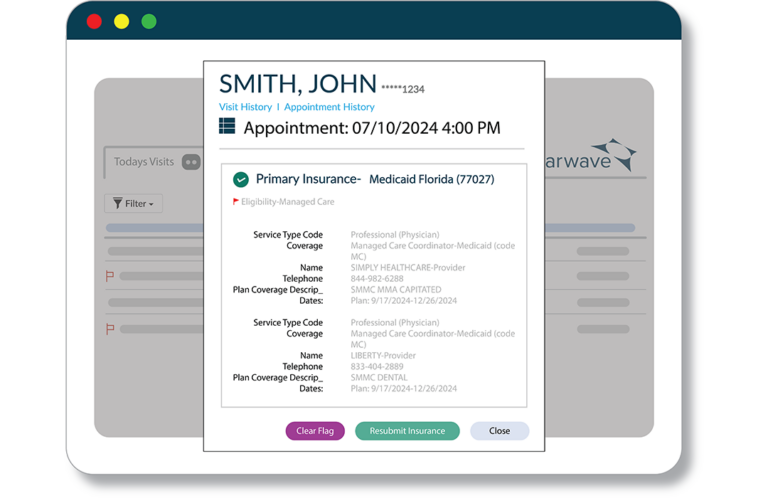
Clearwave is a patient engagement and revenue platform that helps healthcare practices automate scheduling, check‑ins, eligibility verification, communication, and payments. Its tools are designed to reduce front‑desk workload, accelerate patient throughput, and improve patient experience by enabling self‑service scheduling and registration on kiosks, mobile devices, or tablets. Clearwave can integrate with systems like eClinicalWorks, allowing key patient and appointment data to flow between platforms and support consistent workflows.
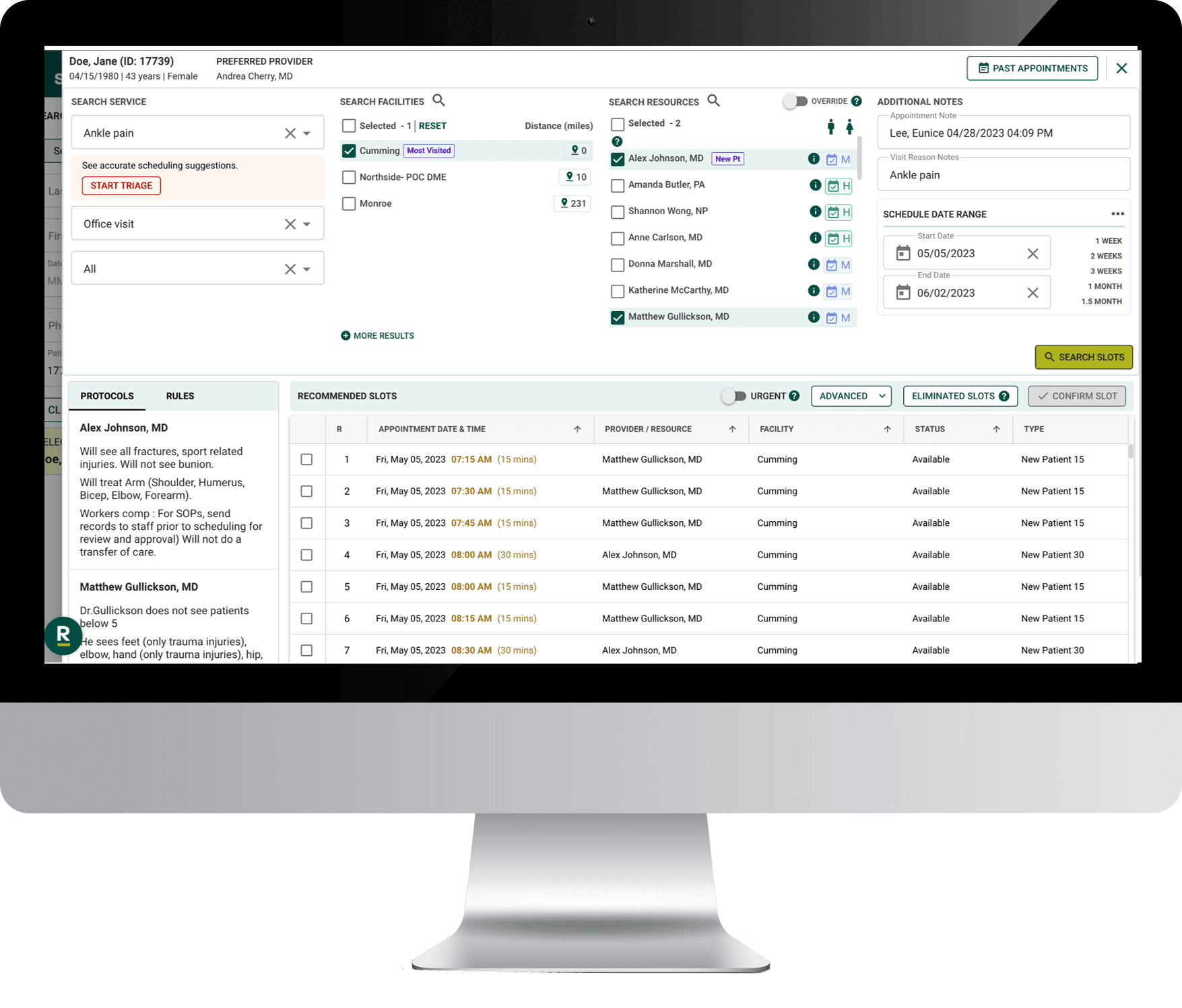
Dash is a patient engagement and scheduling platform developed by Relatient, a company specializing in healthcare communication and patient engagement solutions. Dash combines intelligent scheduling, self‑service appointment booking, patient communication, and digital check‑in tools in one solution. It integrates with eClinicalWorks using APIs and HL7 to exchange key patient and appointment data, enabling clinics to automate outreach, reminders, and check‑in workflows while supporting patients across their entire care journey.
Cons
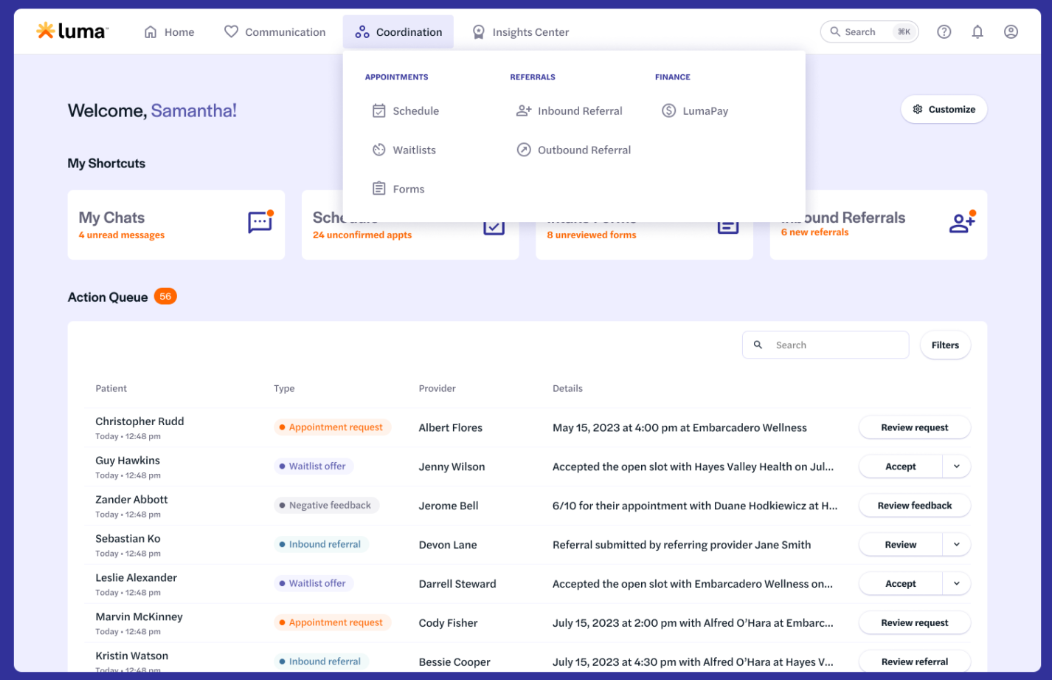
Luma Health is a patient engagement and “patient success” platform that helps healthcare practices improve scheduling, communication, and operational workflows. The platform supports things like patient self‑scheduling, automated reminders, waitlist management, mobile intake and check‑in forms, two‑way messaging, and feedback collection, all designed to reduce administrative burden and keep patients engaged throughout their care journey. Luma Health offers bidirectional integration with eClinicalWorks, allowing appointment, patient, and referral data to sync between the EHR and the engagement system, so communication and actions are tied directly to clinical events.
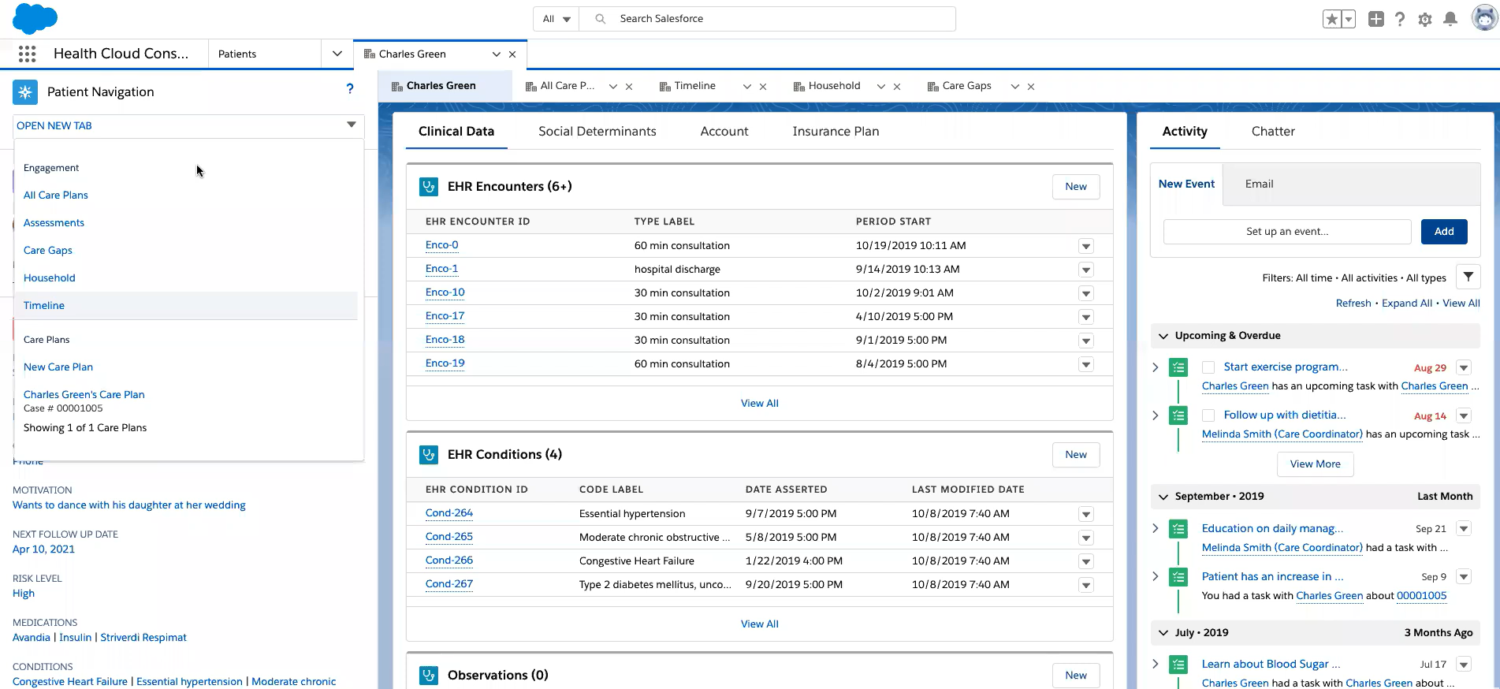
Salesforce Health Cloud is an enterprise‑grade healthcare CRM built on the Salesforce platform and designed specifically for the healthcare and life sciences industries. Health Cloud supports integration with electronic health records through industry standards like FHIR and APIs, enabling data exchange such as patient demographics, appointment details, and clinical information between eClinicalWorks and the CRM.
If your practice already uses eClinicalWorks, you know how central it is for clinical workflows and patient data. A healthcare CRM can take that foundation further—helping your team engage patients more effectively across their entire care journey.
By integrating ECW with healthcare CRM, you can turn your existing data into actionable patient communication, automated touchpoints, and personalized experiences.
Different CRMs support different priorities.
Salesforce Health Cloud works well for large systems that need advanced analytics and care coordination. Luma Health and Dash by Relatient excel at patient engagement and self-service workflows. Clearwave focuses on streamlining check-ins, insurance eligibility, and payments. LeadSquared is designed for structured intake, workflow automation, and managing the patient lifecycle—making it easy to bring eClinicalWorks data into patient engagement, reminders, and follow-up workflows.
The key is choosing a platform that complements your existing ECW setup and fits your team’s workflow. When done well, a CRM integration creates a smoother experience for both staff and patients.
If you are curious to see how a healthcare CRM like LeadSquared can streamline your workflows and enhance patient engagement alongside eClinicalWorks, feel free to book a quick demo today to see it in action.
When a CRM integrates with eClinicalWorks, it means the systems can exchange key data automatically—such as patient demographics, appointment times, and visit outcomes—without staff having to manually re‑enter information. Integration usually uses industry standards like HL7 or FHIR, so patient and scheduling data flows smoothly between the EHR and CRM.
Commonly synced data includes basic patient details (name, contact info), appointment schedules, and referral status. Healthcare CRMs like LeadSquared can also trigger communications based on EHR events, such as sending reminders when an appointment is booked or follow‑ups after a visit. This enables coordinated patient outreach without redundant data entry.
Not all integrations are created equal. Some tools support two‑way sync, meaning updates in the CRM and EHR both reflect in each system. Others may only pull data one way (e.g., from eClinicalWorks into the CRM). When choosing a CRM, clarify whether bidirectional syncing is supported for the specific data points you need.
Yes. A healthcare CRM such as LeadSquared, can automate not just reminders, but also patient education, surveys, and follow‑up communication across multiple channels (SMS, email, chat). This makes it easier to guide patients through their care journey from scheduling to ongoing engagement.
Yes—most CRM integrations are designed to be HIPAA‑compliant and encrypt data to protect patient information, but it’s important to verify that the vendor provides appropriate compliance documentation and agrees to a Business Associate Agreement (BAA) if required.
2
D
 15 min read 18 min read 17 min read



 5 best healthcare CRM to integrate with NextGen to optimize appointment sch...