





- Home

- Learn
- Healthcare
- HIPAA-compliant online intake forms for mental health practices
HEALTHCARE
HIPAA-compliant online intake forms for mental health practices
Contents

 14 min read


For mental healthcare practices, patient intake is no longer happening in the waiting room.
Traditional paper forms are rapidly being replaced with digital intake forms that patients can complete online at their convenience.
This shift has contributed to an array of benefits, from shorter wait times to reduced errors incurred from manually capturing and entering patient data.
But mental health intake forms are not just routine paperwork. They capture some of the most sensitive information a patient shares, including mental health history and medications. In the United States, this information is protected under the regulations laid down by HIPAA and must be handled with strict privacy and security controls.
When intake moves online, those responsibilities do not go away. In fact, they become even more important.
This article breaks down what HIPAA-compliant digital intake forms are, why they matter for mental health practices, and how providers can use them to improve everyday operations while protecting patient privacy.
As mental health practices transition intake to digital channels, digital intake forms become a central part of how patients are onboarded.
In the onboarding process, digital intake forms help bridge administrative and clinical workflows. They collect essential details such as contact information, insurance data, and consent acknowledgments, along with clinical inputs like mental health history and current medications. Many practices also include standardized assessments or screening questionnaires to support initial evaluations.
Compared to paper-based intake, digital forms offer clear advantages. Patients can complete them at their own pace, which reduces pressure and confusion during check-in. For staff, digital forms reduce manual data entry, minimize errors caused by handwritten entries or incomplete fields, and make it easier to store and retrieve information securely. Over time, this leads to smoother operations and a more consistent intake experience across the practice.
Under HIPAA, any information that can identify an individual and relates to their health or care is considered Protected Health Information (PHI). This includes names, contact details, mental health history, medications, and treatment notes, whether collected on paper or digitally.
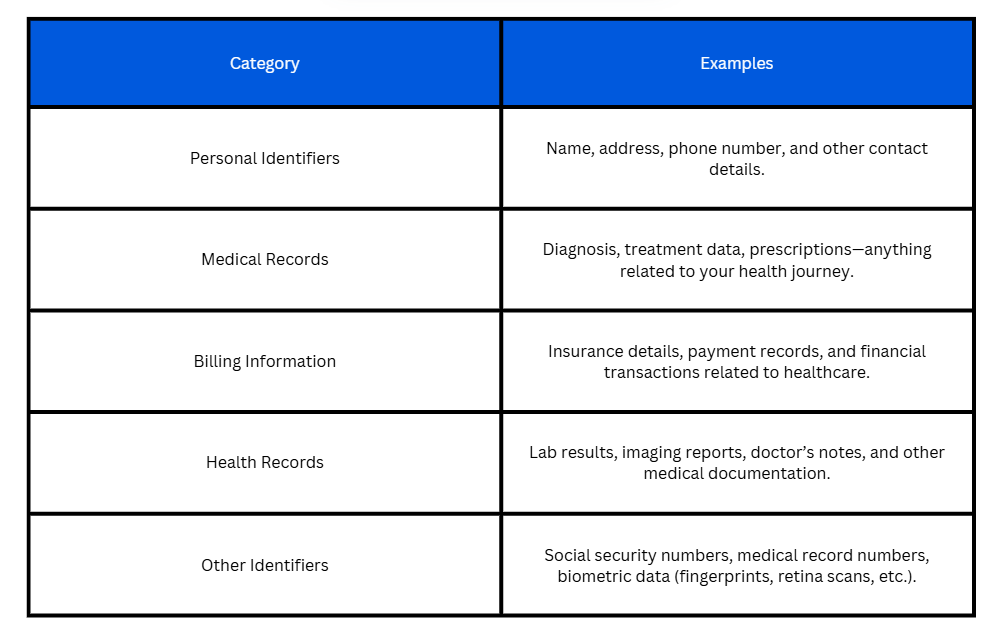
HIPAA has two main rules that apply to intake forms. The HIPAA Privacy Rule governs how PHI can be used and disclosed, ensuring patient information remains confidential. The HIPAA Security Rule focuses on how electronic PHI (ePHI) must be protected when stored or transmitted through digital systems.
HIPAA does not prescribe specific technologies. Instead, it requires covered entities, such as mental health clinics and therapists, and their partners to implement safeguards that protect the confidentiality, integrity, and availability of ePHI.
Business Associate Agreements (BAA). Any vendor that creates, receives, maintains, or transmits PHI on a practice’s behalf must sign a BAA, which legally obligates the vendor to protect patient data under HIPAA.
Authentication and access controls. Systems must restrict PHI access to authorized staff using unique user logins and role-based permissions.
Audit trails. HIPAA expects practices to track who accessed PHI, what actions were taken, and when, to support compliance reviews and investigations.
Encryption. While not strictly required, encryption is strongly recommended. It helps protect PHI by making data unreadable if intercepted or improperly accessed during transmission or storage.
A well-designed digital intake form not only gathers the information a practice needs, but also respects patients’ time, improves completion rates, and supports HIPAA compliance.
A HIPAA-compliant digital intake form typically includes the following sections:
Good design helps patients complete forms without frustration.
Forms should be mobile-friendly, as many patients use phones or tablets to fill them out. Responsive design improves accessibility and completion rates.
Use plain language questions that are easy to understand and avoid jargon to reduce confusion and improve data quality.
Incorporate conditional logic so that patients only see questions relevant to their situation, simplifying the experience and reducing burden. For example, only show follow-up questions if a patient indicates they take medications.
Provide clear instructions and visual progress cues so users know what information is needed and how much of the form remains. This reduces abandonment of the form and supports a smoother intake process.
HIPAA-compliance goes hand in hand with accessibility. Consider offering multilingual support where appropriate to meet the language needs of your patient population.
Additionally, ensure your forms meet basic accessibility standards such as the Web Content Accessibility Guidelines (WCAG). This helps patients with visual, motor, or cognitive impairments navigate and complete forms comfortably. Many digital form platforms offer tools or guidance for accessibility compliance, but practices should confirm these features with vendors and test the patient experience for themselves.
While HIPAA defines what mental health practices are responsible for protecting, security best practices focus on how those protections are implemented in day-to-day systems and workflows. When digital intake forms are used, these practices help ensure that patient data remains secure throughout its lifecycle.
Technical safeguards refer to the technology used to protect electronic patient data.
Digital intake forms should use secure web connections, such as HTTPS, to protect information as it is transmitted from a patient’s device to the practice’s systems. This relies on encryption standards that help prevent unauthorized interception. Although encryption is not strictly required by HIPAA in all situations, it is widely considered a best practice and significantly reduces risk, if data is exposed.
Data should also be protected while stored. Whether intake information is hosted in the cloud or on-premise servers, it must be kept in a secure environment with appropriate access controls, monitoring, and protections. Cloud storage can support HIPAA compliance when it is properly configured and supported by a signed Business Associate Agreement. In simple terms, this means storing data on secure servers managed by a third-party company (the cloud provider) rather than on a local computer or office server.
Operational safeguards focus on how people, processes, and day-to-day system management support security.
Software used for digital intake should be regularly updated. This helps address vulnerabilities that could otherwise be exploited.
Staff training is also important. Team members should understand how to handle patient information securely and follow internal procedures as they do.
Practices should also conduct routine risk assessments and reviews. These help identify weaknesses in systems or workflows and document steps taken to reduce potential risks to patient information.

Digital intake forms are most effective when they are connected to the other tools a mental health practice uses every day. These tools may include a healthcare CRM, an electronic health record system, telehealth software, or reporting dashboards. Integration allows information collected at intake to move smoothly through the practice without extra manual work.
When intake forms are connected to a CRM or electronic health record, information entered by patients is automatically saved in the systems staff use to manage patient records. This includes patient profiles, appointment records, and billing or administrative files. As a result, staff do not need to manually re-enter the same information in multiple places.
For example, contact details collected through the intake form can populate the patient’s profile. Insurance details can flow into billing systems, and intake responses can be linked to clinical notes. This reduces administrative work, lowers the risk of data entry errors, and helps teams spend less time on paperwork.
For telehealth appointments, intake forms often replace what would normally happen at the front desk. If these forms are not integrated with other systems, providers may start a virtual visit without key information, or staff may need to track down forms in separate tools while the patient waits.
When intake forms are integrated, patients complete them before the appointment, and the information is already available to the provider when the session begins. This means the clinician does not need to spend the first part of the visit reviewing missing details, asking the patient to repeat information, or waiting for staff to upload forms manually. Appointments are more likely to start on time with telehealth integration.

When intake data is connected to reporting and analytics tools, practices can better understand how their operations are performing. For example, reports can show common reasons patients seek care, average wait times between intake and first appointment, or trends in patient demographics.
Practices can also analyze how patients interact with intake forms. This includes identifying questions that are often skipped or sections that take longer to complete. These insights help practices refine their intake forms and create a better experience for patients.
A real-world study looked at 45 community pediatric clinics in the U.S., covering over 107,000 patient visits. These clinics replaced paper intake forms with digital intake questionnaires that patients could complete online before their appointment. These forms collected key information and important screening tools like the Autism checklist (M‑CHAT) and PHQ‑2 for depression.
The results were impressive. Completion rates improved significantly: the M‑CHAT went from 68 % completed on paper to 83 % completed digitally, a 15 % increase, and the PHQ‑2 rose from 86 % to 94 %, a 7 % increase.
These improvements happened because patients could fill out forms ahead of time, and staff didn’t have to spend time typing in information manually.
In short, the study demonstrated how implementation of digital intake forms helped more patients complete important screenings, reduced administrative work for staff, and thus the time they spent on it.
In summary, digital intake forms are no longer just a matter of convenience for mental health practices. Instead, they are now a critical part of how they handle patient intake.
As we saw, digital forms for healthcare help streamline patient onboarding, reduce administrative work, and ensure sensitive patient information is collected and handled securely in line with HIPAA requirements.
Implementing these forms also opens the door to better integration with other practice tools (like scheduling, billing, and analytics) that further enhance patient intake.
For practices looking to make this transition, a healthcare CRM such as LeadSquared, is a good option. It acts as a central hub to manage your digital intake forms, connect it to patient records, and automate routine administrative tasks.
If you’d like to see what this would look like for your practice, feel free to book a quick demo of our CRM.
No. Most generic online form tools, like basic Google Forms, are not HIPAA‑compliant by default because they lack encryption, audit logs, and other safeguards required for protected health information. To be compliant, a form platform must offer security features such as encryption and access controls and must be willing to sign a Business Associate Agreement (BAA).
A HIPAA‑compliant intake form can include protected health information such as patient demographics, medical history, insurance data, and consent acknowledgments. It may also capture clinical details like symptoms and medication information, as long as the form meets HIPAA privacy and security standards.
Yes. Modern digital intake forms are designed to be mobile‑friendly, so patients can complete them on smartphones, tablets, or computers. This flexibility improves completion rates and convenience compared with paper forms.
When implemented correctly, digital intake forms use encryption to protect data in transit and in storage, limit access to authorized users, and keep detailed audit records of who viewed or changed information. These measures help ensure compliance with HIPAA’s Privacy and Security Rules.
No. Any form that collects protected health information (PHI) — including treatment, billing, insurance, and operational data — must meet HIPAA compliance requirements, not just treatment‑related fields.
Yes. Digital intake forms generally reduce errors, save time for patients and staff, and make it easier to store and retrieve information securely. They also help create complete records that support care decisions and operational efficiency.
When evaluating digital intake solutions, there are a few key things to consider. First, the platform should be HIPAA-compliant, offering encryption, access controls, and secure storage, and the vendor should sign a Business Associate Agreement (BAA) to protect patient data. Next, it should allow customization and conditional logic, so patients only see questions relevant to them, improving completion rates. The solution should also be mobile-responsive, letting patients complete forms easily on phones, tablets, or computers. Finally, integration capabilities are important — the intake system should connect with your CRM, EHR, scheduling, and billing tools to reduce manual data entry and make workflows smoother for your staff.
Transitioning from Excel to a HIPAA-compliant system starts with choosing a secure platform designed for healthcare intake. First, ensure the system provides encryption, access controls, and a Business Associate Agreement (BAA) to protect patient data. Next, export your existing Excel data carefully, making sure only authorized staff handle it, and import it into the new system.
Set up digital intake forms that replicate or improve your previous workflows, including patient demographics, health history, consents, and clinical screenings.
Finally, train your team on using the new system, and test it to confirm that patient data flows securely into your CRM, EHR, or scheduling tools.
 19 min read 17 min read 15 min read



 How to improve brand recall among students and parents: A playbook for higher...