





EDUCATION
How to integrate Anthology Student (CampusNexus) with CRM systems
Contents

 16 min read


This guide reflects implementation experience with higher education CRM integrations. For institution-specific technical guidance, consult your IT team or a qualified implementation partner.
Most higher education institutions run two core systems that rarely talk to each other.
Anthology Student (formerly CampusNexus Student; now acquired by Ellucian) manages the academic side: enrollments, financial aid, course registrations, grades, and every official record from application to graduation. A CRM manages the relationship side: every inquiry, counselor note, enrollment nudge, and re-engagement campaign. Both systems collect critical data about the same students, but in most institutions, they operate in separate silos.
When that gap goes unaddressed, advisors double-enter data, counselors work from stale records, and students fall through the cracks.
A well-planned Anthology Student integration changes that. Your enrollment team gets a single, up-to-date view of every student — from first inquiry all the way to graduation. This guide walks you through how to make that connection happen, without getting lost in the technical weeds.
Vendor context (updated January 2026): Anthology’s Student Information Systems business was acquired by Ellucian on December 31, 2025, following Anthology’s Chapter 11 bankruptcy restructuring. Ellucian has confirmed that existing Anthology Student integrations, APIs, and configurations will continue to operate without changes. Institutions currently running Anthology Student should monitor Ellucian’s product roadmap communications for longer-term platform direction. For the latest information, see ellucian.com/anthology.
The case for integrating Anthology Student—through a CampusNexus integration—is really a case for giving your enrollment and advising teams better information, faster.
Without a connection between Anthology Student and your CRM, your team runs into the same problems every day:
These aren’t technological failures. They’re information failures — and an effective integration solves them.
When Anthology Student and your CRM are properly connected, your CRM becomes a live enrollment intelligence hub.
Everyone works from a single, shared view of every student.
Before anything is set up, it helps to know exactly what data moves between the two systems. Not everything needs to sync — just the information your team actually uses in their day-to-day work.
The most common data domains that flow between Anthology Student and a CRM are:
Most institutions start with student profiles and enrollment records, then layer in the rest over time. That’s the right approach — a focused first integration is far easier to manage than trying to sync everything at once.
Getting this right starts well before any technical setup. These are the things your team needs to confirm first.
Your IT team needs to verify what version of Anthology Student your institution is running, since older versions connect differently than newer ones. They’ll also need to confirm whether your environment is hosted by Anthology, hosted on your own servers, or in the cloud — because each has different rules for how external systems can connect to it. A test environment with anonymized student data is essential before anything touches your live system.
Your CRM administrator needs to understand how many API calls your CRM allows per day, since high-volume syncs can hit limits if not planned for. They’ll also need to map out where Anthology Student data will live in the CRM — enrollment history and program data don’t always fit neatly into standard CRM fields and may need custom setup.
Both teams — IT and enrollment operations — need to agree on a few things upfront:
There’s no single way to connect Anthology Student and a CRM. The right approach depends on how current your CRM data needs to be.
This is the most common starting point. Data is pulled from Anthology Student on a set schedule — overnight, or every few hours — and pushed into the CRM. It’s reliable, straightforward to set up, and works well for most enrollment and advising use cases where data doesn’t need to be live to the minute.
The tradeoff: your CRM will always be slightly behind. For most teams, that’s perfectly acceptable.
Instead of waiting for a scheduled job, your integration checks Anthology Student every 10–15 minutes for any records that have changed and updates the CRM accordingly. This gives you near-current data without the complexity of a fully live connection. It’s a good middle ground for teams that need reasonably fresh information but don’t have the infrastructure for a real-time setup.
When a record changes in Anthology Student — say, a student withdraws or completes enrollment — the system immediately fires a notification that triggers an update in the CRM. This is the most current approach and the most complex. It’s best suited for institutions where counselors are having live conversations and need enrollment status that’s accurate right now, not from last night’s sync.
Most institutions land on a hybrid: scheduled batch sync for the bulk of their data, with real-time updates for the handful of fields — like enrollment status and academic standing — where timing really matters.
You don’t need to build this from scratch. Most institutions connect Anthology Student and a CRM using one of two approaches.
Integration platforms like MuleSoft, Dell Boomi, Informatica, or Azure Logic Apps are purpose-built for exactly this kind of work. They sit between your two systems, handle the data movement, log every transaction, and alert your team when something goes wrong. They also give non-technical stakeholders visibility into what’s running — which matters when enrollment leadership needs to trust the data.
This is the right choice for most institutions. It costs more upfront than a custom-built solution, but it’s significantly easier to maintain and far less dependent on having a specialized engineer on staff long-term.
Additionally, communication platforms like Twilio or RingCentral can be integrated with the CRM layer to enable automated messaging, calling, and engagement workflows across the student lifecycle.
See LeadSquared’s intergrations here.
Platform selection depends on your institution’s size and IT capacity. Azure Logic Apps and Microsoft Power Automate are lower-barrier entry points for institutions already in the Microsoft ecosystem. MuleSoft and Dell Boomi offer more robust monitoring and enterprise governance but require certified implementation resources. Informatica is primarily a data management platform and might be an overkill for a point-to-point integration.
Some institutions build their own connection layer — essentially a purpose-built service that moves data between the two systems according to custom rules. This gives you maximum flexibility and can be more cost-effective if your IT team has the capacity to build and maintain it.
The downside is that it creates a long-term dependency on engineering resources. If the developer who built it leaves, maintaining it becomes a real problem.
Also read: Top Anthology Competitors & Alternatives: CRM & SIS Options 2026
Your IT team confirms API access to Anthology Student, sets up the appropriate security controls (more on that below), and verifies that they can successfully pull data from the system in a test environment. The same is done on the CRM side with a dedicated integration account.
Field mapping is a joint exercise. Your enrollment operations lead knows which data points your team actually relies on — enrollment status, program interest, counselor assignment. Your CRM administrator knows where those fields live technically and how they need to be formatted. Bring both people to the table and document every field you plan to sync, including whether any translation is needed (for example, Anthology Student might store enrollment status as a code that your CRM needs translated to plain language like “Active” or “Withdrawn”).
Don’t skip this step or rush it. Field mapping decisions made at this stage are very hard to undo later.
Decide how often data should sync and what happens when the same field has different values in each system. For most fields, the rule is simple: Anthology Student wins, because it’s the system of record for academic data. For fields that your CRM team actively manages — like communication preferences or counselor notes — the CRM wins.
Run the integration in a test environment first. Check that record counts match what you expect, that student names and emails are coming through correctly, and that enrollment statuses are mapping to the right values. Then run it again with your actual enrollment operations team — they will find things your IT team won’t.
Any integration that moves student data between systems must account for FERPA — the federal law that governs the privacy of student education records. And the same goes for CampusNexus, or Anthology Student integration.

Compliance note: The FERPA guidance in this section reflects general interpretations of 34 C.F.R. § 99.31. It does not constitute legal advice. Consult with your institution’s legal counsel or a qualified FERPA compliance specialist. For official regulatory guidance, see the U.S. Department of Education’s FERPA overview. For a deeper dive into how FERPA applies specifically to colleges and universities — including data sharing and the school official exception — the Department’s FERPA 101 for Colleges & Universities is the most relevant starting point.
In practice, this means a few things for your integration:
On the technical side, your IT team will ensure that all data is encrypted in transit and at rest, that the integration uses secure authentication methods, and that access is tightly scoped — the integration only touches the data it actually needs.
Run a full parallel test: let the integration run in your test environment for at least two weeks while your team continues using their current manual processes. Compare the data in both systems daily. When your enrollment operations team is confident the data is accurate and complete, you’re ready to cut over.
A few things to confirm before flipping the switch:
Once you’re live, set up a simple dashboard that shows the health of your integration at a glance — how many records synced in the last run, whether any failed, and when the last successful sync completed. A weekly check by your CRM admin is usually enough to catch any issues before they become problems.
Don’t try to do everything at once. A phased approach keeps the project manageable and gives your team time to build confidence in the data before expanding the scope.
Timeline estimates assume institutions with fewer than 10,000 student records, an existing integration platform (e.g., MuleSoft or Azure Logic Apps), and dedicated IT resources. Larger or more complex environments typically require 20–36 weeks for a comparable scope.
Before you build
Before you go live
If your institution is still evaluating which CRM to connect to Anthology Student, LeadSquared’s Higher Education CRM is worth a close look.
Unlike general-purpose CRMs that require significant custom configuration for education, LeadSquared is purpose-built for the student lifecycle. Enrollment stages, program interest tracking, counselor assignment, and drip communication workflows all come ready to use out of the box.

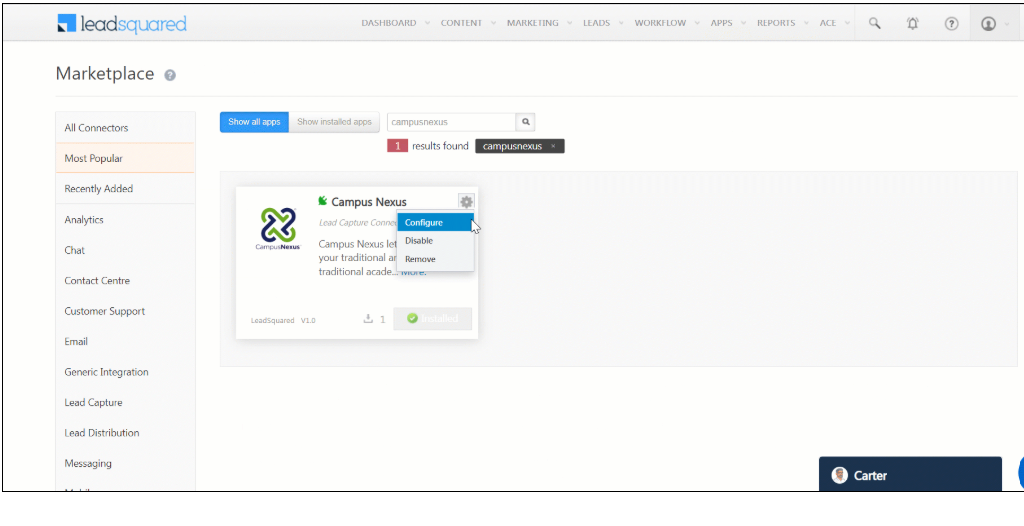
Further reading: Integrate CampusNexus with LeadSquared – Help & Support
LeadSquared connects to Anthology Student via APIs and supports both real-time and scheduled data synchronization. For institutions that want to get up and running faster and with less IT overhead, it’s a compelling option.
Want to see how it works?
Not typically — and it’s worth understanding why before you start planning. Anthology Student exposes data via REST APIs, but those APIs require configuration, authentication setup, and field mapping work before any data moves. What varies significantly is your starting point: institutions already running an iPaaS platform like MuleSoft or Azure Logic Apps can move faster because the middleware layer is already in place. Institutions starting from scratch will need to budget time for platform selection before integration work begins. One exception worth checking: if your CRM vendor has a pre-built Anthology connector, that can meaningfully reduce setup time — ask your CRM vendor directly whether one exists and which Anthology Student versions it supports.
Yes, for some fields. Student profiles and contact details often sync in both directions. Academic data — grades, enrollment status, financial aid — should almost always flow one way, from Anthology Student into the CRM. Letting the CRM overwrite authoritative academic records creates serious data integrity problems.
Keep them as Leads in your CRM and resist the temptation to promote them to Contacts early. The trigger for promotion should be the appearance of a verified Anthology Student ID — that’s your confirmation that the student exists in the system of record and the two profiles can be safely linked. Before that point, any Contact record you create is an orphan: it can’t be matched to Anthology Student data, and you risk ending up with duplicate records when the student does enroll.
One practical step worth taking now: agree on the exact matching logic your integration will use to link CRM Leads to Anthology Student records at the point of admission — student ID, email address, or a combination. Defining this before go-live prevents a backlog of unmatched records that have to be cleaned up manually after the fact.
Design your integration to fail gracefully from day one. Any records that fail to sync should queue for retry rather than drop silently — most iPaaS platforms support this natively. Configure email or Slack alerts for sync failures, so your team knows within minutes, not days. Common failure modes include API rate limit errors (usually fixable by adjusting sync frequency), field validation failures when Anthology Student data doesn’t match your CRM schema (fixable with data transformation rules), and authentication token expiration (fixable with automated token refresh). For production integrations, we recommend a designated on-call contact on both the IT and enrollment operations sides during the first 30 days post-launch.
For the build phase, yes — either an internal integration engineer or an implementation partner. For ongoing operations, a part-time CRM administrator and IT contact is usually sufficient once the integration is stable.
 15 min read 12 min read 17 min read



 5 Best Healthcare CRM to Integrate with Epic EHR