





EDUCATION
How to integrate Anthology Student (CampusNexus) with CRM systems
Contents

 18 min read


This is a planning guide, not a build spec. The sequencing, field-mapping decisions, and failure modes below depend on your Anthology Student version, hosting model, and CRM, so confirm the specifics with your IT team or a qualified implementation partner.
Most higher education institutions run two core systems that rarely talk to each other.
Anthology Student — formerly CampusNexus Student, and often searched as the CampusNexus successor CRM, now acquired by Ellucian — manages the academic side: enrollments, financial aid, course registrations, grades, and every official record from application to graduation.
A CRM manages the relationship side: every inquiry, counselor note, enrollment nudge, and re-engagement campaign. Both systems collect critical data about the same students, but in most institutions, they operate in separate silos. That gap has only widened since Anthology’s own enrollment CRM, Reach, was sold to Encoura as part of Anthology’s Lifecycle Engagement business — leaving institutions to decide whether to wait on that transition or connect a purpose-built CRM directly.
A well-planned CRM for Anthology Student institutions closes that gap between the two systems — giving your enrollment team a single, up-to-date view of every student, from first inquiry all the way to graduation. This guide covers the architecture options, the security requirements, and the implementation plan, plus where an independent CRM like LeadSquared fits once you understand what Anthology’s breakup actually changed.
Vendor context (updated August 2026): Anthology’s Student Information Systems business was acquired by Ellucian on December 31, 2025, following Anthology’s Chapter 11 bankruptcy restructuring. Ellucian has stated it will continue to deliver and maintain Anthology’s existing SIS and ERP systems and has described the transition as continuity-focused. Longer-term platform direction has not been detailed publicly, so institutions should confirm integration and API continuity directly with Ellucian for their environment. Separately, Anthology Reach — the CRM previously sold alongside Anthology Student — was acquired by Encoura in a deal that closed February 2, 2026. The SIS and the CRM now belong to two unrelated companies on two separate roadmaps. Anyone evaluating a post-Anthology merger CRM is choosing inside that split, and it is the gap a dedicated Anthology Student CRM integration is built to close. For background on the restructuring, see Campus Technology’s coverage of the Ellucian deal.
The case for a CampusNexus integration between Anthology Student and your CRM is really a case for giving your enrollment and advising teams better information, faster.
Without a connection between Anthology Student and your CRM, your team runs into the same problems every day:
In each case, the systems are working exactly as designed. The information just never reaches the person who needs it, and that is what an integration fixes.
When Anthology Student and your CRM are properly connected, your CRM becomes a live enrollment intelligence hub.
Everyone works from a single, shared view of every student.
Before anything is set up, it helps to know exactly what data moves between the two systems. Not everything needs to sync — just the information your team actually uses in their day-to-day work.
The most common data domains that flow between Anthology Student and a CRM are:
Most institutions start with student profiles and enrollment records, then layer in the rest over time. That’s the right approach — a focused first integration is far easier to manage than trying to sync everything at once.
Getting this right starts well before any technical setup. These are the things your team needs to confirm first.
Your IT team needs to verify what version of Anthology Student your institution is running, since older versions connect differently than newer ones. They’ll also need to confirm whether your environment is hosted by Anthology, hosted on your own servers, or in the cloud — because each has different rules for how external systems can connect to it. A test environment with anonymized student data is essential before anything touches your live system.
Your CRM administrator needs to understand how many API calls your CRM allows per day, since high-volume syncs can hit limits if not planned for. They’ll also need to map out where Anthology Student data will live in the CRM — enrollment history and program data don’t always fit neatly into standard CRM fields and may need custom setup.
Both teams — IT and enrollment operations — need to agree on a few things upfront:
There’s no single way to connect Anthology Student and a CRM. The right approach depends on how current your CRM data needs to be.
This is the most common starting point. Data is pulled from Anthology Student on a set schedule — overnight, or every few hours — and pushed into the CRM. It’s reliable, straightforward to set up, and works well for most enrollment and advising use cases where data doesn’t need to be live to the minute.
The tradeoff: your CRM will always be slightly behind. For most teams, that’s perfectly acceptable.
Instead of waiting for a scheduled job, your integration checks Anthology Student every 10–15 minutes for any records that have changed and updates the CRM accordingly. This gives you near-current data without the complexity of a fully live connection. It’s a good middle ground for teams that need reasonably fresh information but don’t have the infrastructure for a real-time setup.
When a record changes in Anthology Student — say, a student withdraws or completes enrollment — the system immediately fires a notification that triggers an update in the CRM. This is the most current approach and the most complex. It’s best suited for institutions where counselors are having live conversations and need enrollment status that’s accurate right now, not from last night’s sync.
Most institutions land on a hybrid: scheduled batch sync for the bulk of their data, with real-time updates for the handful of fields where timing really matters, such as enrollment status and academic standing.
You don’t need to build this from scratch. Most institutions connect Anthology Student and a CRM using one of two approaches.
Integration platforms like MuleSoft, Dell Boomi, Informatica, or Azure Logic Apps are purpose-built for exactly this kind of work. They sit between your two systems, handle the data movement, log every transaction, and alert your team when something goes wrong. They also give non-technical stakeholders visibility into what’s running — which matters when enrollment leadership needs to trust the data.
This is the right choice for most institutions. It costs more upfront than a custom-built solution, but it’s significantly easier to maintain and far less dependent on having a specialized engineer on staff long-term.
Additionally, communication platforms like Twilio or RingCentral can be integrated with the CRM layer to enable automated messaging, calling, and engagement workflows across the student lifecycle.
Platform selection depends on your institution’s size and IT capacity. Azure Logic Apps and Microsoft Power Automate are lower-barrier entry points for institutions already in the Microsoft ecosystem. MuleSoft and Dell Boomi offer more robust monitoring and enterprise governance but require certified implementation resources. Informatica is primarily a data management platform and might be an overkill for a point-to-point integration.
Some institutions build their own connection layer — essentially a purpose-built service that moves data between the two systems according to custom rules. This gives you maximum flexibility and can be more cost-effective if your IT team has the capacity to build and maintain it.
The downside is that it creates a long-term dependency on engineering resources. If the developer who built it leaves, maintaining it becomes a real problem.
Also read: Top Anthology Competitors & Alternatives: CRM & SIS Options 2026
Your IT team confirms API access to Anthology Student, sets up the appropriate security controls (more on that below), and verifies that they can successfully pull data from the system in a test environment. The same is done on the CRM side with a dedicated integration account.
Field mapping is a joint exercise. Your enrollment operations lead knows which data points your team actually relies on — enrollment status, program interest, counselor assignment. Your CRM administrator knows where those fields live technically and how they need to be formatted. Bring both people to the table and document every field you plan to sync, including whether any translation is needed (for example, Anthology Student might store enrollment status as a code that your CRM needs translated to plain language like “Active” or “Withdrawn”).
Don’t skip this step or rush it. Field mapping decisions made at this stage are very hard to undo later.
Decide how often data should sync and what happens when the same field has different values in each system. For most fields, the rule is simple: Anthology Student wins, because it’s the system of record for academic data. For fields that your CRM team actively manages — like communication preferences or counselor notes — the CRM wins.
Run the integration in a test environment first. Check that record counts match what you expect, that student names and emails are coming through correctly, and that enrollment statuses are mapping to the right values. Then run it again with your actual enrollment operations team — they will find things your IT team won’t.
Any integration that moves student data between systems must account for FERPA, the federal law that governs the privacy of student education records.

Compliance note: The FERPA guidance in this section reflects general interpretations of 34 C.F.R. § 99.31. It does not constitute legal advice. Consult with your institution’s legal counsel or a qualified FERPA compliance specialist. For official regulatory guidance, see the U.S. Department of Education’s FERPA overview. For a deeper dive into how FERPA applies specifically to colleges and universities — including data sharing and the school official exception — the Department’s FERPA 101 for Colleges & Universities is the most relevant starting point.
In practice, this means a few things for your integration:
On the technical side, your IT team will ensure that all data is encrypted in transit and at rest, that the integration uses secure authentication methods, and that access is tightly scoped so the integration only touches the data it actually needs.
Run a full parallel test: let the integration run in your test environment for at least two weeks while your team continues using their current manual processes. Compare the data in both systems daily. When your enrollment operations team is confident the data is accurate and complete, you’re ready to cut over.
A few things to confirm before flipping the switch:
Once you’re live, set up a simple dashboard that shows the health of your integration at a glance — how many records synced in the last run, whether any failed, and when the last successful sync completed. A weekly check by your CRM admin is usually enough to catch any issues before they become problems.
Don’t try to do everything at once. A phased approach keeps the project manageable and gives your team time to build confidence in the data before expanding the scope.
Timeline estimates assume institutions with fewer than 10,000 student records, an existing integration platform (e.g., MuleSoft or Azure Logic Apps), and dedicated IT resources. Larger or more complex environments typically require 20–36 weeks for a comparable scope.d dedicated IT resources. Larger or more complex environments typically require 20–36 weeks for a comparable scope.
Before you build
Before you go live
A note on what follows: This guide is published by an enrollment technology provider, and the section below describes its own product. Everything above applies regardless of which CRM you choose.
If your institution is still evaluating which higher education CRM to connect to Anthology Student, LeadSquared is worth a close look. Unlike general-purpose CRMs that require significant custom configuration for education, LeadSquared is purpose-built for the student lifecycle — enrollment stages, admission software workflows, counselor assignment, and drip communication all come ready to use out of the box.

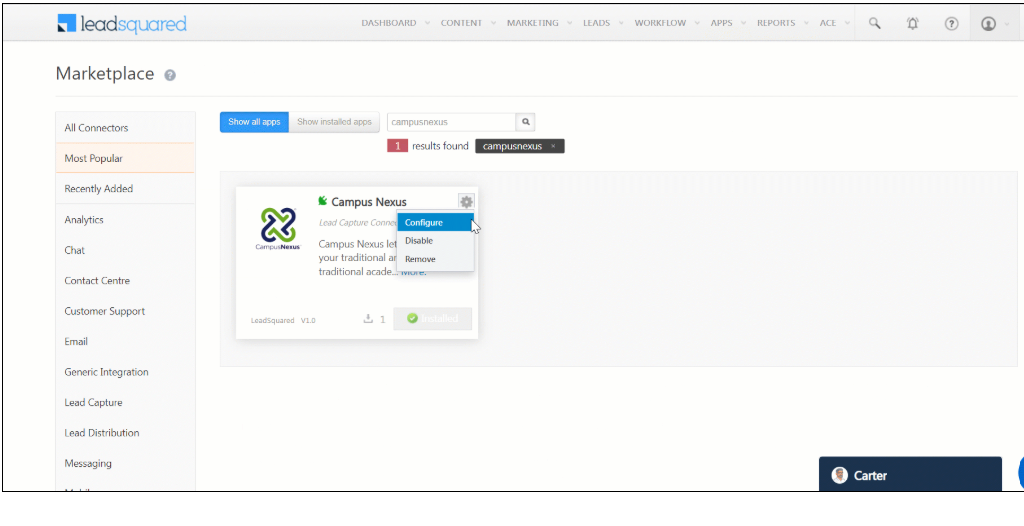
Further reading: Integrate CampusNexus with LeadSquared – Help & Support
LeadSquared Anthology Student integration connects via APIs and supports both real-time and scheduled sync. For institutions that want to get up and running faster and with less IT overhead, it’s a compelling option.
Get a CRM for Anthology Student institutions right right, and you eliminate the double-entry, stale records, and missed-enrollment gaps that plagued the two-silo setup from the start, without waiting to see how the Ellucian and Encoura transitions play out.
Want to see how it works?
Not typically — and it’s worth understanding why before you start planning. Anthology Student exposes data via REST APIs, but those APIs require configuration, authentication setup, and field mapping work before any data moves. What varies significantly is your starting point: institutions already running an iPaaS platform like MuleSoft or Azure Logic Apps can move faster because the middleware layer is already in place. Institutions starting from scratch will need to budget time for platform selection before integration work begins. One exception worth checking: if your CRM vendor has a pre-built Anthology connector, that can meaningfully reduce setup time — ask your CRM vendor directly whether one exists and which Anthology Student versions it supports.
Yes, for some fields. Student profiles and contact details often sync in both directions. Academic data — grades, enrollment status, financial aid — should almost always flow one way, from Anthology Student into the CRM. Letting the CRM overwrite authoritative academic records creates serious data integrity problems.
Keep them as Leads in your CRM and resist the temptation to promote them to Contacts early. The trigger for promotion should be the appearance of a verified Anthology Student ID — that’s your confirmation that the student exists in the system of record and the two profiles can be safely linked. Before that point, any Contact record you create is an orphan: it can’t be matched to Anthology Student data, and you risk ending up with duplicate records when the student does enroll.
One practical step worth taking now: agree on the exact matching logic your integration will use to link CRM Leads to Anthology Student records at the point of admission — student ID, email address, or a combination. Defining this before go-live prevents a backlog of unmatched records that have to be cleaned up manually after the fact.
Design your integration to fail gracefully from day one. Any records that fail to sync should queue for retry rather than drop silently — most iPaaS platforms support this natively. Configure email or Slack alerts for sync failures, so your team knows within minutes, not days. Common failure modes include API rate limit errors (usually fixable by adjusting sync frequency), field validation failures when Anthology Student data doesn’t match your CRM schema (fixable with data transformation rules), and authentication token expiration (fixable with automated token refresh). For production integrations, we recommend a designated on-call contact on both the IT and enrollment operations sides during the first 30 days post-launch.
If anything, it’s a stronger case for it. Anthology’s Chapter 11 restructuring split the company’s SIS and CRM businesses apart entirely — Anthology Student (SIS) went to Ellucian, and Anthology Reach (CRM) went to Encoura, with separate support paths and product roadmaps. An independent Anthology Student CRM integration means your enrollment funnel doesn’t depend on how either company’s transition plays out — LeadSquared owns the CRM layer regardless of who owns the SIS.
For the build phase, yes — either an internal integration engineer or an implementation partner. For ongoing operations, a part-time CRM administrator and IT contact is usually sufficient once the integration is stable.
Enter your details and we'll send you a quick confirmation email to verify your address.
 12 min read 10 min read 10 min read



 5 Best Healthcare CRM to Integrate with Epic EHR
