





EDUCATION
Outgrowing Unifyed Admit? What high-volume admissions teams need in a CRM
Contents

 14 min read


It’s the second week of August. Your inquiry forms have been busy since spring; fall classes start in three weeks, and your admissions team is still working through prospects who asked for information a month ago. Some got an email. A few got a call. Many have already enrolled somewhere else.
If your college runs on Unifyed, you already have a student information system and an admissions module that talk to each other. That’s a real advantage. But once inquiry volume climbs, the question changes from “Do we have a CRM?” to “Can our CRM keep up?”
This guide looks at what a CRM for Unifyed community colleges and regional universities needs to handle at scale, where Unifyed Admit fits, and when it makes sense to add a dedicated enrollment layer on top.
Yes. Unifyed Admit is Unifyed’s recruiting and admissions CRM. It can run on its own or as part of the Unifyed SIS. Its core features include:
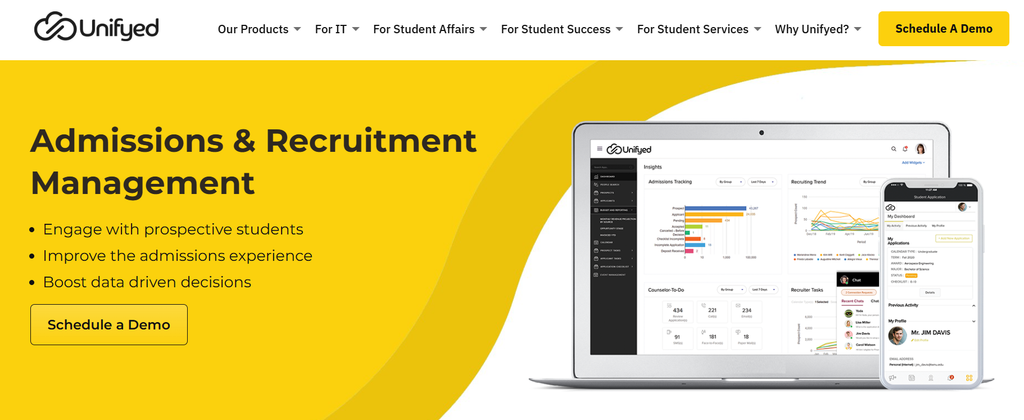
For institutions managing a few hundred applicants a term, that’s often enough. For teams handling thousands of inquiries, the real question is whether Admit can help counselors prioritize leads, follow up fast, and see which campaigns lead to enrollment. That’s usually where the gaps start to show.
Unifyed is a higher education software company backed by ElevenX Capital. Its products are used by colleges and universities in the US and internationally, including community colleges and regional universities.
Here’s how the core pieces fit together:
Unifyed Manage (SIS): This is where the core student record sits. Manage covers course offerings, registration, grades, curriculum, and student accounts. Unifyed also markets its SIS capabilities as part of the larger StudentX suite.
Unifyed Admit (admissions CRM): Admit is the Unifyed SIS enrollment CRM. It handles prospects and applicants. Recruiters can be assigned automatically, while communication plans and checklists help teams manage the steps that happen before enrollment. Admit also offers admissions reporting, an applicant self-service portal, and a direct SIS integration designed to avoid duplicate data entry. SMS is supported, including opt-in controls.
Unifyed StudentX: StudentX brings together SIS and ERP functions, along with a mobile app and campus portal. For students, that means one place to do things like check a schedule, register, pay, talk to an advisor, or see notifications.
Unifyed AI: An AI chatbot for admissions and student services questions.
Put together, these products cover much of what an institution needs to manage applications and maintain student records. Admit also provides APIs for sending and receiving prospect and applicant data, so it can connect to non-Unifyed tools.
The harder part comes before a student reaches the SIS, especially when a team has hundreds or thousands of inquiries to work through.
There’s a difference between keeping an admissions process organized and managing a large volume of prospective students.
At higher volumes, counselors aren’t just tracking applications. They’re deciding who needs a call today, following up with people who haven’t responded, switching between channels, and trying to keep promising prospects from going cold.
Some of that work calls for more than a traditional admissions workflow.
Not every inquiry needs attention at the same time.
Say one prospect opened three emails this week, revisited the financial aid page, and started an application. Another hasn’t engaged in two weeks. The first is probably worth a call today.
Admit gives recruiters information about their prospects. But its public materials don’t describe the continuous, behavior-based scoring a high-volume team may need.
Without it, counselors have more prioritizing to do themselves. And when the queue is long, a prospect who was interested on Tuesday can easily end up getting that call on Friday.
Email and SMS are available within Admit’s communication plans. But prospects don’t always respond the way a communication plan expects.
Take an adult learner researching programs after work. They might ignore an email in the morning, answer a text during lunch, and finally have enough time for a proper phone conversation that evening.
At scale, counselors can’t keep deciding manually which channel to try next for every prospect. It helps when follow-up switches channels based on how each person responds, across email, SMS, calls, and WhatsApp where it fits.
Otherwise, a lot of that coordination lands back on the counselor.
For many admissions teams, phone calls still carry much of the conversation.
But if counselors are calling from personal lines or from a phone system that isn’t connected to the CRM, part of the prospect’s history sits somewhere else.
Maybe the call isn’t logged. Maybe there’s no recording. Maybe another counselor calls the same person two days later and has no idea what was already discussed.
It also leaves managers with less context when they need to coach someone or understand why a prospect stalled.
A campaign generated 300 inquiries. How many of them enrolled?
That’s the number marketing eventually has to answer for. Inquiry volume shows whether a campaign got attention. It doesn’t show whether that attention turned into students.
If source information doesn’t follow the prospect through enrollment, marketing teams have to make budget decisions with only part of the picture. That’s particularly difficult when budgets are already being watched closely.
A counselor with 200 assigned leads isn’t necessarily overloaded. Another counselor with 100 might be.
The difference is in what’s happening inside those lists: calls, overdue tasks, response times, follow-ups, and ultimately conversions.
Admissions directors need enough of that activity in one place to see where work is piling up and where someone may need help. That’s hard to see when the data is spread across systems or never captured.
Adult learners don’t organize their college search around an admissions office’s working hours.
Many are researching programs after work, between shifts, or once their kids are asleep. They may also be comparing several institutions at once.
Then there are rolling admissions, workforce programs, and multiple start dates. Instead of one big fall cycle, teams can have new inquiries coming in throughout the year.
Manual sorting works until volume grows. Then even a good counselor spends too much of the day deciding who to contact instead of contacting them.
LeadSquared doesn’t have to take Unifyed’s place.
The two systems can play different roles. Unifyed can remain the core system for student and applicant records, while LeadSquared handles inquiry management and prospect engagement.
That means deciding which leads need attention, keeping follow-up moving, tracking counselor activity, and connecting marketing to enrollment.
Disclosure: This guide is published by an enrollment technology provider.
| Job to be done | Unifyed (Manage + Admit) | LeadSquared |
| Managing student records, registration, and grades | Yes, system of record* | Integrates and syncs with SIS and other systems |
| Processing and tracking applications | Yes* | Yes, applicant portal, workflows, document collection, and application tracking |
| Scoring leads based on behavior | Prospect-potential insights; continuous behavior-based scoring not detailed in public materials* | Yes, configurable Lead Score and Engagement Score based on prospect activity |
| Engaging prospects by email, SMS, voice, and WhatsApp | Email, SMS, push notifications* | Yes, coordinated email, SMS, and voice engagement; WhatsApp via add-on |
| Calling with logging and recording | Not documented as a core feature* | Yes, telephony integrations with calling, logging, and recording |
| Tracking counselor productivity | Filterable analytics dashboard* | Yes, user productivity, funnel, and customizable performance reporting |
| Attributing enrollments to sources and campaigns | Not detailed in public materials* | Yes, source and campaign tracking through the enrollment funnel |
*Based on publicly available Unifyed product information as of October 2026.
Here’s what that looks like day to day:
Lead scoring that tells counselors who to call first. A counselor shouldn’t have to treat every new name in the queue as equally urgent. LeadSquared’s configurable Lead Score and Engagement Score update as prospects open emails, visit your website, and talk to your team, so engaged prospects move up the list.
Follow-up that moves across channels. A prospect doesn’t answer an email, so the next step might be an SMS. They return to the website a few days later, and that activity could trigger a counselor task. The point is to avoid making counselors manually piece together every next step. WhatsApp campaigns can also be added through the WhatsApp Business API add-on. Invorto, LeadSquared’s Voice AI add-on, can cover first-touch and after-hours calling.
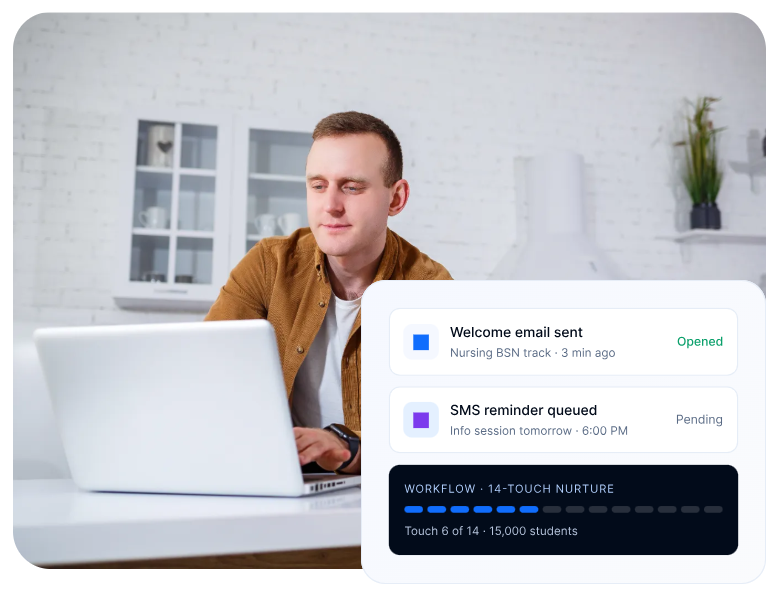
Calls that live in the CRM. Telephony integrations bring calls into the prospect record instead of leaving that history in a separate phone system. Conversations can be logged and recorded, giving counselors context before the next call and giving managers real conversations to use for coaching.
Dashboards for counselor productivity. Calls made, overdue tasks, response times, and conversion performance give admissions directors a better picture of what’s happening behind the final enrollment number. Those views can also be broken down by counselors or programs. For institutions that need appointment booking, FloStack is a LeadSquared add-on that supports self-scheduling for things like campus visits and advising appointments.
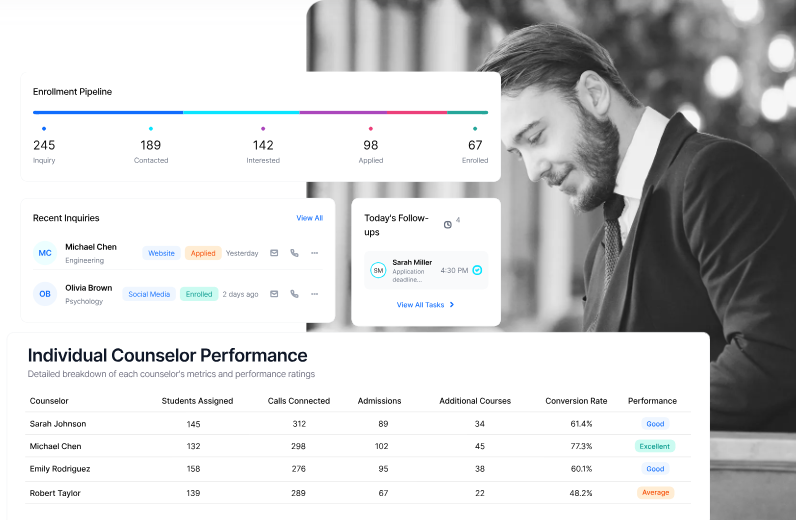
Attribution that reaches enrollment. Knowing that paid search produced a lead is useful. Knowing whether that lead eventually enrolled is much more useful. LeadSquared carries source and campaign information through the enrollment funnel so teams can look beyond form fills when assessing marketing performance.
Keep Unifyed as your system of record. Institutions don’t need to move their core student records out of Unifyed to use LeadSquared for enrollment engagement. The integration setup depends on your existing systems and workflows.
If you want a broader view of these capabilities, see how LeadSquared works as a higher education CRM or explore our admission software for application management.
Many community college students aren’t 18-year-olds coming straight from high school.
According to Community College Daily’s breakdown of AACC’s Fast Facts 2026, the average student is 27, and roughly a third are between 22 and 39. Community colleges also awarded more than 90,000 additional credentials in 2023–24 compared with the previous year.
That student profile changes the admissions workload.
Someone balancing a job, children, and bills may not start researching programs until 10 p.m. They might send inquiries to three schools that night and go with whichever one replies first.
Community colleges are also dealing with workforce programs, rolling admissions, and different start dates. There isn’t always a single admissions season to plan around.
LeadSquared can help organize that front end of the process while Unifyed remains the core system. New inquiries can be assigned and scored, giving counselors a better idea of where to start. Invorto Voice AI, which is an add-on, can also support after-hours calls.
The goal is a shorter, better-ordered list for counselors, not another inbox.
Adding a new program is one thing. Adding the admissions capacity to support it is another.
Regional universities can find themselves recruiting for graduate programs, certificates, online degrees, and other offerings at the same time, each with a different audience and sometimes a different enrollment calendar.
Reporting gets complicated quickly. One program may be generating plenty of inquiries but few enrollments. Another may have fewer leads but convert them at a much better rate. That’s where regional university enrollment automation on Unifyed helps.
LeadSquared can segment prospects by program and route them to the appropriate counselors while keeping that activity visible in the larger funnel. Teams can also track acquisition and enrollment performance at the program level.
Program teams get the details they need without forcing leadership to stitch together a separate report for every single offering.
Email isn’t the default communication channel everywhere.
For institutions recruiting internationally, students and parents in some markets may be far more likely to answer a WhatsApp message than open another admissions email.
That matters because channel preference can look like lack of interest when it isn’t. A prospect who hasn’t opened three emails may still reply to a WhatsApp message within minutes.
LeadSquared supports WhatsApp campaigns and two-way conversations through its WhatsApp Business API add-on. Those conversations sit on the same record as the prospect’s other activity, so counselors don’t have to track them separately.
The same general approach isn’t limited to Unifyed. If your institution runs another SIS, we’ve also covered how LeadSquared can work alongside Empower SIS and Jenzabar SONIS.
Unifyed gives your institution a solid foundation: a modern SIS, an admissions module that feeds it cleanly, and a student app that keeps learners connected. None of that needs to change.
What changes is how you handle the surge. When thousands of prospects inquire across multiple start dates, counselors need to know who to call first, reach people on the channels they use, and see which campaigns actually produce students. The right CRM for Unifyed community colleges works alongside your SIS so more of the inquiries flowing toward it turn into enrollments.
Unifyed stays your source of truth. LeadSquared adds the enrollment layer on top: lead scoring, multichannel engagement, call logging, counselor dashboards, and attribution.
Ready to see it in action?
Unifyed Admit covers the core admissions workflow, from prospect management to application tracking. Questions about Unifyed Admit limitations usually come down to scale. High-volume teams often want more depth in behavior-based lead scoring, coordinated engagement across voice and WhatsApp, call logging and recording, counselor productivity reporting, and attribution from first touch to enrollment. Smaller teams may never feel these gaps. Teams handling thousands of inquiries per cycle usually do.
The best fit is one that works with your Unifyed SIS instead of replacing it. Look for a community college CRM that Unifyed can sync with. It should also offer instant inquiry response, behavior-based lead scoring, multichannel follow-up, and reporting built for adult learners and rolling start dates. LeadSquared is built for high-volume inquiry management.
LeadSquared can connect with Unifyed through an integration scoped to your institution. Unifyed publishes APIs for sending and receiving prospect and applicant data, which can support passing qualified applicants into Unifyed and returning status updates to LeadSquared. Your records stay in Unifyed, and your enrollment team works in LeadSquared. The exact setup depends on your Unifyed modules and workflows.
It can be either. Some institutions use LeadSquared as a full Unifyed Admit alternative for recruitment and admissions. Others keep Admit for application processing and set up a Unifyed Admit CRM integration so LeadSquared handles inquiry management, scoring, and outreach. The right choice depends on your volume and how your team is structured.
No. Unifyed stays your system of record for registration, grades, and student accounts. LeadSquared manages the enrollment funnel and syncs the data your teams need.
Yes. With the WhatsApp Business API add-on, LeadSquared supports WhatsApp campaigns and two-way conversations alongside email, SMS, and voice, all tracked on a single student record.
Enter your details and we'll send you a quick confirmation email to verify your address.
 11 min read 11 min read 11 min read



 Student First SIS + LeadSquared: Build the complete modern enrollment stack
