





- Home

- Learn
- Healthcare
- AdvancedMD integration: 5 best healthcare CRMs for no-show reduction
HEALTHCARE
AdvancedMD integration: 5 best healthcare CRMs for no-show reduction
Contents

 18 min read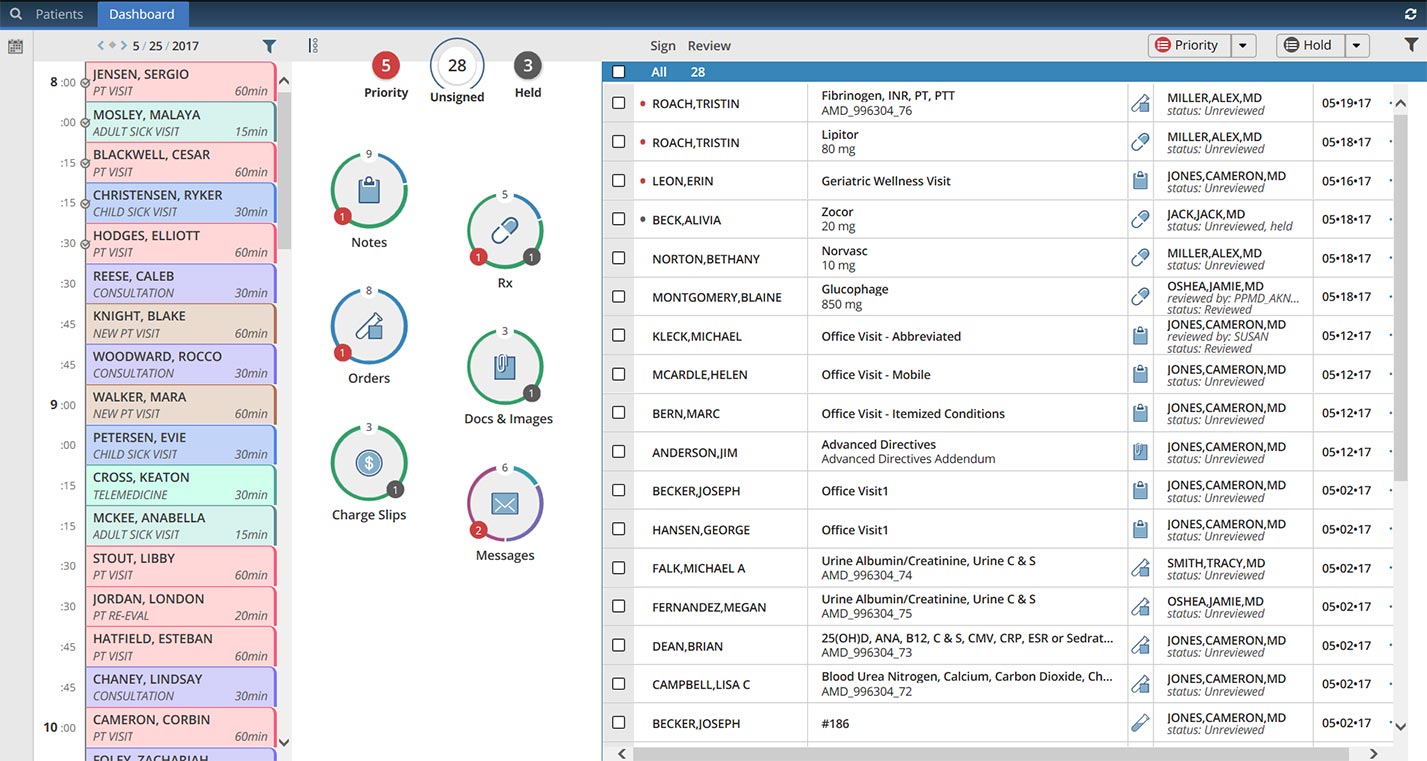


Modern healthcare practices rely heavily on digital systems to keep both clinical care and administrative work organized.
Each patient visit generates a range of tasks for the care team. Staff must schedule appointments, maintain accurate medical records, document consultations, and so on and so forth. Without the right software in place, coordinating all these activities can easily become a mess.
This is why many practices use healthcare platforms such as AdvancedMD. AdvancedMD is a cloud-based system that combines electronic health records (EHRs) with practice management tools.
It allows providers to store patient medical histories, document visits, manage schedules, and handle billing processes within its platform. By centralizing these core functions, AdvancedMD helps practices run their day-to-day operations more efficiently.
However, managing clinical data and appointments is only one part of the patient experience. Healthcare organizations also need effective ways to communicate with patients outside the exam room. Appointment reminders, follow-ups, and ongoing care communication all play an important role in maintaining strong patient relationships.
This is where healthcare CRM platforms become valuable. A CRM helps practices organize patient interactions, automate communication, and track engagement across the entire patient journey.
In this article, we will explore the 5 best healthcare CRMs that your practice can integrate with AdvancedMD to improve patient engagement, cut down patient no-shows, and more.

Many healthcare practices already rely on AdvancedMD to manage clinical records, appointments, and billing. However, even with a strong EHR system in place, clinics often find that managing patient communication across multiple channels can still be challenging.
This is because EHR systems and CRM systems are designed for different purposes. When they work together, practices can manage both clinical care and patient relationships more effectively.
An Electronic Health Record (EHR) such as AdvancedMD acts as the clinical backbone of a healthcare practice. It stores and organizes important medical information such as patient histories, diagnoses, prescriptions, lab results, and encounter notes. Many EHR platforms also include operational tools for scheduling appointments and handling billing workflows.
A Customer Relationship Management (CRM) for healthcare system focuses on a different aspect of healthcare operations. Instead of managing clinical data, a CRM helps practices organize communication and engagement with patients. This includes tracking communication history, automating messages, managing follow-ups, and monitoring how patients interact with the practice over time.
In simple terms, the EHR manages the medical record, while the CRM manages the patient relationship.
When a CRM is integrated with AdvancedMD, the two systems can share important information automatically.
For example, appointment data from AdvancedMD can trigger automated reminders (to be sent to patients) through the CRM. This helps ensure patients receive timely updates, while also helping cut down on patient no-shows.
Integration also allows patient contact details and communication preferences to stay synchronized between systems. Staff can see a complete history of patient interactions, such as calls, emails, and messages, without switching between multiple tools.
Another benefit is improved coordination between teams. Front-office staff who manage scheduling and outreach can work from the same information as clinical teams using the EHR, reducing data silos, and improving operational efficiency.
Most CRM integrations connect to AdvancedMD through secure APIs or certified integration partners. AdvancedMD provides developer APIs that allow third-party applications to exchange data with its EHR and practice management platform. Healthcare systems typically use HL7 messaging, or FHIR standards to securely share data. This ensures that patient information, appointments, and schedule changes in AdvancedMD automatically synchronize with the CRM. Without a reliable integration, automation processes may break or behave unpredictably.
Through these connections, systems can securely synchronize information such as patient demographics, appointment schedules, and engagement triggers in real time.
Because healthcare data is sensitive, these integrations are designed to follow strict security standards and HIPAA compliance requirements to protect patient information.
The first requirement is the ability to integrate reliably with AdvancedMD.
Healthcare systems typically use APIs, HL7 messaging, or FHIR standards to securely share data. This ensures that patient information, appointments, and schedule changes in AdvancedMD automatically synchronize with the CRM. Without a reliable integration, automation processes may break or behave unpredictably.
Some CRM platforms provide native connectors that are already built to work with AdvancedMD or similar EHR systems. These integrations are typically faster to set up because much of the technical configuration is already handled by the vendor.
Other CRMs integrate through APIs (Application Programming Interfaces). APIs allow different software systems to exchange data securely and automatically. API-based integrations often provide more flexibility, especially if practices want to build customized workflows.
It is also important to check whether the integration supports bidirectional data flow. This means updates made in either system, such as a change to a patient’s contact details or appointment schedule, are reflected in both the CRM and AdvancedMD.
One of the main reasons practices adopt a healthcare CRM is to improve patient communication.
A strong CRM should support multi-channel messaging, including SMS, email, and sometimes voice calls or chat. This allows clinics to reach patients through the communication channel they prefer.
Many CRMs also allow trigger-based communication, where messages are sent automatically based on events such as appointment bookings, cancellations, or completed visits.
Automation helps reduce manual administrative work.
Healthcare CRMs often allow practices to create workflows for tasks such as sending pre-visit instructions, post-visit surveys, and preventive care reminders. These automated processes help ensure consistent communication while saving time for staff.
Some healthcare CRMs include tools that make it easier for patients to interact with the clinic and vice versa. These may include self-scheduling links, patient portal messaging, and a two-way chat mechanism. Features like these can reduce phone calls and improve convenience for patients.
Because healthcare data is sensitive, the CRM must support HIPAA compliance. This typically includes encryption, role-based access controls, and detailed audit logs that track who accessed patient information.
Reporting tools help practices measure how well their communication and engagement efforts are working. For example, a CRM may track appointment no-show rates, message delivery performance, and patient response patterns.
Finally, the CRM should be easy for both front-desk staff and care teams to use. If the interface is complicated, staff may avoid using the system, which reduces the value of the integration.
A well-designed CRM should simplify everyday workflows rather than add extra complexity.
| CRM Platform | Primary Focus | Best For | Integration Type |
| LeadSquared | Patient lifecycle automation and engagement workflows | Practices automating patient inquiries and reminders | Prebuilt connector / marketplace integration |
| Apollo | Outreach and relationship management CRM | Managing referral pipelines and engagement workflows | Custom / API Integration |
| OhMD | Secure patient messaging and communication | Clinics wanting two-way patient texting and reminders | Marketplace Integration |
| Salesforce Health Cloud | Enterprise healthcare CRM | Large organizations needing advanced analytics and care coordination | Custom / API Integration |
| CERTIFY Health | Digital patient intake and front-office automation | Practices digitizing patient registration and check-ins | Custom / API Integration |
LeadSquared is a fully HIPAA-compliant healthcare CRM designed to help medical practices of all sizes manage patient inquiries, appointments, and engagement workflows outside the electronic health record. The platform helps clinics organize patient communication and intake processes across multiple channels.
LeadSquared integrates with EHR systems like AdvancedMD through APIs and marketplace connectors. This allows patient and appointment data to sync automatically, so communication workflows can be triggered based on real clinical events.
• Fully HIPAA-compliant CRM designed specifically for healthcare workflows.
• Captures patient inquiries from multiple sources such as websites, ads, calls, and referrals.
• Supports multichannel communication including SMS, email, WhatsApp, and phone calls.
• Healthcare workflow automation for patient intake, reminders, follow-ups, and campaigns.
• Integration with EHR systems like AdvancedMD for synchronized patient and appointment data.
• Analytics and reporting to track patient engagement and operational performance.
• Implementation and workflow setup may require onboarding time depending on the organization’s processes.
• Some advanced integrations may require custom configuration or API setup.
Pro – $60 per user/month
Super – $100 per user/month
Enterprise – Custom pricing based on organization size, integrations, and support needs.
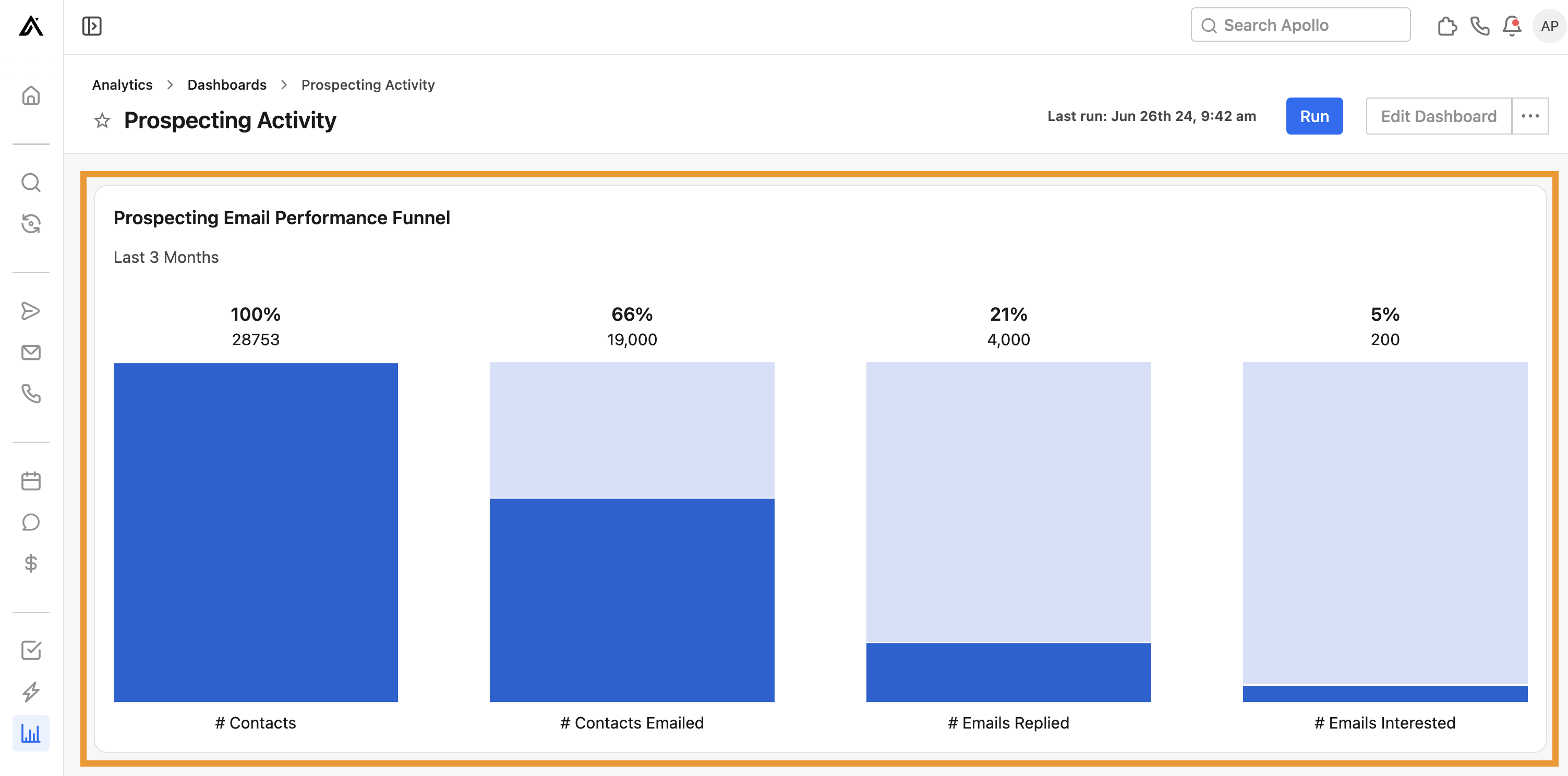
Apollo is a CRM and engagement platform designed to help organizations track contacts, manage outreach, and automate follow-ups. In healthcare environments, it can be used to organize patient inquiries, referral relationships, and communication workflows outside the clinical record.
Apollo CRM can integrate with healthcare platforms such as AdvancedMD through the system’s open API and interoperability framework.
• Helps organize contacts, referrals, and outreach in a centralized CRM system.
• Supports automated email sequences and follow-up reminders for engagement workflows.
• Provides analytics on outreach activity and communication performance.
• Supports customizable workflow automation that can trigger outreach tasks, reminders, or follow-ups based on patient or referral activity.
• Useful for managing relationship pipelines such as patient inquiries or referral partners.
• Not built specifically for healthcare workflows, so organizations will need to configure security and compliance settings carefully when handling sensitive patient data.
• Advanced integrations or automation features may require configuration or technical setup.
Pricing varies depending on plan and features. Custom pricing is typically provided based on team size and usage.
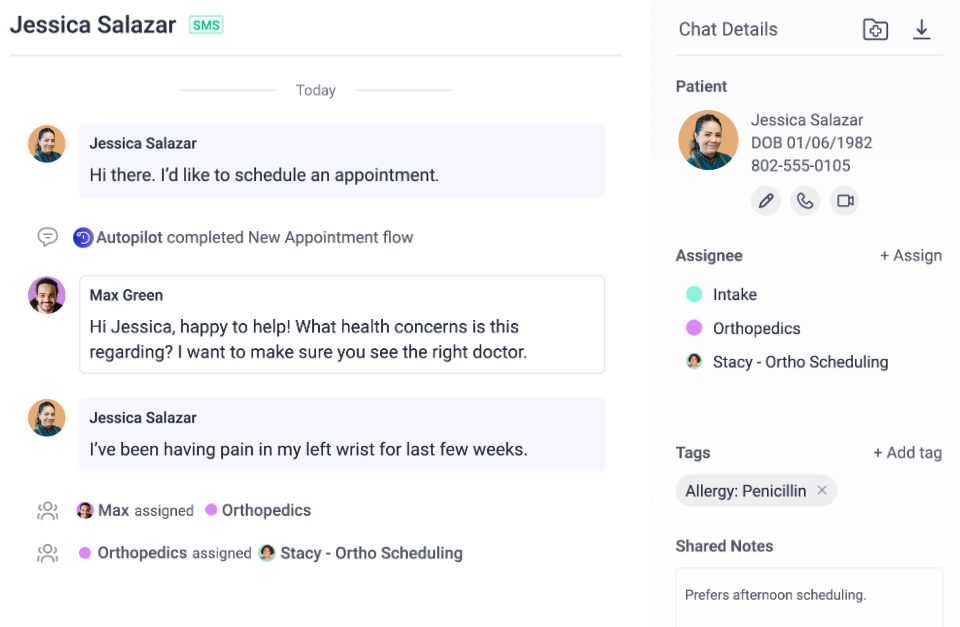
OhMD is a HIPAA-compliant patient communication platform designed to help healthcare practices connect with patients through secure text messaging and digital communication tools.
Instead of relying heavily on phone calls, practices can use OhMD to send appointment reminders, answer patient questions, share forms, and manage follow-ups through SMS.
The platform integrates with EHR systems like AdvancedMD so patient information can sync automatically, and conversations can be documented in the patient record.
• HIPAA-compliant two-way SMS messaging that allows staff and patients to communicate securely.
• Integrates with AdvancedMD to sync patient demographics and document conversations in the EHR.
• Supports broadcast messaging and automated workflows for reminders, follow-ups, and patient outreach.
• Enables additional tools such as video visits, digital forms, and website chat for patient engagement.
• Helps reduce front-desk workload by allowing clinics to answer patient questions and manage appointment confirmations through text messages instead of phone calls.
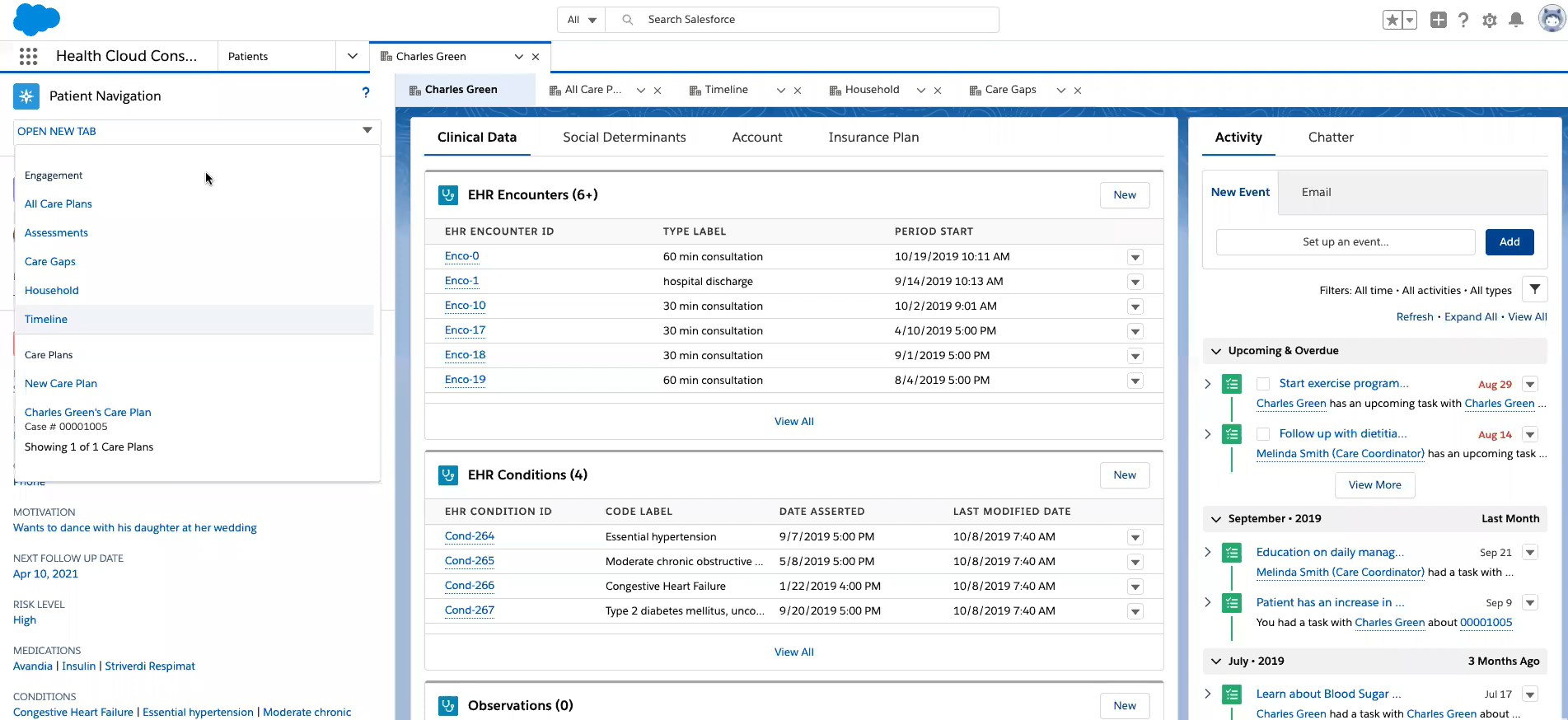
Salesforce Health Cloud is an enterprise-grade healthcare CRM built on the Salesforce platform. It is designed to help healthcare organizations manage patient relationships, coordinate care, and improve communication across care teams. The platform creates a unified patient profile that combines clinical data from EHR systems with communication history, referrals, and engagement activity. Health Cloud integrates with electronic health records through APIs and interoperability standards such as FHIR, allowing patient information to flow between systems. This allows healthcare organizations to use their EHR for clinical records while using the CRM to manage patient engagement, care coordination, and operational workflows.
• Provides a 360-degree patient view, combining clinical data, demographics, and communication history in one profile.
• Supports care coordination and care plans, allowing care teams to assign tasks, track patient progress, and manage follow-ups.
• Includes analytics and reporting tools that help organizations analyze patient engagement, population health trends, and operational performance.
• Designed with HIPAA-compliant infrastructure and healthcare-specific data models, helping organizations manage sensitive patient data securely.
• Highly customizable platform that can support complex healthcare workflows across large provider networks.
• Implementation can be complex and often requires technical expertise or external implementation partners.
• Pricing is significantly higher than many standalone healthcare CRMs, making it more suitable for larger healthcare organizations.
Enterprise Edition – approximately $350 per user/month (billed annually)
Unlimited Edition – approximately $525 per user/month (billed annually)
Agentforce-enabled editions – around $750 per user/month depending on features and add-ons.

CERTIFY Health is a patient engagement and digital intake platform designed to streamline front-office workflows in healthcare practices. It helps clinics automate processes such as patient registration, appointment scheduling, insurance verification, and payment collection. When integrated with systems like AdvancedMD, patient data and appointment information can sync automatically between platforms, reducing the need for manual data entry. The platform allows patients to complete forms, verify insurance, and check in digitally before arriving at the clinic. By digitizing these administrative steps, CERTIFY Health helps practices reduce wait times, minimize billing errors, and improve the overall patient experience.
• Automates digital patient intake and check-in workflows, allowing patients to complete forms and verify details before arriving at the clinic.
• Integrates with AdvancedMD to sync patient demographics, scheduling, and administrative data, reducing duplicate data entry.
• Provides real-time insurance verification, helping practices prevent claim denials and billing errors.
• Supports automated appointment confirmations and reminders, which can help reduce no-shows and keep schedules full.
• Includes digital payment tools and billing automation to improve revenue collection and streamline front-office workflows.
• Offers secure patient identity verification and compliance with healthcare standards such as HIPAA and HITRUST.
• Primarily focused on patient intake and administrative automation, rather than full CRM lifecycle management like marketing campaigns or advanced segmentation.
• Pricing and implementation details are usually customized based on practice size and deployment scope, so costs are not publicly listed.
Custom pricing based on:
Integrating a healthcare CRM with an EHR like AdvancedMD can significantly improve patient communication and workflow efficiency. However, successful integration requires careful planning and ongoing monitoring to ensure that the systems exchange data reliably and securely.
Before connecting the CRM and EHR, practices should identify exactly what they want the integration to achieve. For example, some organizations may want to automate appointment reminders, while others may focus on tracking patient inquiries or referrals. Defining these goals early helps determine which data needs to be synced between systems and how the workflow should function.
Not all data needs to flow in both directions. Many integrations use one-way sync for certain information such as patient demographics, while other data like appointment status or communication updates may require bidirectional syncing, so both systems stay aligned. Establishing clear data rules helps prevent duplicate or inconsistent records.
Instead of rolling out the integration across the entire organization immediately, it is often better to begin with a small group of users or one department. A pilot rollout helps identify workflow issues, data mapping problems, or training gaps before the system is deployed more broadly.
Once the integration is live, practices should regularly review system performance and data accuracy. Healthcare organizations must also maintain strong security measures such as encryption, role-based access controls, and audit monitoring to protect patient information and remain compliant with regulations like HIPAA.
Choosing the right CRM to integrate with AdvancedMD ultimately depends on what your practice wants to improve in its patient engagement workflows.
Some organizations prioritize large-scale care coordination and advanced analytics. In those cases, enterprise platforms like Salesforce Health Cloud may be a strong fit. Others may focus on simplifying patient communication, where tools like OhMD can help streamline messaging and reminders. Platforms such as CERTIFY Health can help digitize patient intake and front-office processes, while solutions like Apollo support outreach and relationship management workflows.
The key is selecting a platform that complements your existing AdvancedMD setup and fits naturally into your team’s daily operations.
For practices looking to automate patient inquiries, reminders, and follow-ups in a structured way, LeadSquared offers a healthcare-focused CRM designed to manage the entire patient engagement lifecycle alongside AdvancedMD.
If you’d like to know how LeadSquared’s healthcare CRM can help you cut down on patient no-shows by integrating with AdvancedMd, feel free to book a quick demo to see the tool in action.
Yes. A healthcare CRM integration with AdvancedMD can help practices track referral sources and manage relationships with other providers more effectively. Instead of keeping referral notes in separate systems or spreadsheets, clinics can organize referral activity within the CRM and connect it with appointment data from AdvancedMD. Some platforms, including LeadSquared’s healthcare CRM, allow teams to track referral pipelines, assign follow-up tasks, and monitor how referred patients move through the care journey.
Yes. A healthcare CRM integration with AdvancedMD can help practices track referral sources and manage relationships with other providers more effectively. Instead of keeping referral notes in separate systems or spreadsheets, clinics can organize referral activity within the CRM and connect it with appointment data from AdvancedMD. Some platforms, including LeadSquared’s healthcare CRM, allow teams to track referral pipelines, assign follow-up tasks, and monitor how referred patients move through the care journey.
In most cases, patients do not need to install a separate application. A healthcare CRM integration with AdvancedMD typically communicates with patients through familiar channels such as SMS, email, or web links. For example, systems like LeadSquared’s healthcare CRM can send reminders, instructions, or intake forms through text or email, allowing patients to interact with the clinic without downloading additional software.
Yes. Many healthcare CRM integrations with AdvancedMD allow practices to send digital forms that patients can complete before arriving for their appointment. This can include registration details, consent forms, or health questionnaires. When the systems are connected properly, the collected information can be synced with AdvancedMD, helping clinics reduce paperwork and speed up the check-in process. Platforms like LeadSquared’s healthcare CRM support automated intake workflows as part of their patient engagement features.
A healthcare CRM integration with AdvancedMD can automate many routine communication tasks that would otherwise require manual work from front-desk staff. For example, appointment reminders, follow-up messages, and preventive care campaigns can be sent automatically based on scheduling data from the EHR. Tools such as LeadSquared’s healthcare CRM allow practices to manage large volumes of patient communication through structured workflows and automated outreach.
Initial setup may involve configuration and integration work, especially if APIs or custom workflows are involved. However, once the healthcare CRM integration with AdvancedMD is in place, most platforms provide user-friendly dashboards for managing communication and engagement workflows. Systems such as LeadSquared’s healthcare CRM are designed so front-office teams can manage reminders, campaigns, and patient follow-ups without requiring advanced technical skills.
How does a healthcare CRM integration with AdvancedMD help clinics manage high patient volumes?
Do healthcare CRM integrations with AdvancedMD require technical expertise to maintain?
 15 min read 17 min read 15 min read


 5 best healthcare CRM to integrate with DrChrono to streamline lab workflo...