





- Home

- Learn
- Healthcare
- 5 Best Healthcare CRM to Integrate with Epic EHR
HEALTHCARE
5 Best Healthcare CRM to Integrate with Epic EHR
Contents

 20 min read


Inside most hospitals today, nearly every clinical decision, prescription, and lab result flows through a single system: the electronic health record, or EHR.
It is the digital foundation of modern healthcare, organizing everything from medical histories to care plans. For many hospitals and large health systems in the United States, that system is Epic.
But Epic is more than an internal record-keeping tool. Through its patient portal, MyChart, patients can log in to schedule appointments, message their doctors, and more. This shift toward self-service access is part of a broader strategy often called the digital front door, where healthcare begins not at the hospital desk, but on a screen.
As expectations rise, health systems are realizing that managing medical data is only part of the equation. They also need better ways to communicate, personalize patient outreach, and build lasting patient relationships. That is where healthcare customer relationship management, or CRM, systems come in.
Bringing healthcare CRM together with Epic can create powerful benefits. In this article, we break down what they are and explore the best healthcare CRM systems that can integrate with Epic EHR.
To understand why integration matters, it helps to first separate the roles of each system.
An electronic health record, such as Epic, is designed to document clinical care. It stores medical histories, diagnoses, prescriptions, lab results, and physician notes.
A healthcare CRM, by contrast, focuses on communication and relationship management. It tracks outreach campaigns, appointment reminders, patient preferences, engagement history, and more.
When these two systems operate separately, information is fragmented. When connected, they give organizations a 360-degree view of the patient. This means staff can see not only a patient’s clinical history, but also their interaction history, the services they are eligible for, and how they prefer to be contacted. This fuller picture helps support more informed decisions and better experiences.
Integrating Epic EHR with a healthcare CRM helps organizations reach the right patients efficiently. For example, if the EHR shows that a group of patients is due for annual wellness visits, the CRM can automatically trigger personalized reminders. If a new cardiology service launches, marketing teams can identify patients who may benefit based on medical history. This targeted approach improves appointment bookings and strengthens long-term relationships.
Without integration, staff often rely on manual phone calls to confirm appointments or follow up on missed visits. When CRM and EHR systems are connected, reminders for appointments, screenings, or recalls can be triggered automatically. Patients receive messages by text, email, or through portals such as MyChart. This reduces no-shows and lowers the burden on call centers.
Integration also makes it easier to measure results. Organizations can track whether a campaign led to scheduled appointments or completed procedures. At the same time, shared information across departments improves coordination, especially when patients move between primary care and specialty services.
Healthcare systems exchange data using standards such as HL7 and FHIR. HL7 is an older messaging format often used for batch updates, meaning information is transferred at scheduled intervals. FHIR is a newer, web-based standard that supports real-time data sharing through secure APIs. Real-time integration is helpful for immediate appointment triggers, while batch updates may be sufficient for reporting.
Because this process involves protected health information, integrations must follow HIPAA rules. That includes encryption, role-based access controls, and detailed audit logs to safeguard patient privacy.
When evaluating a healthcare CRM to integrate with an EHR such as Epic, it helps to think in terms of integration strength, engagement capability, security, and measurable outcomes.
Some CRM vendors offer pre-built integrations specifically designed for Epic. These are often listed in Epic’s App Orchard marketplace and are typically faster to implement with fewer surprises. This option is usually best for organizations that want lower technical risk and quicker deployment.
API-based integration, often using FHIR standards, provides more flexibility. It allows organizations to customize exactly what data flows between systems. However, it may require more internal IT involvement. This option suits organizations with strong technical teams and complex workflow needs.
FHIR is the modern standard for securely exchanging healthcare data over web-based connections. A CRM that supports FHIR can pull structured data such as appointments, diagnoses, and demographics in a standardized way. This improves compatibility and future-proofs the integration.
Real-time integration updates information instantly. If a patient cancels an appointment, the CRM knows immediately and can adjust messaging. Batch integration updates data on a schedule, such as nightly. Real-time is better for appointment reminders and urgent outreach, while batch may be sufficient for reporting or marketing analytics.
The CRM must accurately match patient records from Epic without creating duplicates. Strong identity resolution tools prevent sending the wrong message to the wrong person and ensure consistent communication.
A strong healthcare CRM should support journey orchestration, which means creating automated communication paths triggered by patient actions or clinical events. For example, a patient due for a screening can automatically receive reminders, educational content, and follow-up messages.
The segmentation feature offered by healthcare CRM allows organizations to group patients based on age, conditions, or visit history, ensuring your communication efforts are tailored rather than generic.
Campaign automation reduces manual work by automatically sending outreach once rules are defined. Multi-channel capability ensures messages can be delivered through SMS, email, phone outreach, or patient portals such as MyChart.
Look for portal-triggered messaging, automated appointment reminders, and self-scheduling links that allow patients to book visits directly. Feedback collection tools such as post-visit surveys help organizations measure satisfaction and identify service gaps.
The CRM must comply with HIPAA regulations and ideally maintain SOC 2 certification, demonstrating strong security controls. Audit logs and role-based access controls in the healthcare CRM ensure patient data is only accessed by authorized staff.
Finally, strong analytics capabilities should include campaign ROI tracking, referral source attribution, and population health dashboards. These tools help organizations measure whether outreach efforts are improving access, engagement, and care outcomes.
| Healthcare CRM | Pros | Average Rating | Pricing |
|---|---|---|---|
| LeadSquared | • Designed for healthcare workflows like patient intake, appointment coordination, and follow-ups • Multi-channel patient communication via SMS, email, telephony, and campaigns • Strong workflow automation for reminders, follow-ups, and lifecycle engagement | 4.5 / 5 (G2 & Capterra combined average) | • Pro – $60 per user/month • Super – $100 per user/month • Enterprise – Custom |
| Salesforce Health Cloud | • Unified patient view combining engagement and clinical information • Highly customizable workflows for large healthcare organizations • Large ecosystem of integrations through Salesforce AppExchange | 4.3 / 5 (G2 & Gartner Peer Insights average) | • Enterprise – $350 per user/month • Unlimited – $525 per user/month • Agentforce editions – $750 per user/month |
| Luma Health | • Automated appointment reminders and confirmations • Digital intake and pre-visit forms that reduce paperwork • Two-way messaging with patients via SMS, email, and secure channels | 4.6 / 5 (G2 average) | • Custom pricing |
| CipherHealth | • Automated outreach for pre-visit, post-discharge, and ongoing engagement • Patient rounding and feedback tools to detect care gaps • Analytics dashboards to track engagement trends | 4.7 / 5 (G2 average) | • Custom pricing |
| Actium Health | • Automates high-volume patient communication across voice, SMS, email, and chat • Conversational AI and workflow automation reduce administrative workload • Predictive insights help identify patients needing outreach | 4.4 / 5 (industry review averages) | • Custom pricing |
LeadSquared is a HIPAA-compliant healthcare CRM that helps care teams manage patient intake, engagement, and follow-up workflows alongside EHR systems such as Epic.
It centralizes patient requests from multiple channels — including phone calls, web forms, ads, and portal activity — into a single queue for easy tracking. Teams can assign owners, log interactions, and trigger follow-up actions through defined workflow rules, ensuring a consistent approach to handling operations across the organization.
By integrating with Epic via APIs and connector frameworks, LeadSquared allows appointment and patient data to move seamlessly into CRM-driven workflows.
LeadSquared connects with Epic through APIs and configurable integration frameworks. This allows demographic data, appointment details, and activity updates to sync between systems. Communication workflows in LeadSquared can be triggered by events recorded in Epic, helping teams act on real-time clinical and scheduling data.
Healthcare organizations of all sizes that want an automation-driven CRM to manage patient acquisition, intake, and engagement while staying connected to Epic.
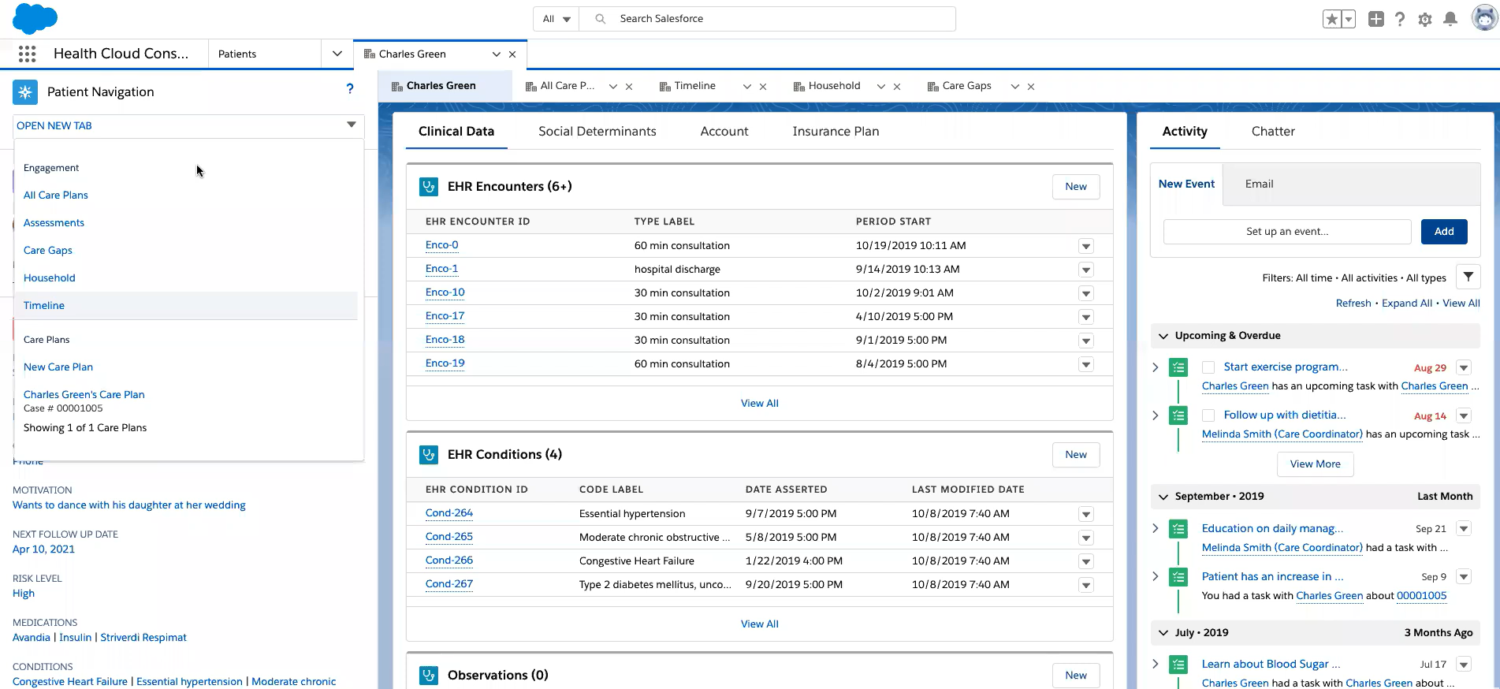
Salesforce Health Cloud is a healthcare CRM built on the broader Salesforce platform with tools that help healthcare teams coordinate patient relationships and engagement. Organizations use it to structure workflows, personalize patient communication, and measure the impact of engagement efforts across departments. Because it scales with add‑ons and automation tools, it suits both program‑level and enterprise‑wide CRM needs.
Health Cloud can integrate with Epic through FHIR‑based APIs and middleware solutions. Integration may be configured directly via Epic’s App Orchard interfaces or through interoperability platforms like Redox or Mulesoft, depending on organizational needs.
Mid‑sized to large healthcare organizations, health systems, and multi‑site practices that need deep care coordination, complex workflow automation, and enterprise‑grade customization with EHR integration.
O
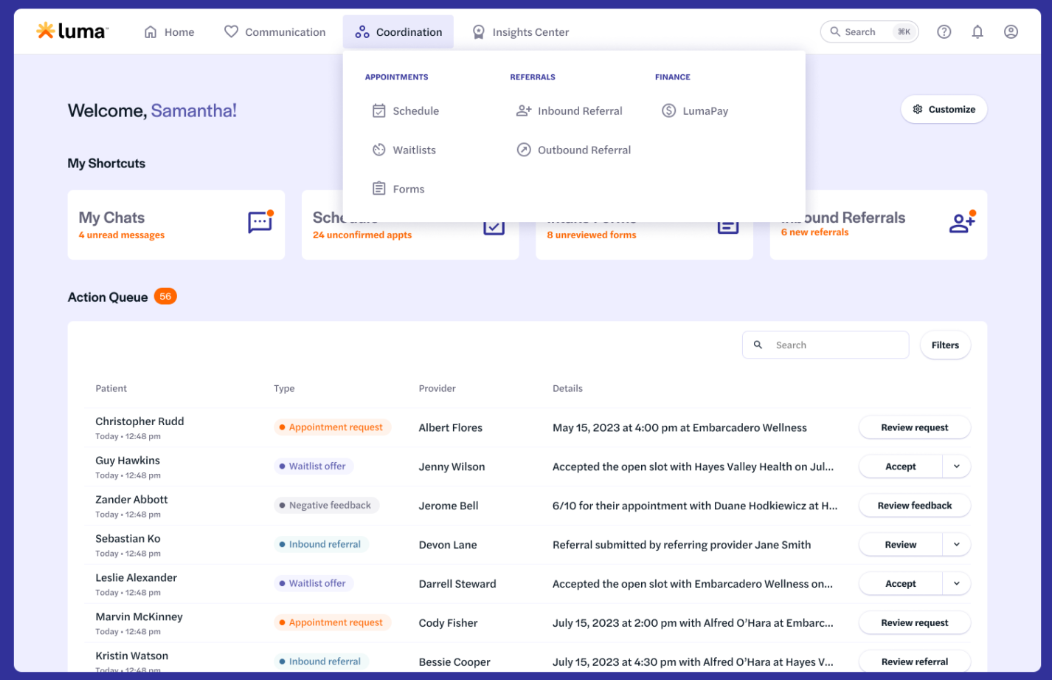
Luma Health is a patient engagement and workflow automation platform that works alongside EHR systems such as Epic to keep patient communication organized and consistent. The platform helps practices send appointment reminders, manage follow‑up messages, deploy digital intake and pre‑visit forms, and gather patient feedback. Luma Health supports communication across SMS, email, and secure messaging, and is built to improve patient experience while reducing administrative burden.
Luma Health integrates with Epic through standard interfaces and APIs, allowing the platform to access appointment schedules, patient demographics, and visit statuses. This connection helps trigger automated messages (such as reminders or follow‑ups) based on real‑time EHR events, and allows communication histories to be visible within the Epic interface where configured. The integration helps reduce manual outreach tasks by automating communications tied to data from the core clinical record.
Healthcare organizations that want to automate patient communication, reduce administrative workload, and improve engagement across the care continuum — especially large clinics, multi‑site practices, and hospital systems with high call center volume.
Luma Health typically uses a custom pricing model that varies based on organization size, channels used (text, email, secure messaging), and integration needs.
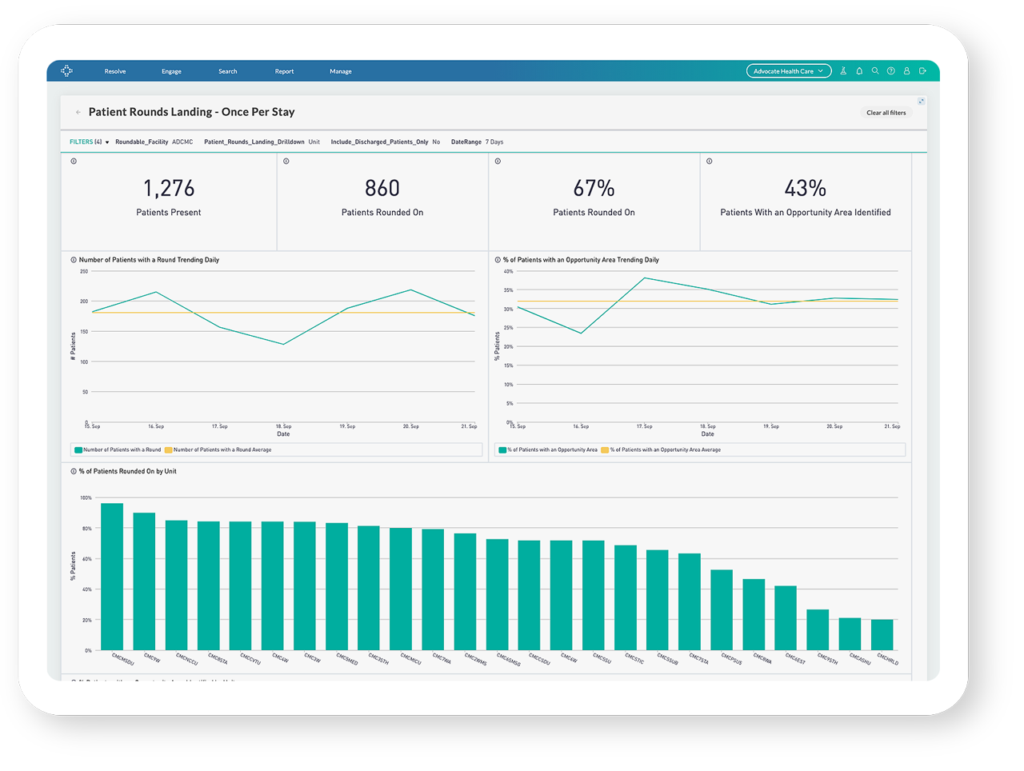
CipherHealth is a patient engagement and communications platform that helps healthcare organizations automate outreach and keep patients connected across the care journey. The platform also includes tools for rounding, surveys, and feedback to help identify care gaps and improve experiences at scale.
CipherHealth integrates directly with Epic. Through bidirectional interfaces such as Epic flowsheets and issue panel write‑back, responses from automated outreach and outreach documentation can be fed into the EHR. The integration also supports features such as enhanced appointment reminders and self‑service rescheduling that draw on Epic scheduling data.
Large health systems, multi‑facility provider networks, and complex care organizations that want to automate and scale patient outreach, reduce call‑center burden, and improve patient engagement efforts.
CipherHealth generally uses custom pricing that is tailored to the size of the health system, channels activated (such as SMS or voice), the level of automation, and the scope of integrations.
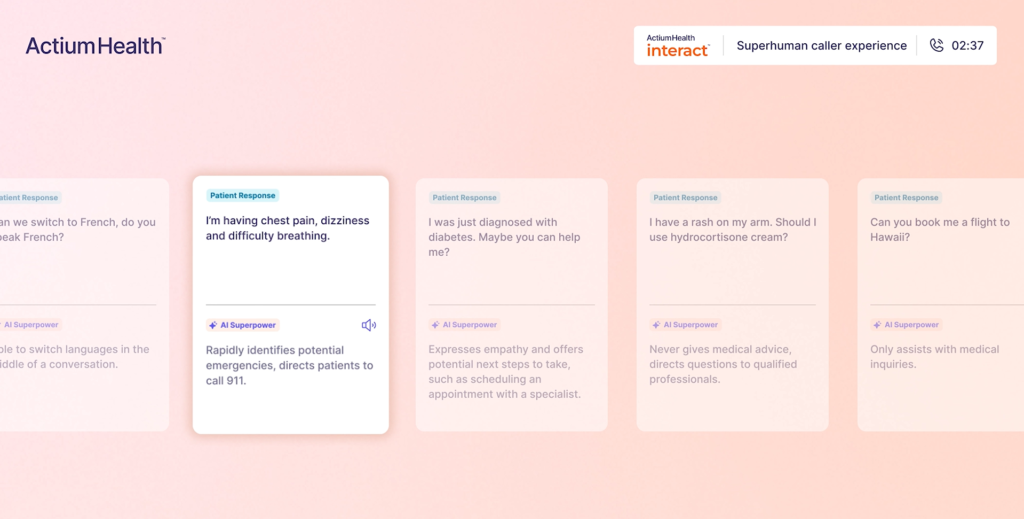
Actium Health is a healthcare engagement platform that uses workflow automation and conversational intelligence to manage patient communication at scale. It helps organizations handle routine interactions such as appointment scheduling, reminders, prescription refills, and general inquiries using automated voice, text, chat, and email messaging. The platform also provides predictive insights that help care teams identify patients who may need an outreach sooner, while routing more complex issues to staff.
Actium Health can integrate with EHR systems like Epic through APIs and middleware frameworks that allow key data such as patient demographics, appointment details, and encounter information to flow between systems.
Large health systems, multi‑site practices, and care organizations that need to automate high‑volume patient communication while maintaining consistency and escalation into human workflows when needed.
Actium Health does not publicly list fixed pricing tiers.
Selecting a CRM to integrate with Epic is less about feature count and more about workflow fit. The ideal platform should align with how your organization handles patient intake, communication, and care coordination today, while also providing room to improve these processes over time.
Start with the fundamentals: consider your organization’s size, patient volume, and engagement priorities. Determine whether your focus is on streamlining communication, improving intake efficiency, gaining deeper analytics, or managing the full patient journey. From there, evaluate budget and technical comfort, as integration approaches can range from ready-made connectors to API and middleware solutions.
Different platforms serve different priorities. Salesforce Health Cloud and Actium Health cater to large, data-driven health systems. Luma Health and CipherHealth specialize in patient communication and engagement, while LeadSquared emphasizes structured intake, workflow automation, and patient lifecycle management for practices of all sizes.
There’s no one-size-fits-all answer. The best results come from planning workflows carefully and choosing a platform that fits your organization’s operational style.
Seeing LeadSquared in action can help your team visualize how a healthcare CRM integrates with Epic to streamline workflows and improve patient engagement — you can book a free demo today.
Integration means connecting the CRM with Epic’s systems so that patient engagement data (such as appointments, reminders, and communication history) can flow between the CRM and the EHR. This allows teams to trigger outreach based on real‑time EHR events and helps keep both clinical and outreach information synchronized.
Integration timelines vary by complexity. A basic FHIR read‑only integration can take a few months, while full bidirectional syncing with Epic using multiple standards and certification processes may take six months or more, depending on organizational readiness, testing, and certification processes.
Common challenges include data mapping, ensuring both systems understand each other’s data structures, workflow alignment to match existing clinical processes, and meeting security requirements (such as encryption and audit controls). Planning these ahead can reduce implementation issues.
Many third‑party integration approaches involve Epic’s developer programs like App Orchard or other certified access paths. These programs provide official APIs and documentation for building supported integrations and can help with long‑term maintenance and support.
In practice, each organization’s Epic instance is unique, so integration often must be set up at each site individually. Smaller practices or labs that want to connect with multiple Epic installations may need separate configurations for each. This is a reality of how Epic environments are structured.
Yes. Beyond CRM licensing and implementation costs, integrating with Epic can involve fees for app marketplace access (such as App Orchard), per‑site activation costs, ongoing maintenance, and possibly middleware or development costs — so budget planning should account for all of these.
Yes — many integration approaches allow you to define what data is shared and how it’s mapped (e.g., only syncing appointment status but not clinical notes). This customization helps organizations protect sensitive data and optimize integration for their use cases.
Pitfalls include data silos due to uneven data mapping, duplicate records if identity resolution isn’t strong, and governance conflicts between IT and other departments over who controls integration rules and messaging policies. Thoughtful planning helps mitigate these.
Yes. Epic has its own healthcare CRM tools (like Cheers – The CRM for Healthcare) that are part of the Epic ecosystem and can be used for patient engagement, outreach tracking, and personalized messaging linked directly to MyChart.
What are some technical challenges when integrating a CRM with Epic?
Common challenges include data mapping, ensuring both systems understand each other’s data structures, workflow alignment to match existing clinical processes, and meeting security requirements (such as encryption and audit controls). Planning these ahead can reduce implementation issues.
Do CRM‑to‑Epic integrations require Epic’s App Orchard?
Many third‑party integration approaches involve Epic’s developer programs like App Orchard or other certified access paths. These programs provide official APIs and documentation for building supported integrations and can help with long‑term maintenance and support.
Can a small lab or practice integrate with Epic in the same way a large hospital does?
In practice, each organization’s Epic instance is unique, so integration often must be set up at each site individually. Smaller practices or labs that want to connect with multiple Epic installations may need separate configurations for each. This is a reality of how Epic environments are structured.
Does Epic itself offer CRM features natively?
Yes. Epic has its own healthcare CRM tools (like Cheers – The CRM for Healthcare) that are part of the Epic ecosystem and can be used for patient engagement, outreach tracking, and personalized messaging linked directly to MyChart.
Enter your details and we'll send you a quick confirmation email to verify your address.
 15 min read 15 min read 15 min read



 5 best healthcare CRM platforms to integrate with eClinicalWorks
