EDUCATION
Using ampEducator? Here’s how to enroll more students with the team you have
Contents

 11 min read


With fewer international students and tighter student funding in 2026, Ontario career colleges on ampEducator can’t afford to let an inquiry go unanswered. Inquiries arrive from ads, web forms, and phone calls faster than a small admissions team can answer them. When your team can’t reply for hours or days, a prospect may enroll at a college that replied sooner.
Running a registered career college in Ontario takes a reliable system of record, and ampEducator is built for that job. It keeps your student records, sends transcripts to STEPS, and prepares the key performance indicator (KPI) and compliance reporting the Superintendent of Career Colleges requires, such as the data behind your graduation and graduate employment rates.
STEPS is Career Colleges Ontario’s (CCO’s) Student Transcript Electronic Protection System, one of the Superintendent-approved services colleges use to store transcripts off-site so graduates can still get them if a college closes. ampEducator develops and maintains STEPS as CCO’s official technology partner.
Enrolling new students is a different job, and it needs a dedicated tool. This article explains what a CRM for ampEducator Ontario career colleges should handle, what your SIS keeps handling, and how the two systems work together.
When the two systems work together, your admissions team reaches more prospective students while they’re still interested, spends less time on data entry, and sees which marketing spend turns into enrolled students.
Yes. ampEducator describes itself as an academic management platform that combines CRM, SIS, and LMS tools. According to ampEducator’s user guide, its built-in CRM lets admissions staff manage prospect records, track follow-ups on a shared calendar, and send tracked email and SMS messages from templates.
For a college enrolling a steady trickle of students through referrals and walk-ins, that’s often enough. Schools running high-volume campaigns across Google, Meta, and lead aggregators often outgrow the built-in CRM, and that’s when a dedicated enrollment CRM makes sense.
Ontario’s private career college sector is large and competitive. Ontario is home to more than half of Canada’s roughly 1,500 registered career colleges, according to a HEQCO report. Many of them compete for the same adult learners, with programs that train the same roles: personal support workers (PSWs), medical office administrators, early childhood assistants, business administrators, and IT support technicians.
Student funding has tightened too. In 2026, the province ended provincial OSAP grants for career college students, leaving them with loans only, The Canadian Press reported.
International enrollment has also shrunk since the federal government capped new study permits in 2024. According to University Affairs, Canada had more than 1 million study permit holders in January 2024 and about 725,000 by September 2025. With fewer international students and less student funding, each domestic inquiry is worth more to your college than it was two years ago.
Yet many admissions teams still run into the same daily frustrations:
Slow follow-up is common even at well-resourced institutions. In UPCEA’s 2025 secret shopper study of online and professional education programs, 44% of prospective student inquiries got no response at all, and replies took more than 14 hours on average. When so many schools are slow to reply, answering fast and following up consistently can set your college apart.
ampEducator is built around the realities of running a registered career college. Its biggest differentiator is its relationship with CCO. As CCO’s Official Technology Partner, ampEducator develops, supports, and maintains STEPS.
Day to day, ampEducator handles:
In short, ampEducator is your system of record. It’s what an inspector expects to see, and nothing in this article suggests moving any of that elsewhere.
The two systems split the work cleanly: ampEducator owns compliance, and LeadSquared owns the enrollment journey. A LeadSquared ampEducator integration can be configured through APIs, so LeadSquared manages every inquiry from first contact until a student is ready to enroll, then passes the record to ampEducator. Here’s what that looks like in practice.
Capture every inquiry in one place
Web forms, Google and Meta ads, landing pages, phone calls, chat, and walk-ins all flow into a single lead record. Duplicates are caught automatically. Two forms and a phone call from the same student still add up to one record.

LeadSquared routes each new lead instantly by program, campus, or language. For leads with consent on record, it sends an automated email or SMS within minutes, even late at night. LeadSquared also adds a follow-up task to the assigned advisor’s queue, so advisors don’t have to keep checking inboxes for new inquiries. That’s the first job of an enrollment CRM for Ontario career colleges: helping your team respond faster without hiring more staff.
LeadSquared ranks every prospect on two scores you configure: a Lead Score for fit and an Engagement Score for activity. Take a prospect who lives near your Hamilton campus and wants a January start. That’s a strong fit. If the same prospect opens your PSW program guide, visits the tuition page twice, and books a campus tour, that’s strong activity too, and LeadSquared moves them to the top of the advisor’s queue. Advisors spend their time talking with the prospects most likely to enroll: the ones ready to sign up for a program and start with the next cohort.
Not every prospect is ready to enroll when they first inquire, especially adults weighing a career change.Your team sets up automated journeys once: sequences of email and SMS messages that LeadSquared sends while a prospect is deciding. Each journey can include reminders before info sessions and course start dates. Colleges that use WhatsApp can add it through the WhatsApp Business API add-on.
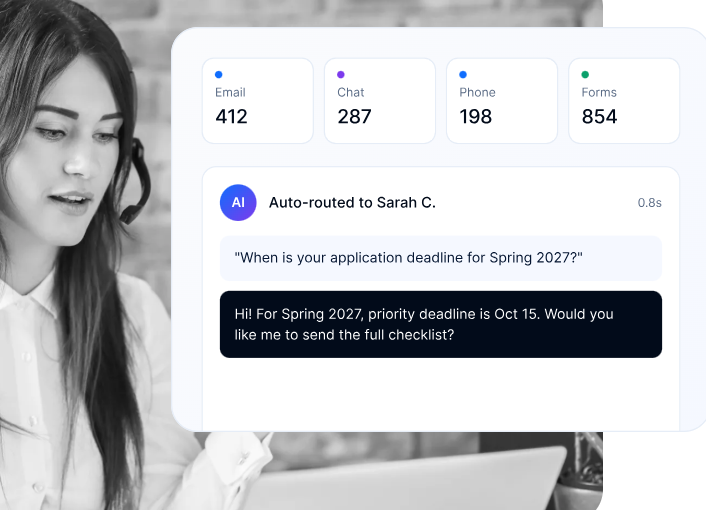
With a telephony integration, advisors can call prospects from inside LeadSquared. LeadSquared logs and records each call in the prospect’s activity history: the running record of every email, SMS, call, and website visit tied to that prospect. Any advisor who picks up the conversation can see what’s already been said.
Many career colleges start a new cohort of the same program several times a year. A prospect who misses one start date may lose interest before the next one begins. LeadSquared shows advisors how many prospects and applicants are lined up for each upcoming cohort, so a half-full class becomes visible weeks early, not the week it begins. Automated reminders nudge undecided students before each enrollment deadline, and anyone who misses one moves straight into nurturing for the next start date.
Here’s what an advisor might see for upcoming starts (illustrative data):
| Program | Next Start | Seats | Applicants | Prospects |
| Personal Support Worker | [date] | 24 | 18 | 41 |
| Medical Office Administration | [date] | 20 | 9 | 27 |
| Early Childhood Assistant | [date] | 18 | 6 | 15 |
LeadSquared records where each prospect came from, such as an ad, a web form, or a phone call, and follows them through to enrollment. As prospects enroll, LeadSquared links each enrollment back to that first source. Your team can see which campaigns and lead sources produce enrolled students for each program, not just inquiries, and move budget to the ones that do.
Want to see which of your campaigns fill seats?
When a prospect is ready to apply or enroll, their details can be sent to ampEducator through an API-based integration, set up to match your admissions process. No re-keying, fewer errors, and your SIS only holds the students who belong there.
If you run multiple program types or campuses, our guide to career school CRM software covers the wider playbook. The same SIS-plus-CRM approach also works for colleges on CampusLogin.
Career colleges in Ontario operate under the Ontario Career Colleges Act, 2005. The Superintendent of Career Colleges administers the Act within the Ministry of Colleges, Universities, Research Excellence and Security. Any new tool would need to account for that, which is why the line between the two systems matters.
LeadSquared is the front end only. It manages inquiries, outreach, and the admissions conversation. When you add a CRM for ampEducator Ontario career colleges, your student records, STEPS transcripts, and KPI reporting stay in ampEducator, so your compliance workflow and what an inspector reviews don’t change.
Consent matters here too. ampEducator won’t email or text anyone who hasn’t opted in, and your admissions team should apply the same discipline to CRM outreach under Canada’s Anti-Spam Legislation (CASL). LeadSquared records each lead’s email opt-in and opt-out activity, including the date, origin, and IP address. With the Consent Management App, you can also store consent status on the lead record.
ampEducator already does the hard, regulated work of running an Ontario career college. Competing for adult learners across ads, inboxes, and phone lines is a separate job, and that’s where a dedicated enrollment CRM comes in.
The right CRM for ampEducator Ontario career colleges should:
You keep your compliance setup and your current team, and you grow enrollment. For a broader look at how this works across institution types, you can also see our overview of higher education CRM.
Ready to see it with your own programs and start dates?
Yes. ampEducator includes built-in CRM tools for prospect records, calendar-based follow-ups, and tracked email and SMS. Colleges running high-volume digital marketing often pair it with a dedicated enrollment CRM for lead capture, scoring, automation, and attribution.
ampEducator handles core admissions communication. For deeper ampEducator enrollment automation, such as instant lead response, multi-step nurture journeys, and score-based advisor queues, colleges add a CRM like LeadSquared. It can be connected to ampEducator to pass ready-to-enroll students into the SIS.
No. STEPS transcripts and KPI reporting stay in ampEducator. The CRM manages inquiries and admissions outreach, and passes only the prospect details you choose to ampEducator when a student is ready to enroll.
Look for lead capture from every channel into a single record, automated email and SMS follow-up, configurable lead scoring, enrollment tracking by campaign and lead source, and a clean handoff to your SIS. Also check that the software records consent in a way that fits Canada’s Anti-Spam Legislation (CASL).
Disclosure: This article is published by an enrollment technology provider. Descriptions of ampEducator are based on its public documentation and Career Colleges Ontario’s affiliate listing.
Enter your details and we'll send you a quick confirmation email to verify your address.
 11 min read 11 min read 11 min read