





- Home

- Learn
- Healthcare
- Experity-CRM Integration: Drive new patient volume for urgent care centers
HEALTHCARE
Experity-CRM Integration: Drive new patient volume for urgent care centers
Contents

 12 min read


Experity helps urgent care centers manage their clinical and practice operations, along with patient engagement and digital access workflows.
But for clinics focused on growth, another challenge is understanding how to manage the work involved in turning interest into visits.
Here, your team may need to respond to a high volume of calls and online inquiries, contact people who haven’t booked a visit, and identify which campaigns bring in new patients. When a clinic operates across multiple locations, keeping these activities consistent can also become more difficult.
A customer relationship management (CRM) system can help urgent care centers better address these challenges.
In this guide, we explore how a CRM for urgent care centers can support patient acquisition alongside Experity, which integration details clinics should check, and what to consider when comparing CRM and patient-access tools.
Your marketing reports may show how many calls and online inquiries your campaigns generate, but they may not show how many of those people eventually visit the clinic. To measure this, your team needs to connect marketing data with completed-visit data from Experity. A CRM can help bring these insights together if an integration supports the required data exchange.
Front-desk teams juggle patient check-ins, phone calls, and other administrative tasks. When new inquiries arrive through multiple channels, staff may struggle to track who needs a response and what action comes next. A CRM can centralize inquiry histories and trigger reminders so teams have a clearer process for handling prospective patients.
Urgent care groups operating across multiple locations may need to compare inquiry volumes, response times, and conversion rates by site or marketing source. If each team tracks this information differently, leadership may struggle to identify where follow-up processes need attention. A CRM can standardize these workflows and reporting across locations, depending on how it is configured and connected to existing systems.
| If your clinic needs to… | Start by evaluating… |
| Document patient visits and manage clinical records | Experity EMR |
| Handle patient registration, billing, and day-to-day clinic operations | Experity practice management software |
| Help patients find your clinic and book appointments online | Experity’s patient engagement tools and patient discovery platforms |
| Keep track of new-patient inquiries, assign follow-up tasks, and manage outreach | A healthcare CRM |
| Manage high volumes of incoming calls or automate routine call handling | Experity’s available phone capabilities, if applicable, or a compatible telephony or voice automation solution |
| Identify which marketing campaigns generate completed patient visits | A CRM that can connect marketing sources with completed-visit data |
| Tool | Best for | How it helps urgent care teams | Integration with Experity | What to consider |
| LeadSquared | Managing patient acquisition and follow-ups | Bring patient inquiries into one place. Give each inquiry a clear owner and help staff follow up on time. Track which acquisition sources lead to patient visits when the necessary data is available. | We offer APIs and custom integration options to connect LeadSquared with other systems. A ready-made Experity connector has not been verified, so the required connection and data exchange would need to be assessed. | A good fit when you need better control over inquiries and follow-ups across acquisition channels. Visit attribution depends on access to reliable appointment and visit data. |
| Solv | Improving digital patient access | Make it easier for patients to find a clinic and book care online. Support digital registration and streamline parts of the front-desk process. | Solv lists Experity among its supported EHR integrations. Confirm which scheduling and data-exchange capabilities are available for your setup. | Consider it when online access, digital intake, or front-desk efficiency is the main priority. |
| Zocdoc | Patient discovery and online bookings | Help prospective patients find your clinic through Zocdoc and book available appointments online. | Zocdoc is listed in Experity’s partner ecosystem. Confirm the supported booking and availability-sync workflows for your clinic. | Most relevant when attracting patients through online discovery and making appointment booking easier is the main goal. |
| FLIP | Managing high call volumes | Use AI-powered phone workflows to answer routine questions and direct callers to the right next step. | FLIP publicly describes an Experity integration. Check which phone, scheduling, and patient-information workflows it supports for your setup. | Consider it when incoming calls and repetitive front-desk tasks are putting pressure on staff. |
A CRM should do more than record inquiries. You need to know whether it helps your team convert interest into completed patient visits and manage acquisition costs more effectively.
Start by measuring five things before and after implementation:
Look at these numbers together. More inquiries don’t necessarily mean more patients. If inquiries increase but completed visits don’t, you may need to investigate follow-up or access issues.
Accurate reporting also depends on reliable visit data. To connect marketing activities with completed visits, your CRM must be able to receive and match the relevant data from Experity or other systems. The results depend on your starting point, local demand, marketing spend, and how well your team uses the new workflows. Measure the change rather than assuming the CRM will increase patient volume.
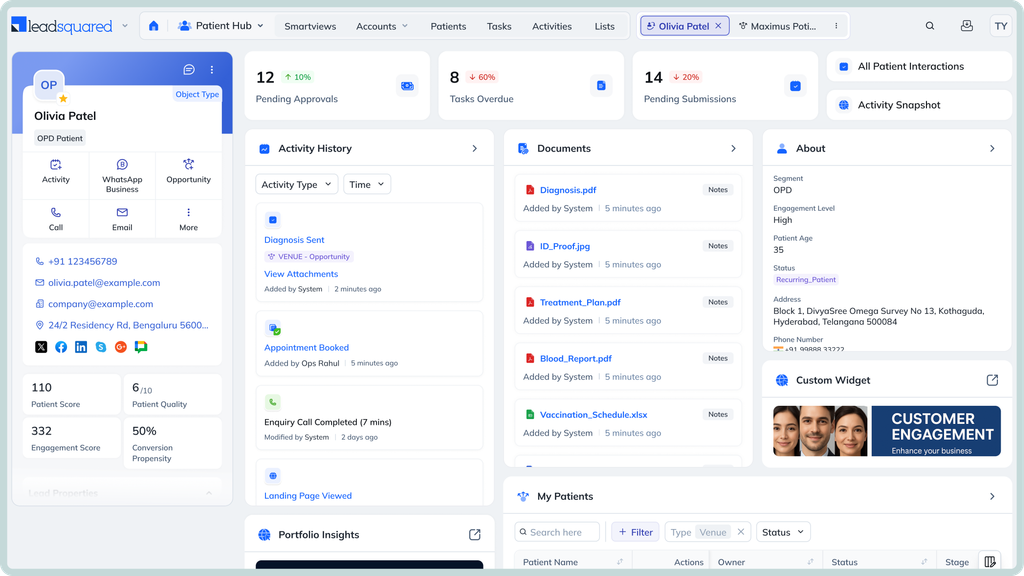
LeadSquared’s healthcare CRM helps urgent care centers manage new-patient acquisition beyond their core Experity workflows. Teams can organize incoming inquiries, follow up with prospective patients, and track which acquisition sources bring in visits. Here’s a closer look at these capabilities.
An inquiry might come from a website form, a paid campaign, a phone call, or a referring provider. LeadSquared brings inquiries from supported sources into one place, so staff can see where they came from, who is handling them, and what needs to happen next. Instead of piecing together updates from different channels, teams have a clearer view of the people who have expressed interest in their clinic.
Some prospective patients need a response before they decide to visit. Others may need a follow-up after an initial conversation. LeadSquared lets teams assign responsibility, schedule follow-up tasks, and trigger communications based on defined rules. This helps staff keep track of outstanding inquiries even when the front desk is busy with patients already at the clinic.
A campaign can generate plenty of clicks and inquiries without necessarily bringing more patients through the door. LeadSquared tracks acquisition sources and how inquiries progress through the funnel. If reliable appointment and visit data can be exchanged with Experity, clinics may also be able to connect their marketing activity with completed visits. This gives teams a stronger basis for evaluating campaigns than inquiry counts alone.
Referrals from local providers, employers, and community partners can contribute to patient acquisition. LeadSquared helps teams keep track of these sources and the interactions associated with them. Over time, that information can help clinics understand which relationships generate inquiries and where further outreach may be worthwhile, provided referral outcomes are recorded.
When an urgent care group operates several clinics, each location may handle new inquiries a little differently. LeadSquared can help standardize how inquiries are assigned, how follow-ups are managed, and how acquisition activity is reported. Leadership can then compare performance across locations and investigate where processes may need attention, based on the data available.
Integration note: These examples describe LeadSquared’s acquisition and follow-up capabilities, not a confirmed, ready-made Experity integration. Workflows that require data to pass between the systems must be validated for API access, supported data fields, record matching, and implementation requirements.
If your urgent care center needs a better way to manage new-patient inquiries, coordinate follow-ups, or understand which marketing efforts bring patients through the door, LeadSquared may be worth exploring.
Book a free demo to see how our healthcare CRM could support these workflows alongside your existing Experity setup.
Not necessarily. Experity already offers patient engagement capabilities, so clinics should first check whether their existing setup supports the workflows they need. A separate healthcare CRM may be useful if the team still struggles with acquisition processes, cross-channel inquiry management, or reporting beyond what its current tools provide. The decision should depend on a specific gap, not simply on the availability of additional features.
Not necessarily. Experity already offers patient engagement capabilities, so clinics should first check whether their existing setup supports the workflows they need. A separate healthcare CRM may be useful if the team still struggles with acquisition processes, cross-channel inquiry management, or reporting beyond what its current tools provide. The decision should depend on a specific gap, not simply on the availability of additional features.
Yes. A CRM can support the activities that happen before and around a walk-in visit, such as managing questions about clinic locations, services, and operating hours. It can also help track how prospective patients discovered a clinic. However, the CRM should not replace Experity’s clinical records or core practice management workflows. Connecting inquiries to completed walk-in visits requires a reliable way to match the relevant records.
Start by deciding which system should manage each type of information. For example, Experity may remain the primary system for clinical and visit records, while the CRM manages acquisition inquiries and follow-up activities. Then define which fields need to move between the systems, when updates should occur, and how duplicate records will be handled. Test these workflows before rolling them out to staff.
Start by deciding which system should manage each type of information. For example, Experity may remain the primary system for clinical and visit records, while the CRM manages acquisition inquiries and follow-up activities. Then define which fields need to move between the systems, when updates should occur, and how duplicate records will be handled. Test these workflows before rolling them out to staff.
Start by deciding which system should manage each type of information. For example, Experity may remain the primary system for clinical and visit records, while the CRM manages acquisition inquiries and follow-up activities. Then define which fields need to move between the systems, when updates should occur, and how duplicate records will be handled. Test these workflows before rolling them out to staff.
Ask which data the integration can exchange, whether updates flow in both directions, and how frequently records synchronize. Confirm how the systems match patients or inquiries and what happens when information is missing or inconsistent. For an Experity CRM integration, also verify whether appointment and completed-visit data can be accessed for reporting. A connection between two platforms does not automatically mean every desired workflow is supported.
Not every CRM workflow requires full clinical records. A clinic may be able to manage some acquisition activities using limited contact and inquiry information. However, if a CRM vendor creates, receives, maintains, or transmits PHI on the clinic’s behalf, HIPAA business associate requirements may apply. Clinics should review the vendor’s security controls, permitted data use, and Business Associate Agreement (BAA) requirements before sharing PHI.
Start with one location or a defined workflow, such as handling website inquiries or following up with prospective patients. Record the current process and its performance before making changes. During the pilot, check whether staff can use the system consistently, whether information reaches the right people, and whether the reports provide useful answers. Expand the rollout only after validating the workflow and resolving integration issues.
Review the information you need to retain before moving it. This may include inquiry histories, contact details, referral sources, ownership assignments, and follow-up status. Decide how to handle duplicates, incomplete records, and outdated contacts. Also confirm which information should remain in Experity rather than being copied into the new CRM. Test a sample migration first so the team can check data quality and access before the full transfer.
Enter your details and we'll send you a quick confirmation email to verify your address.
 11 min read 15 min read 15 min read



 PatientNow-CRM integration: How aesthetic practices automate their growth p...
