





EDUCATION
Your institution runs on EAB Navigate360. But is it actually built for enrollment?
Contents

 11 min read


EAB Navigate360 does a lot. Advising, retention, early alerts, degree planning, and now — enrollment. But doing a lot and doing everything well are different things.
More enrollment teams are asking whether Navigate360 can replace their recruitment CRM. The short answer: It depends on what you mean by enrollment.
So why would enrollment teams still need a separate platform? Something like LeadSquared?
The answer comes down to what EAB Navigate360 was fundamentally built to do — and where that origin creates gaps for teams whose primary job is new student acquisition.
Quick answer: Navigate360 is EAB’s higher education CRM platform. It is soemtimes called EAB Navigate Enrollment CRM. It was built primarily around student success — advising, retention, and graduation support for enrolled students. EAB has since expanded the platform to include a dedicated enrollment module, covering prospect management, outreach campaigns, and yield tracking within the same system that advisors and success teams use for enrolled students. The enrollment capability is real, but it sits inside a platform whose core identity and deepest functionality remain in student success.
Navigate360’s origins and primary identity are in student success. The platform was built to improve retention, advising, and graduation outcomes for students who are already enrolled. Its core capabilities — appointment scheduling, early alert systems, progress reporting, coordinated care networks, and advisor workflow tools — are purpose-built for supporting students once they’re on campus or in class.
This DNA shows up in the results EAB highlights: Graduation rate increases of 3–15% and there are retention rate improvement claims of 2–12%. These are retention and success metrics, not top-of-funnel enrollment acquisition numbers.
EAB has invested meaningfully in building an enrollment capability within Navigate360. The enrollment CRM module now includes:
There are dedicated versions of the module for undergraduate programs, graduate programs, and community colleges. EAB also offers Navigate360 Advantage for Community Colleges, a bundle that includes additional advisory support and access to EAB’s broader student engagement ecosystem.
On paper, this looks comprehensive. In practice, the EAB Navigate360 CRM limitations become apparent when enrollment teams run high-volume prospect pipelines — particularly those managing inquiry-to-enrollment funnels across multiple channels.
EAB Navigate enrollment CRM is described by EAB itself as an extension of its student success platform. That framing matters. The interface, data model, and core logic of Navigate360 were built around enrolled students and advisor workflows. The enrollment layer was added to serve institutions that wanted continuity between their pre-enrollment and post-enrollment systems. That’s a legitimate value proposition for some schools — but it also means the enrollment module inherits design decisions that were never optimized for outbound prospect acquisition.
Teams evaluating the product for recruitment purposes should ask: does this feel like a tool built for enrollment counselors running outreach campaigns, or does it feel like a student success tool with enrollment features added?
EAB describes its campaign tooling around email outreach and event engagement. When it comes to EAB Navigate marketing automation, its publicly documented capabilities don’t extend to coordinated multi-channel outbound automation. Think no SMS, WhatsApp, phone queues, and email in a single behavior-triggered prospect journey.
For institutions managing hundreds or thousands of prospects across different programs, application stages, and communication preferences, this gap becomes meaningful.
Purpose-built enrollment CRMs handle these cadences natively and allow teams to build lead scoring models based on prospect behavior — page visits, form fills, email opens, call outcomes — all of which feed back into prioritization and outreach sequencing.
Navigate360 does not charge per user or per license, as per EAB. It is sold as an enterprise platform rather than a per-seat tool. That pricing model makes sense for large institutions buying the full platform for student success, advising, and enrollment together. It’s less well-suited for enrollment teams that only need the recruitment and acquisition layer and don’t need — or can’t justify — the full student success infrastructure cost.
For teams that want to add enrollment automation without committing to the Navigate360 ecosystem, the cost-benefit calculation looks very different.
LeadSquared is built ground-up as an enrollment acquisition CRM. The entire product logic — from how leads are captured to how they’re scored, routed, and followed up — is designed for the inquiry-to-enrollment funnel.
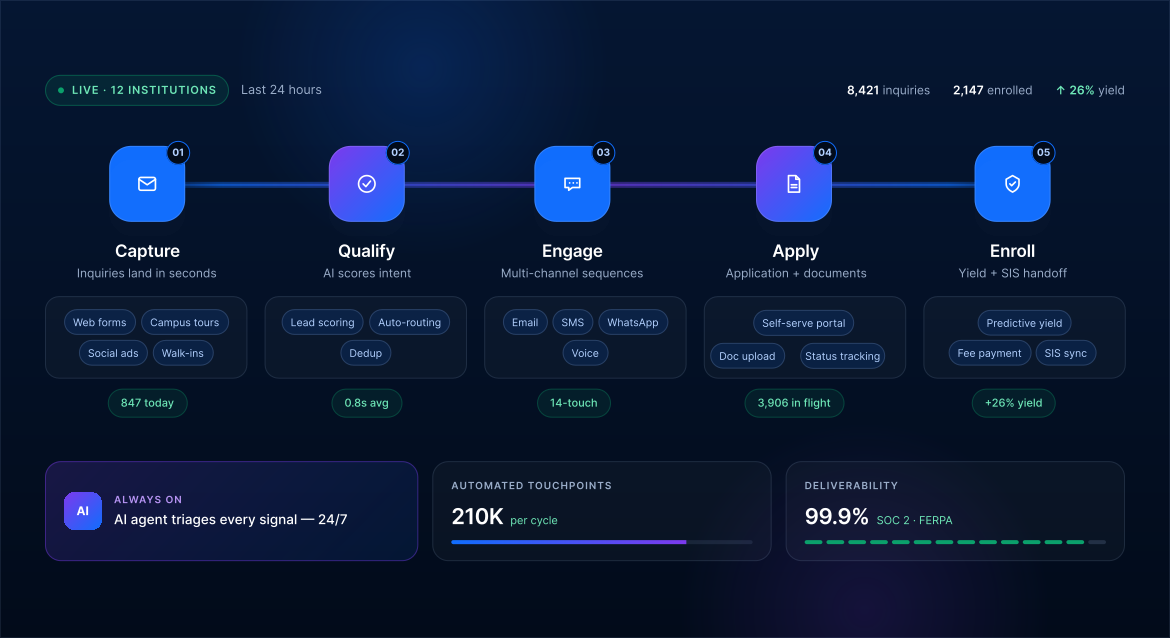
Where Navigate360 grows from student success toward enrollment, LeadSquared grows from lead management and sales automation toward education. The platform’s workflows map to how enrollment counselors actually work: managing inquiry volume, prioritizing follow-ups, tracking application progress, and moving prospects through multi-stage pipelines with time-sensitive outreach.
The funnel architecture — inquiry → inquiry qualified → application started → application complete → admitted → deposited → enrolled — is a first-class object in LeadSquared, not an adaptation of an advising workflow.
LeadSquared supports automated prospect journeys across email, SMS, WhatsApp, and phone — all coordinated within a single pipeline view. Counselors can set up drip sequences triggered by specific behaviors: a prospect who opens an email but doesn’t click gets a different follow-up than one who starts an application but doesn’t submit. These behavioral triggers run across channels, not just within email.
Invorto, LeadSquared’s Voice AI add-on product, adds an additional layer: AI-powered voice calls for initial prospect engagement and follow-up, handling high-inquiry-volume periods without adding headcount. For community colleges and career schools managing large inquiry pools with lean teams, this matters.
LeadSquared’s lead scoring models are designed around enrollment intent signals. Prospects are scored based on engagement behaviors — content consumed, forms submitted, events attended, pages visited — rather than static demographic fields. As a prospect’s engagement deepens, their score updates automatically and counselors are prompted to act.
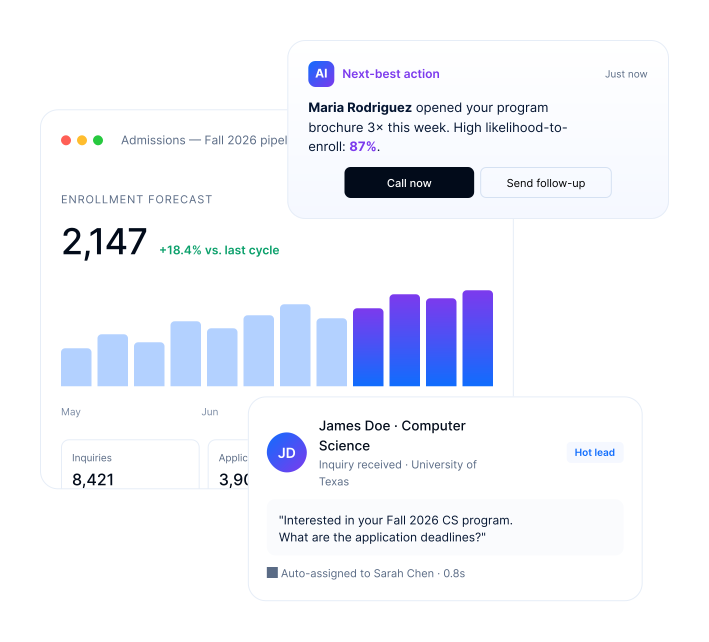
This kind of dynamic scoring is particularly valuable for programs with long inquiry-to-enrollment cycles, where a prospect who went quiet in October and re-engages in February is automatically surfaced back to the top of a counselor’s queue.
FloStack, LeadSquared’s scheduling and engagement add-on tool, connects enrollment counselors with prospects at the right moment — allowing self-serve appointment booking, automated reminders, and follow-up routing. For teams running application review calls, virtual info sessions, or counselor appointments at scale, FloStack reduces the back-and-forth that loses prospects mid-funnel.

LeadSquared’s modular architecture means enrollment teams can adopt the platform for student acquisition workflows without buying into a full student success ecosystem. This is especially relevant for institutions that already have a student success tool — including Navigate360 — and need to add enrollment automation capability, not replace everything they have.
Navigate360 and LeadSquared are not mutually exclusive. They solve different problems at different stages of the student lifecycle.
Navigate360 was built for: Keeping enrolled students on track, supporting advisors, running early alerts, and improving retention. If your institution has invested in Navigate360 for student success, that investment is worth protecting.
For institutions looking at an enrollment CRM beyond Navigate360, LeadSquared complements rather than replaces it. By handling the pre-enrollment funnel — from the first inquiry through deposit — with the depth of automation and lead management that Navigate360’s enrollment module doesn’t fully match.
The clearest division of labor is this: Navigate360 owns the enrolled student experience — advising appointments, degree planning, early alerts, success coaching. LeadSquared handles the acquisition and nurturing layer — from first inquiry through enrollment, and beyond, for re-engagement, drip campaigns, and continued lead nurturing that Navigate360 isn’t designed to run.
For community colleges in particular — where incoming cohorts are large, inquiry volumes are high, and counseling teams are stretched — this two-platform approach divides the workload sensibly rather than asking one system to do everything adequately.
| Capability | Navigate360 | LeadSquared |
| Core focus | Student success & retention | Enrollment growth & admissions automation |
| Primary users | Advising, Student Affairs, Success Teams | Admissions, Enrollment & Marketing Teams |
| Multi-channel engagement | Email, campaigns, advisor outreach | Email, SMS, WhatsApp, phone, automation |
| Lead prioritization | Engagement-based | Behavioral scoring & AI insights |
| Scheduling | Advisor appointment scheduling | FloStack self-scheduling & follow-up |
| Applicant experience | Student support workflows | Personalized journeys, microsites & applicant portal |
| Best fit | Full student lifecycle management | Inquiry-to-enrollment optimization |
| Community colleges | Strong advising and retention use cases | Strong enrollment and recruitment use cases |
| Implementation | Enterprise implementation | In-house implementation with education specialists |
| Time to value | ~100 days (EAB-sourced) | Typically 2–6 weeks, based on LeadSquared education-segment implementations |
| Key differentiator | Student success platform | Fastest speed-to-enrollment |
| Ideal buyer | Student Success Leadership | Enrollment & Admissions Leadership |
This comparison is published by LeadSquared, an enrollment technology provider. Competitor capabilities are summarized from publicly available sources; LeadSquared capabilities reflect our own platform.
Consider an illustrative example — a community college with roughly 8,000 enrolled students and four counselors managing 3,000+ annual inquiries. They’ve been on Navigate360 for two years and their advising outcomes are strong — retention is up, advisor appointment rates have improved, and the early alert system is running well.
But their recruitment numbers are flat. Inquiry-to-application conversion is low. Counselors are spending time on manual follow-up instead of high-value conversations. The enrollment module in Navigate360 helps with application tracking, but the outbound engagement capacity isn’t there to run multi-touch, multi-channel prospect journeys at volume.
Adding LeadSquared to this stack means:
Navigate360 is where enrolled students live — advising, alerts, degree planning, success coaching. LeadSquared is where prospect and lead engagement happens: Inquiry nurturing, application follow-up, re-engagement of stopped-out students, and the kind of ongoing drip communication that keeps prospective and lapsed students moving. The two platforms don’t compete — they cover different kinds of work.
The Navigate360 Enrollment CRM module is a meaningful addition, and for institutions that want one system to manage both student success and enrollment within a single ecosystem, it’s worth evaluating seriously.
But for enrollment teams whose primary challenge is new student acquisition — converting inquiries into applications, running multi-channel outreach at volume, scoring and prioritizing prospects, and managing a fast-moving recruitment funnel — a platform built from the ground up for that problem will outperform an enrollment module built on top of a student success platform.
That’s why LeadSquared is the go-to EAB Navigate enrollment CRM alternative for institutions that need more from their recruitment stack. For those already running Navigate360, it’s not a replacement — it’s the missing front half of the funnel.
See how LeadSquared handles the enrollment acquisition pipeline Navigate360 doesn’t cover.
Yes. Navigate360 is EAB’s higher education CRM platform, and it includes a dedicated enrollment module — Navigate360 Enrollment CRM — covering prospect management, outreach campaigns, application tracking, and yield reporting. The platform’s foundation, however, is student success: advising, retention, and graduation support for enrolled students. The enrollment module is an expansion of that foundation, not where the platform started.
Navigate360 Enrollment CRM, sometimes referred to as EAB Navigate Enrollment CRM, is an extension of the Navigate360 student success platform. It is designed to help enrollment teams manage prospects, run outreach campaigns, track application progress, and improve yield. It is embedded within the Navigate360 ecosystem, meaning enrollment data and student success data live in the same system. EAB positions it as a solution for teams that want to manage pre-enrollment and post-enrollment in one platform.
Community colleges have distinct enrollment needs: High inquiry volume, lean teams, short decision cycles, and diverse student populations with varied entry points. The best CRM for community college enrollment depends on whether the institution needs a full student lifecycle platform or a focused enrollment acquisition tool. Navigate360 Advantage serves community colleges well on the student success side. LeadSquared serves community colleges that need deeper multi-channel outbound automation, lead scoring, and prospect engagement capabilities specifically for new student acquisition.
Yes. Navigate360 and LeadSquared address different phases of the student journey. Navigate360 is well-suited for enrolled student support — advising, retention, and success workflows. LeadSquared handles pre-enrollment acquisition — managing inquiry pipelines, automating multi-channel outreach, scoring prospects, and moving them through the application funnel. Institutions already invested in Navigate360 can add LeadSquared for enrollment without replacing their student success infrastructure.
Enrollment teams evaluating alternatives to EAB Navigate360 for new student acquisition typically consider: LeadSquared (purpose-built enrollment acquisition CRM with multi-channel automation and AI), Slate by Technolutions (strong in four-year admissions), Salesforce Education Cloud (flexible but implementation-heavy), and Element451 (AI-forward enrollment platform). For teams specifically focused on the inquiry-to-enrollment funnel rather than the full student lifecycle, purpose-built enrollment CRMs offer more targeted functionality and often more flexible pricing than a full student success platform with an enrollment module attached.
Enter your details and we'll send you a quick confirmation email to verify your address.
 10 min read 12 min read 10 min read



 PeopleSoft + CRM integration: Closing the enrollment gap for large research...
