





EDUCATION
Workday Student CRM integration: Do enrollment teams still need a separate CRM?
Contents

 13 min read


If your institution is migrating to Workday Student, you’ve probably heard some version of this question in a planning meeting: “Workday Student includes a recruiting module, so do we still need a separate CRM?”
It’s a fair question, and the answer is more nuanced than yes or no.
Workday Student Recruiting is a part of the Workday Student suite — it manages prospect records, recruiter assignments, campaigns, events, and email communications, the same ground a recruitment CRM covers.
But a dedicated enrollment CRM is built from the ground up as a standalone engagement engine, which tends to matter more as recruiting strategies get more complex or more channel-diverse. Most institutions migrating from other platforms find this out somewhere around the planning phase — which, conveniently, is also the best time to plan for an admissions CRM alongside Workday (rather than after go-live).
Workday Student is Workday’s cloud-based SIS, built on the same unified platform as Workday HCM and Financial Management. It manages the full student lifecycle — admissions, enrollment, academic records, course registration, and graduation — within a single shared data model, where changes are reflected in real time inside Workday. (How quickly those changes reach an external CRM is a separate question — see the integration section below.)
In practice, that means:
Workday has positioned this product aggressively at institutions running on legacy systems. It also ships with its own recruiting component, Workday Student Recruiting.
This is the part that’s easy to get wrong: Workday Student Recruiting isn’t a thin admissions tracker bolted onto the SIS. It’s a genuine recruiting and engagement tool:
If your institution’s recruiting model is built around regional territories, structured campaigns, and email-led nurture, Workday Student Recruiting genuinely covers that ground.
So where does a dedicated CRM actually come in?
A note: This guide is published by an enrollment technology provider whose products are referenced below. We’ve aimed to represent Workday Student Recruiting on its own terms — treat what follows as one vendor’s view and test every option, including ours, against your own recruiting model.
The real distinction is structural. Workday Student Recruiting is a recruiting module built inside a broader records platform, designed around that platform’s workflows — and that shapes what it’s good at.
A few places this shows up in practice:
It’s bundled, not standalone. You get Workday Student Recruiting as part of the Workday Student suite, configured Workday’s way, on Workday’s release cadence. A dedicated enrollment CRM is the vendor’s whole product — every roadmap decision and integration is built around enrollment marketing specifically. A G2 reviewer flagged the same dynamic on the employer-hiring side of Workday Recruiting, noting that because it’s built for HR first, recruitment isn’t its main focus and it can feel less practical than a dedicated recruitment CRM. That review is about the hiring product, not Workday Student Recruiting — but the structural point (a recruiting tool living inside a broader records platform) carries over, which is why we raise it by analogy rather than as direct evidence.
Channel and journey complexity. Engagement plans in Workday Student Recruiting are built around email-led, criteria-triggered mailing schedules — solid for standard nurture work. Institutions tend to outgrow it with highly branching, behavior-triggered journeys across many channels at once: web behavior, SMS, WhatsApp, call outcomes, and event attendance all feeding one adaptive sequence per prospect.
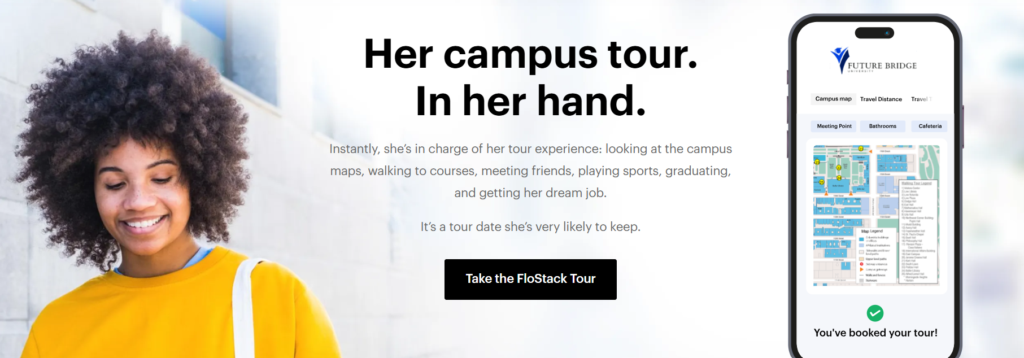
FloStack — a LeadSquared lead-engagement and scheduling add-on, enabled separately from the core CRM — takes a different approach to that first moment: the instant a prospect submits a form, they land on a personalized microsite built around their specific interests (scholarships, programs, campus life) rather than a generic confirmation page or a queued email. Purpose-built enrollment CRMs are generally designed around that level of immediate, individualized response as the core problem, not as an add-on.
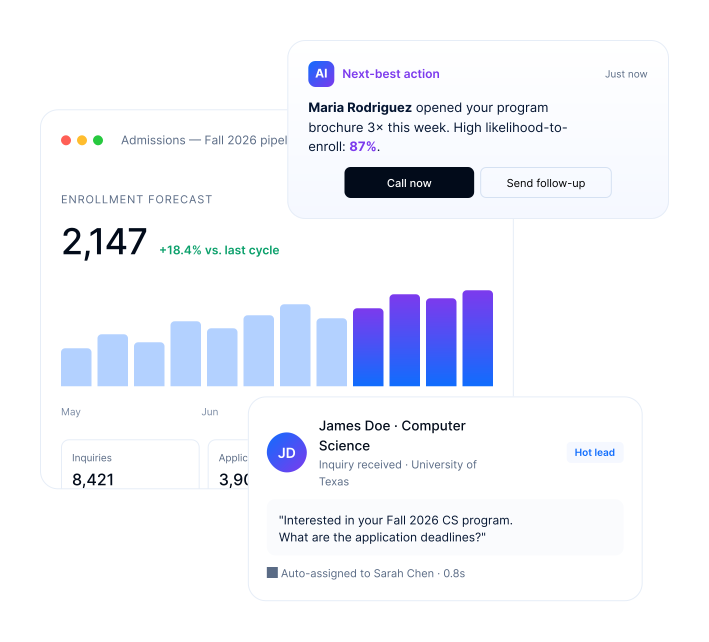
Counselor-facing flexibility. Recruiter workflows here are solid for structured campaign and territory work. Fast, conversational, multi-channel follow-up with an individual prospect — not a segment — is where dedicated CRMs built around counselor workflows tend to be quicker to configure and adapt without a Workday configuration project. LeadSquared, for instance, auto-assigns inbound inquiries to a counselor and triggers an SMS, email, or call task within seconds of capture, without a development cycle to change the routing rules.
None of this makes Workday Student Recruiting a bad tool. It’s a reasonable starting point for some institutions and an insufficient one for others, depending on how complex and channel-diverse the recruiting strategy is.
Here’s the part that’s easy to miss: a Workday Student migration is rarely just an SIS swap. It’s a re-architecture of how student data moves through the institution, which naturally forces a conversation about every connected system — including whether to adopt Workday Student Recruiting as-is, keep an existing CRM, or evaluate something new. Planning a CRM alongside Workday Student implementation from the start avoids a second, separate project later.
Institutions migrating off Banner or PeopleSoft are often carrying a CRM configured around the old SIS’s data structure, sometimes a decade of accumulated workarounds. Ripping out the SIS underneath it tends to surface exactly how dependent that integration was on the old system’s quirks. Some institutions discover their CRM vendor doesn’t have a mature Workday connector at all — which forces the evaluation question regardless of how capable Workday Student Recruiting is on its own.
That’s the opening. If you’re already touching every integration point during migration, evaluating the CRM question at the same time is far less disruptive than doing it as a separate project later. This is exactly when institutions start researching a Workday higher education enrollment CRM as an alternative or complement to the built-in recruiting module.
And the timeline gives you room: Iowa State’s CIO put it plainly when describing their own rollout — student implementation typically requires anywhere from 18 months to two years or more to deploy, based on Workday’s own recommendation, with capabilities turned on incrementally in line with the academic calendar. That’s a long runway, and it’s enough time to test Workday Student Recruiting against your actual workflows, or stand up a CRM in parallel, rather than rush the decision.
Whether you’re sticking with Workday Student Recruiting, layering a CRM alongside it, or replacing it outright, these are the workflows worth stress-testing against your actual student enrollment management model.
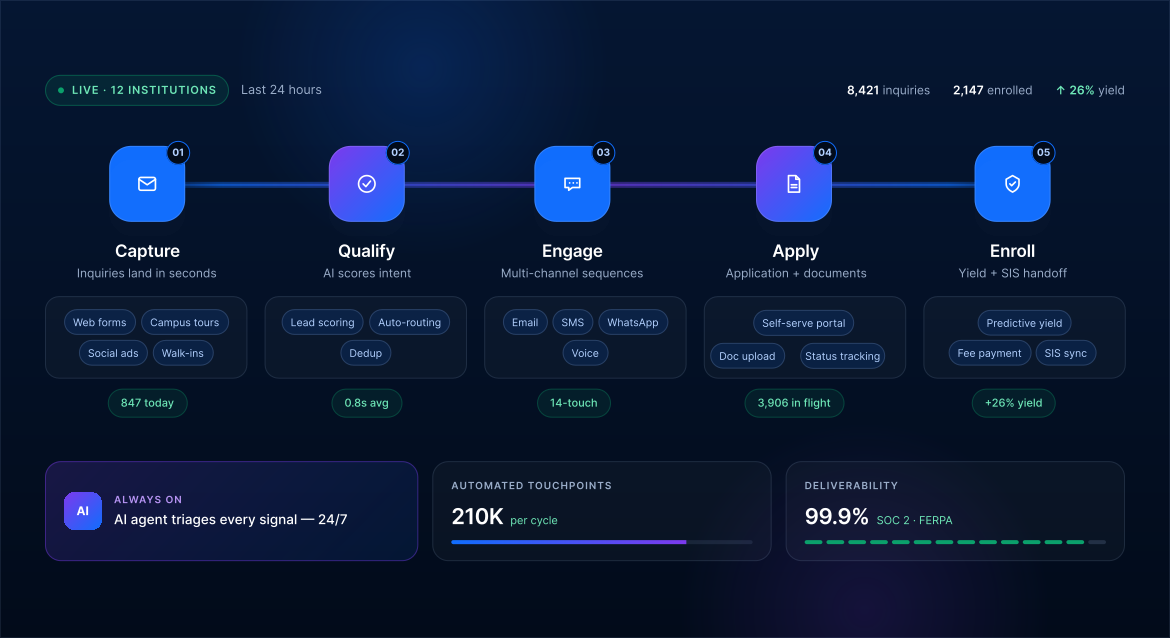
Workday exposes student and admissions data through REST and SOAP APIs, authenticated via OAuth 2.0, which is what makes CRM-to-Workday integration possible without custom middleware for every connection point.
It’s worth being precise about what “real-time” means here, since it gets used loosely in vendor marketing. Workday doesn’t natively push outbound webhooks when a record changes — there’s no built-in event that fires the instant an application status gets updated.
Instead of Workday pushing updates to the CRM the moment something changes, the CRM checks in with Workday at regular intervals — in a well-built integration, every few minutes — to pull any new changes across.
In practice, that’s close enough to real time for enrollment workflows — a counselor doesn’t need millisecond sync to know a FAFSA status changed an hour ago. What matters more is choosing a Workday-compatible enrollment CRM with an integration clean enough to avoid duplicate records, handle field-mapping changes gracefully, and not require a developer every time Workday pushes a configuration update.
Picture a mid-sized private university partway through an 18-month Workday Student rollout, having just gone live with admissions and registration while financial aid and billing are still on the old PeopleSoft instance. Their existing CRM was configured years ago around PeopleSoft’s data structure, and the connector won’t carry over cleanly.
The enrollment team also pilots Workday Student Recruiting for one program’s recruiting cycle to see if it can replace their CRM outright. It handles territory assignment and campaign tracking well, but its email-led engagement plans prove too rigid for the multi-channel, behavior-triggered nurture sequences their counselors rely on — particularly SMS follow-up tied to event attendance and web behavior, sequenced together in ways the built-in tool wasn’t designed to branch.
Rather than patch the old CRM integration twice — once for the interim hybrid state, once again at full cutover — the team uses the migration window to evaluate LeadSquared as a dedicated CRM built for Workday’s current API structure, run alongside Workday Student Recruiting rather than replacing it.
A LeadSquared + Workday Student integration means inquiry capture and counselor pipelines move to LeadSquared from day one, with the FloStack add-on generating a personalized microsite for each admitted student so they can self-book a campus tour or deposit consultation immediately, while application data syncs with whichever SIS is live at that stage. By the time Workday Student is fully live, the CRM side of the house is already stable, instead of becoming a second migration stacked on the first.
Workday Student is a genuine leap forward from Banner and PeopleSoft — a unified data model, closer-to-real-time updates, and a built-in recruiting module that does more than most institutions expect from an SIS vendor. Workday Student Recruiting handles structured campaign management, recruiter territories, and email-led nurture credibly well, and that’s worth taking seriously rather than dismissing. The right CRM for Workday Student institutions isn’t a given, though — it depends on how your institution actually recruits.
What it doesn’t automatically solve is fit. A bundled module designed around one vendor’s idea of recruiting workflows won’t match every institution’s strategy, particularly as recruiting gets more channel-diverse and behavior-driven. The honest move is testing the built-in tool against your actual recruiting model during the migration window, while you’re already touching every integration point — and making a deliberate call rather than defaulting either way. LeadSquared’s broader work across higher education institutions is built around exactly that kind of evaluation.
See how LeadSquared fits alongside a Workday Student migration, whether that means complementing Workday Student Recruiting or replacing it.
Workday Student includes Workday Student Recruiting, a built-in module that manages prospect records, recruiter territories, campaigns, events, and email-based nurture — functionally a CRM for the recruiting stage. It’s not a separately branded “CRM” product, and it’s built around structured, email-led workflows rather than the highly flexible, multi-channel journey design that dedicated enrollment CRMs are built around. Whether it’s enough depends on how complex your recruiting strategy is.
Any CRM with a REST API-based integration to Workday can sync data, but the more relevant question is whether the CRM is purpose-built for enrollment workflows — inquiry capture, counselor pipelines, yield campaigns — rather than a generalist sales CRM adapted for education. A LeadSquared Workday Student integration is one option built specifically for higher-ed enrollment teams, with support for syncing application and student data alongside an SIS like Workday Student.
Not necessarily, but it’s worth evaluating. If your current CRM’s Workday connector is solid and your workflows are working, there may be no reason to change anything. If your CRM was deeply configured around your old SIS’s data structure, or its integration roadmap doesn’t include Workday, the migration window is the lowest-disruption time to make a change — you’re already touching every integration point.
This is one area where the two products genuinely differ, not just architecturally. Banner is a records system without a comparable built-in recruiting/CRM module, so institutions on Banner almost always pair it with a separate CRM by necessity. Workday Student ships with Workday Student Recruiting, which covers a meaningful amount of that ground natively. The practical question for a Banner-to-Workday migration isn’t just “do we need a CRM” — it’s whether Workday’s built-in tool replaces what your existing CRM does, or whether you still want a dedicated CRM running alongside it.
The right fit depends on your enrollment model, but the criteria worth prioritizing for a modern enrollment CRM for Workday institutions are: A proven Workday REST API integration, purpose-built higher ed workflows rather than a retrofitted sales CRM, and a vendor who’s actually worked with institutions mid-migration rather than only post-cutover. LeadSquared checks those boxes for a number of US higher ed institutions, though it’s worth evaluating any option against your own recruiting model rather than taking that on faith.
Enter your details and we'll send you a quick confirmation email to verify your address.
 10 min read 12 min read 10 min read



 Naviance + CRM integration: How colleges enroll students from Naviance-connected...
