





EDUCATION
How to standardize student communication across counselors (with playbooks + KPIs)
Contents

 19 min read


Picture this: A prospective student submits an inquiry form on Monday morning. If they’re assigned to Counselor A, they receive a warm welcome email within an hour, followed by a text message two days later, and a phone call by the end of the week. If they land with Counselor B, the first response arrives Wednesday afternoon—a brief, formal email. Counselor C? That student might wait until Friday, if they hear back at all.
This isn’t a story about good counselors versus bad counselors. It’s about what happens when talented admissions professionals operate without a shared playbook. Each counselor develops their own rhythm, preferred channels, and messaging style. Some send follow-ups within 24 hours while others wait three days. One relies exclusively on email, another prefers texts, a third picks up the phone for everything. Messages range from warm and conversational to formal and template-heavy. Students notice these disparities—and many conclude that your institution simply isn’t interested in them.
The consequences are measurable and costly. According to a 2025 EAB survey of 1,000 community college students, while 73% expected responses to enrollment questions within 24 hours, only 21% actually received them that quickly—and 7% never heard back at all (Source).
When every counselor operates as an island, your institution pays the price in lost enrollments, compliance risk, and counselor burnout. Response times balloon. Inquiries leak out of your funnel before they ever become applications. And your team spends more time putting out fires than building relationships.
The fix isn’t to strip away personalization or turn your team into robots reading from rigid scripts. It’s to standardize student communication across counselors in a way that preserves the human touch while guaranteeing speed, quality, and compliance at scale.

If you’re wondering, “How do I standardize student communication across counselors?”, this guide walks you through the complete framework: governance structures, message mapping, cadences, templates, QA protocols, and KPIs. You’ll also see how an admissions CRM operationalizes every piece of this strategy, turning standardization from an aspiration into a daily reality.
Before diving into tactics, let’s clear up a common misconception. Standardizing student communication across counselors doesn’t mean every message sounds identical. It means building a consistent core with variable layers.
The consistent core includes:
- Response-time commitments (SLAs)
- Channel strategy by lifecycle stage
- Message structure and key talking points
- Compliance guardrails (consent, opt-out, FERPA)
- Quality standards and tone guidelines
The variable layers allow:
- Counselor personality and warmth
- Program-specific details
- Student-specific context (major of interest, campus visit history)
- Regional or demographic nuance
This isn’t about removing the human touch—it’s about ensuring every student gets both the professionalism of timely, clear communication and the personal connection that drives enrollment decisions. One counselor might emphasize financial aid options, another focuses on career outcomes—but both respond within 4 hours, use compliant messaging, and follow the same proven cadence. Students win twice: they get reliability and personalization.
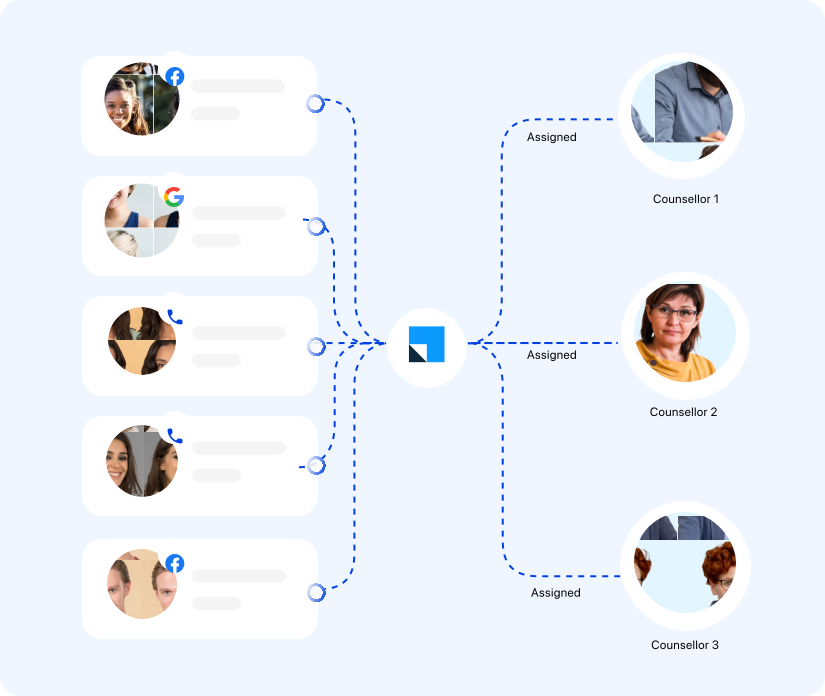
Assign clear owners for your communication strategy. Depending on your institution’s size, these may be separate individuals or combined roles:
At smaller institutions, one person might wear multiple hats—your Director of Admissions could serve as both communication lead and counseling team lead, for instance. The key is that every function has a designated owner, even if that owner handles multiple responsibilities.
Document your governance model in a living playbook. Include decision-making authority, approval workflows for new templates, and quarterly audit schedules. Without governance, standardization dissolves into chaos within months.
Helpful resources:
7 Tips To Increase Admissions Counselor Productivity & Enrollments
How AI Improves Student Counselor Performance: 5 Use Cases
Map which channels you’ll use at each stage of the student journey. Not every inquiry needs a phone call; not every application deserves a WhatsApp message.
Typical omnichannel mix:
Your channel strategy should reflect student preferences (Gen Z overwhelmingly prefers text for time-sensitive updates) and institutional capacity.
Don’t promise 24-hour phone support if you can’t staff it.
This is the heart of standardization. Create a master table that maps every student lifecycle stage to specific communication triggers, channels, templates, SLAs, and owners.
Example message map:
| Stage | Trigger | Channel | Template | SLA | Owner | Escalation |
| Inquiry | Form submit | INQ-Welcome-01 | 2 hours | Assigned counselor | Team lead at 24h | |
| Inquiry | No response after 48h | SMS | INQ-Nudge-01 | n/a | Same | Manager at 7 days |
| Application started | 50% complete, stalled 3 days | Email + SMS | APP-Incomplete-01 | 24 hours | Same | Auto-escalate at 10 days |
| Application submitted | Auto-trigger | APP-Receipt-01 | Instant | System | n/a | |
| Decision pending | 5 days before deadline | Phone | Custom script | 48 hours | Senior counselor | Dean at 2 days overdue |
| Admitted | Decision release | Email + portal | ADM-Congrats-01 | Instant | Assigned counselor | Yield specialist at 7 days no response |
Build this map collaboratively with your team. It becomes the single source of truth for who does what, when, and how.
Draft pre-approved templates for every scenario in your message map. Include:
Template governance rules:
Store templates in your admissions CRM so counselors can access them with one click. This eliminates the “I didn’t know what to say, so I waited” excuse.
Templates are static; cadences bring them to life.
A cadence is a timed sequence of touches across channels, triggered by student behavior or lifecycle milestones.
Sample inquiry cadence:
Cadences should pause or adjust based on student actions.
Your CRM should automate cadence enrollment and track adherence. Counselors shouldn’t have to manually remember to send Day 10 emails to 200 students.
Set clear service-level agreements for every communication type:
Make SLAs visible in your CRM. Use countdown timers, task notifications, and escalation alerts. When Counselor B’s inquiry sits untouched for 20 hours, the system should alert the team lead automatically.
Track SLA adherence as a core KPI.
Not all students need the same level of customization. Tier your personalization effort based on lead score, engagement level, and strategic value.
Tier 1 (high-value, highly engaged):
Tier 2 (moderate engagement or priority):
Tier 3 (early-stage, low engagement):
This tiered approach lets counselors focus human energy where it moves the needle, while automation handles volume.
Yes, students won’t care about your organizational chart.
When a counselor goes on vacation, gets reassigned, or hits capacity, communication shouldn’t drop.
Standardize handoffs:
LeadSquared’s role-based permissions and lead assignment rules make handoffs seamless. The system routes inquiries based on workload, expertise, and availability, then logs every touch for full audit trails.
A helpful resource:
Standardization lives or dies on enforcement. Build QA into your rhythm:
Monthly audits:
Real-time monitoring:
Continuous improvement:
Even the best playbook fails without buy-in. Roll out standardization as a gain, not a constraint.
Onboarding for new counselors:
Ongoing enablement:
Emphasize that templates and cadences free up time for high-impact, creative work. Counselors who spend less time deciding what to write can invest more energy in relationship-building and strategic outreach.
Standardization isn’t just operational; it’s legal protection. Every message you send must comply with FERPA (for education records), GDPR or state privacy laws (for international or California students), and TCPA (for SMS/calls).
Non-negotiables:
Track these metrics weekly in your admissions CRM dashboard:
Operational efficiency:
- First-response time: Median hours from inquiry to first touch (target: <4 hours)
- SLA adherence rate: % of communications meeting target SLA (target: >90%)
- Cadence completion rate: % of students completing planned touch sequences (target: >80%)
Enrollment outcomes:
- Inquiry-to-application conversion: % moving from inquiry to submitted app (benchmark: 10–20% lift post-standardization)
- Application completion rate: % finishing started applications (benchmark: 15–25% lift)
- No-show rate: % of scheduled appointments missed (target: <20%)
- Yield rate: % of admitted students enrolling (track by counselor and communication cohort)
Experience and quality:
- Opt-out rate: % unsubscribing from communications (target: <2%)
- CSAT score: Post-interaction surveys (target: >4.2/5)
- Consistency score: QA audit rubric average (target: >4/5)
Compliance:
- Consent coverage: % of SMS/WhatsApp contacts with documented opt-in (target: 100%)
- Opt-out enforcement time: Hours from opt-out to suppression (target: <24)
Segment these KPIs by counselor, program, and channel. Surface outliers fast.
An admissions CRM isn’t optional for this strategy; it’s the backbone. LeadSquared is purpose-built to operationalize every element of the framework above.

Southeastern College, a career-focused institution with five campuses across Florida, South Carolina, and North Carolina, faced a communication consistency crisis. With admissions coordinators spread across multiple locations and managing inquiries through several disparate systems, prospective students experienced wildly different response times and engagement quality depending on who handled their inquiry.
The challenge:
The admissions team relied on fragmented, manual processes that made inquiry management cumbersome and time-consuming. Without a unified CRM, coordinators easily lost track of prospective students. Sending a simple text or email blast required 6-8 hours of work: running reports, exporting to Excel, filtering, checking contact information, and finally sending messages. Contact rates remained below average, and as the college transitioned to degree-granting status across all campuses, the lack of standardization threatened enrollment growth.
The fix:
Southeastern College implemented LeadSquared to unify and standardize student communication across all five campuses:
Results after implementation:
Inquiry management and student support have been greatly simplified thanks to LeadSquared… Our admissions coordinators have all their tasks right in front of them and are able to work smarter and more efficiently.”
– Dana B. Hutton, Chief Marketing & Enrollment Management Officer.
The compliance and operations teams also benefited: audit trails became automatic, consent management was bulletproof, and the entire admissions pipeline gained end-to-end visibility across all five campuses.
Read more: Southeastern College Partners With LeadSquared For Customer-Centric Enrollment
Ready to unify student communication across counselors? Start here:
Week 1:
Week 2:
Week 3:
Week 4:
Month 2:
Month 3:
This blog gives you the framework. The next step is execution.
Standardizing student communication across counselors isn’t about control; it’s about consistency, speed, and care at scale. When every student gets timely, clear, compliant communication, your enrollment outcomes improve, your counselors feel supported, and your institution’s reputation strengthens. The framework is here. The tools exist. The only question is: will you standardize before your competitors do?
Improve student communication by establishing clear response-time SLAs (aim for under 4 hours for inquiries), implementing standardized message templates that counselors can personalize, and adopting an omnichannel approach that meets students on their preferred platforms—email, SMS, WhatsApp, or phone. Use automated cadences to ensure no student falls through the cracks and track adherence through your CRM dashboard. The key is balancing consistency with personalization: every student should experience the same level of professionalism and speed, while still receiving messages tailored to their interests and stage in the enrollment journey.
Effective communication starts with understanding student preferences and expectations. Use structured message maps that define which channel, template, and timeline to use for each lifecycle stage. Implement quality assurance audits—review a random sample of 10 conversations per counselor monthly using a clear rubric covering SLA adherence, tone, and compliance. Gather feedback directly from students through post-enrollment surveys asking about communication timeliness and clarity. LeadSquared’s auto-logging feature captures every interaction with timestamps, making it easy to review conversation quality and identify coaching opportunities.
Create a “consistent core with variable layers” approach. Standardize response times, channel strategy, message structure, compliance language, and key talking points. Then allow counselors to personalize with their own warmth, program-specific details, and student context (major interest, campus visit history). Use tiered personalization: high-value, engaged students get fully customized messages and personal calls, while early-stage leads receive templated messages with merge fields and smart segmentation.
You need an admissions CRM, like LeadSquared, with template management, automated cadences, SLA tracking, omnichannel capabilities (email, SMS, WhatsApp, calls), audit trails, and reporting dashboards. Essential features include role-based permissions, lead assignment rules, consent management, and integrations with your SIS and telephony systems. The CRM should automate routine tasks (acknowledgment emails, deadline reminders, sequence enrollment) while giving counselors easy access to approved templates and clear visibility into what needs attention through prioritized task lists and SLA alerts.
Start by mapping your current end-to-end admissions workflow and identifying variations across teams. Define clear stage definitions, SLAs, qualification criteria, and handoff rules. Document these in a shared playbook and configure them directly into your CRM to enforce consistency. Train teams on the standardized process, track compliance through dashboards, and review performance regularly to refine and optimize.

 8 min read
  8 min read
  10 min read



 Residential Real Estate Sales Strategy for 2026