





SALES
Computer Telephony Integration: What it means and how it helps your business
Contents

 14 min read


It is 9 a.m. and a sales rep starts the day with a stack of calls to make. The first call comes in and they quickly jot notes on paper while talking. Later, they have to enter those notes into a digital tool, perhaps a CRM. By noon, they have made several outbound calls, answered a few support queries, and tried to follow up with existing customers.
But since this is done manually, somewhere along the way, details tend to get missed, notes can be incomplete, and it is hard to keep track of who said what.
Now imagine this scenario across a whole team. Different people handle inbound calls, outbound calls, support, and account management. Without a central system, conversations get scattered, and information may get lost.
Computer Telephony Integration (CTI) changes this by bringing phone and computer systems together.
What does that change look like?
This article will explain CTI in simple terms, show you practical examples of how it’s used, and help you understand how it eliminates the everyday friction of disconnected tools.
If your organization relies on a lot of phone interactions, CTI can be a game-changer—and we’ll show you why.
What is CTI?
Computer Telephony Integration (CTI) is a technology that allows your phone system and your computer systems to work together instead of operating separately. In simple terms, CTI connects your telephone (or VoIP) system with the software you already use (such as a CRM (Customer Relationship Management System), helpdesk platform, or a patient management system if you work in the healthcare domain) so that calls and computer data stay in sync.
Without CTI, staff often juggle between the phone and their computer, manually searching for records or logging call details. CTI removes most of this manual work. When a call comes in, the system can automatically display the caller’s information on the screen. When staff need to call someone, they can click a number inside the software instead of dialing it by hand. Many CTI systems also record call outcomes, log call duration, and help route calls to the right person or department.
CTI typically involves two components working together:
1. A phone or VoIP system, which handles voice communication.
2. A software platform, such as a CRM or support tool, that displays information and manages workflows.
These two systems exchange information in real time, which makes call handling faster, accurate, and more organized.
CTI became popular as call centers transitioned from manual operations (where agents relied on physical phones and paper files) to digital environments where all customer or patient information lives in computer systems. Today, CTI is common in businesses, hospitals, clinics, customer support teams, and any organization that handles a large number of calls.
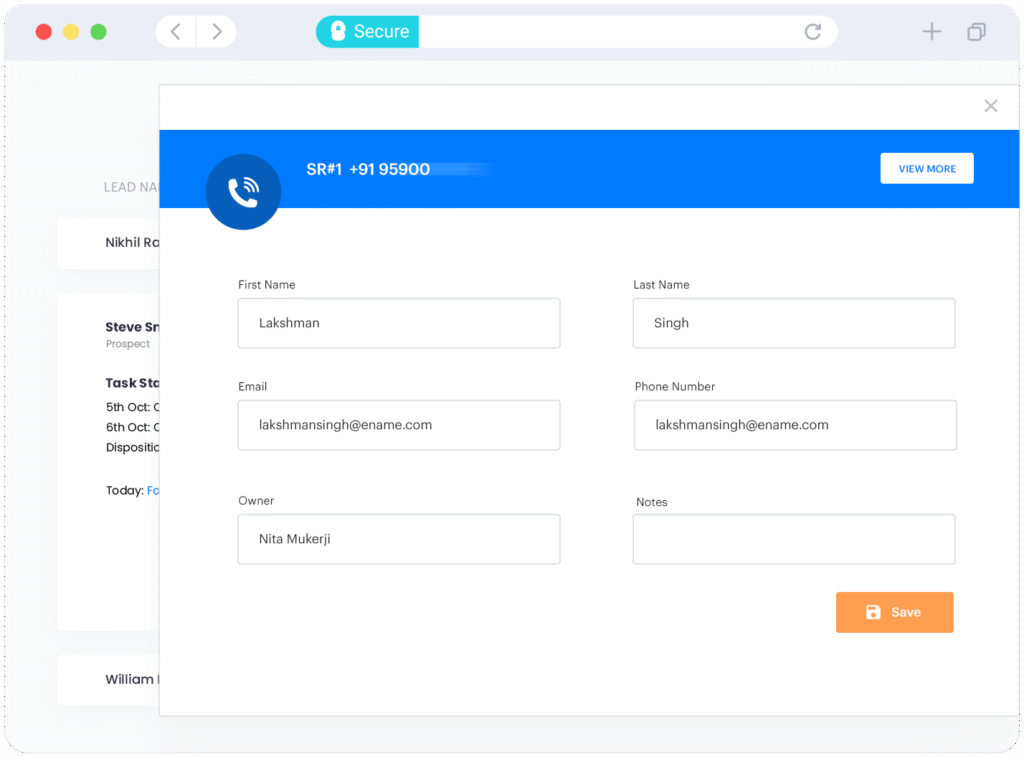
One of the most recognizable CTI features is the screen pop. When someone calls, the system automatically displays their information on the agent’s computer screen. This includes their name, phone number, past interactions, open issues, or relevant customer/patient records.
This feature prevents agents from starting every call with “Can I have your details?” and helps them provide faster, more personalized service.
For example, a clinic receptionist can immediately see a patient’s last visit and upcoming appointments, the moment they call.
Without CTI, agents typically juggle between a phone device and their computer — answering the call on the mobile device and typing notes on the screen.
With CTI, all essential call controls appear inside the software interface:
This means the agent can manage the entire call from their computer with a single click.
Another major CTI capability is intelligent routing. When someone calls, the system decides who the call should go based on set rules — for example:
If the organization uses an IVR (“Press 1 for appointments, press 2 for billing…”), CTI integrates with it, so the call reaches the right agent with minimal waiting or transfers.
This reduces hold times, improves customer/patient experience, and keeps calls from bouncing around between departments.
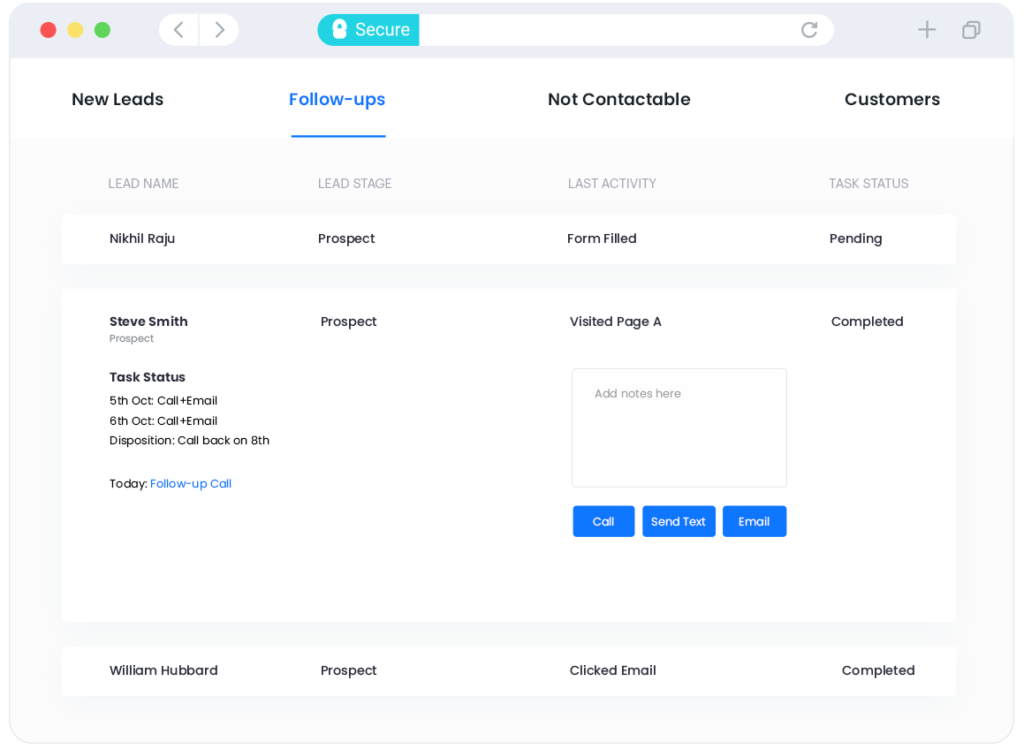
CTI allows users to make outbound calls directly from their computer with a single click. Instead of manually typing phone numbers on a desk phone, the agent can click a number stored inside digital tools like CRM, and the call will be placed instantly.
For call-heavy teams (such as support, sales, or patient-coordination teams), this saves a lot of time and prevents dialing errors. More advanced CTI systems also support auto-dialing, where the system automatically calls through a list of numbers and connects answered calls to an agent.
With CTI, details regarding every call can be easily logged into the connected software or CRM. This means data on call duration, call outcome, and timestamps are saved without the agent doing manual entry.
CTI also allows managers access to analytics dashboards through integration with tools like LeadSquared CRM. This shows them patterns such as call volume, peak hours, wait times, abandoned calls, and agent performance. These insights help organizations identify bottlenecks and put in measures to improve workflows and customer experience.
6. Unified communication history and data sync
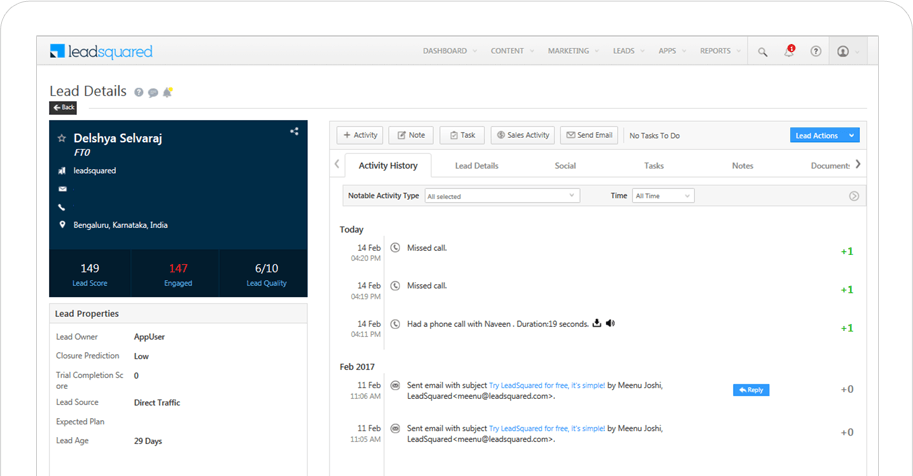
CTI reduces the problem of scattered information. Calls, notes, emails, tickets, or chat interactions can be synced into a single system (like a CRM) to make it easier for staff to view the entire communication history with a caller in one place.
This is useful in healthcare, customer service, and operations teams where multiple people may interact with the same individual.
As we saw, with CTI, the moment a call comes in, the system can show the caller’s details—past interactions, open issues, or recent appointments. This means the agent does not have to ask the caller to repeat basic information. The conversation starts faster, feels more personal, and leads to quicker resolution because the agent immediately has context.
CTI reduces unnecessary steps. Agents no longer need to switch between a phone and a computer or manually enter phone numbers. They can answer, hold, or transfer calls directly from their screen. For outbound teams, click-to-dial and auto-dialing save enormous amounts of time. Altogether, these small improvements significantly increase daily productivity.
Because calls, notes, and outcomes can be logged automatically, there is less chance of forgetting to document a conversation. This is especially important in healthcare, where follow-up details, patient instructions, and call outcomes must be reliable.
When people call a business, they want quick and clear help. CTI makes this easier by reducing the steps it takes to reach the right person. Because calls can be routed based on purpose, language, or urgency, callers spend less time waiting or explaining their issue repeatedly.
As organizations grow, so does their call volume. But hiring large numbers of additional staff is not always possible. CTI allows teams to handle more calls with the same number of agents because many tasks become automated or streamlined. Routing rules, caller identification, on-screen call controls, and efficient workflows reduce bottlenecks. This makes CTI a scalable solution that supports busy call centers, hospitals, clinics, and customer service teams without overwhelming them.
Manual phone processes — dialing numbers, switching screens, logging calls by hand — take time and increase the risk of errors. CTI reduces this overhead by automating or simplifying most call-related tasks. It also eliminates the need for separate phone hardware or older PBX systems, which can be costly to maintain. By shortening call handling time and reducing technical complexity, CTI helps organizations save both time and money, while improving consistency and accuracy across the board.
A CRM, as a digital tool, stores essential information about your customers or leads, including their contact details, interaction history, notes, tasks, and follow-up requirements.
When your CTI system is combined with CRM, incoming calls can be automatically matched to the correct record in the CRM. This gives staff immediate context, such as past conversations, pending issues, or upcoming appointments, which makes the interaction smoother.
CTI also allows calls to be logged automatically inside the CRM to cut down on manual entry of data by your staff.
The combination supports useful features such as click-to-dial, automatic call notes, follow-up reminders, and unified communication timelines. For clinics, support teams, and care coordinators, this means less time managing tools and more time helping the caller.
As we saw, Computer Telephony Integration (CTI) brings telephone systems and computer-based software together. At its core, CTI removes the need for manual steps (like searching for a caller’s details, dialing numbers, or logging call information) and replaces them with automated processes that support faster, more accurate communication.
For teams that manage large call volumes or rely on timely phone communication (such as customer service desks, support centers, healthcare teams, or sales environments), CTI can make everyday operations significantly smoother.
When CTI is paired with a Customer Relationship Management (CRM) system, the benefits become even more pronounced. The CRM provides the data foundation—customer profiles, past interactions, notes, and follow-ups—while CTI brings real-time call handling into the same workflow. Together, they support better continuity and fewer errors in your communication efforts
If you’re exploring ways to streamline communication or improve follow-up accuracy, it may be worthwhile to see how CTI works alongside a CRM like LeadSquared. A quick demo can help show how the combined system can support your team’s day-to-day needs.
CTI, or Computer Telephony Integration, connects your phone system with your computer software. In simple terms, it allows calls and caller information to appear directly on your screen. When someone calls, the system can instantly show their details, previous interactions, and related notes. It also lets staff answer calls, transfer them, record them, and log them automatically without switching between devices. This helps teams work faster and ensures that every call is documented properly.
Most CTI solutions today work very well with VoIP, which means phone calls happen over the internet instead of old copper phone lines. CTI can still work with traditional telephony, but VoIP systems are generally easier to integrate and offer more features. Many businesses and clinics choose VoIP because it is more flexible and cost-effective.
Not at all. Even small or simple CRM systems gain value from Computer Telephony Integration. The biggest advantages come from the basics – pulling up caller details automatically, logging calls, and keeping all communication history in one place. Small teams, clinics, and service desks often benefit the most because CTI reduces manual work and prevents information from being lost.
Call recording is legal in many regions, but the rules vary. Some places require one-party consent while others require both parties to be informed. In regulated sectors like healthcare, calls may need to follow data-protection rules such as HIPAA or local equivalents. Most CTI systems support compliance features, like secure storage and consent prompts, but organizations must still follow local regulations and internal policies.
No. CTI improves phone-based communication, but it does not replace other channels. Most organizations use a mix of phone, email, chat, messaging apps, and sometimes in-person communication. CTI simply ensures phone interactions are integrated with computer systems and recorded in the same place as other data.
CTI is often associated with large call centers, but it is equally useful for small teams. Even a two-person clinic or a small sales team can benefit from features like click-to-dial, caller identification, and automatic call logging. It saves time, reduces errors, and creates a more professional experience for callers.
If you use VoIP, both internet and power outages can affect the system. Some businesses use backup internet connections or mobile hotspots to stay online. Traditional phone lines may keep working even without power, but CTI features that rely on the computer (like screen pops or automatic logging) will not. The exact behavior depends on the phone system and the setup, but most organizations put basic redundancy in place to minimize downtime.
Start by assessing the scale of your operations. Think about how many calls you handle daily, whether the volume fluctuates seasonally, and how quickly you expect your team to grow.
Next, consider the level of compliance or documentation your industry needs. For example, healthcare, and financial services often require secure call recording, detailed communication logs, and proper data retention. If your work involves sensitive information, look for CTI solutions that support encryption, permissions, and audit trails.
Compatibility with your CRM is another major factor. CTI works best when it plugs smoothly into the system where customer or patient information already lives. Make sure your CTI provider offers integrations with your CRM, supports features like screen pop, click-to-dial and automatic call logging, and doesn’t require complicated manual setup.
It’s also important to check whether the CTI supports VoIP, remote work, and cloud-based environments if your team isn’t working from a single physical location. Good analytics and reporting matters, too — they help managers understand call patterns, agent performance and customer needs.
Finally, consider practical elements like cost, training requirements, and ongoing support. Some systems are easy to adopt, while others need dedicated onboarding.
CTI is used across many types of organisations because it simplifies how teams handle phone calls and customer interactions. One of the most common use cases is customer support or contact centers. When a call comes in, CTI can instantly display the caller’s information, previous issues, and any open tickets. This means agents don’t have to start from scratch every time. It also helps reduce repeated questions and improves first-call resolution.
CTI also supports outbound work such as sales, appointment setting, and follow-up calls. Instead of manually dialling, staff can use click-to-dial or automated dialers directly from their CRM or call interface. This speeds up outreach, simplifies logging call outcomes, and helps teams move through call lists more efficiently.
Healthcare organisations use CTI to provide better patient communication. As soon as a patient calls, receptionists or care coordinators can see the patient’s details, recent visits, or upcoming appointments. This reduces friction and ensures more accurate and reassuring conversations.
CTI is also practical for distributed or remote teams. With VoIP-based CTI, the same routing rules, caller information, and logging features work no matter where staff are located. Studies comparing cloud-based CTI to older, hardware-based systems show that cloud setups scale more easily and offer better dialer performance for remote operations.

 11 min read
  19 min read 11 min read



 Student admissions tasks: How to automate repetitive duties