





EDUCATION
Student admissions tasks: How to automate repetitive duties
Contents

 13 min read


Handling large applicant pools is not exactly new for admissions teams. What has changed, however, is how that work gets done.
In the past, even when systems were slower and processes were less advanced, admissions tasks typically lived in a small number of tools and followed a predictable, linear flow. Teams knew where information lived and how applications moved from one stage to the next.
Today the challenge is how fragmented the admissions process has become.
As institutions introduced new systems to make it easier for students to apply online, submit documents digitally, and receive faster updates, each tool improved a specific part of the experience. However, over time,admissions work spread across multiple disconnected systems.
Given this reality, the focus has shifted from adding more tools to using the existing ones better. And that’s where automation comes in.
By automating repetitive admissions tasks, institutions can reduce day-to-day friction without disrupting existing workflows.
In this article, we explore where automation fits best within the admissions process and how teams can implement it thoughtfully.
In student admissions, repetitive tasks are activities that occur for every applicant and follow a predictable pattern. These tasks typically don’t require complex decision-making but are essential to keeping the admissions process moving. Because of their repetitive nature, they can consume a lot of time and energy when handled manually.
Common examples of repetitive admissions tasks include:
Identifying the repetitive tasks is the first step to making the admissions process smoother.

One of the first steps in automating admissions is moving the application process online. Instead of using paper forms, students complete digital application forms through a secure portal or an admissions management system.
Many platforms include auto-fill features that allow returning students or applicants from partner institutions to access existing data, so they don’t need to retype information. Once submitted, the system automatically stores and organizes the data in a central database, ready for admissions staff to review.
This speeds up the process and reduces errors from typos or missing information.
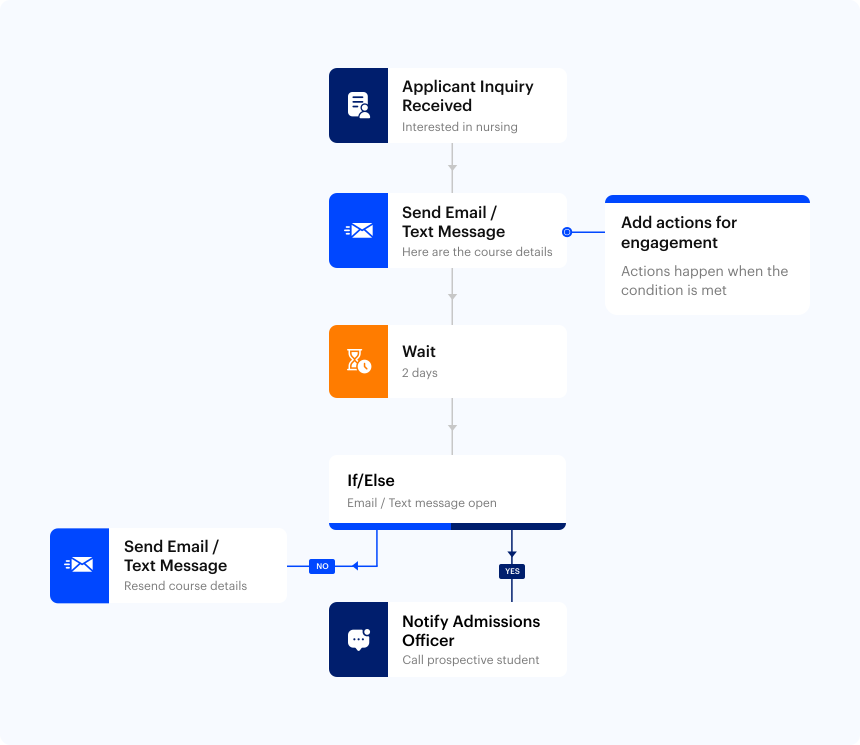
Admissions teams handle a high volume of routine communication with applicants (such as confirming submissions, reminders for missing documents, or updates about their application status). Automated communication tools allow this to happen without manual intervention. These tools can send auto-response emails, SMS confirmations, and multi-channel reminders, ensuring students receive timely updates across the channels they use most.
Modern systems can also provide personalized messages based on applicant status. For example, if a student has submitted an application but not uploaded all documents, the system can automatically send a friendly reminder highlighting what is missing and the upcoming deadline. Once documents are received, a confirmation message can follow, keeping the applicant informed at every step.
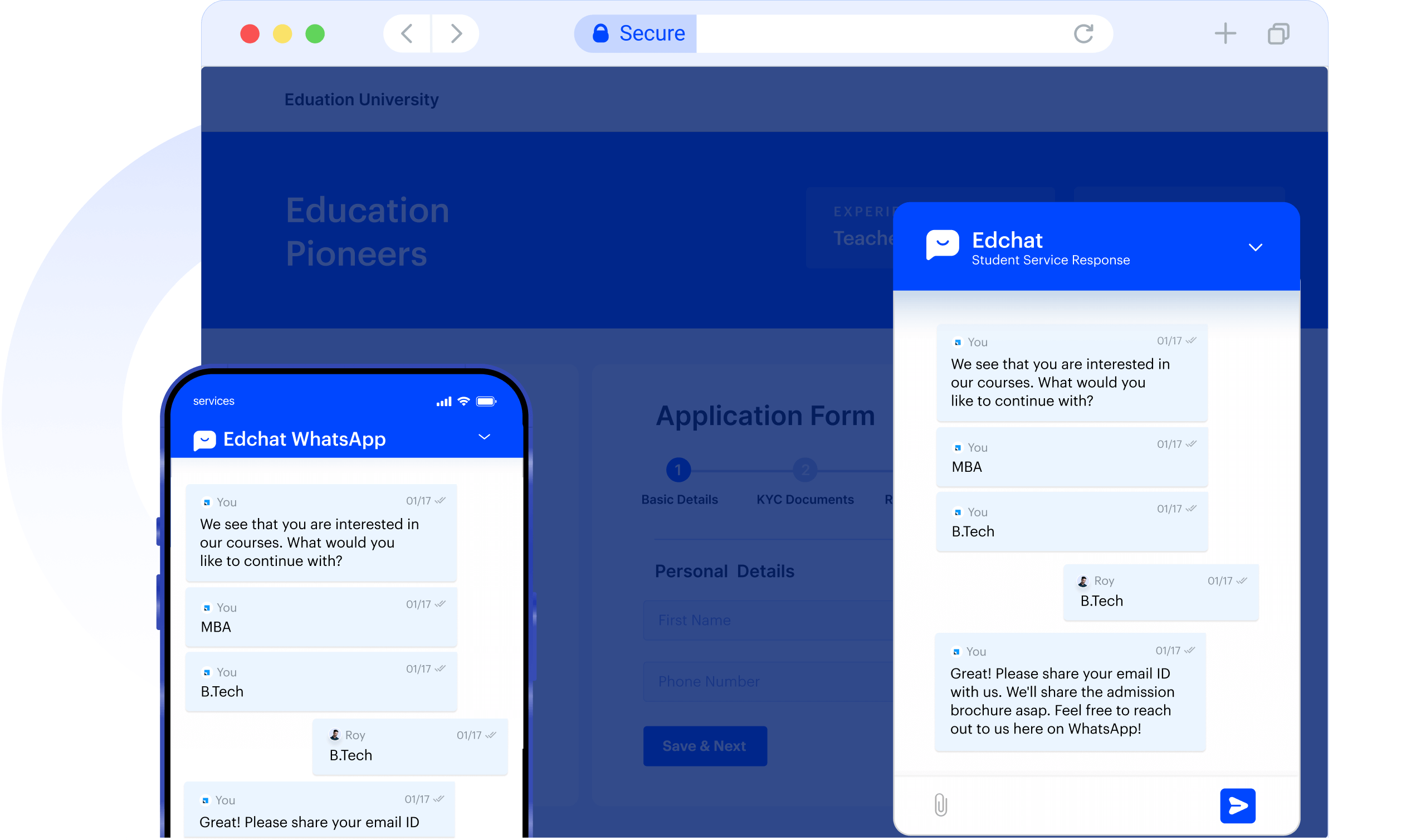
When students visit an institution’s website, they often have basic questions.
They may want to know eligibility criteria, application deadlines, required documents, or how to apply. Chatbots and AI assistants can help here by answering these common questions instantly, without needing staff to respond each time.
These tools can also guide applicants step by step, such as pointing them to the right application form or explaining what to do after submission. This immediate support reduces confusion and the chance of students dropping off from the application process.
Handling documents is often one of the most time-consuming parts of student admissions. Students submit transcripts, ID proofs, test scores, and other certificates, usually through emails or multiple platforms. Admissions staff then spend hours downloading files, organizing them, renaming them, and checking for missing items. As application numbers grow, this becomes difficult to manage.
A digital system like education CRM gives students the option to upload documents directly to a central portal. Each file is linked to the correct application and stored in an organized way, so staff no longer need to search through inboxes or shared drives.
Staff members are able to review submissions for completeness and verify whether the files meet basic requirements. If something is missing or needs correction, they can alert the student with the help of the CRM or other means, who can then submit the correct or missing documents.
For instance, if a transcript is incomplete or in the wrong format, the issue can be flagged, prompting the student to replace or fix the document. With all documents stored in one place, admissions teams gain a clear, up-to-date view of each application.
Once applications start coming in, admissions teams need to quickly answer a basic question: which applicants meet the minimum requirements and which ones do not.
This initial screening usually involves checking eligibility criteria such as academic qualifications, test scores, age limits, prior coursework, or language proficiency. This allows applications to be grouped based on how closely they align with program requirements.
Today, AI-driven scoring adds further direction to this process. By weighing predefined factors related to program fit, the system highlights stronger matches while drawing attention to borderline or incomplete cases. Human reviewers still make the final decisions, but they begin with better context instead of blank slates.

Processing student applications involves many steps, and multiple staff members usually handle different parts. From checking documents to scheduling interviews, every action needs to happen in the right order.
Workflow automation in an education CRM helps move applications through these stages automatically. For instance, once an applicant uploads all required documents, the CRM can advance their file to the next stage—like eligibility review—without anyone having to manually intervene. Predefined rules ensure that every application progresses smoothly.
Task routing makes sure the right staff member handles the right job. Assignments can follow rules based on roles, expertise, or availability. If someone is busy or away, the CRM can redirect tasks automatically, preventing bottlenecks.
Dashboards and notifications in the CRM keep the team on top of everything. Staff can see which applications are waiting, which tasks are urgent, and where delays happen most commonly. Alerts remind teams about pending actions, so no application gets overlooked.
By linking all tasks to each applicant’s record, the CRM provides a clear view of the complete student journey. Teams can coordinate work efficiently and ensure nothing is missed, keeping admissions running smoothly even when volumes are high.

Scheduling interviews can be a tedious process. Coordinating staff availability with applicants often leads to long email chains, missed messages, or double bookings.
Automation can help here as well. A system like education CRM can suggest interview slots based on staff and applicant availability, send automatic confirmations, and issue reminders before the scheduled time. If someone needs to reschedule, the CRM can handle it without staff intervention.
This reduces the back-and-forth that usually consumes hours of staff time and eliminates common errors.
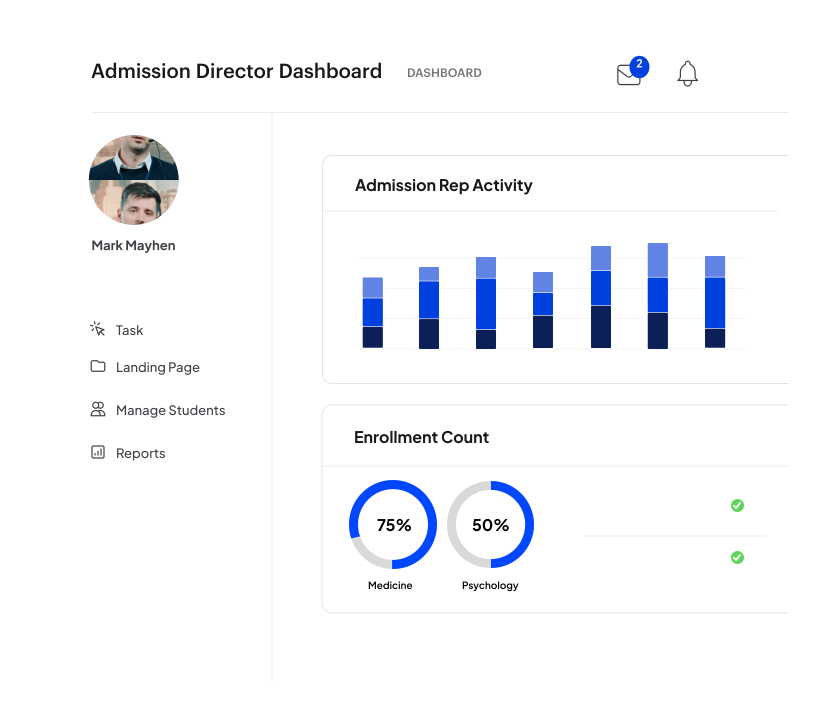
Once applications start coming in, visibility becomes critical. Admissions teams need to understand what is moving smoothly and where applicants tend to drop off. Without clear tracking, these issues often surface only after an admission cycle ends, when it is too late to fix them.
Tracking and analytics tools make this information visible in real time. With it, admissions teams can monitor metrics like application volumes, completion rates, processing times, and conversion stages as they happen. This helps teams respond faster instead of relying on assumptions or delayed reports.
Analytics also help identify recurring bottlenecks. For example, reports may show that applications frequently stall at the document submission stage, or that decision timelines vary widely between programs. Metrics such as average time to process an application or the most commonly missing documents provide concrete signals about where processes need improvement.
Over time, this data has become even more valuable. A growing number of institutions now rely on analytics to guide admissions decisions, with over 60 percent of universities using data analytics to inform their recruitment and admissions strategies.
Many admissions tasks follow predictable patterns, from collecting documents to scheduling interviews and tracking progress. As we saw, automating these steps helps reduce manual effort and keeps applications moving without disrupting the current workflow.
To support this, institutions increasingly rely on centralized systems that bring application data, communication, workflows, and reporting into one place.
Platforms like LeadSquared’s education CRM are built around this operational need.
If you’d like to see how this works in a real admissions setup, you can book a quick demo of LeadSquared’s education CRM.
While automation streamlines repetitive and predictable work, decisions that require human judgment should remain manual. This includes reviewing personal statements, contextualizing applications, interpreting nuances in recommendation letters, and final admissions decisions.
Technology is best used to support your team by reducing manual workload, not replacing the human evaluation that ensures fairness and institutional priorities are upheld.
Not necessarily. Automation can improve consistency and responsiveness without removing personal touch. For example, automated reminders and updates make applicants feel informed, while follow-ups from staff can be reserved for personalized or complex conversations.
Automated systems can also trigger personalized messaging based on applicant actions, so communication feels timely and relevant rather than generic.
Automation isn’t only for large universities. Smaller schools can benefit by handling high volumes of inquiries, sending consistent reminders, and tracking applicant progress without needing a large admissions team. Many modern tools scale with your needs, allowing even small teams to maintain speed and reliability as application volumes grow.
Yes. Beyond task automation, analytics dashboards can reveal trends like common missing documents, average processing times, and applicant behavior patterns. These insights help teams optimize processes, plan resources, and identify stages where applicants tend to drop off. Over time, institutions can make data-driven improvements in each cycle.
Full automation—where decisions are made without human review—is not recommended. The most effective approach is augmented admissions, where technology handles repetitive tasks and data handling while humans make core academic and policy decisions. This helps maintain fairness and preserves the critical role of human judgment in admissions.
No. Most modern admissions automation tools are built for non-technical users. Admissions teams can configure workflows, templates, and rules through visual interfaces rather than coding. Training typically focuses on understanding the process rather than learning technical skills.
Admissions systems are designed to comply with data protection regulations such as FERPA or GDPR, depending on the region. They include role-based access, audit logs, and secure storage, so only authorized staff can view or modify sensitive applicant information.
Yes. Admissions automation does not require replacing all existing tools. Many institutions integrate automation with student information systems, payment gateways, learning platforms, and email tools to reduce fragmentation while keeping familiar systems in place.
Return on investment is usually seen through reduced processing time, fewer application errors, higher completion rates, and lower staff workload. Over time, institutions also benefit from better planning and improved applicant experience, which can positively impact enrollment outcomes.
A CRM acts as the central system that connects and coordinates all automated admissions activities. Instead of application data, communication, documents, and tasks living in separate tools, a CRM brings everything into one place.
As applications move through different stages, the CRM tracks each applicant’s information, communication history, and pending actions in real time. This allows admissions teams to see exactly where an application stands without switching between systems. Automated tasks such as follow-up emails, reminders for missing documents, interview scheduling updates, and status changes are all triggered based on predefined rules inside the CRM.
A CRM also improves collaboration across departments. Admissions officers, counselors, finance teams, and program coordinators can work from the same applicant record, reducing miscommunication and delays. Reporting and analytics are built on top of this centralized data, making it easier to track conversion rates, processing times, and engagement levels.
For example, an education-focused CRM like LeadSquared can manage inquiries, automate applicant communication, and organize workflows, while still allowing staff to step in wherever human judgment is needed.
Successful admissions automation starts with understanding existing processes. Institutions benefit from first reviewing their admissions workflow to identify tasks that are repetitive and rule-based.
Prioritization is key. Rather than automating everything at once, teams should focus on areas with the highest impact, such as application intake, document follow-ups, or interview scheduling. A gradual rollout helps avoid disruption during active admission cycles and gives staff time to adjust.
Training is equally important. Admissions teams should understand not just how the tools work, but how automation supports their daily responsibilities. Collecting feedback during early stages helps refine workflows and improve adoption.
Most importantly, automation should support human decision-making, not replace it. While systems handle routine work, admissions staff remain responsible for reviewing applications, engaging with students, and making final decisions. When implemented thoughtfully, automation strengthens efficiency without losing the personal element of admissions.
Admissions automation often raises valid concerns, especially during early adoption. One common challenge is staff resistance to new technology. This usually comes from fear of change or uncertainty about job impact. Involving staff early, explaining how automation reduces repetitive work, and offering hands-on training helps build confidence and adoption.
Data integration can also be a hurdle. Many institutions use multiple systems for applications, finance, and communication. Choosing tools that integrate well or offer flexible data syncing reduces fragmentation and prevents duplicate work.
Another concern is losing personal touch. Automation works best when it handles routine tasks while staff focus on meaningful interactions. Clear rules about where human review and communication are required helps preserve this balance.
Data privacy and compliance are equally important. Institutions should use systems that support role-based access, audit logs, and compliance with regulations such as GDPR or FERPA. Regular data reviews and security practices ensure automation remains both efficient and responsible.

 16 min read
  9 min read 17 min read



 Lead routing: The complete guide to automation rules, examples, and best pr...