





SALES
Lead routing: The complete guide to automation rules, examples, and best practices
Contents

 18 min read


Speed to lead isn’t a metric—it’s a revenue multiplier.
And most teams are slower than they think.
Without an intelligent lead routing system in place, high-intent prospects get delayed, misassigned, or ignored entirely. And when that happens, the deal usually goes to whoever responds first—78% of the time.
Lead routing isn’t just a backend process—it’s the engine that drives sales efficiency by ensuring every inquiry reaches the right rep at the right time, reducing wait times and irrelevant handoffs. In this article, we’ll cover everything you need to know about lead routing, from the basics to lead routing best practices that ensure every lead gets the attention it deserves.
Lead routing is the process of assigning incoming leads to your team members – think sales reps, patient intake coordinators, admission counsellors, service team members, etc. It ensures each lead is directed to the right sales rep as soon as possible, based on their use case, company size, location, or specific needs. But lead routing is more than just an assignment process – it’s a strategic way to manage your sales pipeline and your team by prioritizing high-intent leads, balancing rep workloads, and ensuring every opportunity gets timely follow-up.
Lead routing involves a series of steps funneling the lead to an appropriate rep.
Each of these steps is important to your lead routing strategy.
Trigger-based lead routing assigns leads to reps based on real-time actions—like repeated pricing-page visits, webinar attendance, or content downloads—rather than static factors such as location or industry. It reacts to what prospects are doing right now, signaling intent and allowing your team to follow up at the peak moment of interest.
How it differs from traditional routing:
To keep distribution fair, this approach should be paired with load-balancing rules, since some triggers occur more frequently than others. Regularly adjusting thresholds helps avoid overwhelming reps and ensures no high-intent lead gets overlooked.
Every lead is different. They come from different cities, have different use cases, show interest in different products, and operate at different scales.
To move these leads forward, you need to route them to the right owner—whether that’s a sales rep, SDR, counselor, specialist, or partner—who can address their specific needs and context.
We already discussed that most customers buy from the company that responds to their inquiry first. This highlights the need for fast and efficient lead routing. By assigning leads to the right sales rep quickly you can:
Beyond speed, lead routing also ensures leads are matched with owners who have the right expertise. This could mean:
By matching leads with the right experts, you increase the chance of conversations that address the lead’s specific needs and concerns.
Lead routing isn’t just about the leads – it’s also about your sales team. A good routing system ensures:
This balanced approach keeps team morale high, prevents burnout, and ensures all leads get attention.
Manually assigning leads can be a time-consuming and error-prone process. This is where automation comes in. By using CRM software like LeadSquared you can automate your lead routing and get:
Automation reduces the manual workload and speeds up lead assignment. Instead of having a manager spend hours each day assigning leads, the system can do it in seconds based on pre-defined rules.
An automated system ensures a more even distribution of leads among sales reps, without overloading. It follows the rules consistently, without human bias or oversight.
Leads are assigned faster, follow-ups are quicker, and consequently conversion potential increases. In a world where the first responder wins the sale, this speed is a big competitive advantage.
Integration with pre-defined rules means smarter routing decisions based on lead characteristics. The system can consider multiple factors at once, more than a human can in real-time.
As your business grows and lead volume increases an automated system can handle the extra load without needing more manpower for lead assignment.
Automated systems can track and measure routing patterns and provide valuable insights to refine your routing rules and sales strategies over time.
Let’s look at some of the most common lead assignment rules you can use in your automated lead routing:
Assigning leads by location is one of the most popular routing methods. Sales reps can leverage their local knowledge and meet the lead in person if needed. This approach is particularly effective for real estate lead routing, where geographic proximity and local market expertise are essential.
Benefits of territory-based routing:
If you’re wondering, “Which CRM supports territory-based lead assignment?” look no further than LeadSquared.
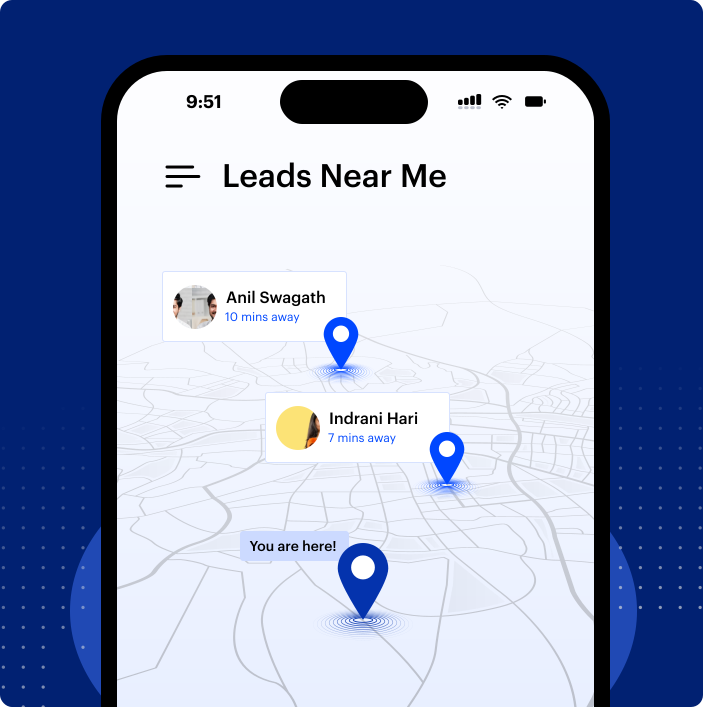
Admins can configure territory-based routing rules, ensuring leads are automatically assigned to the right local owner—while the Mobile CRM empowers reps to receive, engage, and act on those leads immediately, wherever they are.
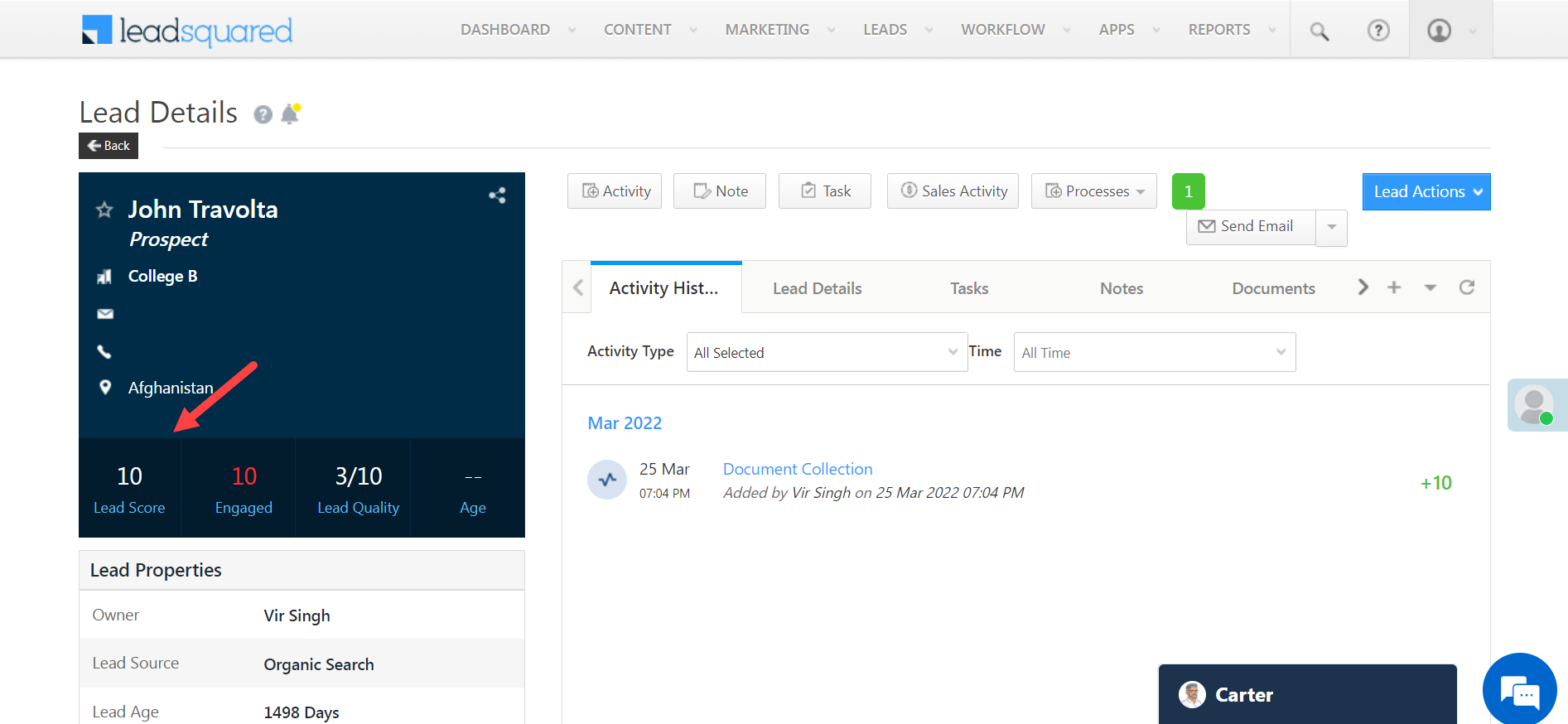
Lead scoring is a method of ranking leads based on their conversion potential. Email opens, website visits, demo requests, app installs, form submissions, and repeat product views can all contribute to a lead’s score.
By routing high scoring leads to your most experienced sales reps you can ensure your best opportunities get the attention they deserve. This approach:
LeadSquared’s lead scoring can be integrated with routing rules, so you can do dynamic score-based assignments.
Not all leads come from the same place—and the way you follow up should reflect that. With source-based routing, you can match leads to reps who specialize in the origin of each inquiry, ensuring more relevant and effective conversations.
For example, if a lead comes in through a referral program, it makes sense to send it to a rep familiar with partnership dynamics and referral processes. Leads that arrive via social media campaigns can go to team members who understand those channels and can speak the language of that audience. Similarly, if someone attends a webinar, you can route them to reps who are skilled at following up on event-based interest.
Benefits of this approach include:
Not all leads are interested in the same products or services. Routing leads by their interests ensures they’re connected with a rep who has expertise in that area.
This method:
LeadSquared allows you to set up routing rules by product interest so you can increase the chances of a sale.
Different industries require different sales approaches. By routing leads to reps with experience in that industry, you can give them more tailored and relevant pitches.
Today’s buyers—whether B2B or B2C—do extensive research before reaching out. Most begin their journey online and engage with multiple touchpoints long before speaking to a business.
This means when a lead does reach out, they’re often well informed about their industry needs – so when you connect with them, you need to be knowledgeable too.
Industry routing:
While routing by industry offers sector-specific expertise, it does come with a few challenges to watch for:
These factors can complicate resource allocation and team dynamics, so it’s important to balance specialization with opportunities for reps to broaden their skill sets.
A small startup has different needs than a large enterprise. Routing leads by company size ensures each lead gets the right level of attention and solutions.
Benefits:
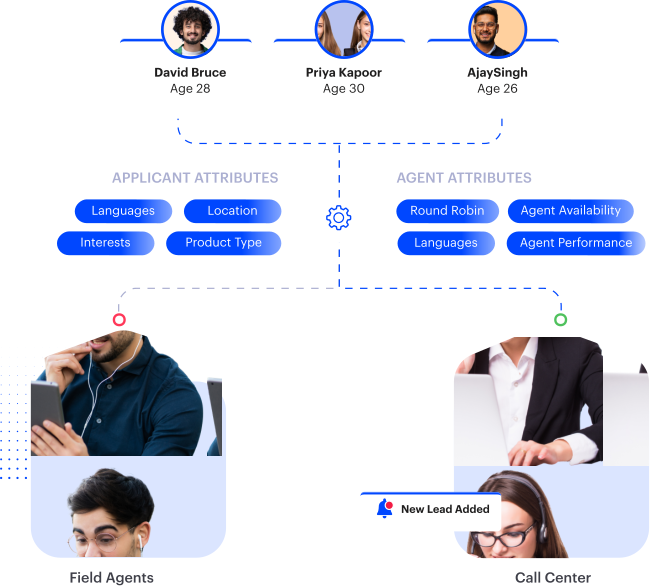
This method involves matching leads with reps based on shared attributes or complementary skills. For example, a lead who prefers to communicate in Spanish would be routed to a Spanish-speaking rep.
Other attributes might be:
High value leads require a different approach. Routing these leads to your most experienced reps can help you close more of these big deals.
This approach:
No point in routing a lead to a rep who’s on vacation or overwhelmed with work. Routing by availability ensures leads are always assigned to reps who can give them immediate attention.

Benefits:
This method, known as round robin lead routing, involves distributing leads equally among all sales reps in a rotating sequence. It’s a fair way to distribute leads and can be good for teams with reps of similar skill level.

Account-based lead routing assigns incoming leads to the reps who own specific accounts. This ensures every lead tied to a company—whether through domain, company name, or variations like subsidiaries—is routed to the correct account owner. For example, any lead connected to “Zoom” should automatically go to the rep managing that account, regardless of minor naming differences.
This approach creates consistent, context-rich follow-ups and stronger relationships, since the rep already understands the account’s needs. The challenge: large accounts can generate uneven lead volumes and overwhelm certain reps. Regular workload monitoring and adjustments help maintain balance and protect response times.
A flexible, no-code routing system puts you in control—even when your go-to-market strategy changes. Instead of relying on IT teams or developers, you (or your sales ops team) can adapt lead assignment rules instantly using an easy, drag-and-drop interface. This means that as your team experiments with outreach by industry, territory, or company size, you’re not stuck with outdated processes or manual workarounds.
Making adjustments is as simple as tweaking your criteria or adding new steps, like sending tailored alerts or logging actions for robust reporting. Need to fine-tune how leads are matched by account hierarchy, or prioritize certain verticals for a new campaign? Just update the logic—no code, no waiting period.
The benefits:
Ultimately, no-code flexibility, with platforms like LeadSquared, ensures that as your business scales and your strategies evolve. And your lead routing keeps pace—delivering speed and accuracy, regardless of complexity.
LeadSquared’s CRM has the lead routing tools to set up and manage automated lead routing. Here’s how to get started:
LeadSquared’s automation allows you to combine multiple routing rules to create a complex routing scenario.
One of the common lead management pitfalls is assigning the same lead to multiple sales reps. This can cause confusion, inconsistent messaging and a bad experience for the lead.
Consequences of duplicate assignments:
LeadSquared’s CRM has features to prevent duplicate assignments, so a single point of contact handles each lead. This improves the lead’s experience and saves your sales team’s time and effort.
To get the most out of your lead routing, follow these best practices:
Define your lead qualification criteria and set up routing rules accordingly. This might include:
Use a CRM like LeadSquared to automate your routing process, reduce errors and increase efficiency. Automation can make complex routing decisions in real-time, so leads are distributed optimally.
Give your reps immediate access to lead information when assigned. So they can:
Review metrics like response time and conversion rates regularly to see where you can improve. Key metrics to track:
Make sure your sales reps know the routing system and their role. This includes:
Be prepared to change your routing rules as your business grows and changes. Review your routing strategy regularly to make sure it’s aligned with your current business goals and market.
When done right, lead routing can have a big impact on your business. By routing leads to the right sales rep, you increase your chances of being the first to respond.
Also, a well-implemented lead routing can:
By matching leads with the right sales reps, you get better sales conversations and higher conversion rates.
Fast response times and knowledgeable reps = happy customer
The happier the customer, the more likely they are to repeatedly buy from you, loyal customers are a huge contributor to successful businesses.
Fair lead distribution and matching reps with leads they can handle increase reps’ job satisfaction and enhance their performance.
Data from your lead routing system can give you insights into your sales process, team performance and market trends. Inform your decisions.
These benefits alone should be more than convincing to realize that lead routing is key to timely and efficient lead communication.
To future-proof your lead routing for AI, strengthen your data and processes now with advanced lead routing technology:
With clean, organized data and clear processes, tools like LeadSquared can deliver better automation, real-time recommendations, and more efficient lead assignment—boosting performance today and preparing your system for tomorrow.
Fast and effective lead communication is a must-have in today’s competitive business world. Lead routing is the key to making sure that all leads that enter your business’s pipeline are channeled to the most appropriate representative and quickly.
Automate and follow best practices, and you can create a lead routing system that boosts your sales productivity and customer experience.
Don’t let leads fall through the cracks. Route leads with LeadSquared and see the conversions rise!
Fallback routing acts as a safety net to ensure no lead gets overlooked when a primary rep is unavailable or slow to respond. If a rep doesn’t take action within a set timeframe, the system can send reminders, reassign the lead to another rep, or escalate it to a manager. It can also pause assignments outside business hours and resume them automatically. This backup layer protects response-time targets and keeps every opportunity moving, even when the team is busy.
Reducing manual intervention in student lead routing starts with automating assignment rules based on criteria like program interest, location, or inquiry source. Use a CRM with built-in lead routing tools that can automatically distribute leads to the right admissions counselor in real-time. Set up triggers for immediate notifications, implement round robin lead routing for fair distribution, and use lead scoring to prioritize high-intent prospects. With the right lead routing technology, you eliminate bottlenecks, speed up response times, and ensure no student inquiry falls through the cracks—all without manual sorting.
Some organizations—especially global enterprises with multiple subsidiaries—use hierarchy-based lead routing to ensure leads tied to any branch, brand, or division are automatically assigned to the right account owner. For example, if a lead comes from a subsidiary like Hulu (under Disney), the system recognizes the parent-child relationship and routes it correctly, preventing duplicate ownership and keeping all activity unified.

 8 min read
  11 min read
  18 min read



 Lead capture forms: 14 Data-backed tactics to grow your leads + TipsÂ...
