





- Home

- Learn
- Healthcare
- 5 Ready-to-use Patient Appointment Reminder SMS Templates with Examples
HEALTHCARE
5 Ready-to-use Patient Appointment Reminder SMS Templates with Examples
Contents

 7 min read


As much as you’d want your patients to show up, patients would also like to visit your facility to get timely treatment.
Sadly, the no-show rates range from 12% to 80% in different healthcare settings.
Often, people forget that they have a scheduled appointment, which leads to worrisome no-show rates.
But a simple reminder through SMS just a few hours before the scheduled appointment can help reduce patient no-shows.
Here are 5 patient appointment reminder SMS templates you can use for your practice.
Related:
• HIPAA compliant texting guide
• Healthcare SMS templates
• Patient outreach SMS templates
• Patient appointment scheduling SMS templates
Template #1:
Hi [Name], we wanted to remind you about your appointment at [Clinic/Hospital Name] on [Date], [Time]. Address- [Google Maps link]. Please arrive at the consultation area at least 15 minutes before the appointment.
Example:
Hi Jenny, we wanted to remind you about your appointment at Boston Dental on 16/11/2022 at 4:30 PM. Address – https://g.page/boston-dental-downtown?share. Please arrive at the consultation area at least 15 minutes before the appointment.
Template #2:
Dear [Name], this is a friendly reminder that you have an [Time] appointment today at [Clinic/Hospital Name]. Please carry your previous reports with you.
Example:
Dear Matt, this is a friendly reminder that you have a 4 o’clock appointment today at Sunshine Clinic. Please carry your previous reports with you.
Template #3:
Dear [Name], You’ve got an appointment today at [Time] at [Clinic/Hospital Name]. For queries, call us at [Your Number].
Example:
Dear Sally, You’ve got an appointment today at 3:30 PM at Baystate Health. For queries, call us at 999-999-9999.
Template #4:
Hello [Name], your appointment with [Physician’s name] is scheduled on [Date and Time]. Please go through the consultation checklist at [Link] and upload the documents if you have not already.
– [Hospital/Clinic name]
Example:
Hello Danny, your appointment with Dr Saroyan is scheduled for Friday 18th, at 2:20 PM. Please go through the consultation checklist at https://bit.ly/3Exgzh9 and upload the documents if you have not already. – Jefferson Healthcare
Template #5:
Hi [Name], This is a courtesy reminder for your appointment on [Date] at [Time]. For a change in schedule or concerns, please call [Phone Number]. – [Hospital/Clinic name]
Example:
Hi Liza, This is a courtesy reminder for your appointment on 16/11/2022 at 4:50 PM. For a change in schedule or concerns, please call 999-999-9999 – Atlanta Medical Center
The laws require healthcare providers to be HIPAA compliant. That means the messaging and the software you use for sending the SMS should also be HIPAA compliant.
Let’s look at how you can make your text messages HIPAA-compliant.
However, ensure that the software you’re using to send those texts is HIPAA compliant. For instance, a physician or a nurse should not send text and inform patients or their relatives through their personal numbers. Even if the patient or their relatives insist on doing so.
As mentioned, a healthcare CRM can help you send automated appointment reminders according to the triggers you create. For instance, a day before or an hour before the scheduled appointment.
Solutions like LeadSquared help you send appointment reminders via several channels like email, SMS, and WhatsApp, all while being HIPAA compliant. Your staff can also make a phone call through the LeadSquared CRM application and record the interaction.
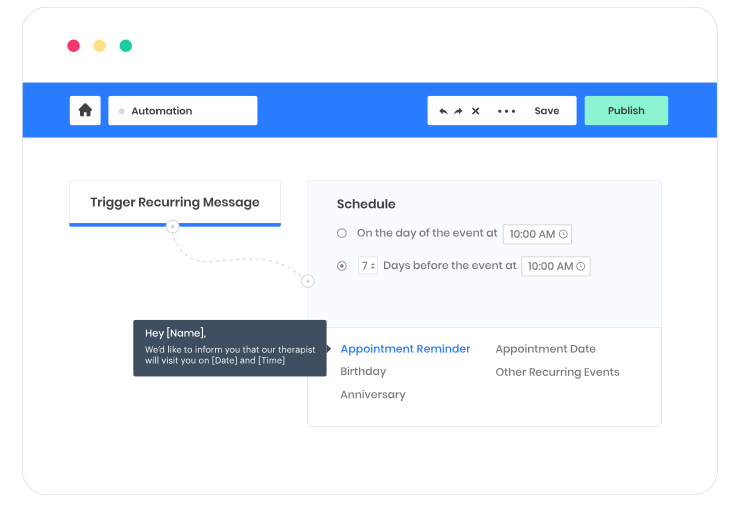
If you’re looking for a solution to automate communications with your patients and build stronger relationships, check out LeadSquared’s HIPAA-compliant healthcare CRM built for progressive healthcare practitioners.
Book a free 1-1 consultation to explore its complete functionalities.
Most healthcare providers find that sending two to three reminders strikes the right balance between keeping the appointment top-of-mind and avoiding message fatigue. A common sequence is: a reminder 48–72 hours before the appointment so the patient has time to reschedule if needed, a second reminder the morning of the appointment, and optionally a third message a few hours before the scheduled time. Sending too many reminders can feel intrusive and may prompt patients to opt out of future communications entirely, so spacing them meaningfully based on appointment type and patient preference tends to work best.
Timing significantly affects whether a reminder is seen and acted upon. Research consistently shows that SMS messages sent between 9 AM and 11 AM have higher open and response rates, as patients are typically alert and going about their day. For same-day reminders, sending between 7 AM and 8 AM gives patients enough notice to confirm or reschedule without disrupting care schedules. Avoid sending reminders late at night or very early in the morning, as these can feel intrusive and may violate patient communication preferences. Automating reminders through a CRM ensures they go out at optimal times without burdening administrative staff.
These two message types serve distinct purposes and should not be used interchangeably. An appointment confirmation SMS is sent immediately after a patient books a slot — its purpose is to acknowledge the booking, share the date, time, location, and any preparation instructions, and give the patient a record of the appointment. An appointment reminder SMS, on the other hand, is sent closer to the appointment date its purpose is to jog the patient’s memory, reduce no-shows, and give them the opportunity to reschedule if they can no longer attend. Using both in sequence as part of an automated communication workflow delivers the best results for patient attendance and satisfaction.
A: Yes automated SMS reminders are one of the most cost-effective tools for reducing no-shows. Studies show that no-show rates in the US can be as high as 30%, costing the healthcare industry an estimated $150 billion annually. Automated reminders sent via SMS have been shown to boost patient confirmations by over 150% and bring no-show rates down to 5% or lower when timed correctly. However, the impact is maximized when SMS reminders are combined with other channels such as email or WhatsApp and when patients are given an easy way to confirm, cancel, or reschedule directly from the message. A healthcare CRM that automates this multi-channel reminder workflow delivers the most consistent reduction in missed appointments.
Enter your details and we'll send you a quick confirmation email to verify your address.

 13 min read
  12 min read
  7 min read


 What is Sales Force Automation (SFA)? [Benefits and Examples]
